
Linking a debit or credit card to your Cash App account is an indispensable first step for unlocking its full suite of functionalities, from sending and receiving money to utilizing the Cash App Card and investing. This process transforms Cash App from a mere application into a powerful digital wallet, seamlessly integrating your financial instruments with a user-friendly interface. Understanding the technical nuances, security implications, and common troubleshooting steps associated with card linking is paramount for a secure and efficient user experience.
The Essential First Step: Understanding Cash App’s Foundations
Cash App, developed by Block, Inc., functions primarily as a peer-to-peer (P2P) payment service, enabling users to transfer money to one another with ease. Beyond its core P2P capabilities, the app has evolved into a comprehensive financial ecosystem, offering features like direct deposit, a custom debit card (the Cash App Card), stock and Bitcoin investing, and tax filing services. At the heart of this ecosystem lies the user’s linked bank account or debit/credit card, acting as the primary conduit for funds entering and exiting the platform.
What Cash App Is: A Glimpse into its Technical Architecture
From a technological standpoint, Cash App is a mobile application designed for both iOS and Android platforms, employing robust encryption protocols to secure user data and transactions. Its backend infrastructure processes millions of transactions daily, relying on a complex network of financial partnerships and digital security measures to ensure compliance and prevent fraud. The app’s design emphasizes intuitive navigation, making complex financial operations accessible to a broad user base.
Why Linking a Card is Crucial for Functionality
Linking a card is not merely an optional step; it’s fundamental to Cash App’s operational utility. Without a linked card, users are severely limited, primarily able to receive funds but unable to initiate outgoing transactions. The linked card serves several critical purposes:
-
Funding Transfers: It’s the primary source for adding money to your Cash App balance, allowing you to send funds to others.
-
Direct Payments: In some instances, it can be used directly for payments without first moving money to your Cash App balance.
-
Cash App Card Replenishment: For those using the physical Cash App Card, a linked bank account or card ensures continuous funding for purchases.
-
Identity Verification: While not the sole method, a successfully linked and verified card contributes to raising your transaction limits by strengthening identity verification.
Supported Card Types and Important Nuances
Cash App primarily supports most debit cards from Visa, MasterCard, American Express, and Discover. These are generally the easiest to link and offer the most seamless experience for adding cash and making payments. Credit cards can also be linked, but users should be aware of a key difference: Cash App typically charges a 3% fee for sending money using a linked credit card. This fee is standard across many P2P platforms to cover the higher processing costs associated with credit card transactions. Prepaid cards, while sometimes linkable, may have limitations depending on the issuing bank and their specific terms of service. It’s crucial to ensure the card is registered under your name and has a billing address matching your Cash App profile for successful linking.
Step-by-Step Guide to Adding Your Card
The process of linking a card to your Cash App account is designed to be straightforward, leveraging the app’s intuitive user interface. Careful attention to detail during input is essential to avoid common errors.
Navigating the Cash App Interface
-
Open Cash App: Launch the Cash App on your mobile device.
-
Access the Banking Tab: Look for the “Banking” icon, often represented by a house or building icon, usually located on the bottom left of the home screen. This section is your gateway to managing your money, cards, and bank accounts.
-
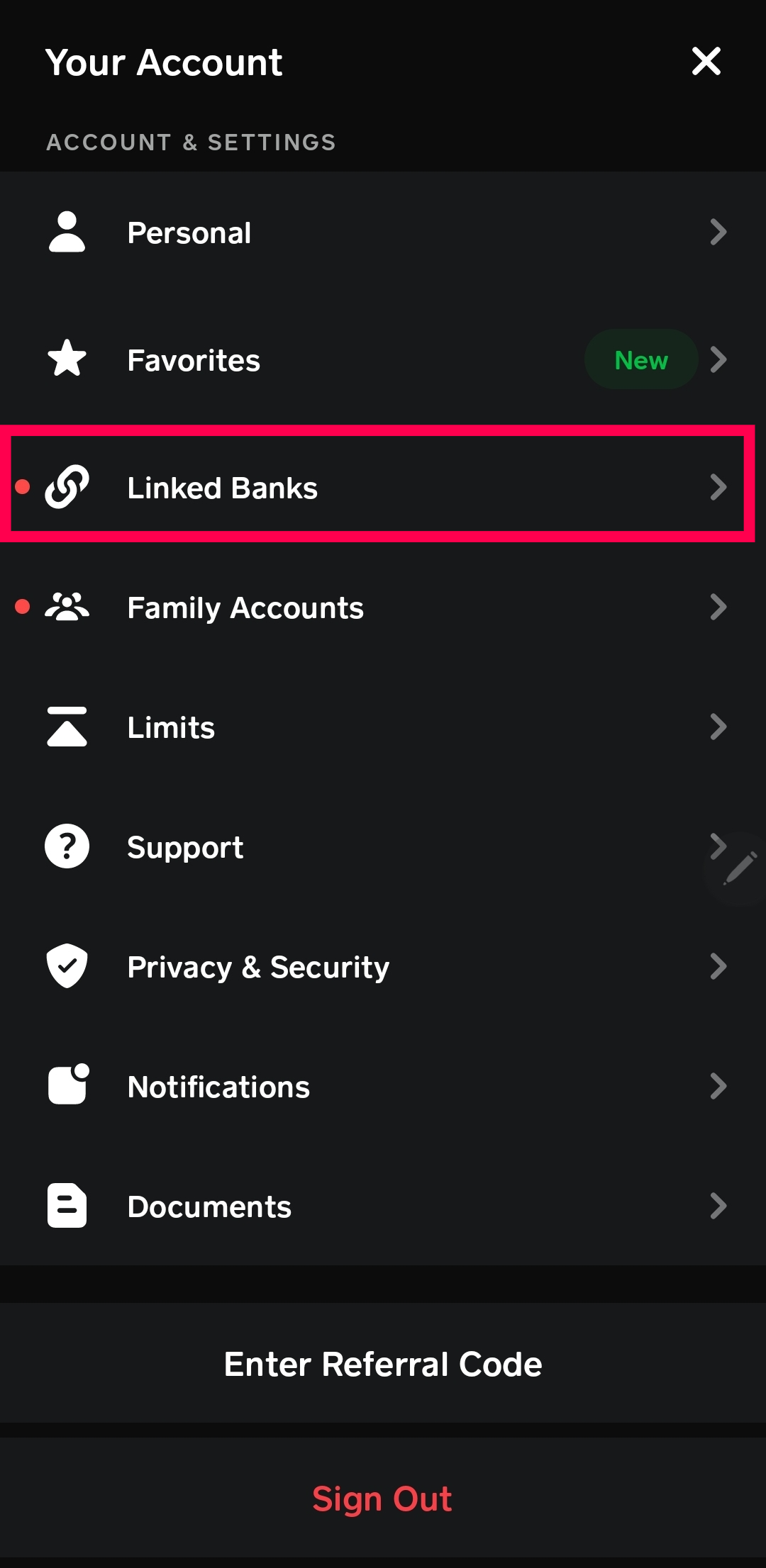
Initiate Card Linking: Within the Banking tab, you’ll typically see options such as “Link Bank” or “Link Card.” Tap on “Link Debit Card” (or “Link Bank” if it prompts for a card first).
Inputting Card Details
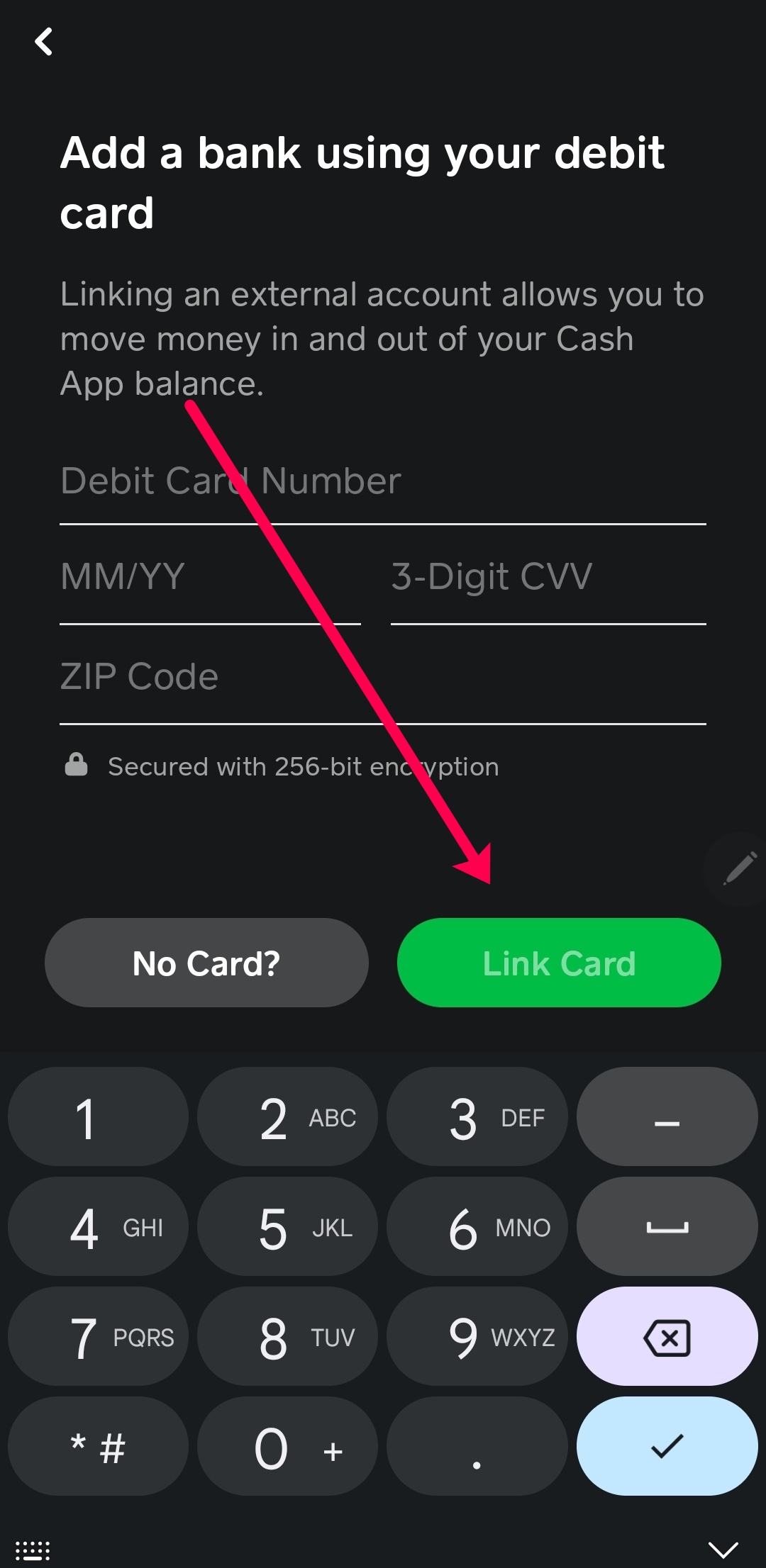
Once you’ve selected the option to link a card, you’ll be prompted to enter specific information from your card:
-
Card Number: Carefully input the 16-digit number found on the front of your debit or credit card. Double-check for accuracy.
-
Expiration Date: Enter the month and year of your card’s expiration, usually in MM/YY format.
-
CVV/CVC Code: This is a 3- or 4-digit security code typically found on the back of your card (for Visa, MasterCard, Discover) or front (for American Express). Do not share this code with anyone.
-
ZIP Code: Enter the billing ZIP code associated with your card. This is a crucial security measure to verify your ownership of the card.
-
Confirm: After entering all details, tap the “Link Card” or “Add Card” button.
Verification Process and Security Checks
Upon submission, Cash App performs an instant verification process with your bank. This typically involves:
-
Authorization Check: A small, temporary authorization charge (often $0 or $1) might appear on your bank statement, which is immediately reversed. This confirms the card is active and valid.
-
Address Matching: The ZIP code provided is checked against the billing address on file with your card issuer.
-
Fraud Detection Algorithms: Cash App employs sophisticated algorithms to detect unusual activity or potential fraud during the linking process.
Confirmation and Troubleshooting Initial Issues
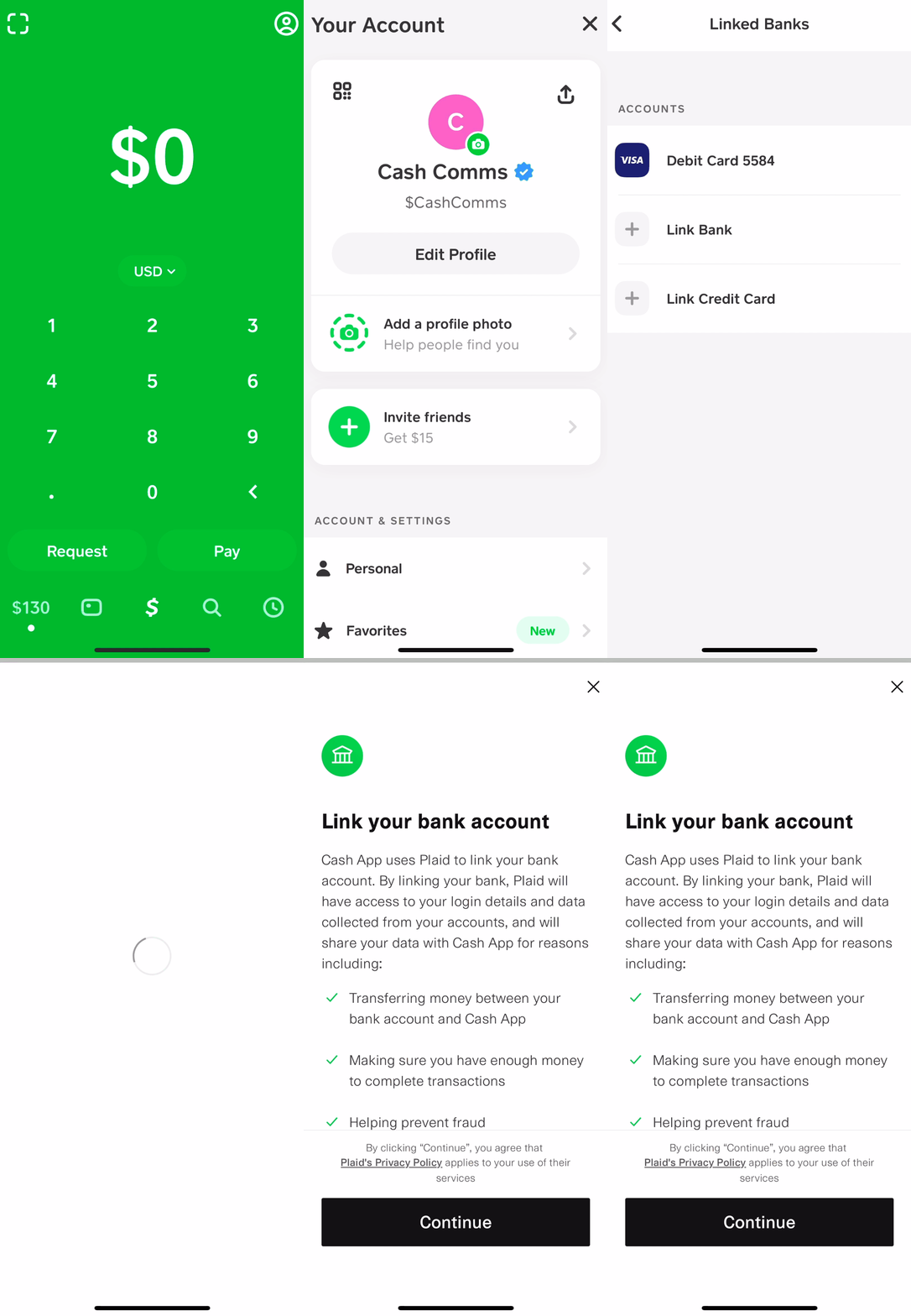
A successful link will be confirmed with an on-screen message, and your linked card will appear under your “Banking” tab. If you encounter issues, such as an error message or a failed attempt, common causes include:
-
Typographical Errors: Re-check all card details for typos.
-
Incorrect ZIP Code: Ensure the ZIP code matches the one registered with your bank for that specific card.
-
Expired Card: Verify the card’s expiration date.
-
Bank Restrictions: Some banks may temporarily block what they perceive as unusual online activity. Contact your bank directly if you suspect this.
-
Prepaid Card Limitations: Certain prepaid cards may not be fully supported or require additional steps for online transactions.
Optimizing Your Cash App Experience: Beyond the Link
Linking your card is just the beginning. Cash App offers several features that enhance its utility, which are directly impacted by how you manage your linked payment methods.
Managing Multiple Cards
Users often have multiple financial instruments. Cash App allows you to link several debit or credit cards, offering flexibility in how you fund transactions.
-
Adding Another Card: The process is identical to linking your first card, typically found under the “Banking” tab by selecting “Link Bank” or “Add another card.”
-
Setting Default Card: You can designate one card as your default for transactions, streamlining the payment process. This option is usually available when viewing your linked cards.
-
Removing a Card: To enhance security or declutter your options, you can remove linked cards. Simply tap on the card you wish to remove from the “Banking” tab and select the “Remove Card” option. This is advisable if a card is lost, stolen, or expired.
Understanding Transaction Limits
Cash App implements various transaction limits, which are often tied to the level of identity verification. Initially, without full verification (which often involves linking a bank account and providing your SSN), limits are relatively low for sending and receiving. Linking a card helps establish initial trust but full verification significantly increases these limits, allowing for larger transactions and access to features like the Cash App Card and direct deposit. Users can often view their current limits within the app’s profile or support sections.
Direct Deposit and Cash App Card Integration
A linked bank account (which can sometimes be facilitated through linking a debit card first) is essential for setting up direct deposit into your Cash App balance. This feature allows employers or government agencies to send funds directly to your Cash App, effectively using it as a primary bank account. The Cash App Card, a customizable Visa debit card, draws directly from your Cash App balance. For this card to be consistently useful, a reliable funding source—your linked debit card or bank account—must be in place to ensure your balance is sufficient for purchases.
Digital Security Best Practices for Card Linking
Security is paramount when dealing with financial applications. While Cash App employs robust security measures, user vigilance is critical.
Protecting Your Account: Strong Passwords and 2FA
The first line of defense is your account access.
-
Strong, Unique Passwords: Use a complex password that is not reused across other services. Consider a password manager.
-
Two-Factor Authentication (2FA): Always enable 2FA on your Cash App account. This adds an extra layer of security, requiring a code from your phone (via SMS or an authenticator app) in addition to your password for login, making it significantly harder for unauthorized individuals to access your account even if they know your password.
Recognizing Phishing and Scams
Scammers frequently target financial app users.
-
Verify Senders: Be extremely cautious of unsolicited messages or emails claiming to be from Cash App, especially those asking for personal information or directing you to external links.
-
Official Channels Only: Only interact with Cash App support through the official in-app chat or phone number listed on their official website. Never share your card details, PIN, or login credentials outside the secure app environment.
-
Examine Links: Before clicking any link, hover over it (on desktop) or long-press (on mobile) to check the actual URL. Ensure it’s genuinely cash.app or a verified domain.
What to Do If Your Linked Card is Compromised
If you suspect your linked debit or credit card has been compromised (e.g., fraudulent charges, physical card loss/theft):
-
Unlink Immediately: Go to your “Banking” tab in Cash App, tap on the compromised card, and select “Remove Card.”
-
Contact Your Bank: Report the compromise to your card issuer immediately to block the card and initiate fraud investigations.
-
Review Cash App Transactions: Check your Cash App activity for any unauthorized transactions.
-
Change Cash App Password: As a precautionary measure, change your Cash App password.
Cash App’s Built-in Security Features
Cash App incorporates several security features to protect your financial data:
-
Data Encryption: All sensitive financial data is encrypted both in transit and at rest.
-
Fraud Detection: Advanced algorithms constantly monitor transactions for suspicious activity.
-
Security Locks: You can enable a PIN, Touch ID, or Face ID for app access, adding another layer of security to prevent unauthorized use if your device falls into the wrong hands.
-
PCI DSS Compliance: Cash App adheres to Payment Card Industry Data Security Standard (PCI DSS) requirements, which are stringent global security standards for organizations that handle branded credit cards.
Common Issues and Advanced Troubleshooting
While the linking process is generally smooth, specific technical hiccups can occur. Understanding these and knowing how to address them can save time and frustration.
Card Not Accepted or Declined
-
Bank Restrictions/Holds: Your bank might automatically decline the linking attempt if it flags it as suspicious activity, especially for new online service registrations. A quick call to your bank to authorize the transaction or to inform them of your intent to link the card can resolve this.
-
Insufficient Funds (for debit cards): Although linking typically involves a $0 or $1 authorization that reverses, some bank systems might require a minimal balance for verification processes.
-
Card Type Incompatibility: Ensure the card is a supported type (Visa, MasterCard, Amex, Discover). Some lesser-known or specific institutional cards may not be compatible.
-
Temporary Server Issues: Occasionally, Cash App or your bank’s servers might experience temporary outages. Trying again after some time can resolve these.
Verification Failures
-
Address Mismatch: The most common cause of verification failure is a discrepancy between the ZIP code entered in Cash App and the billing address linked to your card with your bank. Ensure these are identical. Even a small difference can lead to rejection.
-
Name Mismatch: If your Cash App profile name does not match the name on the card (or the bank account associated with the card), verification can fail. Cash App prioritizes matching legal names for security.
-
Expired or Invalid CVV: Double-check that the expiration date and CVV are current and correctly entered.
-
Too Many Attempts: Repeated failed attempts can sometimes trigger temporary security locks. If this happens, wait a few hours before trying again.
Contacting Cash App Support
If you’ve exhausted basic troubleshooting steps, reaching out to Cash App’s official support channels is the next move:
-
In-App Support: This is generally the fastest and most secure method. From the Cash App home screen, tap the profile icon (top right), scroll down, and select “Support.” You can then navigate through topics or choose “Contact Support” to chat with a representative.
-
Official Website: Visit Cash App’s official support page on their website (cash.app/help) for FAQs and further contact options.
-
Social Media (Caution): While Cash App has official social media accounts, use extreme caution. Avoid sharing any personal or financial information publicly. Official support will never ask for your PIN, sign-in code, or full card number via social media.
By understanding the technical requirements, adhering to security best practices, and knowing how to troubleshoot common issues, users can confidently link their cards to Cash App and leverage its full potential as a versatile digital financial tool.
aViewFromTheCave is a participant in the Amazon Services LLC Associates Program, an affiliate advertising program designed to provide a means for sites to earn advertising fees by advertising and linking to Amazon.com. Amazon, the Amazon logo, AmazonSupply, and the AmazonSupply logo are trademarks of Amazon.com, Inc. or its affiliates. As an Amazon Associate we earn affiliate commissions from qualifying purchases.