
Cash App has become an indispensable tool in the landscape of peer-to-peer payments and mobile banking, simplifying how millions manage their finances. At the core of its utility is the ability to seamlessly integrate with traditional banking systems. Linking your bank account to Cash App is not merely a convenience; it’s a fundamental technical step that unlocks the full spectrum of its features, from direct deposits to instant transfers. This guide will delve into the technical underpinnings, step-by-step processes, and crucial security considerations for integrating your bank account with Cash App, ensuring a robust and secure digital finance experience.
Understanding Cash App’s Banking Integration Architecture
The seemingly simple act of linking a bank account to a mobile application like Cash App relies on a sophisticated and secure technical architecture. This integration bridges the gap between the agile world of fintech apps and the established, often more rigid, traditional banking infrastructure. Understanding this architecture provides insight into the security and functionality behind your digital transactions.
The Role of Linked Accounts in Mobile Finance Ecosystems
Mobile finance applications function as an overlay, enhancing accessibility and speed for financial transactions. At their heart, they require connectivity to a user’s primary financial institution. For Cash App, this connectivity is predominantly facilitated through secure third-party financial data aggregators, such as Plaid or Finicity. These aggregators act as intermediaries, employing Application Programming Interfaces (APIs) to securely connect your Cash App account with your bank account. When you initiate the linking process, Cash App doesn’t directly access your bank; instead, it leverages these trusted services. They provide a standardized, encrypted channel for transmitting login credentials and authorizing data access, all without Cash App ever storing your actual bank login information on its servers. This model ensures that sensitive data is handled by specialized, audited entities, thereby decentralizing the risk. The result is a robust ecosystem where funds can be pulled from and pushed to your bank account, enabling features like adding cash, cashing out, and direct deposit.
Prerequisites for a Seamless Linkage
Before embarking on the linking process, ensuring certain technical prerequisites are met can significantly streamline the experience and prevent common hurdles. First and foremost, a stable internet connection is paramount. Whether Wi-Fi or cellular data, a consistent connection prevents timeouts or data corruption during the crucial authentication phase. Secondly, access to your online banking login credentials is non-negotiable. This includes your username and password, as the linking process will require you to authenticate directly with your bank via the secure third-party aggregator interface. It’s vital that you have successfully logged into your online banking portal recently to ensure your credentials are correct and your account is active. Furthermore, ensure your Cash App is updated to the latest version. Developers frequently release updates that include performance enhancements, bug fixes, and critical security patches, all of which contribute to a smoother and more secure linking process. Lastly, verify that your bank is supported by Cash App’s integration partners. While most major U.S. banks and credit unions are supported, smaller or niche institutions might not always be directly integrable, though such instances are rare.
Cash App’s Security Protocols for Financial Data
Given the sensitivity of financial data, Cash App employs stringent security protocols designed to protect user information throughout the integration lifecycle. When you link your bank account, your online banking credentials are encrypted end-to-end as they pass through the secure aggregator to your bank. Cash App itself operates on Payment Card Industry Data Security Standard (PCI DSS) compliance, which involves a comprehensive set of requirements for enhancing payment account data security. Beyond this industry standard, Cash App utilizes state-of-the-art encryption technologies to safeguard all data in transit and at rest. Multi-factor authentication (MFA), such as requiring a PIN, fingerprint, or Face ID for transactions and logins, adds an additional layer of security, ensuring that even if your device is compromised, your financial data remains protected. Furthermore, sophisticated fraud detection algorithms continuously monitor transactions and account activity for suspicious patterns, allowing Cash App to proactively identify and mitigate potential security threats. These integrated technical safeguards are crucial in maintaining the integrity and confidentiality of your financial information within the mobile application environment.
Step-by-Step Technical Tutorial: Linking Your Bank Account
Linking your bank account to Cash App is a straightforward process, designed for user accessibility. However, understanding each technical step ensures a smooth experience and helps in troubleshooting potential issues.
Initial Access and Navigation
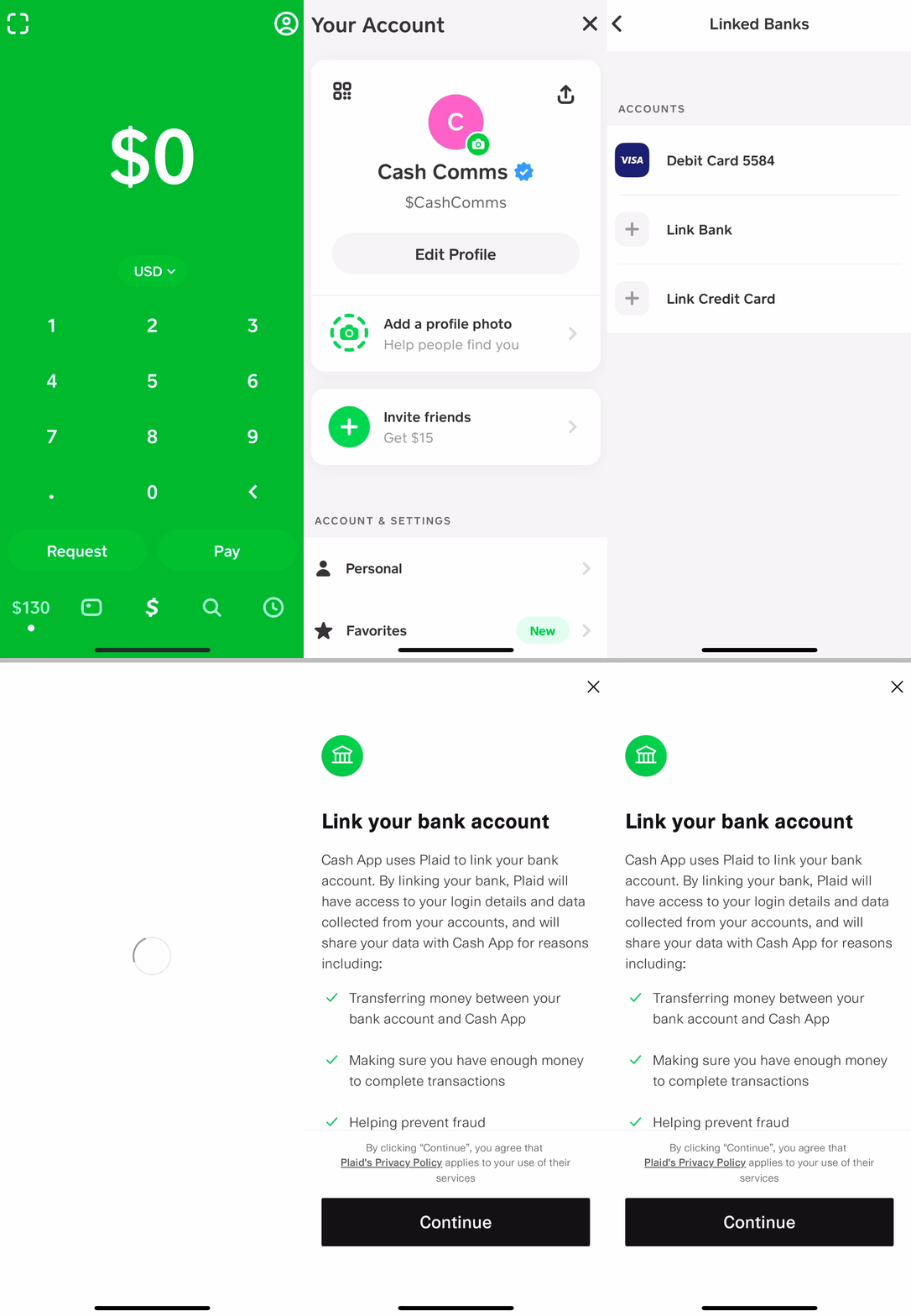
To begin, open the Cash App on your mobile device. Ensure you are logged into your account. The primary interface typically displays your Cash App balance and quick access buttons. To initiate the bank linking process, you need to navigate to the “Banking” or “Money” tab, which is usually represented by a bank icon or a dollar sign icon at the bottom navigation bar of the app. Tapping this icon will take you to a section dedicated to your financial instruments, including your Cash App balance, linked debit cards, and credit cards. Within this section, look for an option that explicitly states “Link Bank” or “Add Bank.” Tapping this option will launch the secure connection process.
Selecting Your Financial Institution
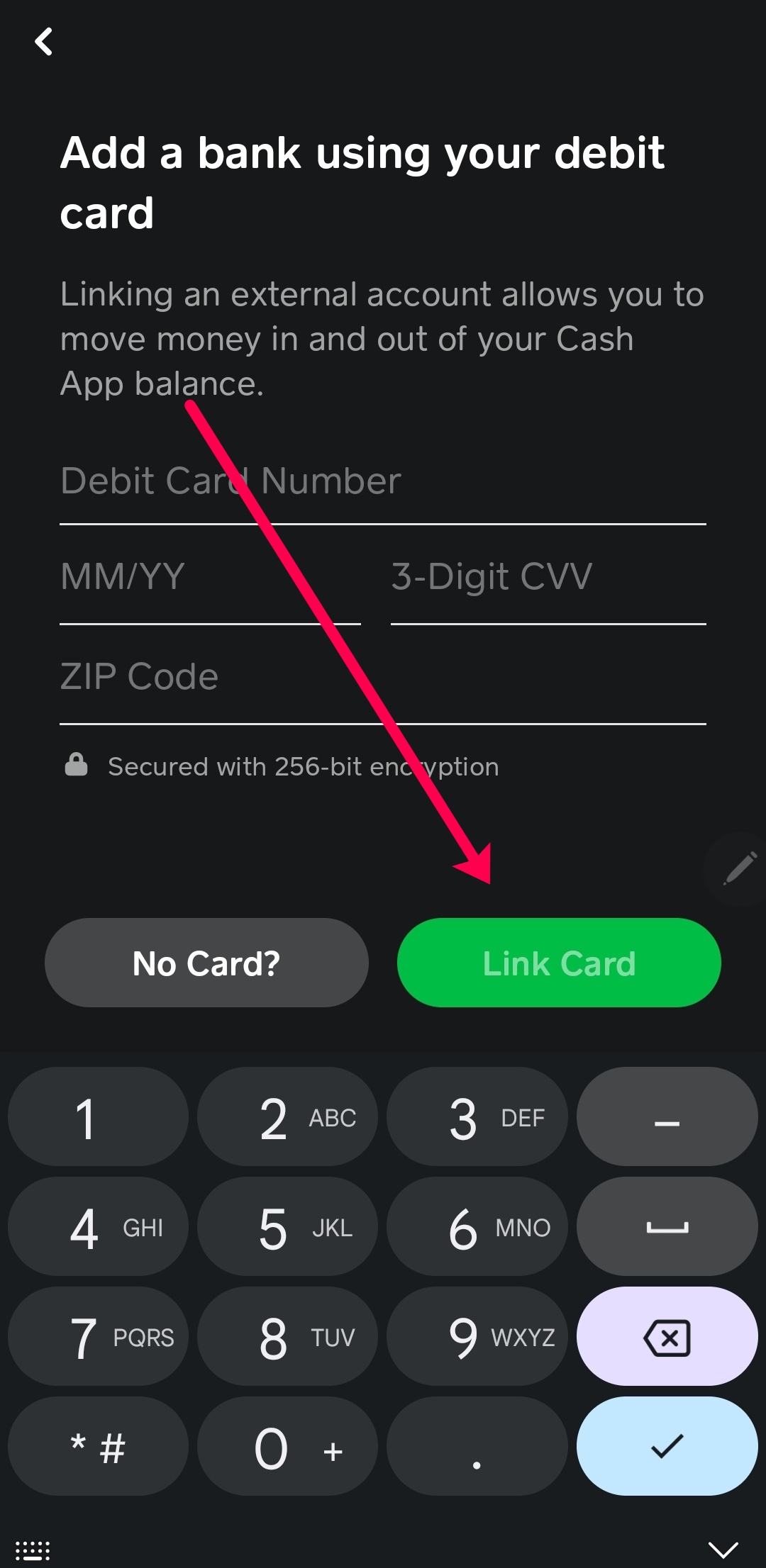
Upon selecting “Link Bank,” Cash App, through its secure aggregator partner (e.g., Plaid), will present you with a search bar and a list of commonly used financial institutions. Here, you will type the name of your bank or credit union. As you type, the list will filter, making it easier to locate your specific institution. It’s crucial to select the correct bank, as some institutions may have similar names or different divisions. If your bank is not immediately visible, continue typing its full name. If, after a thorough search, your bank does not appear, it might indicate that it’s not directly supported by Cash App’s current integration partners. In such rare cases, you may need to consider linking via a debit card as an alternative, though this offers fewer functionalities than a full bank link.
Secure Credential Input and Verification
Once you’ve selected your bank, you will be redirected to a secure interface, typically branded by the aggregator (like Plaid), which then seamlessly connects to your bank’s login portal. Here, you will be prompted to enter your online banking username and password. This is the most critical security step. It is imperative to understand that Cash App does not store these credentials. Instead, they are securely transmitted through the encrypted aggregator service directly to your bank for authentication. Your bank then verifies these credentials. Following successful login, your bank might initiate a secondary verification step, such as sending a one-time passcode (OTP) to your registered phone number or email, or asking a security question. This multi-factor authentication strengthens the security of the linking process. After successful verification, you might be asked to select which specific account (e.g., checking or savings) you wish to link if you have multiple accounts with that bank.

Confirming the Linkage and Troubleshooting Common Errors
After successfully entering your credentials and completing any security verification, the system will process the link. A confirmation message will usually appear, stating that your bank account has been successfully linked. You can then navigate back to the “Banking” or “Money” section of Cash App, where your linked bank account should now be visible under the “Linked Banks” or “Bank Accounts” section. If you encounter errors, common issues include incorrect login credentials (double-check them carefully), temporary bank server outages (try again after some time), or an unstable internet connection. If the issue persists, try clearing the Cash App cache, reinstalling the app, or contacting Cash App support with a detailed description of the error message received. Checking your bank’s website for any scheduled maintenance or service disruptions can also be helpful.
Optimizing Your Cash App Experience with a Linked Bank Account
Linking your bank account transforms Cash App from a basic P2P payment tool into a powerful, multifaceted financial instrument. This integration unlocks advanced features, streamlines financial management, and provides greater flexibility in how you move and manage your money digitally.
Enabling Direct Deposits and Transfers
A securely linked bank account is the gateway to unlocking Cash App’s full potential for managing your income and larger transactions. Specifically, it enables you to set up direct deposits for your paychecks, government benefits, or tax refunds directly into your Cash App account. This feature leverages a unique routing and account number provided by Cash App, which then directs funds seamlessly to your digital wallet. From a technical standpoint, this relies on the Automated Clearing House (ACH) network, a secure electronic funds transfer system used by all U.S. financial institutions. Furthermore, a linked bank account facilitates faster and larger transfers of funds between your bank and Cash App. You can easily “Add Cash” from your linked bank account to your Cash App balance, or “Cash Out” funds from Cash App directly back to your bank, often with options for instant transfers that bypass the standard ACH processing times for a small fee, demonstrating the advanced integration capabilities.
Managing Multiple Linked Accounts (Technical Perspective)
For users with more complex financial portfolios, Cash App typically offers the functionality to link and manage multiple bank accounts. This technical capability allows for greater flexibility in funding sources and destinations. From a user interface perspective, you can usually view all your linked accounts within the “Banking” or “Linked Banks” section. When performing transactions such as “Add Cash” or “Cash Out,” the app will prompt you to select which linked bank account you wish to use for that specific transaction. This granular control is essential for budgeting, managing funds across different purposes, or isolating business finances from personal ones. The underlying architecture for managing multiple links utilizes the same secure aggregator protocols, but applies them to distinct accounts, effectively creating separate, secure tunnels for each bank connection, all managed centrally within the Cash App interface.
Unlinking Accounts and Digital Footprint Management
There might come a time when you need to unlink a bank account from Cash App, perhaps due to changing banks, security concerns, or simply wanting to streamline your financial connections. The process to unlink is straightforward: navigate to the “Banking” or “Linked Banks” section, select the specific bank account you wish to remove, and then choose the option to “Remove Bank” or “Unlink Account.” Confirming this action will sever the active connection. From a technical standpoint, unlinking revokes Cash App’s (and its aggregator’s) authorized access to your bank account’s data and transaction capabilities. However, it’s important to understand the concept of digital footprint. While the live connection is severed, historical transaction data that occurred while the account was linked will typically remain within your Cash App transaction history for auditing, regulatory compliance, and user record-keeping purposes. This data retention is a standard practice across financial applications, ensuring transparency and accountability, even after an account is no longer actively linked. Users should be aware of this data persistence and review Cash App’s privacy policy for specifics on data retention periods.
Digital Security Best Practices for Financial App Integrations
While Cash App employs robust security measures, the ultimate responsibility for maintaining the security of your financial data rests partly with the user. Adopting strong digital security practices is paramount, especially when integrating sensitive financial information with mobile applications.
Proactive Account Security Measures
Actively enabling and utilizing all available security features within Cash App is your first line of defense. Always enable a PIN code for opening the app and authorizing transactions. Furthermore, if your device supports it, activate biometric authentication (fingerprint or Face ID) for an added layer of security, making it significantly harder for unauthorized individuals to access your account even if they gain physical access to your phone. Setting up Two-Factor Authentication (2FA) for your Cash App login is crucial. This usually involves receiving a unique code via SMS or email, which must be entered in addition to your password, effectively creating a double lock on your account. Regularly review your transaction history for any unfamiliar activity. These proactive technical safeguards are designed to thwart unauthorized access and protect your funds.
Recognizing and Avoiding Phishing and Scams
The digital landscape is rife with phishing attempts and scams targeting financial app users. It’s vital to develop a critical eye for recognizing these threats. Be extremely wary of unsolicited emails, SMS messages, or calls claiming to be from Cash App or your bank, especially if they request personal information, login credentials, or direct you to suspicious links. Phishing attempts often use slightly altered URLs, poor grammar, or urgent language to trick users. Always verify the sender’s email address or phone number. Never click on suspicious links; instead, if you suspect a legitimate request, open the Cash App directly and navigate to the relevant section. Remember, Cash App support will never ask for your login password, PIN, or full bank account number via email or text. Understanding these technical indicators of fraud can prevent you from inadvertently compromising your account.
Maintaining Device and App Security
The security of your Cash App account is intrinsically linked to the security of your mobile device and the application itself. Always keep your smartphone’s operating system (iOS or Android) updated to the latest version. These updates frequently include critical security patches that address newly discovered vulnerabilities, protecting your device from malware and exploits. Similarly, ensure your Cash App is always updated. App updates not only bring new features but also often contain security enhancements. Avoid downloading apps from unofficial app stores, as they may contain malicious software. Furthermore, be cautious when using public Wi-Fi networks for financial transactions. These networks are often less secure and can be vulnerable to eavesdropping. Opt for a secure, private network or use your cellular data for sensitive operations. Regularly review the permissions granted to Cash App on your device, ensuring it only has access to necessary functions (e.g., contacts for sending money, not your microphone). These practices collectively form a robust technical barrier against potential digital threats.
In conclusion, linking your bank account to Cash App is a powerful integration that leverages advanced technological architecture to provide a seamless and secure financial experience. By understanding the underlying processes, adhering to the step-by-step guide, and diligently applying digital security best practices, users can confidently harness the full capabilities of Cash App for managing their money in the digital age.
aViewFromTheCave is a participant in the Amazon Services LLC Associates Program, an affiliate advertising program designed to provide a means for sites to earn advertising fees by advertising and linking to Amazon.com. Amazon, the Amazon logo, AmazonSupply, and the AmazonSupply logo are trademarks of Amazon.com, Inc. or its affiliates. As an Amazon Associate we earn affiliate commissions from qualifying purchases.