
TikTok has undeniably revolutionized the digital landscape, transforming how we consume and create short-form video content. Its addictive algorithm, vibrant creator community, and unparalleled reach have made it a global phenomenon, influencing everything from pop culture and trends to marketing strategies and personal branding. For millions, it’s not just an app; it’s a creative outlet, a primary source of news and entertainment, and for many entrepreneurs and content creators, a vital platform for online income and brand building.
However, TikTok’s meteoric rise has been accompanied by significant geopolitical scrutiny, particularly concerning data privacy and national security. This has led to outright bans or severe restrictions in several regions, leaving countless iPhone users unable to access the app through official channels. The question then becomes: For those determined to maintain their presence, continue their side hustles, or simply enjoy the content, is there a way to install TikTok on an iPhone after it’s been banned?
This comprehensive guide delves into the various methods available for circumvention, exploring the technological intricacies, the potential risks, and the critical considerations for users, creators, and brands alike. While we aim to provide a thorough overview of the technical possibilities, it’s paramount to understand that bypassing official restrictions often comes with legal, security, and ethical implications that warrant careful consideration.
Understanding the TikTok Ban and Its Implications
The decision by governments to ban or restrict access to TikTok is rarely taken lightly. These actions are typically rooted in deep-seated concerns over data security, the potential for foreign influence, and geopolitical tensions. For users and businesses, such bans introduce a complex dilemma: how to balance personal digital freedom with compliance, and how to navigate the disruption to their digital lives and income streams.
Why Bans Occur: A Global Perspective
The primary driver behind TikTok bans often revolves around the app’s ownership by ByteDance, a Chinese company. Governments in countries like India, and regions within the United States, have expressed fears that user data could be accessed by the Chinese government, posing national security risks. These concerns touch upon the core tenets of digital security and data sovereignty, sparking debates about the global flow of information and the control over personal data. The specifics of each ban vary, from outright prohibitions on app stores to restrictions on government devices, reflecting a complex interplay of technology, politics, and national interest. Understanding the genesis of these bans is crucial for appreciating the technical and legal challenges involved in circumventing them.
The User Dilemma: Access vs. Compliance
For the average user, a TikTok ban can feel like a sudden cut-off from a significant part of their social and entertainment ecosystem. But for content creators, small businesses, and individuals who leverage TikTok for personal branding or as a source of online income, the implications are far more profound. A ban can mean losing access to an established audience, disrupting marketing strategies, and potentially crippling a side hustle or an entire business model built around the platform.
This creates a dilemma: should one comply with the ban, seeking alternative platforms and rebuilding their digital presence from scratch, or explore technical avenues to regain access? The motivations for bypassing a ban are strong, driven by the desire to maintain connections, preserve creative work, and protect financial interests tied to the platform. This tension between compliance and continued access highlights the powerful role apps like TikTok play in modern digital life, blurring the lines between personal entertainment and economic necessity.
Legitimate & Semi-Legitimate Methods for Re-installing TikTok
While a direct download from your local App Store might be blocked, several methods exist that leverage regional differences or technical workarounds to install TikTok on an iPhone. These methods vary in complexity and risk, ranging from simple geo-spoofing to more involved sideloading techniques.
Method 1: Changing Your App Store Region (Geo-Restrictions)
This is often the simplest and most “official” workaround if the ban is primarily geo-restricted. Apple’s App Store content varies by region, meaning an app unavailable in one country might be readily accessible in another.
How it works: Your Apple ID is linked to a specific country or region. By changing this region to one where TikTok is still available, you can access that region’s App Store and download the app.
Step-by-step guide:
- Backup your iPhone: Before making significant changes, it’s always wise to back up your device.
- Spend any remaining store credit: You must have zero balance on your Apple ID account.
- Cancel subscriptions: You’ll need to cancel all active subscriptions tied to your current region (e.g., Apple Music, iCloud storage).
- Wait for subscriptions to end: If you have active subscriptions, you might need to wait until their billing cycle finishes.
- Go to Settings > [Your Name] > Media & Purchases > View Account. Authenticate with your Face ID, Touch ID, or passcode.
- Tap “Country/Region” and then “Change Country or Region.”
- Select a country where TikTok is available (e.g., Canada, Mexico, or many European countries).
- Agree to the new Terms and Conditions.
- Enter a valid payment method and billing address for the new country. You might need to use a dummy address if you don’t have a legitimate one, but this can cause issues. A common workaround is to select “None” for the payment method if available in that region.
- Confirm the change.
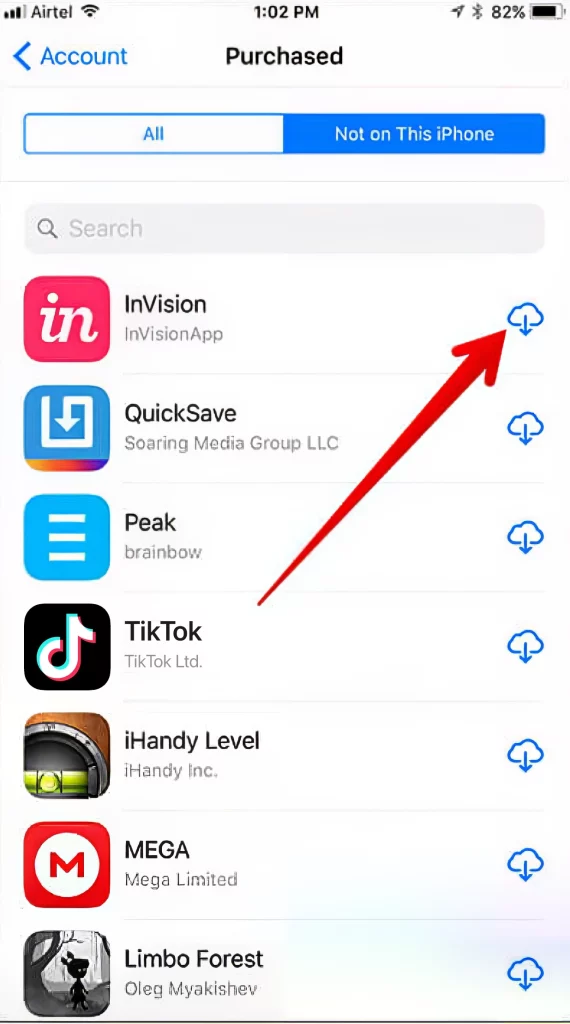
- Open the App Store: Search for “TikTok” and download it.
- Consider reverting: Once TikTok is installed, you might be able to switch your App Store region back to your original country. However, this might prevent future updates to TikTok unless you switch back again.
Considerations: This method impacts all your App Store purchases, payment methods, and subscriptions. It can be cumbersome to manage if you frequently switch regions or have many region-locked apps. It’s a technical inconvenience that reflects a global digital security issue, affecting everything from personal finance management (e.g., specific bank apps in a region) to productivity tools.
Method 2: Utilizing a Virtual Private Network (VPN)
A VPN is a powerful digital security tool that encrypts your internet connection and masks your actual IP address by routing your traffic through a server in a different location. This makes it appear as if you are browsing from that server’s location, effectively bypassing geo-restrictions.
How it works: By connecting to a VPN server in a country where TikTok is not banned, your iPhone will appear to be located in that country. This might allow you to download TikTok directly if the ban is solely based on your IP address. However, for App Store bans, a VPN alone usually isn’t enough; it’s often used in conjunction with Method 1 or when sideloading. Its primary use here is to access TikTok’s services once the app is installed, especially if access to the service itself is blocked in your region, not just the download.
Choosing a reliable VPN:
- Security features: Look for strong encryption (AES-256), a strict no-logs policy, and a kill switch.
- Server locations: Choose a VPN with servers in countries where TikTok is freely available.
- Speed and reliability: A good VPN shouldn’t significantly degrade your internet speed.
- Cost: While free VPNs exist, paid services generally offer better security, speeds, and reliability.
- Reputation: Research reviews and choose a reputable provider.
Step-by-step for connecting and downloading (if applicable):
- Download and install a reputable VPN app from the App Store (before the ban takes full effect on VPN apps if applicable, or from another region).
- Open the VPN app and connect to a server in a country where TikTok is accessible.
- Attempt to access TikTok: If you already have TikTok installed but it’s geo-blocked, a VPN should allow you to use it. If you’re trying to download, you might still need to combine this with Method 1 (changing App Store region) for the initial download, as the App Store determines availability based on your Apple ID’s country setting.
Considerations: While VPNs offer enhanced digital security and privacy, cheap or free VPNs can sometimes compromise your data. Using a VPN for activities that bypass local regulations might also have legal ramifications depending on your jurisdiction. For businesses and personal brands, a reliable VPN ensures continued access to a global audience, maintaining brand visibility and engagement.
Method 3: Sideloading via Third-Party Tools (e.g., AltStore, Sideloadly)
Sideloading refers to installing applications on a device without using the official App Store. This method bypasses Apple’s stringent review process and regional restrictions, giving users more control but also introducing greater risks.
How it works: You download the TikTok app package (an .ipa file) from a trusted source and then use a sideloading tool to install it directly onto your iPhone, often requiring a computer for the process.
Overview of tools:
- AltStore: A popular, open-source alternative app store that allows you to sideload apps using your Apple ID. It refreshes sideloaded apps periodically to keep them active, circumventing Apple’s 7-day signing limit for free developer accounts.
- Sideloadly: A Windows/macOS utility that simplifies the process of sideloading IPA files onto iOS devices. It functions similarly to Cydia Impactor (a now-defunct tool) and requires an Apple ID (free or paid developer account).
Basic steps and requirements (general for both):
- Obtain the TikTok
.ipafile: This is the most crucial and potentially risky step. You must source this file from a highly reputable and trusted third-party website to avoid installing malware. Exercise extreme caution. - Install the sideloading tool (AltStore or Sideloadly) on your computer (Windows or macOS).
- Connect your iPhone to your computer.
- Follow the specific instructions for your chosen tool:
- For AltStore: Install AltServer on your computer, then install AltStore onto your iPhone via AltServer. Once AltStore is on your iPhone, you can open it and install the TikTok
.ipafile directly from there. You’ll need to periodically connect your iPhone to your computer (on the same Wi-Fi network) for AltStore to “refresh” the apps and prevent them from expiring. - For Sideloadly: Launch Sideloadly on your computer, drag and drop the TikTok
.ipafile into it, select your device, enter your Apple ID credentials (these are used to sign the app for your device, not transmitted to Sideloadly’s servers), and click “Start.”
- For AltStore: Install AltServer on your computer, then install AltStore onto your iPhone via AltServer. Once AltStore is on your iPhone, you can open it and install the TikTok
Requirements:
- A computer (Windows or macOS).
- Your iPhone connected via USB.
- An Apple ID (free developer account is sufficient for most sideloading).
- The
.ipafile for TikTok.
Considerations: Sideloading offers a robust way to bypass bans but demands technical proficiency and carries significant security risks if the IPA file is compromised. It highlights the open-source community’s efforts to provide alternative software distribution channels, but users must prioritize digital security when opting for this route.
Advanced & Risky Approaches (and Why Caution is Key)
Beyond the methods above, there are more technically intensive and inherently riskier options that some users might encounter in their quest to install banned apps. These methods offer greater control over your device but come with significant drawbacks, especially concerning security and device integrity.
The Complexities of Jailbreaking
Jailbreaking refers to the process of removing software restrictions imposed by Apple on iOS devices. It grants users root access to the operating system, allowing them to install apps from unofficial sources (like Cydia), modify system files, and customize their devices beyond Apple’s intended limits.
What it is: Essentially, it “unlocks” your iPhone, giving you full control over its software. Historically, jailbreaking was a popular method for installing apps not available in the App Store or for enhancing features that Apple hadn’t implemented.
Pros (in the context of a ban): Complete freedom to install any .ipa file or apps from alternative repositories without Apple’s restrictions.
Significant Cons:
- Security Vulnerabilities: Jailbreaking significantly weakens your iPhone’s security posture. It removes Apple’s sandboxing, making your device more susceptible to malware, viruses, and data breaches. Malicious actors can more easily gain access to your personal information. This is a critical digital security concern.
- Warranty Void: Jailbreaking typically voids your iPhone’s warranty, meaning Apple will not service your device for free if you encounter hardware or software issues.
- Update Issues: iOS updates can “unjailbreak” your device, and often, new jailbreaks are not immediately available for the latest iOS versions, leaving you stuck on older, potentially less secure, software.
- Instability: Jailbroken devices can be less stable, prone to crashes, battery drain, and general performance issues.
- Risk of Bricking: In rare cases, an incorrect jailbreak procedure can render your device unusable.
Why it’s generally discouraged: While it offers ultimate freedom, the security risks, potential for instability, and lack of official support make jailbreaking a precarious choice for most users, especially for those reliant on their device for professional use, personal finance, or secure communication. It’s a path few should tread without a deep understanding of its implications.
Enterprise Certificates and Developer Accounts
While not a typical consumer solution, enterprise certificates and paid developer accounts are fundamental to how sideloading tools work and how organizations distribute internal apps outside the App Store.
Brief explanation for context: Apple allows businesses to distribute proprietary apps to their employees without going through the App Store, using “enterprise certificates.” Similarly, individual developers with a paid Apple Developer Program membership ($99/year) can sign and install apps on their own devices or a limited number of test devices for development purposes. These paid accounts allow for longer app expiration periods (usually a year) compared to the 7-day limit for free Apple IDs used in basic sideloading.
Why it’s generally not a consumer solution:
- Cost: A paid developer account is an annual expense ($99), which is excessive just to install a single app like TikTok for personal use.
- Complexity: Managing developer certificates and provisioning profiles requires technical knowledge beyond the average user.
- Intended Use: These tools are designed for professional development and organizational distribution, not for general public access to banned consumer apps. While they underpin the functionality of tools like AltStore (which cleverly uses your free developer account to sign apps), directly using them for a single app is impractical for most.
For the purpose of installing TikTok after a ban, the average user will find the previous methods (changing region, VPN with App Store, or consumer-friendly sideloading tools) more accessible and appropriate than delving into enterprise certificates or full developer programs.
Critical Considerations Before Proceeding
Bypassing official restrictions, regardless of the method, carries inherent risks and implications that extend beyond just technical hurdles. It’s crucial for individuals, brands, and businesses to weigh these factors carefully.
Security and Privacy Risks
This is arguably the most significant concern. When you deviate from official App Store downloads, you expose yourself to several dangers:
- Malware and Viruses: Unofficial
.ipafiles, especially those from untrusted sources, can be tampered with. They might contain malware, spyware, or adware designed to steal your personal data, track your activity, or flood your device with unwanted ads. This directly compromises your digital security. - Data Exposure: Even legitimate sideloaded apps might not receive regular security updates, leaving vulnerabilities unpatched. Furthermore, if you’re using unofficial versions, your data might not be handled according to TikTok’s (or Apple’s) privacy policies, potentially exposing sensitive information.
- Phishing and Scams: The demand for banned apps creates fertile ground for scammers. You might encounter fake websites or apps designed to steal your Apple ID credentials or payment information.
Prioritizing digital security means always questioning the source and understanding the potential trade-offs.
Legality and Terms of Service
Circumventing government bans or an app store’s regional restrictions exists in a legal gray area, and for good reason.
- Government Regulations: In countries with outright bans, attempting to bypass them could have legal consequences, though enforcement against individual users is rare. It’s more about contributing to a larger ecosystem that might be viewed as non-compliant.
- Apple’s Terms of Service: Apple explicitly warns against installing apps from unofficial sources and explicitly prohibits jailbreaking. Violating these terms can lead to loss of warranty, refusal of service, or even revoking your Apple ID’s access to certain services.
- TikTok’s Terms of Service: While less common, using modified versions of an app could also violate its terms of service, potentially leading to your account being banned by TikTok itself.
It’s vital to be aware of these potential infringements, even if the personal repercussions might seem minor.
The Impact on Your Digital Brand and Income
For content creators, marketers, and businesses relying on TikTok, the ban presents a unique challenge to brand strategy and online income.
- Audience Reach and Engagement: If your audience is largely in a banned region and cannot access the app, your efforts to build a personal brand or market products become severely hampered. Maintaining consistency and engagement becomes difficult.
- Monetization Challenges: TikTok’s creator fund, in-app purchases, and brand partnerships are often tied to official app usage and regional availability. Bypassing the ban might allow you to post, but it could complicate receiving payments or participating in official monetization programs. Your ability to generate online income or leverage side hustles could be compromised.
- Brand Reputation: For corporate brands, being associated with methods that bypass governmental regulations, even indirectly through user tutorials, might pose a reputational risk. For individual creators, it’s about weighing the value of maintaining a presence against potential legal or ethical implications.
Ultimately, the choice to bypass restrictions impacts not just personal access but also strategic branding and financial sustainability.
Maintaining Updates and Functionality
Officially installed apps receive seamless updates directly from the App Store. Sideloaded or regionally downloaded apps face different challenges:
- Manual Updates: Sideloaded apps typically require manual updates, meaning you’ll need to re-download the new
.ipafile and re-install it using your chosen method, often losing app data in the process unless specific tools (like AltStore’s refresh) are used. - Broken Functionality: TikTok frequently updates its app, and unofficial or outdated versions might experience bugs, broken features, or decreased performance.
- Compatibility Issues: Older versions of the app might not be compatible with newer iOS versions, leading to crashes or non-functionality.
Ensuring continued functionality and access to the latest features is a constant battle when you operate outside official channels, affecting user experience and productivity.
Beyond TikTok: Exploring Alternatives and Future Prospects
While the desire to retain access to TikTok is understandable, it’s also prudent to consider the broader landscape of short-form video content and the evolving nature of digital access. Relying solely on circumventing bans might not be a sustainable long-term strategy.
Popular Short-Form Video Platforms
The market has responded to TikTok’s dominance and its controversies by developing robust alternatives:
- Instagram Reels: Integrated within Instagram, Reels offers a similar short-form video experience, leveraging Instagram’s massive user base. For personal branding and marketing, it’s often the most direct competitor and a viable alternative for many creators.
- YouTube Shorts: YouTube, the original video giant, has heavily invested in Shorts, providing creators with access to its vast audience and existing monetization infrastructure. This is particularly appealing for those looking to diversify their online income streams.
- Snapchat Spotlight: Snapchat’s take on short-form content, Spotlight, offers another platform for creators to share engaging videos.
- Other regional or niche platforms: Depending on your location, other platforms might be gaining traction.
Diversifying your presence across these platforms not only mitigates the risk of a single platform ban but also broadens your audience reach and strengthens your overall brand strategy. It’s a pragmatic approach to maintaining a robust online presence.
The Evolving Digital Landscape
The TikTok ban is a stark reminder of the dynamic and often unpredictable nature of the digital world. Technology trends are constantly shifting, and geopolitical factors increasingly influence which apps are available and how.
- Data Sovereignty and Privacy: Governments worldwide are becoming more assertive about data control and privacy regulations. This trend suggests that restrictions on global apps might become more common, pushing users and developers to seek localized or more secure alternatives.
- Decentralized Platforms: The rise of decentralized technologies, while nascent, could offer future avenues for content creation and distribution that are less susceptible to centralized control or national bans. This is a technology trend worth watching.
- Innovation and Adaptation: The tech industry is incredibly adaptive. New apps and platforms will continue to emerge, filling voids and offering new opportunities for connection, creativity, and monetization.
For individuals and businesses, staying informed about these broader technology trends and being prepared to adapt is crucial for long-term digital success.
Conclusion
The pursuit of installing TikTok on an iPhone after a ban is a testament to the app’s profound impact on modern digital life, influencing everything from personal expression to brand building and online income. While technical methods like changing App Store regions, utilizing VPNs, and sideloading offer pathways to regain access, each comes with its own set of complexities, security risks, and legal implications.
Users must approach these methods with a clear understanding of the trade-offs involved. Prioritizing digital security, being aware of local regulations, and understanding the potential impact on your personal brand or financial ventures are paramount. While the lure of continued access to a familiar platform is strong, it’s equally important to consider the long-term sustainability of such methods and explore robust alternatives.
The digital landscape is in constant flux, shaped by technological innovation, evolving regulations, and geopolitical shifts. Navigating this environment requires adaptability, informed decision-making, and a keen awareness of both the opportunities and the inherent risks. Whether you choose to bypass restrictions or explore new platforms, the ultimate goal remains the same: to maintain your digital connections, continue your creative endeavors, and secure your online presence in an ever-changing world.
aViewFromTheCave is a participant in the Amazon Services LLC Associates Program, an affiliate advertising program designed to provide a means for sites to earn advertising fees by advertising and linking to Amazon.com. Amazon, the Amazon logo, AmazonSupply, and the AmazonSupply logo are trademarks of Amazon.com, Inc. or its affiliates. As an Amazon Associate we earn affiliate commissions from qualifying purchases.