
The modding community has long been the backbone of longevity for many sandbox and role-playing games, and Stardew Valley is no exception. At the heart of this creative ecosystem lies SMAPI, the Stardew Modding API. SMAPI is more than just a simple loader; it is a sophisticated piece of software that facilitates the interaction between the game’s original code and thousands of community-created modifications. Understanding how to install and maintain SMAPI is the first step for any user looking to expand their digital farming experience through technical customization.
This guide provides a deep dive into the installation process, the underlying architecture of the API, and the technical configurations required to ensure a stable modded environment across multiple operating systems.
Understanding the Architecture of SMAPI
Before diving into the installation steps, it is essential to understand what SMAPI actually does from a technical perspective. SMAPI (Stardew Modding API) functions as a secondary layer that sits between the game’s executable and the operating system. When you launch the game via SMAPI, it loads the game’s code into memory and then “hooks” into various events.
The API provides a stable environment for mods to interact with the game’s internal logic without permanently altering the game files. This is a critical distinction in software engineering: rather than “hacking” the game’s .exe or .dll files, SMAPI uses a process known as code injection and event handling. This ensures that if a mod fails, the base game remains intact. Furthermore, SMAPI handles complex tasks such as compatibility checks, update alerts, and error logging, which are vital for maintaining a functional software suite.
The Role of .NET and C
SMAPI is built using the .NET framework, mirroring the architecture of Stardew Valley itself, which is written in C#. Because of this shared language, SMAPI can provide high-level abstractions for modders, allowing them to change game behavior, add new items, or rewrite UI elements efficiently. For the user, this means that keeping your .NET environment updated is often just as important as updating the game itself.
Step-by-Step Installation Across Different Platforms
The installation process for SMAPI varies depending on your operating system. While the core functionality remains the same, the way the installer interacts with file directories and permissions differs significantly between Windows, macOS, and Linux.
Installing SMAPI on Windows
Windows is the most common platform for Stardew Valley modding, and the installation process is highly automated.
- Download and Extract: Begin by downloading the latest version of SMAPI from the official website or trusted repositories like Nexus Mods. The file will arrive as a
.ziparchive. Use a utility like WinRAR or 7-Zip to extract the contents to a temporary folder. - Run the Installer: Inside the extracted folder, you will find a file named
install on Windows.bat. Right-click this file and select “Run as Administrator” to ensure the installer has the necessary permissions to modify the game directory. - Path Selection: The installer will open a command prompt window. It will attempt to automatically detect your game directory (usually under
SteamLibrarysteamappscommonStardew Valley). If it finds the path, press ‘1’. If not, you will need to manually paste the file path into the window. - Completion: The installer will rewrite the necessary entry points. Once finished, it will display a message in green text. Crucially, do not close the window yet; it will provide a specific string of text needed for Steam integration.
Installing SMAPI on macOS and Linux
The Unix-based architecture of macOS and Linux requires a slightly different approach, primarily involving terminal permissions.
- Preparation: Ensure the base game is installed and has been run at least once. This creates the necessary internal folders in your
Application Supportor.local/sharedirectories. - Running the Script: After downloading and extracting the SMAPI files, locate the
install on Mac.commandorinstall on Linux.shfile. - Terminal Execution: On macOS, you may need to right-click the file and select “Open” to bypass security warnings. On Linux, you might need to make the script executable via the terminal using the command
chmod +x install on Linux.sh. - Directory Mapping: Like the Windows version, the script will guide you through selecting the game folder. It will then install the SMAPI files and create a specialized executable that launches the game with the API layer active.
Installation for Android Devices
While modding on mobile is more restrictive, SMAPI has a dedicated Android version (ZaneYork’s SMAPI Android). This involves downloading an .apk that acts as a launcher. Users must ensure that the version of SMAPI matches the version of the game installed via the Play Store, as version mismatches are the leading cause of crashes in mobile modding.

Integrating SMAPI with Game Launchers
One of the most common technical hurdles users face is ensuring that their game launcher (Steam or GOG) tracks playtime and achievements while running the modded version of the game. By default, Steam will launch the standard Stardew Valley.exe, bypassing SMAPI and your mods entirely.
Configuring Steam Launch Options
To bridge the gap between Steam and SMAPI, you must redirect Steam’s launch command to the SMAPI executable.
- Copy the Path: Upon finishing the SMAPI installation on Windows, the installer provides a specific line of text that looks something like this:
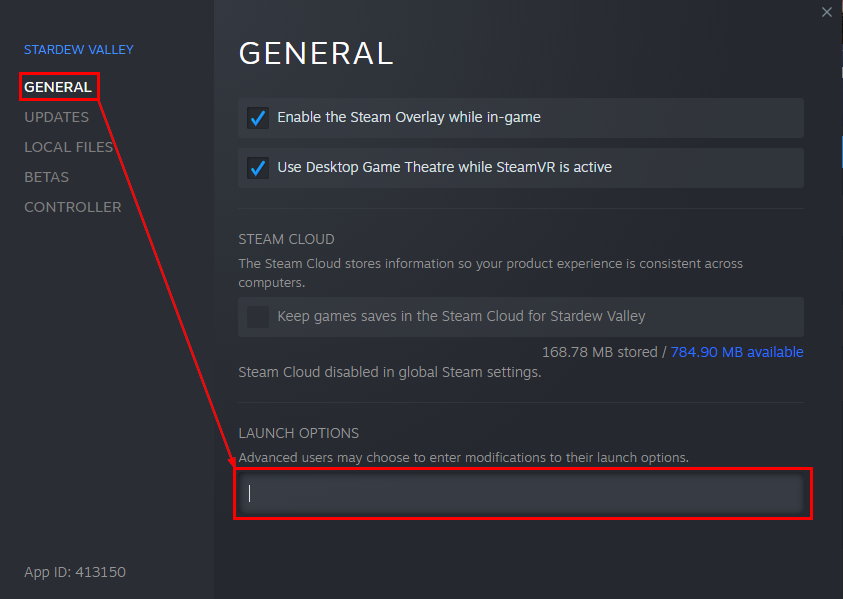
"C:Program Files (x86)SteamsteamappscommonStardew ValleyStardewModdingAPI.exe" %command%. - Steam Settings: Open your Steam Library, right-click Stardew Valley, and select “Properties.”
- Launch Options: Under the “General” tab, look for the “Launch Options” field at the bottom.
- Paste and Save: Paste the entire string (including the quotes and the
%command%part) into this box. Now, when you click “Play” in Steam, it will trigger the SMAPI console, which in turn launches the game with mod support enabled.
GOG and Other DRM-Free Versions
For users on GOG Galaxy, the process is similar. You can navigate to the “Manage Installation” settings and configure a custom executable. However, many GOG users prefer to simply create a desktop shortcut directly to the StardewModdingAPI.exe file located in the game folder, as GOG does not require the same “hooking” mechanism as Steam to track achievements in all cases.
Advanced Technical Troubleshooting and Maintenance
Once SMAPI is installed, the work moves from installation to maintenance. Because mods are third-party software, updates to the base game can often “break” the API or specific mods.
Utilizing the SMAPI Log Parser
When the game crashes or a mod fails to load, SMAPI generates a detailed log file named SMAPI-latest.txt. To the untrained eye, this file is a wall of confusing code. However, the community has developed a powerful web-based tool: the SMAPI Log Parser.
- Locating the Log: On Windows, this is found in
%appdata%StardewValleyErrorLogs. - Parsing: By uploading this file to the official log parser website, the technical data is translated into readable instructions, such as “Update this mod” or “Missing dependency: Content Patcher.”
Dependency Management
Modern modding relies heavily on dependencies. Many mods do not function standalone; they require “framework mods” like Content Patcher, Generic Mod Config Menu, or Expanded Preconditions Utility. From a software management perspective, it is best practice to install these core libraries first. SMAPI will alert you in the console window (the purple text) if a mod is loaded but its required dependency is missing.
Updating the API
Updating SMAPI is a “clean” process. You do not need to uninstall the previous version. Simply download the new version and run the installer again. It will automatically detect the existing installation and overwrite the old API files with the updated ones while leaving your Mods folder untouched.

The Future of Modding APIs and Community-Driven Software
SMAPI represents a pinnacle of community-driven software engineering. It has evolved from a simple tool into a robust platform that supports thousands of mods, from simple aesthetic changes to massive expansions like Stardew Valley Expanded.
The technical success of SMAPI lies in its open-source nature. Hosted on platforms like GitHub, the code is constantly audited and improved by a global community of developers. This ensures that even when the game’s creator, ConcernedApe, releases significant updates (such as version 1.6), the API can be patched rapidly to maintain compatibility.
For the user, installing SMAPI is more than just a way to add new furniture to a digital farm; it is an entry into a sophisticated technical ecosystem. By understanding the installation process, the importance of launch arguments, and the utility of error logs, users can ensure a stable, high-performance gaming experience that pushes the boundaries of the original software. As the tech behind game modding continues to advance, tools like SMAPI will remain essential for bridging the gap between developers and the creative communities that sustain their work.
aViewFromTheCave is a participant in the Amazon Services LLC Associates Program, an affiliate advertising program designed to provide a means for sites to earn advertising fees by advertising and linking to Amazon.com. Amazon, the Amazon logo, AmazonSupply, and the AmazonSupply logo are trademarks of Amazon.com, Inc. or its affiliates. As an Amazon Associate we earn affiliate commissions from qualifying purchases.