
Venmo has transformed into more than just a convenient way to split dinner bills; it’s a vital digital wallet and peer-to-peer payment system that plays a significant role in personal finance for millions. Understanding how to effectively receive money through Venmo is crucial for managing your financial inflows, whether it’s for everyday expenses, small business income, or side hustles. This guide delves into the various methods and best practices for getting money into your Venmo account, and subsequently, into your broader financial ecosystem.
Venmo as a Core Financial Tool for Receiving Funds
At its heart, Venmo is a digital payment platform designed to simplify money transfers between individuals. For personal finance, it acts as a quick and often free conduit for receiving funds. Its ease of use has integrated it into daily financial interactions, making it an indispensable tool for many.

The Mechanics of Peer-to-Peer Payments
Venmo facilitates instant or near-instant transfers of money directly between user accounts. When someone sends you money, it lands in your Venmo balance. This balance can then be held within the app, used to make purchases with a Venmo debit card, or transferred to an external bank account. The link between your Venmo balance and your linked bank account or debit card is fundamental to its utility, allowing you to fluidly move funds into and out of your primary banking. It streamlines the often cumbersome process of traditional bank transfers, making it ideal for immediate needs or settling casual debts.
Setting Up for Seamless Transactions
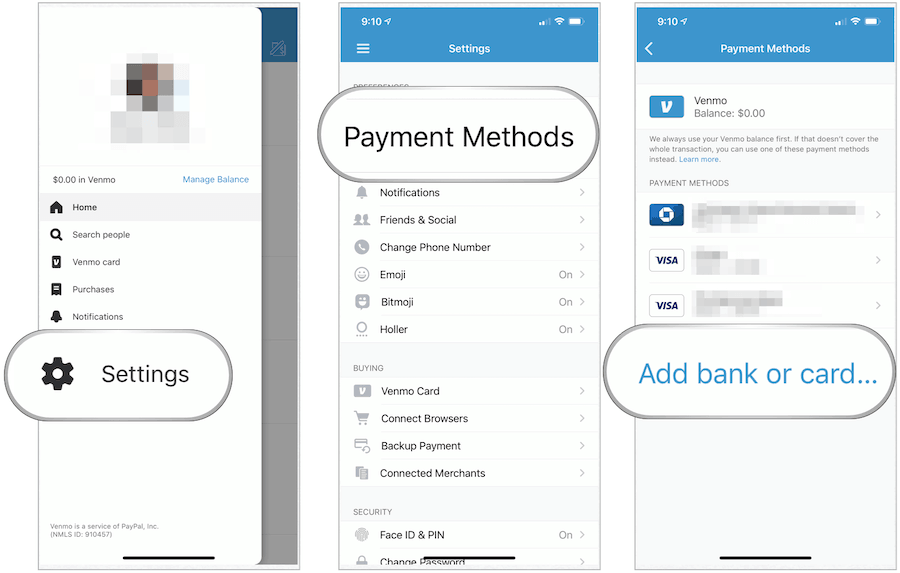
To ensure you can receive funds without hitches, your Venmo profile must be properly set up. This includes verifying your identity, which might involve providing your date of birth, mailing address, and the last four digits of your Social Security number to comply with financial regulations. Crucially, you need to link a verified bank account or a debit card. This not only allows you to fund your own payments but, more importantly, provides a destination for transferring any money you receive from your Venmo balance. It’s also wise to review your privacy settings; while Venmo transactions default to public (visible to friends), you can adjust them to be visible only to participants or private, which can impact how others perceive your financial activities and is a key consideration for personal financial privacy.
Direct Methods for Receiving Funds
Getting money into your Venmo account can happen through several direct channels, each suited for different scenarios, from requesting repayment to accepting direct deposits.
Requesting Money from Others
One of Venmo’s most common uses is sending money requests. If a friend owes you for half of a dinner bill, a shared ride, or a loan, you can easily request the exact amount. Navigate to the “Pay & Request” button (often a pencil and paper icon) within the app, select “Request,” and choose the person (or people) you’re requesting from. Enter the amount and a clear description of the request. A concise description is crucial for both parties to keep track of their spending and receipts, aligning with good personal finance practices. This method eliminates the awkwardness of verbal reminders and provides a digital record of the debt and repayment.
Receiving Payments from Venmo Users
When someone sends you money, it instantly (or nearly instantly, depending on their funding source) appears in your Venmo balance. You’ll receive a notification, and the transaction will be visible in your feed. Once the money is in your Venmo balance, you have options. You can leave it there for future Venmo payments, or transfer it to your linked bank account. Standard bank transfers typically take 1-3 business days and are free. For a quicker transfer, Venmo offers an “Instant Transfer” option, which usually moves funds to your linked debit card or eligible bank account within minutes, though this service typically incurs a small fee (e.g., 1.75% of the amount, with a minimum of $0.25 and a maximum of $25). Understanding these options allows you to manage your cash flow effectively based on urgency and cost.
Utilizing Venmo’s Direct Deposit Feature
Beyond peer-to-peer transfers, Venmo offers a direct deposit feature, transforming it into a more robust financial tool. By setting up direct deposit, you can have your paycheck, government benefits, or tax refunds deposited directly into your Venmo account. To do this, you’ll typically find an option within the app (often under “Manage Balance” or “Direct Deposit”) to generate an account number and routing number unique to your Venmo account. You then provide these details to your employer or benefits provider. This allows you to centralize more of your incoming funds within Venmo, potentially using the balance for daily spending via the Venmo Debit Card, or easily transferring to your primary bank, offering greater flexibility in managing your finances.
Leveraging Venmo for Online Income and Side Hustles
Venmo has become an increasingly popular payment method for freelancers, small business owners, and those engaging in the gig economy. Its simplicity makes it attractive for quickly receiving payments for services or goods.
Freelancing and Small Business Payments
For freelancers (e.g., graphic designers, writers, virtual assistants) or small service providers (e.g., pet sitters, tutors, personal trainers), Venmo offers a low-barrier way to accept payments. Clients can easily send money for services rendered. For those regularly receiving business income, Venmo Business Profiles are a crucial financial tool. A business profile allows you to separate personal and business transactions, maintain a professional presence, and potentially access specific business features and transaction reporting. It’s important to remember that all income, regardless of how it’s received, is generally taxable. The IRS requires payment processors like Venmo to report transactions for goods and services when they exceed certain thresholds (e.g., $600 for tax year 2024 for third-party payment network payments, though this threshold has changed and can vary by state, so always check current IRS guidelines for 1099-K reporting). Maintaining accurate records of all business income received via Venmo is essential for tax purposes.

Selling Goods and Services
If you sell items online through local marketplaces or social media, Venmo provides a straightforward way for buyers to pay you. For these transactions, it’s advisable to use a Venmo Business Profile or ensure the sender marks the payment as being for “goods and services.” This triggers Venmo’s Purchase Protection Program, which offers some security for both buyers and sellers, though it typically involves a seller transaction fee (e.g., 1.9% + $0.10) to cover the cost of the protection. Clearly describing the item sold in the transaction notes is a good practice for record-keeping and dispute resolution.
Gig Economy and Casual Work
Individuals engaged in the gig economy or performing casual work—like babysitting, yard work, or delivering groceries for a friend—find Venmo an ideal payment solution. It eliminates the need for cash and allows for quick, digital payments. For occasional, small-scale work, it provides immediate access to earnings, contributing directly to your personal cash flow. However, even for casual work, if the total income reaches certain thresholds, it still counts as taxable income, necessitating careful tracking of all earnings.
Managing Your Received Funds and Financial Health
Receiving money is only half the battle; effectively managing those funds within and outside of Venmo is key to sound personal finance.
Transferring Funds Out of Venmo
Once money is in your Venmo balance, you have two primary options for moving it to your traditional bank account: standard transfers and instant transfers. Standard transfers are free and typically take 1-3 business days. Instant transfers move money to your linked debit card or eligible bank account within minutes for a small fee. For those managing multiple bank accounts, Venmo allows linking several, offering flexibility in where you deposit your funds. This flexibility is valuable for allocating funds to different financial goals, such as savings, investments, or bill-paying accounts.
Tracking Your Financial Inflow
Venmo’s transaction history serves as a digital ledger of your incoming funds. Regularly reviewing this history allows you to monitor your income, reconcile it with your budget, and ensure all expected payments have been received. For business income, maintaining accurate and detailed records of Venmo transactions is vital for tax compliance and financial reporting. Consider exporting your transaction history periodically or integrating it with personal finance software if applicable, to get a holistic view of your financial health.
Venmo Debit Card and Credit Card Features
To simplify spending money received in your Venmo balance, the Venmo Debit Card allows you to directly spend your balance anywhere Mastercard is accepted. This effectively turns your Venmo balance into an active checking account, bypassing the need to transfer funds to a traditional bank for spending. Additionally, Venmo offers a credit card (issued by Synchrony Bank) that provides cashback rewards on eligible purchases, which are automatically deposited into your Venmo balance, offering another avenue for “getting money” in the form of rewards back into your account. These features expand Venmo’s utility beyond just transfers, integrating it more deeply into your daily financial management.
Security and Best Practices for Financial Safety
While Venmo offers convenience, safeguarding your funds and transactions is paramount. Adhering to security best practices ensures your financial well-being.
Protecting Your Venmo Account
Always use a strong, unique password for your Venmo account and enable two-factor authentication (2FA). This adds an extra layer of security, making it significantly harder for unauthorized individuals to access your account. Be vigilant against phishing scams; Venmo will never ask for your password or sensitive financial information via email or text message. Always log in directly through the app or official website. As a general rule of thumb for any digital financial tool, only transact with people you know and trust, or through verified Venmo Business Profiles, especially when sending money for goods and services.
Understanding Transaction Limits and Holds
Venmo has daily and weekly limits for sending and receiving money, which can vary based on whether your identity is verified. Be aware of these limits to avoid unexpected issues when expecting large payments. Additionally, Venmo, like any financial institution, may place holds on transactions deemed suspicious for security reasons. While inconvenient, these measures are in place to protect users from fraud. If a hold occurs, Venmo will typically contact you to resolve the issue.
When to Use Venmo (and When Not To)
Venmo is ideally suited for trusted peer-to-peer transactions, splitting costs among friends, and for small-scale business payments where the amount isn’t excessively high and the parties are somewhat known. It is generally not recommended for large, high-value, or anonymous transactions where stronger escrow services or traditional banking protections might be more appropriate. Always verify the recipient’s Venmo username and associated details (like the last four digits of their phone number) before initiating or accepting any payment to ensure funds go to or come from the correct individual. By understanding these nuances, you can leverage Venmo safely and effectively as a powerful tool in your personal financial management arsenal.
aViewFromTheCave is a participant in the Amazon Services LLC Associates Program, an affiliate advertising program designed to provide a means for sites to earn advertising fees by advertising and linking to Amazon.com. Amazon, the Amazon logo, AmazonSupply, and the AmazonSupply logo are trademarks of Amazon.com, Inc. or its affiliates. As an Amazon Associate we earn affiliate commissions from qualifying purchases.