
In the contemporary landscape of digital services, Amazon Prime has evolved from a simple free-shipping program into a comprehensive technological ecosystem. It represents one of the most sophisticated examples of “Software as a Service” (SaaS) integration, blending e-commerce, cloud computing, digital streaming, and Internet of Things (IoT) connectivity into a single user interface. For tech-savvy users, acquiring Amazon Prime is not merely about receiving packages faster; it is about gaining access to a massive digital infrastructure designed to streamline the modern lifestyle.
This guide provides a technical deep dive into how to secure an Amazon Prime subscription, optimize your digital setup across various hardware, and manage the underlying security protocols that keep your data safe within the Amazon architecture.
Understanding the Amazon Prime Digital Infrastructure
Before initiating the signup process, it is essential to understand that Amazon Prime functions as a centralized hub for a suite of interconnected applications. Unlike standalone streaming services, Prime is built on the backbone of Amazon Web Services (AWS), ensuring high availability and low-latency delivery of digital content.
The Core Software Architecture
When you subscribe to Prime, you are essentially unlocking permissions across several distinct software platforms. This includes Prime Video (a global VOD service), Amazon Music (a high-fidelity audio streaming platform), and Prime Gaming (an integration with Twitch and desktop gaming launchers). These services are built using microservices architecture, allowing Amazon to update individual features—such as the X-Ray overlay on Prime Video—without disrupting the entire ecosystem.
Account Security and Two-Factor Authentication
From a technical security standpoint, your Amazon account is the “Master Key.” Before signing up, users must ensure their digital security is robust. Amazon supports Multi-Factor Authentication (MFA) via SMS or TOTP (Time-based One-Time Password) apps like Google Authenticator or Authy. Implementing MFA is a critical first step because a Prime account contains sensitive payment data, cloud storage (Amazon Photos), and access to smart home controls.
Step-by-Step Technical Guide to Subscription Setup
The process of “getting” Amazon Prime involves navigating a multi-platform interface. Whether you are using a mobile operating system or a desktop browser, the backend synchronization ensures your subscription status is updated in real-time across the global server network.
Signing Up via Web Interface vs. Mobile App
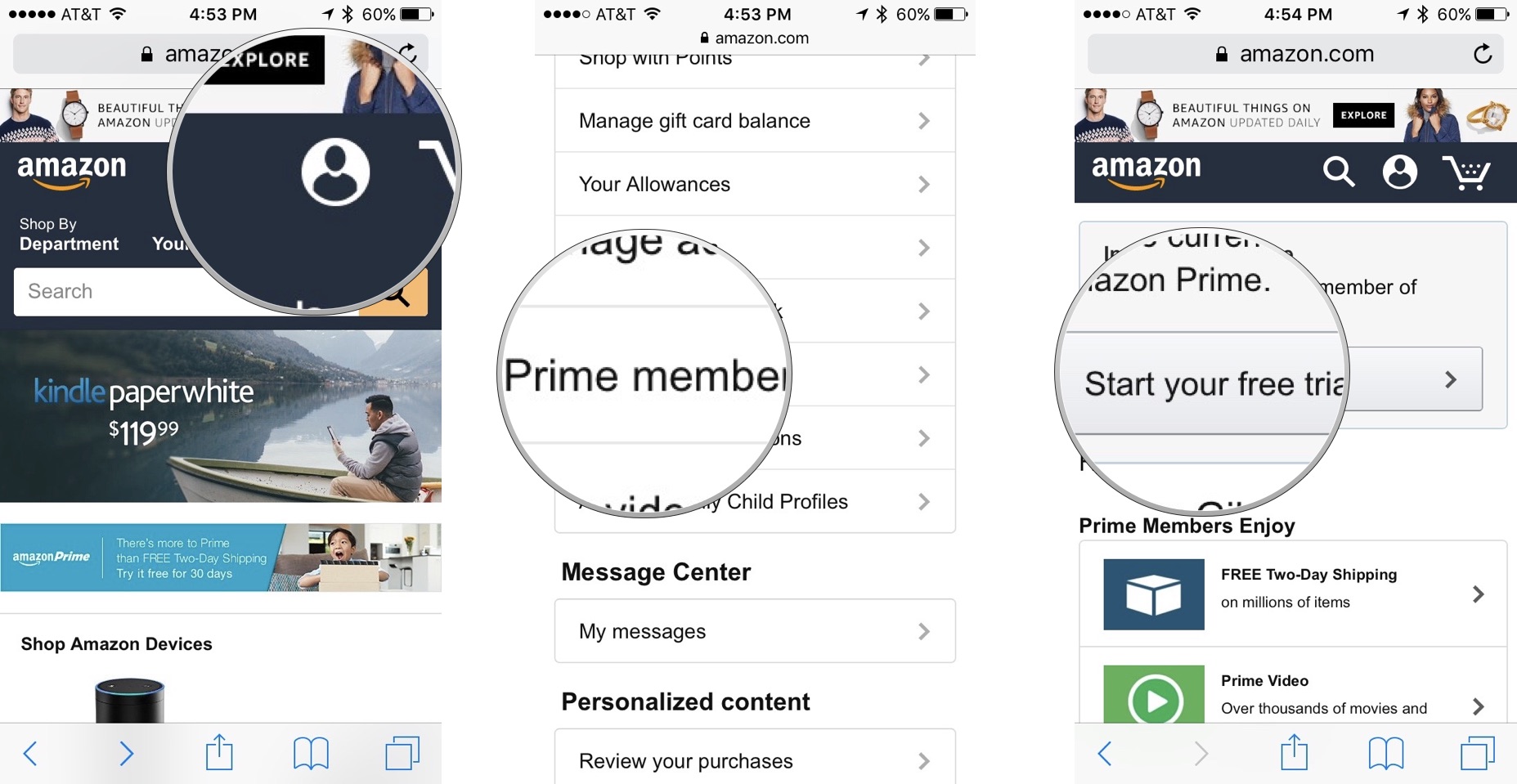
The most direct way to get Amazon Prime is through a web browser. From a UI/UX perspective, the desktop version offers the most comprehensive view of subscription tiers (Monthly vs. Annual).
- Browser Navigation: Navigate to the Amazon homepage and hover over the “Accounts & Lists” menu to find the “Prime Membership” link.
- The App Experience: On iOS and Android, the process is handled via the Amazon Shopping app. It is important to note that if you sign up via the Apple App Store or Google Play Store, your billing may be managed by those respective third-party ecosystems, which can sometimes lead to delays in data synchronization across different hardware. To ensure a “pure” Amazon-managed experience, signing up via a direct web browser is often recommended for easier administrative control.
Configuring Payment Gateways and Digital Wallets
During the setup, you will be prompted to link a payment method. Amazon’s digital wallet system supports advanced tokenization, meaning your actual card details are not stored in plaintext. If you utilize digital-only banks or virtual credit cards (which provide an extra layer of digital security), ensure that “1-Click” settings are enabled. This feature is a proprietary piece of Amazon software logic that streamlines the handshake between your bank’s API and Amazon’s checkout service.
Managing Multiple User Profiles
Once the subscription is active, the “Amazon Household” feature allows for the digital sharing of Prime benefits. This is a sophisticated user-management system that permits two adults to link their accounts while keeping their personal data—such as search history and private cloud storage—separate. From a technical management perspective, this prevents “profile pollution,” where the recommendation algorithms for one user interfere with another’s.

Optimizing the Prime Experience Across Devices
Getting Amazon Prime is only the beginning. To truly leverage the technology, you must integrate the subscription across your hardware stack. Prime is designed to be hardware-agnostic, functioning on everything from ARM-based tablets to x86-based smart TVs.
Setting Up Prime Video on Smart TVs and Consoles
The Prime Video app is one of the most widely distributed applications in the world. When setting this up on a Smart TV or a gaming console (PS5, Xbox Series X), you will typically encounter a “code-based” login system. This utilizes an OAuth 2.0 flow, where the device generates a code that you verify on your smartphone or computer. This prevents you from having to type complex passwords using a TV remote, a significant UI friction point.
Leveraging Amazon Photos for Cloud Storage
One of the most underutilized tech features of Amazon Prime is the unlimited full-resolution photo storage. For users concerned with data redundancy, Amazon Photos serves as a reliable cloud backup. The app uses machine learning (ML) to categorize your photos by object recognition, location metadata, and facial recognition. Users can configure the app to auto-sync over Wi-Fi, ensuring that every photo taken on a mobile device is instantly archived in the AWS cloud.
Integrating Alexa and IoT Devices
Amazon Prime is the “operating system” for the smart home. If you own Echo devices or Ring security cameras, a Prime membership enables specific automated features. For example, Alexa can provide proactive shipping notifications (using the “Yellow Ring” light notification) by checking the status of your orders via the Amazon Fulfillment API. Setting up “Hunches” in the Alexa app allows the AI to predict your needs based on your Prime usage patterns, such as suggesting reorders of frequently used consumables.
Managing Your Digital Subscription and Security
A professional approach to digital services requires ongoing maintenance. Subscribing to Amazon Prime creates a persistent digital footprint that should be audited regularly to ensure privacy and security.
Monitoring Login Activity and Device Management
Within the “Your Account” settings, the “Manage Your Content and Devices” section is a crucial dashboard. It provides a list of every hardware ID that has accessed your Prime account. If you have signed in to Prime Video on a hotel TV or a friend’s tablet, you can remotely de-authorize those devices. This is a critical security step to prevent unauthorized API calls and data access from legacy devices.
Understanding Data Privacy Settings
Amazon’s recommendation engine is powered by vast amounts of telemetry data. For users who prefer a smaller digital footprint, the “Privacy” settings allow you to manage your “Browsing History” and opt-out of certain data-tracking features. From a tech standpoint, clearing your “Video Search History” or “Improve Your Recommendations” data resets the local cache and forces the algorithm to re-learn your preferences from scratch.
The Future of Prime: AI and Hyper-Personalization
As Amazon continues to invest in generative AI and Large Language Models (LLMs), the Prime experience is set to become even more automated. Understanding these trends helps users prepare for the next generation of digital services.
How AI Enhances Recommendations
Amazon is currently integrating more advanced AI agents into the Prime interface. Soon, the “How to get Amazon Prime” question will be answered by conversational AI that can customize a membership package based on your specific tech usage—whether you are a heavy gamer (Prime Gaming focus) or a cinephile (4K UHD streaming focus). The transition from a static menu to a dynamic, AI-driven interface is already underway.

Anticipatory Shipping and Logistics Tech
On the back end, Amazon utilizes “Anticipatory Shipping” algorithms. This patented technology predicts what Prime members will buy before they even click “order,” moving items to local fulfillment centers. While this happens “under the hood,” it is the technical reason why Prime members in many urban areas can receive items within hours. By getting Amazon Prime, you are essentially plugging your household into a massive, AI-optimized logistics grid.
In conclusion, getting Amazon Prime is a gateway into one of the world’s most advanced digital ecosystems. By following the correct technical setup, securing your account with modern protocols, and optimizing your device integrations, you can transform a simple subscription into a powerful tool for digital productivity and entertainment. Whether you are managing cloud storage or automating your smart home, the value of Prime lies in its sophisticated software integration and its ability to scale with your technological needs.
aViewFromTheCave is a participant in the Amazon Services LLC Associates Program, an affiliate advertising program designed to provide a means for sites to earn advertising fees by advertising and linking to Amazon.com. Amazon, the Amazon logo, AmazonSupply, and the AmazonSupply logo are trademarks of Amazon.com, Inc. or its affiliates. As an Amazon Associate we earn affiliate commissions from qualifying purchases.