
In an era defined by digital convenience, our smartphones have transformed into powerful financial command centers. Banking apps, in particular, have become indispensable tools, allowing us to manage accounts, pay bills, and execute transactions with unprecedented ease. Among the myriad pieces of information accessible through these applications, the routing number stands out as a fundamental identifier for facilitating electronic funds transfers. For Chase customers, knowing how to efficiently locate this crucial detail within the Chase app is a testament to mastering modern digital banking. This guide will walk you through the process, emphasizing the technological aspects, user interface navigation, and the underlying digital security considerations that make the Chase app a robust platform for managing your financial life.

The Chase App: Your Gateway to Essential Banking Information
The evolution of banking has seen a significant shift from physical branches and paper transactions to highly sophisticated digital interfaces. The Chase app is a prime example of this technological leap, offering a comprehensive suite of features designed for the contemporary user. Understanding its architecture and purpose helps illuminate why it’s the go-to platform for critical information like your routing number.
Understanding the Modern Digital Banking Landscape
Today’s banking apps are more than just digital ledgers; they are intricate software ecosystems built on principles of user experience (UX) design, data security, and real-time connectivity. The Chase app consolidates a vast amount of financial data and transactional capabilities into a single, intuitive interface. This centralization means that essential identifiers, which once required a trip to a branch or a physical document, are now just a few taps away. The app’s design prioritates accessibility while maintaining robust security protocols, making it a cornerstone of personal financial technology. It represents a paradigm shift where the bank’s services are always at your fingertips, mediated by the power of mobile computing.
Why Your Routing Number Matters in the Digital Age
While the physical routing number (also known as an ABA transit number) has existed for decades to identify financial institutions in the U.S., its relevance has only grown with the proliferation of digital transactions. In the context of the Chase app and digital banking, your routing number is the digital address that enables a multitude of electronic transfers. Whether you’re setting up direct deposit for your paycheck, configuring automatic bill payments, initiating wire transfers, or linking third-party financial apps (like Venmo or PayPal), the routing number acts as a critical piece of digital authentication and routing logic. The Chase app, as a primary interface for these operations, provides swift access to this number, facilitating seamless integration with the broader digital finance ecosystem. Without this precise identifier, digital funds would lack direction, highlighting its irreplaceable role in ensuring the accuracy and efficiency of modern electronic money movement.
Navigating the Chase App: A Step-by-Step Tutorial
Finding your routing number within the Chase app is a straightforward process, thanks to its user-friendly interface. This section provides a detailed walkthrough, focusing on the navigational cues and key features within the application that lead you to this vital piece of information.
Initial Access and Secure Login Protocols
Before you can access any account details, the Chase app employs stringent security measures to verify your identity. The first step involves opening the Chase app on your smartphone or tablet. You will then be prompted to log in using your established credentials, which typically include a username and password. For enhanced security and convenience, the app often integrates biometric authentication methods such as fingerprint ID (Touch ID) or facial recognition (Face ID), or a personalized passcode/PIN. These advanced technological features ensure that only authorized users can gain entry to sensitive financial data. Successfully completing this secure login is your gateway to the personalized dashboard and account information.
Locating Account Details Within the Interface
Upon logging in, you’ll be greeted by your primary accounts dashboard, which typically displays a summary of your checking, savings, credit card, and investment accounts. The intuitive design of the app usually presents these accounts as distinct tiles or listings. To find your routing number, you need to select the specific checking or savings account for which you require the number. Tap on the relevant account (e.g., “Chase Checking” or “Chase Savings”). This action will take you to the individual account’s detail page, where you can view recent transactions, current balance, and other specific account-related information. The app’s navigation logic is designed to funnel users from a general overview to specific data points with minimal clicks.
Identifying and Retrieving Your Routing Number
Once you are on the specific account’s detail page, you will need to locate a section dedicated to account information or settings. Often, there’s an option labeled “Show Details,” “Account Details,” or an icon (like a gear or three dots) that reveals additional information. Tap on this option. Within this expanded view, you should find a clearly labeled field for “Routing Number.” Chase typically displays both your account number and the routing number in this section. The app also often provides a convenient “Copy” button next to the routing number, allowing you to instantly copy it to your device’s clipboard. This feature is particularly useful for seamlessly pasting the number into other applications or online forms, minimizing the risk of transcription errors inherent in manual data entry. Some iterations of the app might embed the routing number directly within the initial account view without requiring an extra tap into “details,” making it even more accessible. Always ensure you are on the correct account type (checking vs. savings) as routing numbers can sometimes differ based on the account type or region.
Beyond the App: Exploring Other Digital and Physical Avenues
While the Chase app is the most convenient digital method, it’s not the sole source for retrieving your routing number. Understanding alternative options, both digital and physical, can be beneficial, especially in scenarios where app access might be unavailable or for cross-referencing purposes. These methods still often involve technological interfaces or physical records that serve as data sources.
Online Banking Portals: Desktop Accessibility
For users who prefer a larger screen or are working from a desktop computer, Chase’s online banking portal offers a similar, if not identical, pathway to your routing number. By logging into your account via the Chase website (chase.com) using a web browser, you can navigate to your account summary. From there, selecting a specific account will lead you to an account details page, where your routing number will be clearly displayed. This desktop interface provides the same comprehensive account management functionalities as the mobile app but through a different technological platform, demonstrating the bank’s commitment to multi-channel access for its digital services. The design principles are often mirrored between the app and the web portal for a consistent user experience.
The Enduring Role of Physical Checks (as a Data Source)
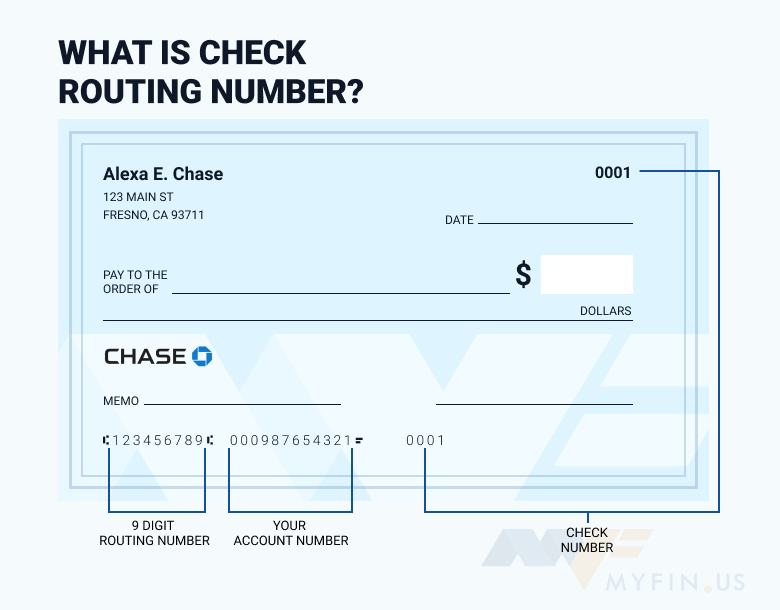
Despite the digital revolution, the physical checkbook remains a reliable, albeit traditional, source for your routing number. On a standard Chase check, you will find a series of numbers printed along the bottom edge. From left to right, these numbers represent:
- Routing Number: The nine-digit number on the far left.
- Account Number: The next set of digits, identifying your specific account.
- Check Number: The last set of digits, corresponding to the sequential number of the check.
While less immediate than an app, a physical check serves as an analog data storage device for this critical information. It’s a good fallback, especially if you’re experiencing technical issues with your digital devices or require a tangible reference.
Direct Contact via Digital Support Channels
Should you encounter any difficulties or prefer a more direct human interaction, Chase’s customer service can provide your routing number. While this isn’t a direct “tech tool” in the sense of an app, accessing customer service often involves digital communication channels such as secure messaging within the app/online portal, or phone calls initiated through your mobile device. When contacting support, be prepared to verify your identity through security questions, emphasizing the digital security protocols in place to protect your financial information. This method ensures that even if other digital or physical options are inaccessible, you can still retrieve the necessary data.
Digital Security and Best Practices for Banking Apps
Accessing sensitive financial information like your routing number through a mobile app necessitates a strong understanding of digital security. The Chase app is built with multiple layers of protection, but user vigilance plays a critical role in safeguarding your data.
Safeguarding Your Financial Data on Mobile
The security of your routing number and other banking details within the Chase app is paramount. Chase employs encryption, multi-factor authentication, and fraud monitoring systems to protect your data. However, your practices are equally important. Always ensure your device’s operating system and the Chase app itself are updated to the latest versions, as these updates often include critical security patches. Use strong, unique passwords, and enable biometric logins where available. Avoid public Wi-Fi networks when accessing your banking app, or use a Virtual Private Network (VPN) for an encrypted connection. Regularly review your account activity for any suspicious transactions, leveraging the app’s notification features for real-time alerts.
Recognizing and Avoiding Phishing Scams
A significant threat in the digital realm is phishing, where malicious actors attempt to trick users into revealing sensitive information. Be extremely cautious of unsolicited emails, texts, or calls purporting to be from Chase, asking for your login credentials or routing number. Remember that Chase will never ask for your password or full account number via email or text. Always access your account directly through the official Chase app or website, never through links provided in suspicious communications. Understanding the technology behind these scams (e.g., spoofed email addresses, deceptive links) is key to protecting yourself.
Leveraging App Features for Enhanced Protection
The Chase app often comes equipped with built-in security features designed to empower users. These can include:
- Account Alerts: Configure notifications for large transactions, login attempts, or changes to your personal information.
- Card Controls: Temporarily lock or unlock your debit/credit cards directly from the app if they are lost or stolen.
- Secure Messaging: Communicate with Chase customer service through an encrypted channel within the app.
- Login History: Review recent login activity to detect unauthorized access.
Utilizing these technological features actively enhances your personal cybersecurity posture, turning the app into not just a convenience tool but also a powerful security guardian.
Troubleshooting and Maximizing Your App Experience
While the Chase app is designed for seamless operation, occasional technical hiccups can occur. Knowing how to troubleshoot common issues and optimize your app usage can further enhance your digital banking experience, ensuring you always have reliable access to your routing number and other financial services.
Common Issues and Quick Fixes
If you’re having trouble finding your routing number or accessing the app, here are a few tech-oriented troubleshooting steps:
- Connectivity Issues: Ensure your device has a stable internet connection (Wi-Fi or cellular data). Poor signal strength can prevent the app from loading data.
- App Updates: Check your device’s app store (Google Play Store or Apple App Store) to confirm you have the latest version of the Chase app. Outdated versions can lead to functionality issues.
- Cache Clearing: For persistent loading or display problems, try clearing the app’s cache (via your device settings) or uninstalling and reinstalling the app. This can resolve corrupted data files.
- Device Compatibility: Ensure your smartphone or tablet meets the minimum operating system requirements for the Chase app. Older devices or OS versions might not fully support all features.
For issues beyond these basic steps, contacting Chase’s technical support, often accessible via the app itself or their website, is the next logical step.
Optimizing App Performance and Notifications
To truly maximize your app experience, personalize its settings to fit your needs. Configure push notifications for alerts that matter most to you, such as transaction confirmations or account balance updates, without being overwhelmed by unnecessary information. Explore features like quick balance previews or “Zelle” payment integration to streamline frequent banking tasks. Understanding the app’s settings and customization options allows you to tailor the digital banking environment to your preferences, making the process of finding your routing number or managing other finances even more efficient.

The Future of In-App Information Retrieval
As technology continues to advance, banking apps are expected to become even more sophisticated. Future iterations of the Chase app may incorporate advanced AI-powered chatbots for instant information retrieval, augmented reality features for contextual banking services, or even more seamless integrations with smart home devices. The trend is towards hyper-personalization and predictive analytics, where the app anticipates your needs and presents information proactively. This ongoing evolution underscores the importance of staying abreast of app updates and new features, ensuring you leverage the full power of your digital banking tools.
In conclusion, finding your routing number in the Chase app is a prime example of how modern technology empowers users with immediate access to critical financial data. By understanding the app’s interface, adhering to digital security best practices, and recognizing its capabilities, you can navigate your financial landscape with confidence and efficiency. The Chase app is not just a tool; it’s a testament to the seamless integration of technology into our daily financial lives.
aViewFromTheCave is a participant in the Amazon Services LLC Associates Program, an affiliate advertising program designed to provide a means for sites to earn advertising fees by advertising and linking to Amazon.com. Amazon, the Amazon logo, AmazonSupply, and the AmazonSupply logo are trademarks of Amazon.com, Inc. or its affiliates. As an Amazon Associate we earn affiliate commissions from qualifying purchases.