
In our increasingly data-driven world, understanding and calculating percentages is not merely an academic exercise; it’s a fundamental skill, deeply embedded in everything from tracking software update progress to analyzing gadget specifications. While the concept of a percentage might seem straightforward, the practical application, especially when leveraging the right technological tools, can significantly enhance efficiency and accuracy. This article delves into the precise methods of finding percentages using various types of calculators, exploring their features, optimizing your workflow, and peering into the future of numerical computation within the tech landscape.

The Ubiquitous Role of Percentage Calculations in the Digital Age
Percentages are more than just mathematical figures; they are the language of proportion and change, critical for informed decision-making across numerous technological domains. From monitoring system performance to understanding market share in the tech industry, the ability to quickly and accurately calculate percentages is indispensable.
Why Understanding Percentages Remains Critical
In technology, percentages manifest everywhere. Consider the battery life indicator on your smartphone, tablet, or laptop – a direct representation of remaining power. Software installations display progress as a percentage, indicating how close you are to completion. Data storage units are often discussed in terms of percentage usage, alerting you to impending capacity limits. Network bandwidth utilization, CPU load, disk space, download speeds, and even the adoption rates of new operating systems or applications are frequently communicated and analyzed using percentages. For developers, understanding percentage distribution in user demographics or error rates in code is paramount. For consumers, comparing discounts on electronics or interpreting performance benchmarks (e.g., “this new chip offers a 20% performance boost”) relies entirely on this mathematical concept. Without a solid grasp of percentages, navigating the complexities of modern technology becomes significantly harder.
Calculators as Essential Digital Tools
The humble calculator, whether a standalone physical gadget, a built-in operating system application, or a sophisticated online tool, serves as the primary conduit for performing these crucial calculations. These devices, in their various forms, represent a cornerstone of personal computing and daily technological interaction. From the basic four-function models that revolutionized early business and scientific endeavors to the advanced graphing calculators used in engineering, and further to the integrated calculator apps on every smartphone, tablet, and desktop, they embody technological progression aimed at simplifying complex arithmetic. They abstract away the manual steps of division and multiplication, allowing users to focus on the numbers and their implications rather than the mechanics of computation. Understanding how to effectively use these tools is key to harnessing their power for everything from quick checks to intricate analyses.
Mastering the Basics: Core Percentage Calculations on Standard Calculators
At its heart, finding a percentage of a number is about determining a part of a whole, expressed as a fraction of 100. Modern calculators, even the simplest ones, are designed to make this process remarkably straightforward.
Finding a Percentage of a Number: Step-by-Step Guide
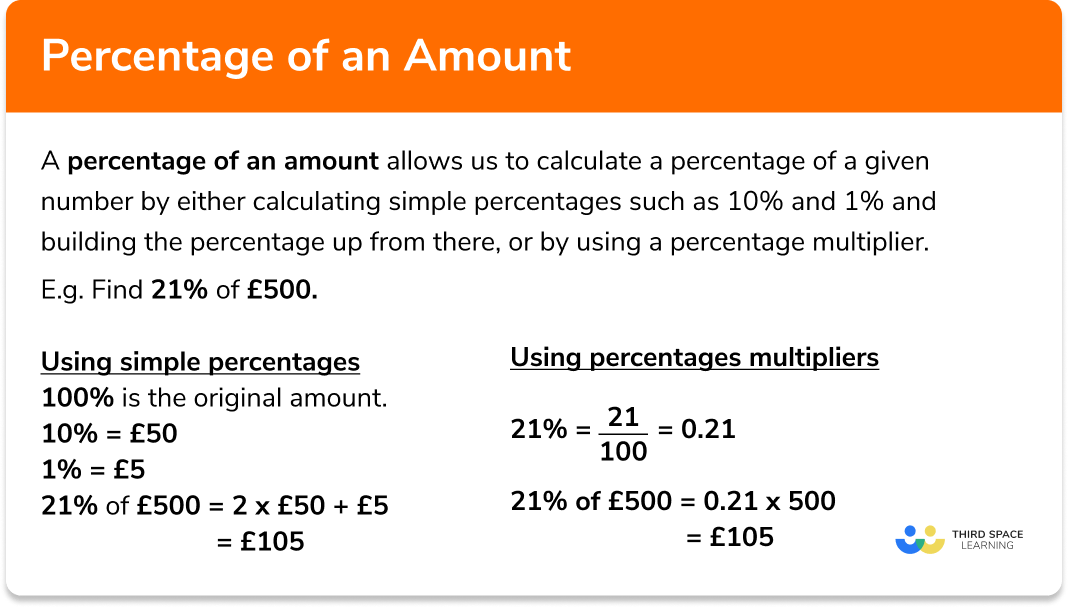
The most common percentage calculation is finding X percent of Y. For example, calculating 15% of 200. Most calculators handle this with intuitive precision.
Method 1: Using the Percentage (%) Button (if available)
Many calculators feature a dedicated “%” button, simplifying the process.
- Enter the base number: Type
200. - Press the multiplication button: Press
*(orx). - Enter the percentage: Type
15. - Press the percentage button: Press
%. - View the result: The display should show
30.
Method 2: Without a Percentage (%) Button (Universal Method)
If your calculator lacks a percentage button, or if you prefer a more explicit mathematical approach, you can convert the percentage to a decimal. To do this, divide the percentage by 100. So, 15% becomes 0.15.
- Enter the base number: Type
200. - Press the multiplication button: Press
*. - Enter the decimal equivalent of the percentage: Type
0.15. - Press the equals button: Press
=. - View the result: The display will show
30.
This method is universally applicable across all digital and physical calculators, from basic models to advanced scientific calculators and spreadsheet software.
Calculating Percentage Increase and Decrease
Beyond finding a simple percentage, calculators excel at determining percentage increases or decreases – crucial for tracking growth in tech metrics, understanding price changes, or analyzing performance improvements.
To Calculate a Percentage Increase:
Let’s say a software’s user base grew from 500,000 to 650,000. To find the percentage increase:
- Find the absolute increase:
650,000 - 500,000 = 150,000. - Divide the increase by the original number:
150,000 / 500,000 = 0.3. - Multiply by 100 to get the percentage:
0.3 * 100 = 30.
On a calculator:(650000 - 500000) / 500000 * 100 = 30. So, a 30% increase.
To Calculate a Percentage Decrease:
If a gadget’s price dropped from $500 to $425 due to a sale:
- Find the absolute decrease:
500 - 425 = 75. - Divide the decrease by the original number:
75 / 500 = 0.15. - Multiply by 100 to get the percentage:
0.15 * 100 = 15.
On a calculator:(500 - 425) / 500 * 100 = 15. Thus, a 15% decrease.
Determining the Whole from a Percentage
Sometimes, you know a percentage of a number and need to find the original total. For instance, if a tech company announced that 20% of its employees, or 500 people, received a bonus, you can find the total number of employees.
- Divide the known part by the percentage (as a decimal):
500 / 0.20.
On a calculator:500 / 0.20 = 2500. So, the company has 2500 employees.
This inverse calculation is particularly useful in resource allocation, budget planning, and scaling projects based on partial data.
Advanced Calculator Features and Digital Tools for Percentage Operations
While basic calculators handle core percentage tasks, the digital ecosystem offers an array of more sophisticated tools that integrate percentage calculations into broader functionalities.
Scientific and Graphing Calculators: Beyond the Basics
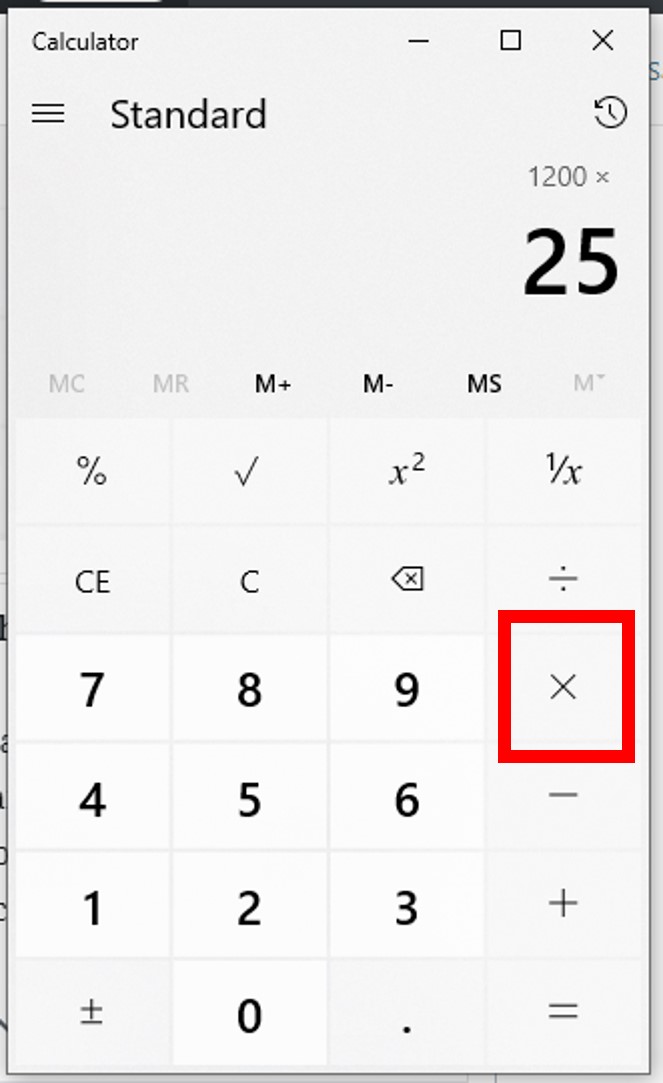
Scientific calculators, common among students and professionals in STEM fields, often include specialized keys and functions that can streamline complex percentage-related calculations. Features like memory functions (M+, M-, MR, MC) allow users to store intermediate results, which is incredibly useful for multi-step calculations involving percentages. For instance, if you’re calculating a percentage of a sum of several numbers, you can sum the numbers, store the total, then recall it for the percentage calculation. Graphing calculators further extend this capability, allowing users to define functions with percentages and visualize their impact, useful for modeling growth rates or decay curves in data analysis. Some even have built-in financial functions that incorporate percentage rates for interest, amortizations, and more.
Smartphone Calculator Apps: Convenience and Enhanced Functionality
The calculator apps pre-installed on virtually every smartphone and tablet have evolved significantly. Beyond basic arithmetic, many offer a “scientific mode” (often accessible by rotating the device to landscape orientation) that unlocks advanced functions, including often a dedicated percentage button and memory functions. These apps benefit from touch interfaces, allowing for quick input and correction. Furthermore, their integration within a mobile operating system means you can quickly switch between apps, copy numbers from a webpage or document, paste them into the calculator, and then use the result elsewhere. Some third-party calculator apps offer even more features, such as calculation history, unit conversions, currency conversions (which often involve percentage-based exchange rates), and customizable interfaces, making them powerful and always-available companions for percentage calculations on the go.
Online Calculators and Spreadsheet Software: Powering Complex Analysis
For more intricate or large-scale percentage calculations, online calculators and spreadsheet software like Microsoft Excel or Google Sheets become invaluable. Online calculators, found through a simple web search, often specialize in particular types of percentage calculations (e.g., tip calculators, loan calculators, discount calculators), providing tailored interfaces and immediate results without manual setup. They are excellent for specific, one-off tasks.
However, for repeated calculations, data analysis, or scenarios involving many variables, spreadsheet software is the undisputed champion.
- Excel/Google Sheets Formulas: These tools allow you to input numbers into cells and apply formulas to automatically calculate percentages. For example, to find 15% of a number in cell A1, you’d type
=A1*0.15into another cell. To calculate percentage change between two values in A1 (old) and A2 (new), you could use=(A2-A1)/A1. - Automation: Once a formula is set up, it can be copied across hundreds or thousands of cells, instantly updating results as input data changes. This is incredibly powerful for financial modeling, sales forecasting, performance reporting (e.g., server uptime percentages, download completion rates), and demographic analysis within technological contexts.
- Data Visualization: Spreadsheets can then convert these percentage results into charts and graphs, making trends and insights immediately apparent – a crucial step in tech reporting and presentations.
Optimizing Your Workflow: Tips for Efficiency and Accuracy
Even with the best tools, effective percentage calculation comes down to user proficiency. Adopting best practices can significantly boost both speed and precision.
Understanding Calculator Modes and Syntax
Different calculators have different operational logic. Some follow algebraic order of operations strictly (PEMDAS/BODMAS), while others, especially older basic models, process operations sequentially. Familiarize yourself with your calculator’s specific syntax. For instance, 200 * 15 % might work differently than 200 * (15 / 100). When dealing with multi-step percentage calculations, strategically using parentheses () is critical to ensure operations are performed in the correct order, preventing common errors. Leveraging memory functions (M+, M-) can also simplify complex calculations by storing intermediate results and preventing the need to re-enter long numbers.
Common Errors and How to Avoid Them
The most frequent mistakes in percentage calculations stem from misinterpreting the problem or inputting values incorrectly.
- Forgetting to Convert to Decimal: If your calculator doesn’t have a ‘%’ button, remember to divide the percentage by 100 before multiplying (e.g., 25% becomes 0.25).
- Incorrect Base for Percentage Change: When calculating increase/decrease, always divide by the original value, not the new one.
- Order of Operations: In complex expressions, ensure you’re performing operations in the correct sequence, especially when mixing addition/subtraction with multiplication/division. Use parentheses generously.
- Typographical Errors: Double-check your input. A misplaced decimal point or a forgotten digit can lead to wildly inaccurate results.
Practicing with various examples and consciously thinking through each step can mitigate these common pitfalls.
Leveraging Integrated Features for Speed
Many digital calculators offer features designed for speed. The percentage button, as discussed, is a primary example. Beyond that, modern calculator apps often have a history log, allowing you to review previous calculations and quickly retrieve numbers without re-typing. Some advanced apps support expression building, letting you see the entire calculation string before hitting enter. For repetitive tasks, especially in spreadsheets, mastering autofill features and absolute/relative cell referencing ($A$1 vs. A1) can save immense amounts of time. The efficiency gained from understanding and utilizing these integrated features frees up cognitive load, allowing you to focus on interpreting the data rather than struggling with the mechanics of calculation.
The Future of Calculation: AI, Voice Assistants, and Beyond
The evolution of calculation tools continues at a rapid pace, with artificial intelligence and natural language processing poised to transform how we interact with numerical tasks, including percentages.
Natural Language Processing for Numerical Tasks
Voice assistants like Siri, Google Assistant, and Amazon Alexa already perform basic arithmetic and percentage calculations. You can simply ask, “Hey Google, what is 15 percent of 300?” and receive an instant audio response. This natural language interface bypasses the need for manual input, offering unparalleled convenience for quick mental checks or hands-free operation. As NLP improves, these assistants will become adept at more complex multi-step percentage problems, understanding context and extracting numerical information from spoken or written sentences, further integrating calculation seamlessly into our daily digital interactions.
AI-Powered Data Analysis Tools
Advanced AI and machine learning algorithms are increasingly being integrated into data analysis platforms. These tools can automatically identify patterns, calculate trends, and present percentage-based insights from vast datasets without explicit user commands. Imagine a dashboard automatically highlighting that “user engagement increased by 8% this quarter” or “server downtime decreased by 15% month-over-month,” complete with predictive analytics. AI can handle the raw number crunching, including complex percentage adjustments and weightings, leaving humans to focus on strategic interpretation and decision-making. This shift moves beyond simply finding a percentage on a calculator to having the percentages found and interpreted for you by intelligent systems.
The Evolving Interface of Calculation
The interface for numerical computation is also evolving. While physical calculators will likely always have their niche, we are seeing augmented reality (AR) and virtual reality (VR) applications beginning to integrate calculator-like functionalities. Imagine an AR overlay that calculates the percentage discount on a product just by looking at its price tag, or a VR environment where you can manipulate data visualizations with percentage metrics in three dimensions. The calculator, once a static device, is becoming a dynamic, contextual, and often invisible part of our technological environment, constantly assisting us with the proportions and changes that define the digital age.
From simple discounts to complex data analytics, the ability to find a percentage of a number using a calculator is a foundational skill in the tech world. By understanding the tools available, mastering core methods, and embracing future innovations, we can navigate the quantitative landscape with greater confidence and efficiency.
aViewFromTheCave is a participant in the Amazon Services LLC Associates Program, an affiliate advertising program designed to provide a means for sites to earn advertising fees by advertising and linking to Amazon.com. Amazon, the Amazon logo, AmazonSupply, and the AmazonSupply logo are trademarks of Amazon.com, Inc. or its affiliates. As an Amazon Associate we earn affiliate commissions from qualifying purchases.