
Venmo, at its core, is a social payment platform designed to simplify transactions between friends, family, and trusted contacts. Its popularity stems not only from its ease of use but also its inherent social features, which include the ability to easily find and connect with other users. Navigating these features effectively ensures you can quickly locate the right person for your payment needs, all while maintaining a secure and private experience. Understanding how Venmo structures its search capabilities and privacy settings is key to maximizing its utility.
The Social Fabric of Venmo: Why Finding Connections Matters
Venmo distinguishes itself from traditional banking apps by integrating a social feed where users can see (depending on privacy settings) the transactions of their connections. This social layer fosters a sense of community and transparency, making it natural to want to connect with people within the app. Whether you’re splitting a dinner bill, collecting money for a group gift, or paying a roommate for rent, the primary step is always to locate the correct recipient. An inability to find someone swiftly can lead to delays, incorrect payments, or even the perception of a non-existent account. Therefore, Venmo provides multiple intuitive pathways to help users establish these crucial connections, underpinned by options for personal control over discoverability and privacy.
Direct Pathways: Navigating Venmo’s Search Features
Venmo offers several straightforward methods to find individuals, each suited to different scenarios based on the information you possess about the person you’re trying to locate. These methods prioritize both convenience and accuracy.
Leveraging the Search Bar: Usernames and Full Names
The most common and direct method to find someone on Venmo is through the app’s integrated search bar. This feature is typically found at the top of your Venmo feed or within the “Pay & Request” tab.
-
Searching by Username: Every Venmo user has a unique username, often beginning with an “@” symbol. This is the most reliable way to find someone, as usernames are distinct identifiers. If you know the person’s exact Venmo username, simply type it into the search bar. The app will usually provide immediate results.
- Tip for Accuracy: Usernames are case-insensitive, but exact spelling is crucial. If you’re unsure, ask the person for their specific Venmo handle.
-
Searching by Name: If you don’t have a username, you can search using a person’s first and last name. Venmo will display a list of profiles that match the name. This method can yield more results, especially for common names.
- Refining Your Search: When searching by name, pay close attention to profile pictures, city locations (if visible), and any shared friends or past transaction details that might help confirm identity. If the person has a particularly unique middle name or initial they use, including that can narrow down results.
Synchronizing Contacts for Seamless Discovery
Venmo can integrate with your phone’s contact list to help you find friends already using the app. This method is particularly efficient for connecting with multiple individuals you already know.
-
Enabling Contact Synchronization:
-
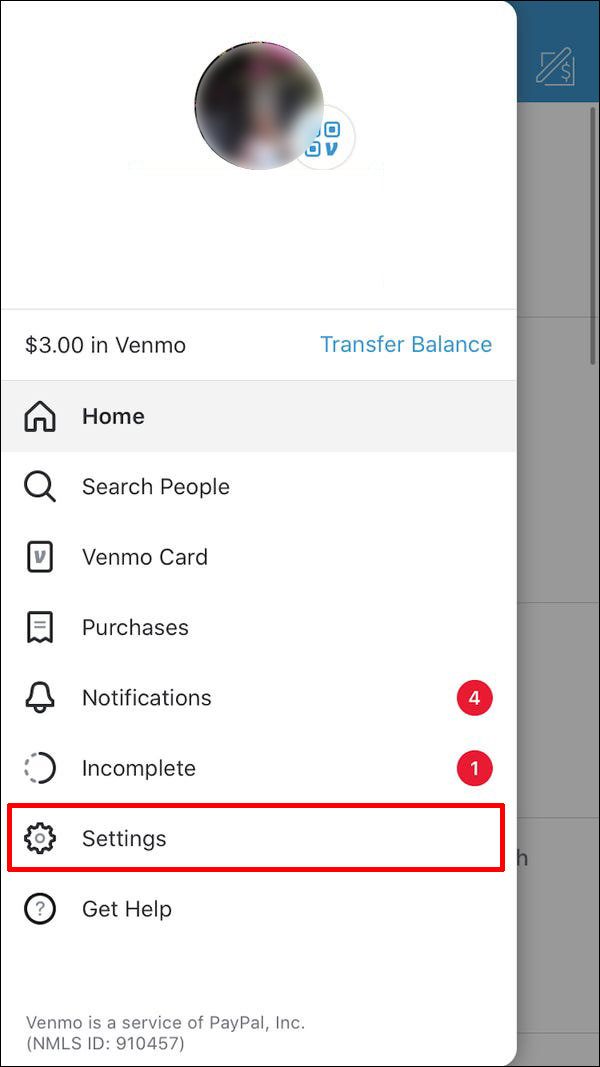
Open the Venmo app and navigate to your profile (usually represented by a single person icon or your profile picture).
-
Tap on “Settings” (gear icon).
-
Select “Friends & Social.”
-
Choose “Phone Contacts” or “Connect Phone Contacts.”
-
Follow the prompts to grant Venmo access to your phone’s contacts.
-
-
How it Works: Once enabled, Venmo will scan your contacts and cross-reference phone numbers with its user database. It will then suggest friends who are already on Venmo, allowing you to easily send them a friend request or initiate a payment.
-
Managing Sync Settings: You can disable contact synchronization at any time through the same settings menu if you prefer not to have Venmo access your phone’s contact list continuously. This setting only affects your ability to find people via this method, not your overall Venmo functionality.
Connecting Through Social Media: Facebook Integration
For users who prefer to link their social networks, Venmo offers integration with Facebook to help discover connections. This method leverages your existing Facebook friend list to identify Venmo users.
-
Linking Your Facebook Account:
-
Go to your Venmo profile within the app.
-
Tap “Settings.”
-
Select “Friends & Social.”
-
Choose “Facebook” or “Connect Facebook.”
-
Follow the prompts to authorize Venmo to access your Facebook friends list.
-
-
Discovery and Suggestions: Once linked, Venmo will use your Facebook connections to suggest potential friends on the platform. This can be an effective way to find individuals who might use a different name on Venmo than what you have in your phone contacts.
-
Privacy Considerations: Be mindful of the privacy implications when linking social media accounts. While convenient, it increases the interconnectedness of your digital profiles. You can unlink your Facebook account from Venmo at any time through the same settings menu.
Understanding Venmo’s Privacy Settings and Discoverability
While finding people easily is a core feature, Venmo also places a strong emphasis on user privacy. How visible you are to others, and how much information they can see about you, is largely determined by individual privacy settings.
How Your Settings Influence Who Can Find You
Venmo provides granular control over transaction visibility and overall profile discoverability. These settings directly impact whether someone can find you through various search methods and what information they can glean from your profile before connecting.
-
Transaction Privacy: Venmo transactions can be set to “Public,” “Friends,” or “Private.” While this primarily controls who sees your payment activity in the Venmo feed, it also subtly influences discoverability. A user with many public transactions might be perceived as more active or easier to identify through their activity, though this is not a direct search filter.
-
Profile Discoverability: While Venmo doesn’t have a single “make my profile unsearchable” button, your profile’s information (like your full name and profile picture) is what searchers rely on. If your account details are minimal or use an alias, it becomes harder for strangers to find you via general name searches.
-
Username as Primary Identifier: Regardless of other privacy settings, your unique Venmo username always serves as the most direct and reliable way for anyone to find you, provided they know it. Therefore, choose your username carefully.
Adjusting Your Own Visibility Preferences
Taking control of your own Venmo privacy settings is crucial for managing your digital footprint and ensuring you’re only found by those you wish to connect with.
-
Modifying Transaction Default Privacy:
-
Navigate to your profile and tap “Settings.”
-
Select “Privacy.”
-
Under “Default Privacy Settings,” choose “Public,” “Friends,” or “Private.” Your choice here will apply to all future transactions unless manually changed for a specific payment.
-
-
Managing Past Transaction Visibility: You can also retroactively change the privacy settings for individual past transactions through your personal transaction history.
-
Controlling Friend Recommendations:
-
In “Settings,” go to “Friends & Social.”
-
You’ll find options related to “Suggested Friends” or “People You May Know.” Disabling these might reduce the likelihood of your profile being suggested to others through shared connections, although it doesn’t prevent direct searches.
-
-
Limiting Profile Information: Consider what personal details you make visible on your profile (e.g., profile picture, display name). While a clear photo and real name aid legitimate connections, they also increase general discoverability. Balance convenience with your personal privacy comfort level.
Best Practices for Securely Connecting on Venmo
Beyond simply finding people, ensuring you’re connecting with the right person and maintaining the security of your account is paramount. The social nature of Venmo means vigilance against errors or malicious actors is always necessary.
Verifying Identity Before Sending Funds
Before initiating any payment, it is critical to confirm you have selected the correct recipient. Sending money to the wrong Venmo user can be difficult, if not impossible, to reverse, as Venmo transactions are generally instant and irreversible between active accounts.
-
Double-Check Usernames: Always prioritize verifying the exact username, especially if you’re searching by a common name. Even a slight misspelling can lead you to an entirely different person.
-
Review Profile Pictures and Names: Once you’ve selected a potential recipient, examine their profile picture and the full name displayed on their profile. Do they match what you expect? Are there any discrepancies?
-
Look for Shared Connections (if applicable): If you share friends on Venmo, this can be a strong indicator of identity.
-
Confirm Out-of-App: For significant payments or when in doubt, verbally confirm the Venmo username with the recipient through a separate channel (text message, phone call, in-person). This extra step can prevent costly mistakes.
-
Be Wary of Impersonators: Scammers may create profiles designed to look like someone you know. Always verify directly if a request seems unusual or unexpected.

Protecting Your Account and Information
While finding people safely, it’s also important to secure your own Venmo account from unauthorized access and potential fraud.
-
Strong, Unique Passwords: Use a complex password that is unique to your Venmo account. Avoid easily guessable information.
-
Enable Multi-Factor Authentication (MFA): This adds an extra layer of security by requiring a code from your phone in addition to your password, significantly reducing the risk of unauthorized access.
-
Be Skeptical of Suspicious Requests: Never click on links in unsolicited emails or texts claiming to be from Venmo, especially if they ask for your login credentials or personal information. Always go directly to the Venmo app or official website.
-
Monitor Your Account: Regularly review your transaction history for any unauthorized activity. Report suspicious transactions or unknown profiles to Venmo customer support immediately.
-
Understand Public Wi-Fi Risks: Avoid accessing sensitive financial apps like Venmo on unsecured public Wi-Fi networks, which can be vulnerable to eavesdropping.
By understanding and utilizing Venmo’s features for finding people, combined with a strong focus on privacy and security, users can enjoy a seamless and safe experience on the platform. The key lies in being deliberate in your search efforts and diligent in verifying identities before every transaction.
aViewFromTheCave is a participant in the Amazon Services LLC Associates Program, an affiliate advertising program designed to provide a means for sites to earn advertising fees by advertising and linking to Amazon.com. Amazon, the Amazon logo, AmazonSupply, and the AmazonSupply logo are trademarks of Amazon.com, Inc. or its affiliates. As an Amazon Associate we earn affiliate commissions from qualifying purchases.