
Your Adjusted Gross Income (AGI) is more than just a line item on your tax return; it’s a foundational figure that dictates much of your financial life. From determining your eligibility for tax credits and deductions to influencing your qualification for loans, scholarships, and healthcare subsidies, understanding and accessing your AGI is paramount. While many keep meticulous records, the fast pace of life or unexpected circumstances can sometimes leave us scrambling to find this critical number, often at the most inconvenient times. Fortunately, the Internal Revenue Service (IRS) provides robust online tools designed to help taxpayers retrieve their tax information, including their AGI, with relative ease and security.

This comprehensive guide will demystify the process of locating your AGI on the IRS website. We’ll delve into what AGI truly represents, walk you through the precise steps to navigate the IRS online portals, explore alternative retrieval methods, and discuss why maintaining easy access to this vital financial data is a cornerstone of sound personal finance. Whether you’re filing next year’s taxes, applying for financial aid, or securing a mortgage, knowing exactly where to find your AGI empowers you to manage your financial obligations effectively and confidently.
Unpacking Your Adjusted Gross Income (AGI)
Before diving into the “how,” it’s crucial to grasp the “what” and “why” behind Adjusted Gross Income. AGI is a core concept in the U.S. tax system, serving as a critical midpoint in calculating your tax liability and eligibility for various financial benefits.
What is AGI and Why Does It Matter?
At its simplest, your Adjusted Gross Income is your gross income (all money you earned from wages, salaries, tips, interest, dividends, business income, capital gains, etc.) minus specific above-the-line deductions. These “above-the-line” deductions include items like contributions to traditional IRAs, student loan interest, self-employment taxes, health savings account (HSA) contributions, and certain educator expenses. The resulting AGI is a crucial figure because it’s used as the starting point for calculating various tax benefits.
Its significance extends far beyond tax computation. A lower AGI can translate into a lower tax bill because many tax credits (like the Child Tax Credit or Earned Income Tax Credit) and itemized deductions are phased out or capped based on your AGI. Moreover, AGI is a gatekeeper for eligibility for programs like the Premium Tax Credit for health insurance, Pell Grants for education, and even the deductibility of certain medical expenses. Understanding your AGI is the first step toward optimizing your financial planning and maximizing available benefits.
Key Scenarios Where AGI is Required
The need for your AGI arises in a surprisingly broad range of financial interactions. Perhaps the most common scenario is filing your current year’s tax return. Tax software and tax preparers often require your prior year’s AGI as a security measure to verify your identity. Without it, you might be unable to e-file your return.
Beyond taxes, AGI is frequently requested for:
- Loan applications: Mortgage lenders, auto loan providers, and personal loan companies often use AGI to assess your debt-to-income ratio and overall financial capacity.
- Financial aid applications (FAFSA): The Free Application for Federal Student Aid (FAFSA) heavily relies on your and your parents’ (if applicable) AGI to determine eligibility for federal student grants, loans, and work-study programs.
- Health insurance subsidies: If you purchase health insurance through a state or federal marketplace, your AGI determines your eligibility and the amount of any premium tax credits you might receive.
- Income-driven repayment plans: For federal student loan borrowers, AGI is used to calculate monthly payments under various income-driven repayment plans.
- Estate planning and trust creation: AGI can sometimes play a role in complex financial instruments.
AGI vs. Gross Income vs. Taxable Income
To avoid confusion, it’s helpful to differentiate AGI from other income terms:
- Gross Income: This is the total of all your income from all sources before any deductions or adjustments. It’s the “top line” number.
- Adjusted Gross Income (AGI): This is your gross income minus specific “above-the-line” deductions. It’s a stepping stone between gross income and taxable income.
- Taxable Income: This is your AGI minus either the standard deduction or your itemized deductions. This is the final figure on which your tax liability is calculated.
Understanding these distinctions is crucial for accurate financial reporting and effective tax planning.
Navigating the IRS Website for Your Tax Records
The IRS website (IRS.gov) is the official gateway to your tax information. For most individuals, the “Get Your Tax Record” tool is the primary resource for retrieving past tax data, including AGI.
The “Get Your Tax Record” Tool
The IRS provides a dedicated online service called “Get Your Tax Record” (often referred to as the “Get Transcript” service). This tool allows individuals to obtain various types of tax transcripts for the current tax year and the past three prior tax years. These transcripts are summaries of your tax return information, wage and income data, or account information, and they are frequently accepted by lenders, schools, and other institutions in place of an actual tax return. Critically, the “Tax Return Transcript” is where you’ll find your AGI.
Account Creation and Verification
Accessing your tax transcripts online requires a rigorous identity verification process, which the IRS has significantly enhanced for security. Most users will be directed to create an account with ID.me, a trusted technology provider that partners with the IRS (and other government agencies) for secure digital identity verification.
The ID.me verification process typically involves:
- Providing personal information: Full name, date of birth, Social Security Number, and address.
- Email and phone verification: Confirming your email address and a phone number (often requiring a smartphone for face verification).
- Document upload: Submitting images of an official photo ID (e.g., driver’s license, state ID, passport).
- Live selfie or video call: Using your device’s camera to take a live selfie that is compared to your ID, or in some cases, a brief video call with an ID.me agent for additional verification.
This multi-factor authentication ensures that only you can access your sensitive tax data, safeguarding against identity theft and fraud. While it might seem cumbersome, it’s a vital step in protecting your financial information.
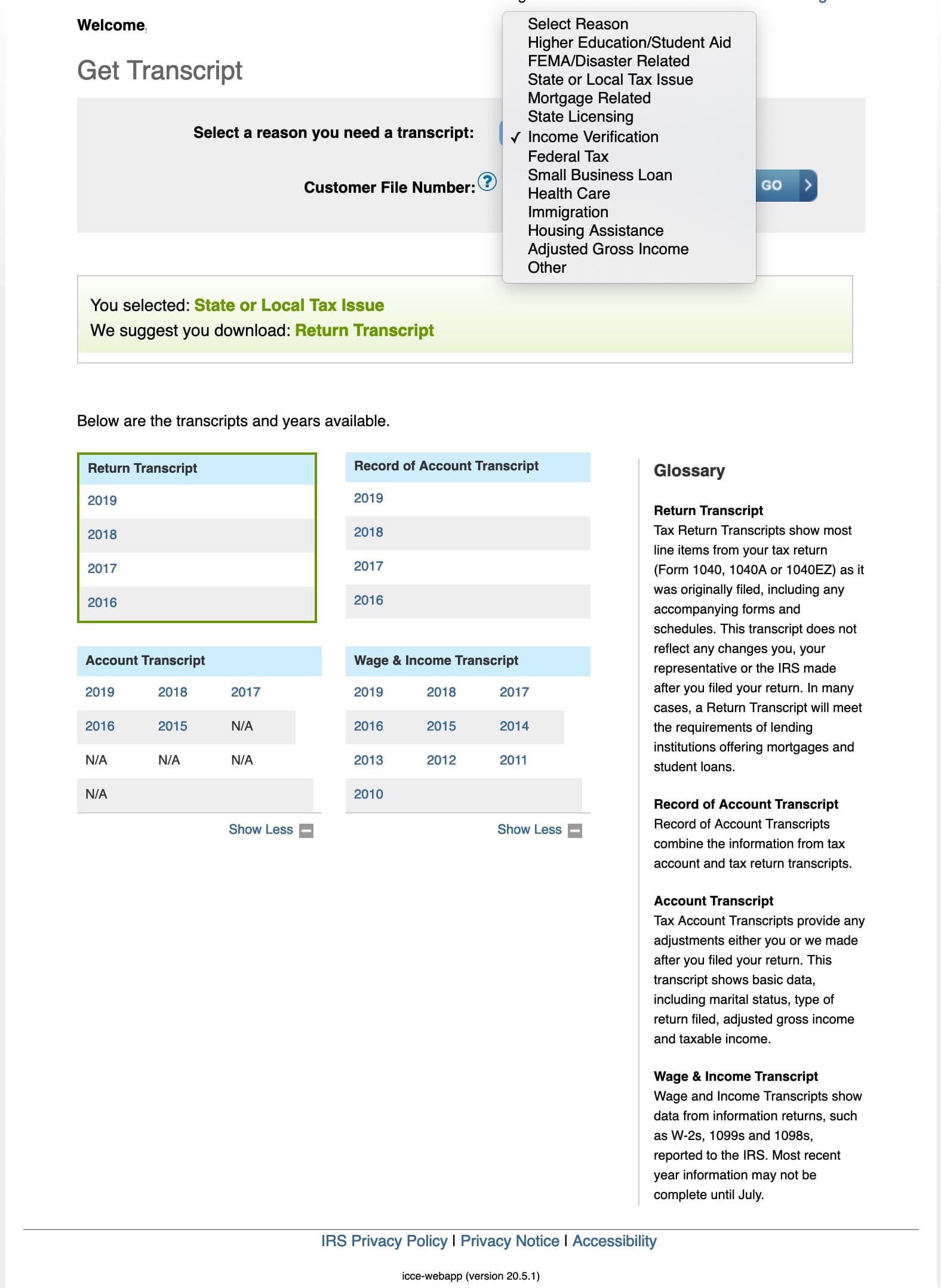
Types of Transcripts Available
When you use the “Get Transcript” service, you’ll typically have several options. Knowing which one to choose is key to finding your AGI:
- Tax Return Transcript: This is the transcript you want for AGI. It shows most of the line items from your original tax return (Form 1040, 1040-SR, etc.) as you filed it, including your Adjusted Gross Income. It does not show changes made after the original return was filed.
- Tax Account Transcript: This transcript provides basic data from your tax return, such as marital status, type of return filed, and AGI, but also includes adjustments made by the taxpayer or the IRS after the return was filed. It also shows payment history.
- Wage and Income Transcript: This transcript displays information reported to the IRS by employers and other third parties, such as W-2s, 1099s (interest, dividends, pensions, etc.), and 1098s (mortgage interest). It does not contain your AGI directly, though the underlying data contributes to its calculation.
- Record of Account Transcript: This combines the information from the Tax Return Transcript and the Tax Account Transcript into one document.
For the sole purpose of finding your AGI from a specific tax year, the Tax Return Transcript is usually the most straightforward choice.
Step-by-Step Guide to Retrieving Your AGI Online
Once your ID.me account is set up and linked to your IRS online account, retrieving your AGI is a straightforward process.
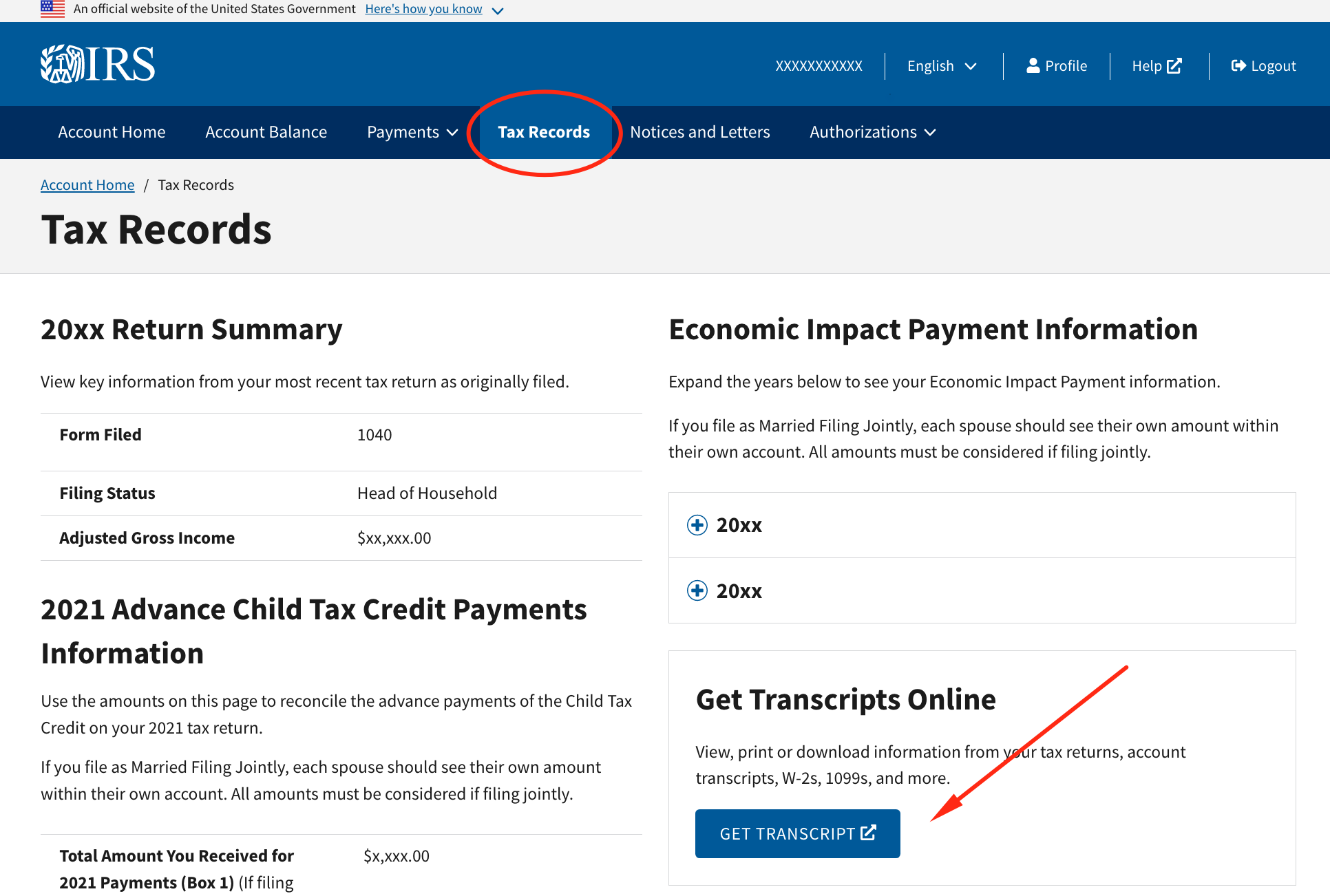
Accessing the IRS Online Account
- Go to IRS.gov: Start by navigating to the official IRS website.
- Find the “Get Your Tax Record” section: On the homepage, look for a link or search for “Get Your Tax Record” or “Get Transcript.” Alternatively, you can directly visit the “Your Online Account” page.
- Sign in: Click on “Get Transcript Online” or “Sign in to your Online Account.” You will be redirected to the ID.me login page. Enter your ID.me credentials (email and password) and complete any multi-factor authentication steps (e.g., entering a code sent to your phone).
Requesting a Tax Return Transcript
Once logged into your IRS online account:
- Select “Get Transcript”: You’ll see an option to “Get Transcript.” Click on it.
- Choose “Tax Return Transcript”: From the available transcript types, select “Tax Return Transcript.”
- Select the tax year: Specify the tax year for which you need your AGI (e.g., 2022 for your 2022 tax year AGI). Remember that your AGI for a given year is from the return filed in the following year. So, for 2023 filings, you might need your 2022 AGI.
- Confirm and view/download: After making your selection, the transcript will typically be generated instantly. You will have the option to view it directly in your browser or download it as a PDF.
Locating AGI on the Transcript
When you open your Tax Return Transcript, it will resemble a simplified version of your original Form 1040. Look for the line labeled “ADJUSTED GROSS INCOME”. On a Form 1040, this is typically found on Line 11 for tax years 2020 and later. For earlier tax years, the line number might vary slightly (e.g., Line 7 on the 2019 Form 1040). The amount next to this line is your AGI for that specific tax year.
Downloading and Saving Your Transcript
Once you’ve located and confirmed your AGI, it’s wise to download the PDF transcript and save it in a secure, easily accessible location. Consider creating a dedicated digital folder for tax documents, perhaps encrypted or password-protected. This practice ensures you have a readily available copy for future needs, minimizing the hassle of retrieving it again. Remember to practice good digital hygiene by using strong, unique passwords for your IRS and ID.me accounts.
Alternative AGI Retrieval Methods and Troubleshooting
While online retrieval is the quickest and most efficient method, sometimes technical issues, lack of required documents, or a preference for traditional methods may necessitate alternatives.
Using Your Prior Year’s Tax Return
The most straightforward alternative to the IRS website is to simply look at your physical or digital copy of your prior year’s tax return. Your AGI is prominently displayed on Form 1040, Line 11 (for 2020 and later tax years). If you used tax preparation software (like TurboTax, H&R Block, or TaxAct), you can usually log back into your account with that software to access and print previous years’ returns. This method is instantaneous if you have your records organized.
Requesting a Transcript by Mail
If you cannot access the online system or prefer a physical copy, you can request a tax transcript by mail.
- Go to IRS.gov: Navigate to the “Get Your Tax Record” section.
- Select “Get Transcript by Mail”: Choose this option instead of “Get Transcript Online.”
- Provide information: You will need to enter your Social Security Number, date of birth, street address, and zip code. This information must exactly match what the IRS has on file from your last tax return.
- Select “Tax Return Transcript” and year: Specify the type of transcript and the tax year needed.
The IRS typically mails transcripts within 5 to 10 calendar days to the address on file. This is a reliable but slower method.
Contacting the IRS Directly
As a last resort, if all other methods fail, you can contact the IRS directly by phone or by visiting a Taxpayer Assistance Center (TAC). Be prepared for potential wait times when calling the IRS at 1-800-829-1040. If visiting a TAC, you generally need to make an appointment in advance. When calling or visiting, you will undergo rigorous identity verification. This method should be considered if you face significant hurdles with online or mail requests.
Common Pitfalls and Solutions
- Identity Verification Issues (ID.me): If you struggle with the ID.me process, double-check that all information entered exactly matches your official documents. Ensure your photos are clear and taken in good lighting. If persistent issues occur, contact ID.me customer support directly.
- Address Mismatch: If your address has changed since you last filed taxes, the “Get Transcript by Mail” service might not work correctly. Ensure the IRS has your most current address by filing Form 8822, Change of Address, if necessary.
- Wrong Transcript Type: As discussed, selecting the “Tax Return Transcript” is crucial for easily finding your AGI. If you accidentally request a different transcript, simply go back and choose the correct one.
- Lost Passwords/Logins: For tax software accounts, use the “forgot password” or “recover account” options. For the IRS online account, you’ll go through the ID.me password reset process.
The Broader Context: AGI in Your Financial Life
Beyond the immediate need to retrieve it, understanding your AGI’s role in your overall financial strategy is key to effective personal finance management.
AGI’s Impact on Financial Planning
Your AGI is not just a backward-looking number; it’s a forward-looking indicator for financial planning. A lower AGI can be advantageous as it can increase eligibility for various tax benefits and reduce your taxable income. Savvy financial planning often involves strategies to legally reduce your AGI, such as maximizing contributions to pre-tax retirement accounts (401(k), traditional IRA) or Health Savings Accounts (HSA). When planning for significant life events like retirement, college funding, or major investments, your AGI impacts how much you can contribute to certain accounts or the tax implications of withdrawals. Regularly reviewing your AGI allows you to assess your financial health and adjust your tax-planning strategies accordingly.
Protecting Your AGI and Personal Data
Given the sensitivity and importance of your AGI, protecting this information is paramount. Your AGI can be a critical piece of information used by identity thieves to file fraudulent tax returns or access other accounts.
- Strong Passwords: Use complex, unique passwords for your IRS, ID.me, and tax software accounts.
- Two-Factor Authentication (2FA): Always enable 2FA wherever available.
- Phishing Awareness: Be wary of unsolicited emails or calls claiming to be from the IRS. The IRS typically initiates contact via mail. Never click suspicious links or provide personal information over the phone unless you’ve initiated the call to an official IRS number.
- Secure Storage: If saving digital copies of your transcripts, ensure they are stored on a secure, encrypted drive or cloud service. Physical copies should be kept in a locked filing cabinet.
Proactive Record Keeping for Future Needs
The best defense against scrambling for your AGI is proactive record-keeping. Develop a system for organizing your tax documents annually.
- Dedicated Folder: Create a physical or digital folder for each tax year, containing your W-2s, 1099s, tax returns, and any relevant receipts or statements.
- Digital Backups: Store digital copies of your tax returns and transcripts on an external hard drive or secure cloud storage, separate from your primary computer.
- Review Annually: Take a few minutes after filing your taxes each year to confirm you have access to the filed return and know where to find your AGI for future reference.
By embracing these practices, you can transform the often-stressful task of finding your AGI into a simple, confident step in your ongoing financial journey. The IRS provides the tools; understanding and utilizing them securely puts you in control of your financial destiny.
aViewFromTheCave is a participant in the Amazon Services LLC Associates Program, an affiliate advertising program designed to provide a means for sites to earn advertising fees by advertising and linking to Amazon.com. Amazon, the Amazon logo, AmazonSupply, and the AmazonSupply logo are trademarks of Amazon.com, Inc. or its affiliates. As an Amazon Associate we earn affiliate commissions from qualifying purchases.