
Understanding Cash App Deposits: Why It Matters for Your Finances
In the rapidly evolving landscape of personal finance, digital payment applications like Cash App have become indispensable tools for managing money. Far beyond simple peer-to-peer transfers, Cash App offers a robust suite of financial services, including diverse options for depositing funds directly into your account. Understanding these methods is crucial for anyone looking to fully integrate Cash App into their financial ecosystem, whether for budgeting, saving, or everyday transactions. The ability to seamlessly add money affects cash flow management, expenditure tracking, and overall financial fluidity, making it a cornerstone of effective personal finance in the digital age.

The Role of Cash App in Modern Personal Finance
Cash App serves as a versatile financial hub for millions, bridging traditional banking functions with modern digital convenience. For many, it acts as a primary checking account, a supplementary wallet for specific expenses, or a gateway to investing in stocks and Bitcoin. Its accessibility and user-friendly interface have democratized financial services, making it easier for individuals to receive paychecks, manage spending, and transfer funds without relying solely on conventional banks. The various deposit methods available are designed to cater to different financial realities, from those with traditional employment to freelancers and individuals who primarily deal in cash, ensuring financial inclusion and flexibility.
Key Deposit Methods Overview
Cash App provides several avenues for depositing money, each designed to meet specific user needs and financial situations. These methods include direct deposit for regular income, adding cash at participating retail stores for physical funds, and linking external bank accounts or debit cards for electronic transfers. Each method comes with its own set of advantages, limitations, and potential fees, which smart financial planning necessitates understanding. The choice of deposit method often hinges on factors such as urgency, the source of funds, and the user’s preference for digital versus physical interactions with their money.
Direct Deposit: Streamlining Your Income
Direct deposit is arguably one of the most powerful features Cash App offers for serious financial management. By directing your paychecks, government benefits, or other recurring income directly to your Cash App account, you can centralize your funds and streamline your budgeting process. This method bypasses traditional banking intermediaries, often leading to quicker access to your money and eliminating the need for physical checks. For many users, particularly those who prefer managing their finances entirely within a mobile application, direct deposit transforms Cash App into a primary financial institution.
Setting Up Direct Deposit for Paychecks
To set up direct deposit, you typically need your Cash App account and routing numbers. These can be found within the app by tapping the “Banking” or “Money” tab and looking for “Direct Deposit.” Once you have these details, you provide them to your employer’s payroll department, government agency, or any other institution issuing recurring payments. They will typically require a form to be filled out, which may also request your employer’s information. It’s a straightforward process that usually takes only a few minutes to initiate, though it might take one to two pay cycles for the change to fully take effect.
Benefits for Budgeting and Cash Flow
Utilizing direct deposit for your income offers significant financial advantages. Firstly, it often means faster access to your funds compared to paper checks, with some users even receiving their paychecks up to two days early. This immediate access can greatly improve cash flow, allowing for timely bill payments and avoiding late fees. Secondly, by having your primary income flow into Cash App, you can more easily track your spending and adhere to a budget, as all transactions are recorded within a single platform. This consolidated view of income and expenses is invaluable for personal financial planning and analysis.
Potential Limitations and Considerations
While direct deposit is highly beneficial, it’s essential to be aware of potential limitations. Cash App does have transaction limits, and while these are generally high enough for most standard paychecks, very large deposits might warrant checking the specific limits within your account. Furthermore, while Cash App is a secure platform, relying solely on a single mobile app for all your financial needs might present concentration risk. Consider diversifying where your funds are held, perhaps by transferring a portion to a traditional bank account or a dedicated savings account for funds not immediately needed. Always monitor your Cash App notifications and account activity closely to ensure the security of your direct deposits.
Adding Cash at Retail Stores: Convenience for Physical Funds
For individuals who receive income in cash or prefer to manage physical currency, Cash App offers a convenient solution: depositing cash at participating retail locations. This method bridges the gap between the physical and digital financial worlds, allowing users to convert tangible money into digital funds available instantly in their Cash App balance. This feature is particularly valuable for those working in cash-tip industries, receiving payments for odd jobs, or simply preferring to keep some cash on hand for daily expenses.
Step-by-Step Guide for In-Store Deposits
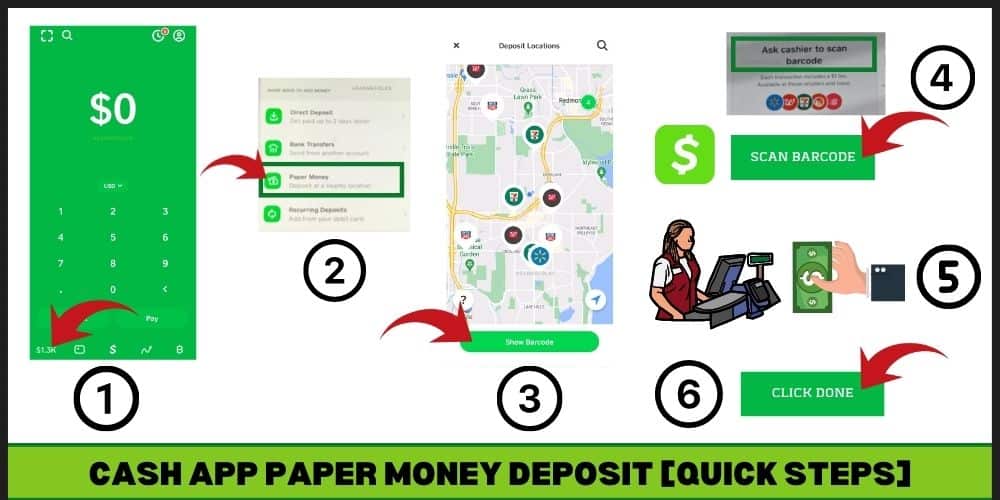
The process for adding cash at a retail store is designed to be simple and user-friendly. First, open your Cash App and navigate to the “Banking” or “Money” tab. Look for an option like “Deposit Cash” or “Paper Money.” The app will typically use your location to show you a map of nearby participating stores, which often include major pharmacies and convenience stores. Once you’ve selected a store, the app will generate a unique barcode. At the checkout counter, present this barcode to the cashier, along with the cash you wish to deposit. The cashier will scan the barcode and accept your cash. The funds are usually reflected in your Cash App balance almost instantly, making them available for immediate use.
Fees and Transaction Limits to Note
It’s important to be aware of any associated fees and transaction limits when using in-store cash deposits. While many retailers offer this service, some may charge a small fee for the transaction, typically a flat rate per deposit. These fees can vary, so it’s wise to check within the app or inquire at the store before making a deposit. Additionally, Cash App imposes limits on the amount of cash you can deposit per transaction, per day, and per week. These limits are in place for security and regulatory compliance. Always check your specific limits within your Cash App profile to avoid any inconvenience when planning larger cash deposits.
Maximizing Security During In-Person Transactions
When depositing cash in person, take proactive steps to ensure the security of your funds. Choose well-lit, reputable retail locations during business hours. Always double-check that the amount of cash you’re handing over matches the amount the cashier enters into their system and the amount displayed on your Cash App screen. Once the transaction is complete and you’ve confirmed the funds appear in your balance, retain any receipt provided by the store as proof of the transaction. If there are any discrepancies or issues, this receipt will be crucial for resolving them with Cash App support.
Linking Bank Accounts and Debit Cards: Seamless Transfers
One of the most common and versatile ways to deposit money into Cash App is by linking an external bank account or debit card. This method provides immense flexibility, allowing users to transfer funds directly from their existing financial institutions. It serves as a bridge between your traditional banking relationships and your Cash App balance, enabling easy top-ups whenever needed for peer-to-peer payments, investing, or any other Cash App function.
Connecting External Financial Institutions
To link a bank account or debit card, navigate to the “Banking” or “Money” tab within Cash App and select “Link Bank” or “Add Card.” You will then be prompted to enter your bank account login credentials (for linking a bank directly) or your debit card number, expiration date, CVV, and zip code. Cash App uses secure encryption to protect your financial information. Once linked, you can initiate transfers directly from these sources. For bank accounts, Cash App typically uses Plaid to securely connect to thousands of financial institutions, providing a streamlined and secure linking process.
Instant vs. Standard Deposits: Cost-Benefit Analysis
When transferring money from a linked bank account, Cash App usually offers two options: standard and instant deposits. Standard deposits are typically free but can take 1-3 business days for the funds to clear and appear in your Cash App balance. This is suitable for non-urgent transfers and regular top-ups. Instant deposits, as the name suggests, make the funds available immediately, but Cash App charges a small fee (typically 0.5% to 1.75% of the transaction amount) for this expedited service. The choice between standard and instant depends on your urgency and willingness to pay a fee for immediate access. For sound financial management, consider if the convenience of instant access outweighs the cost for each specific transaction.
Troubleshooting Common Deposit Issues
Occasionally, users may encounter issues when attempting to deposit money. Common problems include incorrect card details, insufficient funds in the linked account, or bank-imposed transfer limits. If a deposit fails, first verify all entered information is correct. Check with your linked bank for any daily transaction limits or security flags that might be preventing the transfer. If the issue persists, contacting Cash App support is the next step. Providing them with details of the failed transaction, including timestamps and any error messages, will help them diagnose and resolve the problem efficiently. Always ensure your app is updated to the latest version to prevent software-related glitches.
Optimizing Your Cash App for Financial Management
Depositing money into Cash App is just the first step in leveraging its full potential for personal financial management. To truly optimize your experience, it’s crucial to integrate Cash App strategically into your overall financial plan, prioritize security, and explore its various features beyond simple money transfers. Using Cash App effectively can contribute significantly to achieving your financial goals, from daily budgeting to long-term savings.
Integrating Cash App with Your Overall Financial Strategy
View Cash App not as an isolated tool, but as a component of your broader financial strategy. For instance, if you use it primarily for budgeting, consider creating a dedicated “cash app budget” that allocates funds for specific categories like dining out or entertainment. For those who invest via Cash App, regularly review your portfolio and ensure it aligns with your risk tolerance and financial objectives. Think about how Cash App complements your traditional bank accounts, investment portfolios, and other financial tools. By consciously integrating it, you can avoid financial fragmentation and gain a clearer picture of your complete financial standing.
Security Best Practices for Your Funds
Protecting the money you deposit into Cash App is paramount. Always enable two-factor authentication (2FA) for your account, using both a strong password and a secondary verification method like an authenticator app or SMS code. Be vigilant against phishing attempts; Cash App will never ask for your PIN or sign-in code via email or text. Regularly monitor your transaction history for any unauthorized activity. If you suspect your account has been compromised, immediately change your password and contact Cash App support to report the issue and secure your funds. Remember that while Cash App provides FDIC insurance for funds held in associated bank accounts, it’s crucial to understand the specifics of this coverage within the app’s terms of service.

Beyond Deposits: Using Cash App for Comprehensive Financial Control
Once funds are deposited, Cash App offers numerous features to help you exercise comprehensive financial control. Utilize the Spending feature to categorize and track your expenditures, giving you insight into where your money goes. Explore its investment capabilities to dip your toes into stocks or Bitcoin, aligning with your financial growth objectives. Consider using the Cash Card for daily purchases, which can provide a convenient way to manage spending directly from your Cash App balance. By actively engaging with all these features, you transform Cash App from a simple deposit mechanism into a powerful instrument for achieving financial stability and growth.
aViewFromTheCave is a participant in the Amazon Services LLC Associates Program, an affiliate advertising program designed to provide a means for sites to earn advertising fees by advertising and linking to Amazon.com. Amazon, the Amazon logo, AmazonSupply, and the AmazonSupply logo are trademarks of Amazon.com, Inc. or its affiliates. As an Amazon Associate we earn affiliate commissions from qualifying purchases.