
In an increasingly digital world, managing your finances has never been more convenient. The days of making a special trip to a bank branch or ATM just to deposit a check are largely becoming a relic of the past, thanks to advancements in mobile banking technology. For Bank of America customers, the power to deposit checks from virtually anywhere, at any time, is now at their fingertips. This fundamental shift in banking practices not only saves time and effort but also empowers individuals with greater control over their personal finances.
This guide will delve into the seamless process of depositing a check online using the Bank of America mobile app, framing it within the broader context of intelligent money management. We’ll explore the myriad benefits of embracing this digital convenience, walk through the step-by-step procedure, highlight crucial security considerations, and discuss how this tool integrates with a robust financial strategy. Understanding how to leverage such features is not just about convenience; it’s about optimizing your financial flow, ensuring timely access to funds, and building a more resilient personal financial ecosystem.
The Evolution of Check Deposits: Embracing Digital Convenience
The landscape of personal finance has undergone a profound transformation over the last two decades, driven largely by technological innovation. What was once a highly manual, time-consuming process involving physical checks and banking hours has evolved into an instant, accessible service available 24/7. This evolution is a testament to the banking industry’s commitment to meeting the demands of modern consumers who prioritize efficiency and flexibility in their financial interactions.
The Shift from Branch Visits to Digital Solutions
Historically, depositing a check meant a journey to the local bank branch or, later, an ATM. These methods, while functional, presented inherent limitations: restricted operating hours, geographical inconvenience, and the potential for queues. For individuals with demanding schedules, those living far from a branch, or even those simply seeking to minimize in-person interactions, these traditional methods were often a source of friction.
The advent of mobile banking, spearheaded by institutions like Bank of America, revolutionized this experience. Mobile Deposit, a feature integrated into banking apps, allows users to simply snap photos of their checks using a smartphone camera. This innovation effectively turns every smartphone into a personal banking portal, eliminating the need for physical proximity to a bank. The shift has been transformative, not just in terms of convenience, but also in fostering a greater sense of financial autonomy among consumers. It underscores a broader trend where digital tools are not merely supplementary but are becoming the primary interface for many fundamental financial transactions.
Key Benefits of Online Check Deposits for Personal Finance
Beyond the sheer convenience, depositing checks online offers several tangible advantages that contribute positively to personal finance management:
-
Time Savings: Eliminate travel time, waiting in line, and manual paperwork. Your valuable time can be better spent on other financial planning activities or personal pursuits.
-
Accessibility and Flexibility: Deposit checks anytime, anywhere – whether you’re at home, at work, or on vacation. This 24/7 availability means you no longer have to align your schedule with bank operating hours.
-
Faster Access to Funds: While availability times vary, mobile deposits often process more quickly than mailed-in checks, and sometimes even faster than certain ATM deposits, allowing you quicker access to your money for bill payments or investments.
-
Enhanced Security: Reducing the physical handling and transportation of checks minimizes the risk of loss or theft. Mobile apps employ robust encryption and security protocols to protect your financial data during transmission.
-
Reduced Environmental Impact: Opting for digital deposits contributes to a paperless environment by reducing the need for physical checks and transportation, aligning with sustainable financial practices.
-
Improved Record-Keeping: Digital confirmations and transaction histories within your banking app make it easier to track and reconcile your deposits, aiding in more accurate budgeting and financial oversight.
Embracing mobile check deposit is more than just using a new feature; it’s adopting a smarter, more efficient way to manage a fundamental aspect of your personal finances, aligning with the demands of a fast-paced, digitally-driven world.
Step-by-Step Guide to Depositing a Check Using the Bank of America Mobile App
Depositing a check with the Bank of America mobile app is designed to be intuitive and straightforward, enabling even first-time users to complete the process with ease. However, a clear understanding of each step ensures a smooth and secure transaction.
Preparing Your Check for Mobile Deposit
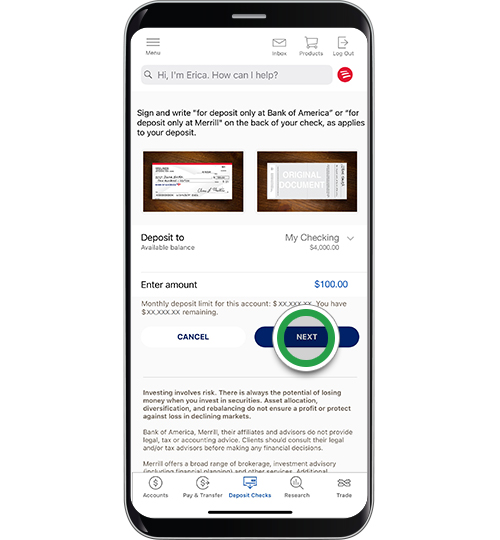
Before you even open the app, a crucial step involves preparing the physical check itself. Proper endorsement is paramount for the deposit to be processed correctly.
-
Endorse the Back of the Check: Turn the check over to the back.
-
Sign Your Name: Sign your name exactly as it appears on the “Pay to the Order of” line on the front of the check.
-
Add “For Mobile Deposit Only at Bank of America”: Directly below your signature, write this specific phrase. This endorsement is critical as it indicates the check is solely intended for digital deposit through the bank’s mobile platform, preventing potential fraud if the check were to fall into the wrong hands. Some apps also offer a checkbox for mobile deposit, which you can check instead of writing the phrase. Ensure the entire endorsement is clear and legible.
Navigating the Bank of America Mobile App Interface
With your check properly endorsed, you can proceed to the digital steps.
-
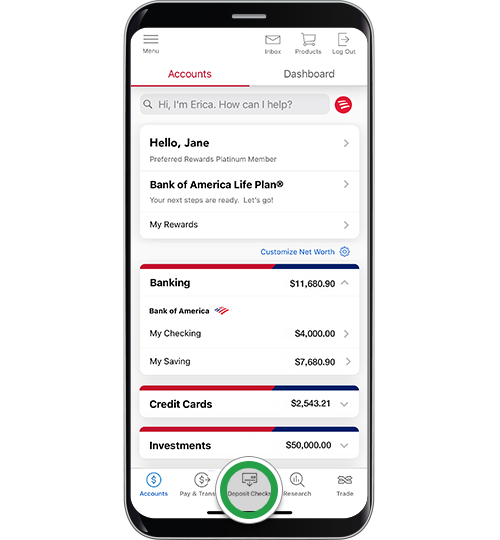
Launch the App and Log In: Open the Bank of America mobile app on your smartphone or tablet. Log in using your credentials (username and password), or biometric authentication if enabled (fingerprint or facial recognition).
-
Locate the “Deposit” Feature: Once logged in, look for the “Deposit” or “Deposit Checks” option. This is typically prominently displayed on the main dashboard, often represented by a camera icon or listed in a main menu.
-
Select the Account: You will be prompted to choose the account into which you wish to deposit the funds (e.g., checking, savings). Select the appropriate account.
-
Enter the Check Amount: Accurately type in the exact dollar amount of the check. Double-check this figure to prevent discrepancies that could delay your deposit.
Capturing Clear Images of Your Check
This is the most critical technical step, requiring attention to detail to ensure successful processing.
-
Position Your Device: Hold your smartphone steady, directly above the check. Ensure there is good lighting and no shadows obscuring the check. Place the check on a dark, plain, non-reflective surface for best contrast.
-
Align the Check: The app will typically display a frame or guidelines on your screen. Position the check so that all four corners fit within this frame. Ensure the entire check, including the routing and account numbers at the bottom, is visible.
-
Take the Photo (Front): Take a clear, well-lit photo of the front of the check. The app may automatically detect the edges and snap the photo, or you may need to tap the capture button.
-
Take the Photo (Back): Flip the check over to the back, ensuring your endorsement is clearly visible. Repeat the photo-taking process for the back of the check.
-
Review Images: The app will usually display thumbnails of both images. Carefully review them to ensure they are not blurry, all information is legible, and no parts of the check are cut off. If an image is unclear, retake it.
Confirming Your Deposit and Tracking Status
Once you’ve captured satisfactory images, the final steps are quick.
-
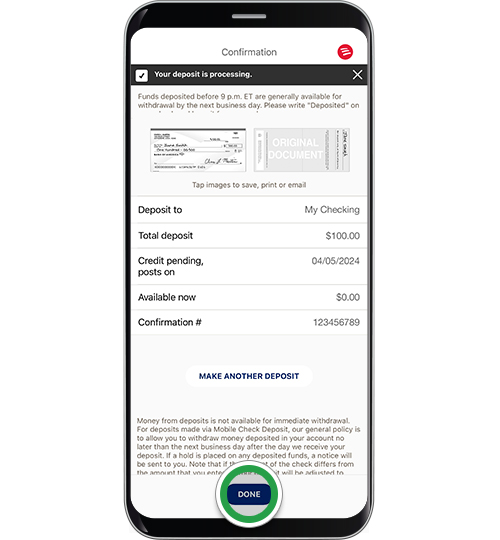
Review and Confirm: The app will present a summary of your deposit, including the account selected, the amount, and the images. Verify all details one last time.
-
Submit Your Deposit: If everything is correct, tap the “Submit” or “Deposit” button to send your check information to Bank of America.
-
Receive Confirmation: You will receive an on-screen confirmation message, often with a confirmation number, and typically an email confirmation as well. Keep this confirmation for your records.
-
Track Your Deposit: You can usually monitor the status of your deposit within the “Activity” or “Deposit History” section of the app. It will move from “Pending” to “Processed” once cleared.
By following these steps meticulously, you can efficiently and securely deposit checks into your Bank of America account, leveraging the full power of modern digital banking tools.
Important Considerations and Best Practices for Secure Mobile Deposits
While the convenience of mobile check deposits is undeniable, it’s crucial for users to be aware of certain parameters and best practices to ensure both successful transactions and the security of their financial information. Adopting a disciplined approach to mobile deposits safeguards your funds and personal data.
Understanding Deposit Limits and Funds Availability
Banks implement limits on mobile deposits for security reasons, typically varying by customer relationship, account history, and transaction type.
-
Daily and Monthly Limits: Bank of America, like other institutions, sets daily and sometimes monthly limits on the dollar amount and/or the number of checks you can deposit via the mobile app. These limits are displayed during the deposit process or can be found in the app’s FAQ section or by contacting customer service. Being aware of these limits prevents frustrating delays if you attempt to deposit a check exceeding your current allowance.
-
Funds Availability: While the deposit might be confirmed instantly, access to the funds is subject to the bank’s funds availability policy. Typically, a portion of the deposit may be available immediately, with the remainder becoming available within one to two business days. Larger deposits, or those from new accounts, might have extended holds. Always check your bank’s specific policy or the expected availability date provided in the app to plan your spending and bill payments accordingly.
Endorsement Requirements: “For Mobile Deposit Only”
As highlighted earlier, the specific endorsement “For Mobile Deposit Only at Bank of America” (or similar wording/checkbox) is not merely a suggestion; it’s a critical security measure.
-
Preventing Double-Deposits: This endorsement prevents the check from being accidentally or fraudulently deposited again via another method (e.g., at an ATM or branch) after it has already been processed digitally.
-
Compliance: Banks require specific endorsements to comply with regulations governing remote deposit capture. Failing to endorse properly can result in the rejection of your deposit, necessitating a trip to a physical branch or re-attempting the mobile deposit. Always ensure your signature and the endorsement are clear and within the designated endorsement area on the check.
Protecting Your Financial Data During Online Transactions
The digital nature of mobile deposits necessitates vigilance in protecting your personal and financial information.
-
Secure Network Connection: Always use a secure, private Wi-Fi network or your mobile data when making financial transactions. Avoid public Wi-Fi networks (e.g., at coffee shops, airports) as they can be less secure and vulnerable to data interception.
-
Strong Passwords/Biometrics: Enable and use strong, unique passwords for your banking app, and leverage biometric security features like fingerprint or facial recognition if available on your device.
-
Device Security: Keep your smartphone’s operating system and the Bank of America app updated to benefit from the latest security patches. Use screen locks and reputable antivirus/anti-malware software.
-
Phishing Awareness: Be wary of unsolicited emails or messages asking for your banking login details or to click suspicious links. Bank of America will never ask for sensitive information via unsecure channels.
What to Do After a Successful Mobile Deposit
The process doesn’t end immediately after you receive a confirmation.
-
Retain the Check: Do not immediately discard the physical check. Bank of America recommends keeping the paper check in a secure place for a reasonable period (e.g., 5-14 days) after the deposit has been confirmed and the funds are available. This allows time for any potential issues to be resolved or for the bank to request the original check if needed.
-
Mark the Check: Once you are confident the deposit is complete and funds are available, clearly mark the check as “VOID” or “Electronically Deposited” before securely shredding it. This prevents anyone from attempting to deposit it again.
-
Monitor Your Account: Regularly review your account statements and transaction history through the app or online banking to ensure the deposit was correctly posted and to monitor for any unauthorized activity.
By adhering to these best practices, you can maximize the benefits of mobile check deposits while minimizing risks, integrating this powerful tool safely into your comprehensive personal finance strategy.
Beyond the Deposit: Integrating Digital Banking into Your Financial Strategy
Depositing checks online is just one facet of the broader digital banking ecosystem that Bank of America offers. For savvy money managers, understanding and leveraging the full suite of digital tools available can significantly enhance financial planning, budgeting, and overall financial literacy. It’s about more than just transactional convenience; it’s about strategic financial empowerment.
Leveraging Other Bank of America Digital Tools
The Bank of America mobile app and online platform are robust financial hubs designed to provide a comprehensive view and control over your accounts. Beyond mobile deposits, other features include:
-
Bill Pay: Schedule and pay bills directly from your checking account, often with automatic reminders, ensuring timely payments and avoiding late fees. This tool is invaluable for managing recurring expenses and maintaining a healthy credit score.
-
Fund Transfers: Easily transfer money between your Bank of America accounts, or to accounts at other financial institutions, or even to friends and family using services like Zelle®. This facilitates saving goals, managing different budgets, and splitting costs seamlessly.
-
Budgeting and Spending Tracking: The app often includes tools to categorize your spending, visualize your financial habits, and set budgets. Features like “MyMerrill” integration offer insights into investments, while “Erica,” the AI-driven virtual financial assistant, can provide personalized insights, suggest ways to save, and alert you to unusual activity.
-
Account Alerts: Set up customized alerts for various account activities, such as low balances, large transactions, or direct deposits, helping you stay informed and proactive in managing your funds.
-
Card Management: Lock/unlock your debit/credit cards, report them lost or stolen, and set travel notifications, all from within the app, enhancing security and control over your plastic.
Integrating these tools means transforming your banking app from a simple transaction portal into a sophisticated personal finance management system.
The Role of Digital Banking in Budgeting and Financial Planning
Digital banking tools are instrumental in building and maintaining an effective budget and long-term financial plan.
-
Real-time Visibility: Instant access to account balances, transaction history, and pending deposits provides a real-time snapshot of your financial health. This immediate visibility is crucial for making informed spending decisions and avoiding overdrafts.
-
Automated Savings: Set up automatic transfers to savings accounts or investment vehicles on a regular basis. This “pay yourself first” strategy, easily managed through digital banking, is a cornerstone of effective financial planning and wealth accumulation.
-
Expense Categorization: Many digital platforms automatically categorize your spending, helping you identify areas where you might be overspending and adjust your budget accordingly. This data-driven approach to budgeting is far more effective than manual tracking.
-
Goal Setting and Tracking: Link financial goals (e.g., saving for a down payment, retirement) to specific accounts or tools within the app, allowing you to track progress and stay motivated.
By actively engaging with these features, individuals can move beyond simply reacting to their finances and instead proactively shape their financial future.
Enhancing Financial Literacy Through Accessible Banking
The transparency and accessibility offered by digital banking platforms naturally foster greater financial literacy.
-
Understanding Transaction Flows: Regular interaction with your accounts, observing deposits clear and bills being paid, builds a practical understanding of how money moves and how financial systems operate.
-
Data-Driven Insights: Tools that analyze spending patterns or provide personalized financial advice (like Erica) empower users with insights that might otherwise require a financial advisor, demystifying complex financial concepts.
-
Empowerment and Confidence: Having control over your finances through an easy-to-use digital interface builds confidence in managing money, encouraging more informed decision-making and a greater willingness to explore further financial strategies, such as investing or debt management.
Ultimately, integrating mobile check deposits and other digital banking features into your routine transforms passive banking into active, intelligent financial management, laying a strong foundation for long-term financial well-being.
Troubleshooting Common Issues and Getting Support
While the Bank of America mobile deposit process is generally smooth, occasional issues can arise. Knowing how to address these common problems and where to find support ensures minimal disruption to your financial activities. Proactive problem-solving is another hallmark of smart money management.
Addressing Image Capture Problems
The most frequent issues with mobile deposits often stem from the quality of the check images.
-
Blurry or Unclear Images: If the app rejects an image due to blurriness, try repositioning your phone, ensuring steady hands, and checking that the lighting is sufficient and even. Avoid glare from overhead lights.
-
Incomplete Images: Ensure all four corners of the check are within the frame provided by the app. If part of the check, particularly the routing or account numbers, is cut off, the deposit will likely be rejected. Place the check on a contrasting background to help the app detect edges more easily.
-
Improper Endorsement: Double-check that you have signed the back of the check and included the phrase “For Mobile Deposit Only at Bank of America” (or used the mobile deposit checkbox) clearly. Any ambiguity or omission in the endorsement can lead to rejection.
-
Retrying the Deposit: If an image is rejected, the app will usually prompt you to retake it. Take your time, focus on getting a clear, complete, and properly endorsed image.
Resolving Deposit Limit Questions
If your deposit is rejected or pending due to exceeding limits, several actions can be taken.
-
Check Your Limits: Access your specific daily/monthly mobile deposit limits through the Bank of America app or by logging into your online banking portal. Limits can vary based on your account type and relationship with the bank.
-
Split the Deposit (If Applicable): If you have multiple checks and are nearing a daily limit, consider depositing one now and the others on subsequent days, or explore if one check can be deposited digitally while another larger check requires an ATM or branch visit.
-
Contact Customer Service: If you believe there’s an error in the limit applied, or if you have an urgent need to deposit a larger amount, contact Bank of America customer service. They may be able to provide specific guidance or temporary adjustments based on your situation.
Contacting Bank of America Customer Service
For any issues that you cannot resolve using the in-app guidance or troubleshooting tips, reaching out to customer support is your best course of action.
-
In-App Support: Many issues can be resolved using the virtual assistant “Erica” within the Bank of America app, which can answer common questions and guide you to relevant information. There’s often a “Help” or “Contact Us” section directly in the app.
-
Phone Support: Call the Bank of America customer service number provided on their official website or on the back of your debit card. Be prepared to provide your account details and a clear description of the issue.
-
Secure Message: For less urgent inquiries that involve sensitive information, sending a secure message through your online banking account is often a safe and convenient option.
Effective financial management isn’t just about using tools correctly, but also about knowing how to navigate challenges when they arise. By understanding common pitfalls and having a clear path to support, you can ensure that mobile check deposits remain a reliable and stress-free component of your digital banking experience.
Embracing Bank of America’s mobile deposit feature is a testament to the power of modern financial technology in simplifying and securing personal finance. By following the outlined steps, understanding the underlying considerations, and leveraging the broader digital banking ecosystem, you can transform a routine task into an efficient, insightful, and integral part of your proactive money management strategy.
aViewFromTheCave is a participant in the Amazon Services LLC Associates Program, an affiliate advertising program designed to provide a means for sites to earn advertising fees by advertising and linking to Amazon.com. Amazon, the Amazon logo, AmazonSupply, and the AmazonSupply logo are trademarks of Amazon.com, Inc. or its affiliates. As an Amazon Associate we earn affiliate commissions from qualifying purchases.