
In the modern era of digital finance, peer-to-peer (P2P) payment platforms have revolutionized how we split dinner bills, pay rent, and send gifts. Among these, Cash App has emerged as a leader, offering a seamless interface that blends social connectivity with financial utility. However, as our financial lives become increasingly digitized, a common question arises among privacy-conscious users: “How do I delete Cash App transactions?”
While the desire for a “clean slate” or private ledger is understandable, the intersection of technology and financial regulation creates a complex landscape. In this guide, we will explore the realities of transaction management within Cash App, the regulatory frameworks that govern digital ledgers, and the steps you can take to maintain the highest level of financial privacy.
The Reality of Transaction Records in Modern Fintech
To understand why “deleting” a single transaction isn’t as simple as deleting a text message, one must first understand the nature of financial record-keeping. Cash App, owned by Block, Inc., operates under strict financial regulations that require the maintenance of an immutable ledger.
Why You Cannot Delete Individual Transactions
Unlike a social media post, a financial transaction is a legal record of a transfer of value. From a personal finance perspective, these records serve as proof of payment and are essential for dispute resolution. From a regulatory perspective, Cash App is classified as a money service business. Under the Bank Secrecy Act (BSA) and Anti-Money Laundering (AML) regulations, financial institutions are required to maintain records of transactions for a specific period—usually five years—to assist in the prevention of fraud and illegal activities.
Consequently, the Cash App interface does not provide a “delete” button for individual line items in your activity feed. This is a deliberate design choice meant to ensure the integrity of your financial history.
The Difference Between the Activity Feed and the Permanent Ledger
It is important to distinguish between what you see on your smartphone screen and what exists on the server. The “Activity” tab is a user-facing reflection of your account’s history. Even if there were a way to hide a transaction from your view, the underlying data remains part of your permanent financial record. For users seeking to manage their “Money” profile effectively, understanding that these digital footprints are semi-permanent is the first step toward better financial hygiene.
Managing Expectations for Financial Privacy
Privacy in the digital age is often about control rather than total erasure. While you cannot cherry-pick transactions to erase, you can control who sees your activity and how your data is handled. In the following sections, we will discuss how to manage the visibility of your account and the ultimate step of account deactivation.
Steps to Clearing Your Activity Visibility Through Account Closure
If your goal is to ensure that your transaction history is no longer accessible via the app interface—perhaps because you are switching devices or simply want to start fresh—the only definitive method is to close your Cash App account entirely. This action removes the history from the mobile interface, though the data remains archived by the institution for legal compliance.
Preparing Your Account for Closure
Before you can “wipe” your history by closing the account, you must settle your financial standing. This involves several critical steps:
- Drain Your Balance: You cannot close an account with a remaining balance. You must transfer your funds to a linked bank account or spend the balance to zero.
- Sell Your Assets: If you have invested in Bitcoin or stocks through Cash App, these must be liquidated or transferred to another brokerage.
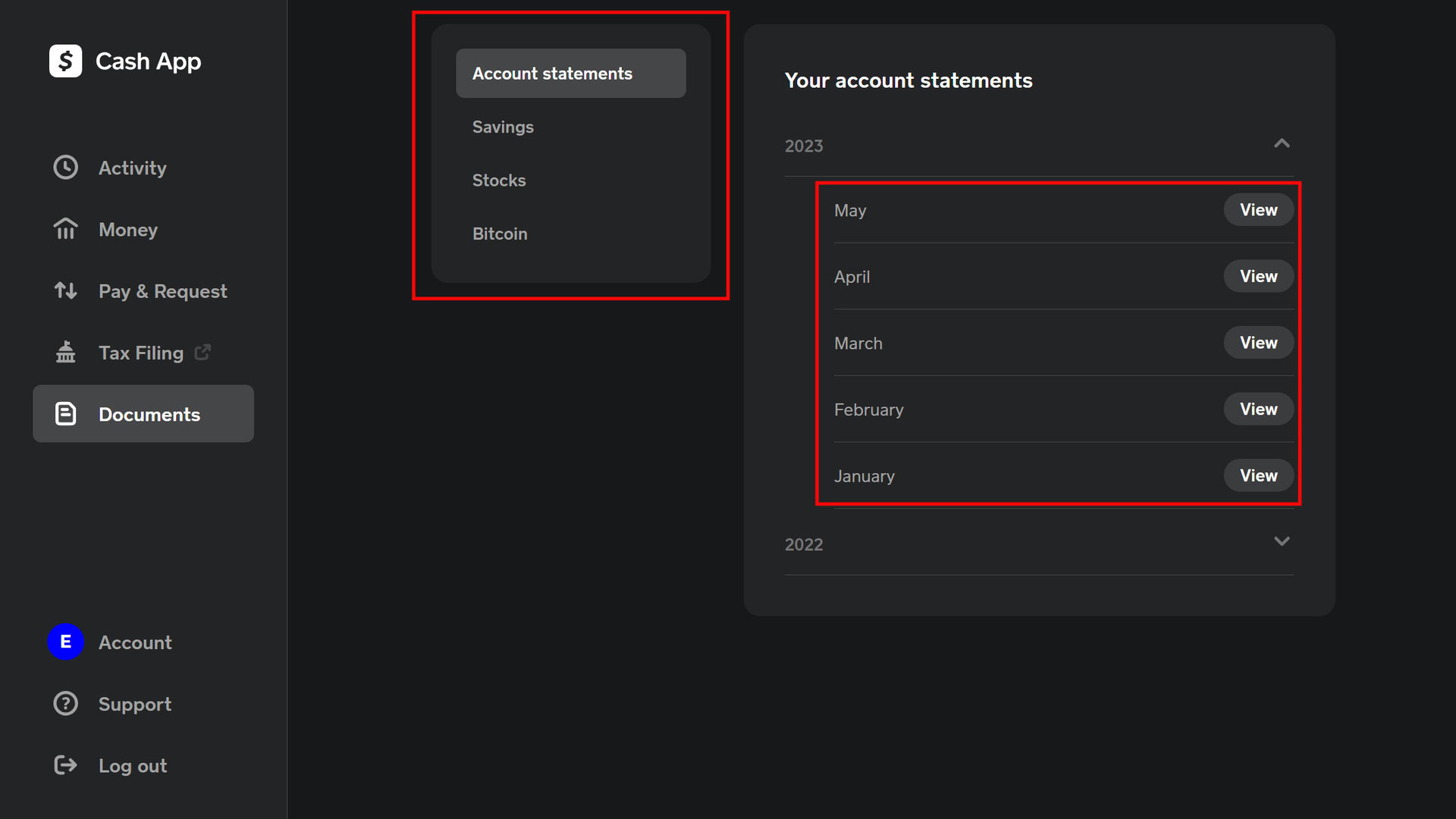
- Download Your Statements: For personal finance management and tax purposes, it is vital to download your transaction history. You can do this by logging into your account on the Cash App website and exporting your data to a CSV or PDF file.
The Process of Deactivating Your Account
Once your balance is zero and your records are saved, you can proceed with the closure. In the app, you navigate to the profile icon, select “Support,” and then “Something Else.” From there, you can find the option to “Account Settings” and “Close my Cash App Account.” Once confirmed, your $Cashtag will be deactivated, and the transaction history will disappear from the mobile view.

Starting Fresh with a New Account
Many users who wish to “delete” history choose to close their old account and open a new one with a different email or phone number. While this provides a clean interface, remember that your identity (SSN) is still linked to the previous records in the company’s backend. In terms of personal branding and money management, starting a new account can be a way to separate business transactions from personal ones if you previously used one account for both.
Navigating Financial Privacy and Security Settings
For most users, the desire to delete transactions stems from a need for privacy. Cash App provides several tools that allow you to safeguard your financial movements without resorting to account deletion.
Adjusting Privacy and Security Settings
Within the app’s settings, you can toggle several features that enhance your privacy. The “Security Lock” (requiring FaceID, TouchID, or a PIN for every transaction) is a fundamental tool for protecting your financial data from unauthorized eyes. Furthermore, you can toggle off the “Incoming Requests” feature to prevent strangers from sending you unsolicited “Request” notifications, which can clutter your activity feed.
Controlling Your Searchability
By default, other users might be able to find you using your phone number or email address. To maintain a more private financial profile, you can navigate to the “Privacy & Security” menu and toggle off “Suggest me to others.” This prevents your $Cashtag from appearing in the contact lists of people who have your information, effectively making your financial presence “invisible” to the casual observer.
The Social Aspect of Payments
Unlike some competitors that default to a public social feed of payments, Cash App is inherently more private. Transactions are generally only visible to the sender and the receiver. However, maintaining this privacy requires vigilance. Never share screenshots of your transaction history on social media, as these often contain sensitive data like the last four digits of linked cards or specific transaction IDs.
Best Practices for Maintaining a Clean Financial Trail
Effective money management involves more than just spending; it requires organizing your digital footprint so that it serves you during tax season or when applying for a loan. Instead of trying to delete history, aim to curate it.
Separating Personal and Business Finances
One of the most common reasons for wanting to delete transactions is the “clutter” caused by mixing personal and business expenses. To manage your money more professionally, consider utilizing Cash App’s specific “Business Account” feature. This allows for a clearer distinction between your side hustle income and your daily coffee purchases, making your primary ledger much easier to audit.
Regular Auditing and Record Keeping
Instead of fearing your transaction history, use it as a tool. At the end of each month, review your “Activity” to identify any unauthorized charges or subscriptions you forgot to cancel. By downloading monthly statements, you create an offline archive that allows you to manage your budget without needing to scroll through months of data on a small screen.
The Importance of the 1099-K and Tax Compliance
From a financial tool perspective, your transaction history is your best friend when it comes to the IRS. For those using Cash App to receive payments for goods and services, the platform is required to report earnings over a certain threshold via Form 1099-K. Attempting to “delete” or hide these transactions is not only impossible but could lead to significant issues during a tax audit. Keeping a transparent and well-managed ledger ensures that you remain in good standing with financial authorities.

Conclusion: Emphasizing Privacy Over Erasure
The quest to “delete Cash App transactions” highlights a growing concern for digital privacy in an age where every penny spent leaves a trace. While the platform—and the laws governing it—do not allow for the selective deletion of history, they do offer robust tools for account management and data protection.
By shifting the focus from “erasure” to “management,” you can take control of your financial life. Whether it is through securing your app with biometric locks, adjusting your searchability settings, or eventually closing an account to start anew, you have the power to define your digital financial boundaries. Remember, in the realm of personal finance, a clear and accurate record is often your greatest asset. Treat your transaction history not as a list of “secrets” to be hidden, but as a professional ledger that reflects your journey toward financial literacy and security.
aViewFromTheCave is a participant in the Amazon Services LLC Associates Program, an affiliate advertising program designed to provide a means for sites to earn advertising fees by advertising and linking to Amazon.com. Amazon, the Amazon logo, AmazonSupply, and the AmazonSupply logo are trademarks of Amazon.com, Inc. or its affiliates. As an Amazon Associate we earn affiliate commissions from qualifying purchases.