
In an increasingly digitized world, managing our online presence extends beyond social media profiles to include financial platforms, payment processors, and various digital services. PayPal, as a global leader in online payments, plays a significant role in many individuals’ and businesses’ digital ecosystems. However, circumstances often arise where an individual or entity may decide to discontinue their use of such a service, necessitating the deletion of their account. This decision, while seemingly straightforward, involves a series of technical considerations, digital security protocols, and meticulous steps to ensure a smooth, secure, and complete account closure.
Deleting a PayPal account is not merely clicking a “delete” button; it’s a process deeply intertwined with digital security best practices, data management, and an understanding of how online financial tools operate. This guide will walk you through the essential technical steps, critical preparatory actions, and important post-deletion considerations, all within the purview of managing your digital identity and safeguarding your financial data in the tech landscape.
Understanding the Implications Before You Delete
Before embarking on the process of deleting your PayPal account, it’s crucial to pause and consider the broader implications. Account deletion on a platform like PayPal carries consequences that extend beyond simply discontinuing service. A thorough understanding of these repercussions is vital for informed decision-making and to prevent potential technical or financial complications down the line.
Financial Considerations and Outstanding Balances
The most immediate and apparent implication relates to any funds held within your PayPal balance or pending transactions. Deleting an account with an active balance or unresolved financial obligations can lead to forfeiture of funds or hinder the completion of legitimate transactions. It is imperative to ensure that your PayPal balance is zero and that all pending payments, refunds, or disputes have been fully resolved before initiating the closure process. Furthermore, consider any recurring payments or subscriptions linked to your PayPal account; these will need alternative arrangements to avoid service interruptions.
Linked Accounts and Subscriptions
Modern digital payment platforms often serve as central hubs, connecting to various external services. Your PayPal account might be linked to e-commerce sites, streaming services, software subscriptions, or even other financial applications. Deleting your PayPal account without first updating these linked services could result in payment failures, subscription cancellations, or loss of access to services. Proactively identify all services that use PayPal as a payment method and update your payment information with an alternative card or bank account before proceeding with the deletion. This technical audit prevents unexpected disruptions across your digital footprint.
Transaction History and Record Keeping
PayPal provides a comprehensive record of your transaction history, which can be invaluable for personal budgeting, tax purposes, or business accounting. Once your account is deleted, access to this historical data is permanently lost. Therefore, a critical preparatory step involves downloading and archiving all necessary transaction records. PayPal typically allows users to export their transaction history in various formats (e.g., CSV, PDF), offering a digital trail of your financial activities over the account’s lifespan. This foresight ensures you maintain crucial documentation, a fundamental aspect of robust digital personal finance management.
Digital Footprint and Privacy Concerns
Every online account contributes to your digital footprint. Deleting a PayPal account helps reduce this footprint and enhances your overall digital privacy. However, it’s important to understand what “deletion” truly means for platforms like PayPal. While your account will be closed and inaccessible to you, regulatory requirements might necessitate the retention of certain transaction data for a specified period, even after account closure. Understanding PayPal’s data retention policies, usually outlined in their privacy policy, offers insight into the extent of data erasure versus data archival, providing a clearer picture of your long-term digital privacy posture.
Preparing Your PayPal Account for Deletion
The technical process of deleting a PayPal account is relatively straightforward, but the preparatory steps are where the true complexity and potential pitfalls lie. Neglecting these crucial actions can lead to financial losses, service interruptions, or ongoing administrative headaches. This section outlines the essential technical and logistical preparations required to ensure a smooth and secure account closure.
Withdrawing Funds and Resolving Disputes
The paramount preparatory step is to empty your PayPal balance. Any funds remaining in the account at the time of deletion may become inaccessible or subject to forfeiture. Initiate a transfer of all funds to a linked bank account or debit card. Ensure that the transfer is fully processed and confirmed before proceeding. Simultaneously, meticulously review your account for any open disputes, claims, or chargebacks. All such issues must be resolved and closed, either in your favor or against you, before you can successfully delete your account. PayPal’s system will typically prevent account closure if there are unresolved financial matters.
Unlinking Bank Accounts and Cards
For enhanced digital security and peace of mind, it is highly recommended to unlink all connected bank accounts and credit/debit cards from your PayPal profile. While PayPal aims to secure your data, proactively removing these sensitive financial instruments provides an additional layer of protection, particularly if you do not intend to use PayPal’s services again. Navigate to your Wallet or Payment Methods section within your PayPal settings and individually remove each linked account and card. This action severs the direct digital connection between your personal banking infrastructure and the PayPal platform.
Cancelling Automatic Payments and Subscriptions
As mentioned previously, many digital services use PayPal for recurring billing. Before deleting your account, you must systematically identify and cancel all automatic payments and subscriptions that are processed through PayPal. This can often be done directly within your PayPal account settings under the “Automatic Payments” or “Pre-approved Payments” section. For each active subscription, you’ll need to either cancel it directly or update the payment method with the respective merchant to an alternative form of payment. Failure to do so could lead to continued billing attempts or service disruptions from those third-party providers.
Downloading Transaction History for Records
As a critical component of digital record-keeping, downloading your complete transaction history is non-negotiable. This data can be vital for tax purposes, warranty claims, business auditing, or simply personal financial analysis. PayPal typically allows you to generate and download reports for specific timeframes. Access the “Activity” or “Statements and Reports” section, select the desired date range (often up to several years), and export the data in a suitable format such as CSV or PDF. Store these files securely on an encrypted drive or a reliable cloud storage service.
The Step-by-Step Process of Deleting Your PayPal Account
Once all preparatory steps have been meticulously completed, the actual technical process of deleting your PayPal account is relatively straightforward. However, precision and adherence to the platform’s instructions are key to a successful and irreversible account closure.
Navigating to Account Settings
Log in to your PayPal account via a web browser (using a desktop computer is often recommended for full functionality, as mobile app interfaces can sometimes have limited options for sensitive account management tasks). Once logged in, locate the “Settings” icon, typically represented by a gear or cogwheel, usually found in the top right corner of the dashboard. Click on this icon to access your account preferences and controls.
Locating the Close Account Option
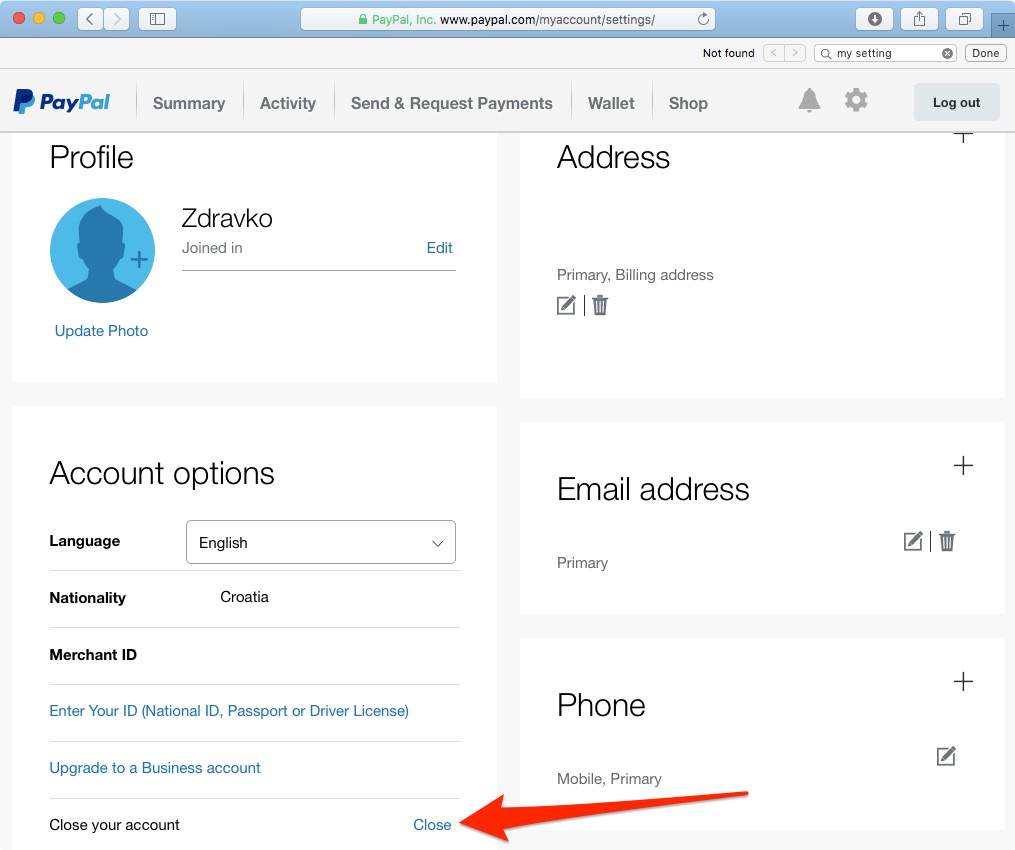
Within the “Settings” menu, you will typically find various tabs or sections such as “Account,” “Security,” “Payments,” etc. Navigate to the “Account” or “Account Settings” section. Scroll down to the bottom of the page or look for a section specifically labeled “Closing your account,” “Close your account,” or similar. This option might be less prominently displayed to deter impulsive deletion, so a careful review of the settings page is necessary. Click on this link or button to initiate the closure process.
Verifying Your Identity
As a security measure to prevent unauthorized account deletion, PayPal will likely prompt you to verify your identity. This could involve re-entering your password, answering security questions, or confirming a code sent to your registered phone number or email address. This step is a crucial digital security protocol designed to protect your account from malicious actors attempting to close it. Follow the prompts accurately to proceed.
Confirmation and Finalizing the Closure
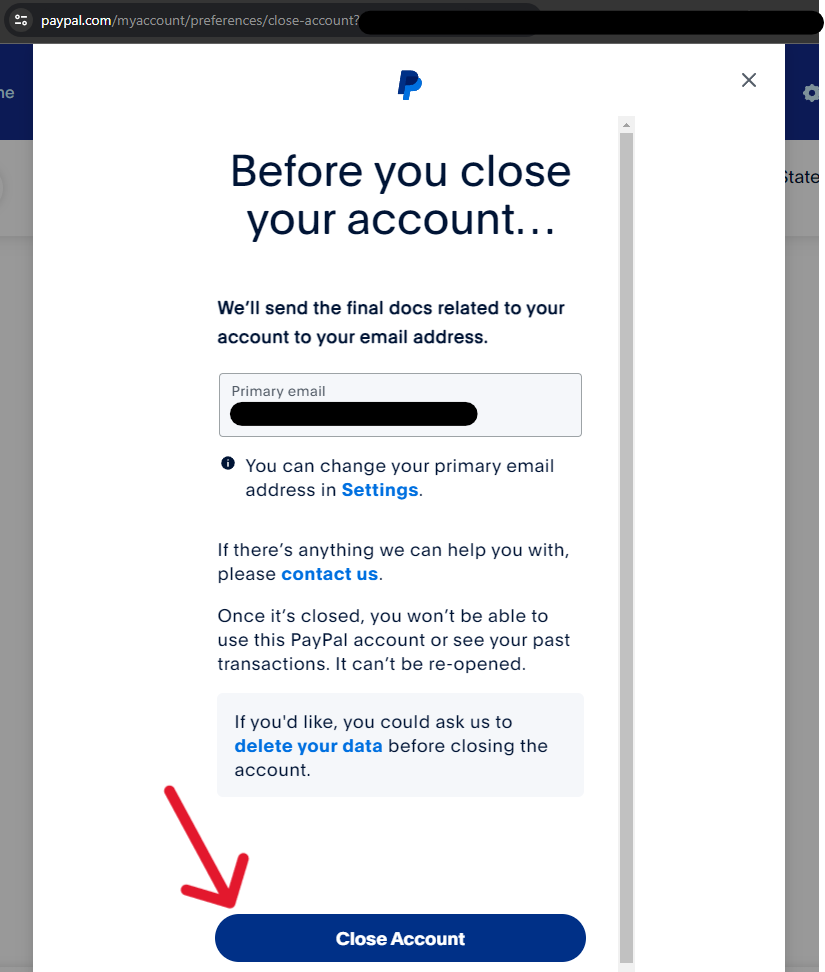
After successful identity verification, PayPal will typically present you with a final confirmation page. This page might reiterate some implications of deleting your account and ask for a reason for closure (which is often optional). Read through any final warnings carefully. Once you are certain you wish to proceed, click the “Close Account,” “Delete Account,” or similar confirmation button. PayPal will then process the request and usually send a final email confirmation that your account has been successfully closed. It’s advisable to retain this email for your records.
Alternatives to Full Account Deletion
While outright deletion is an option, it’s worth considering if a permanent closure is truly necessary. For some users, managing their digital identity might involve less drastic measures that still address concerns without severing ties completely. This section explores alternatives to full account deletion, focusing on ways to modify your PayPal usage within the framework of digital security and privacy.
Limiting Account Usage
If your primary concern is reducing your PayPal activity or preventing unauthorized use, rather than complete removal, you might consider simply limiting its usage. This involves removing all linked bank accounts and cards, cancelling all automatic payments, and emptying the balance, as discussed in the preparation phase. However, instead of closing the account, you simply leave it dormant. This allows you to retain access to historical transactions and potentially reactivate it more easily in the future if needed, without maintaining active financial links.
Adjusting Privacy Settings
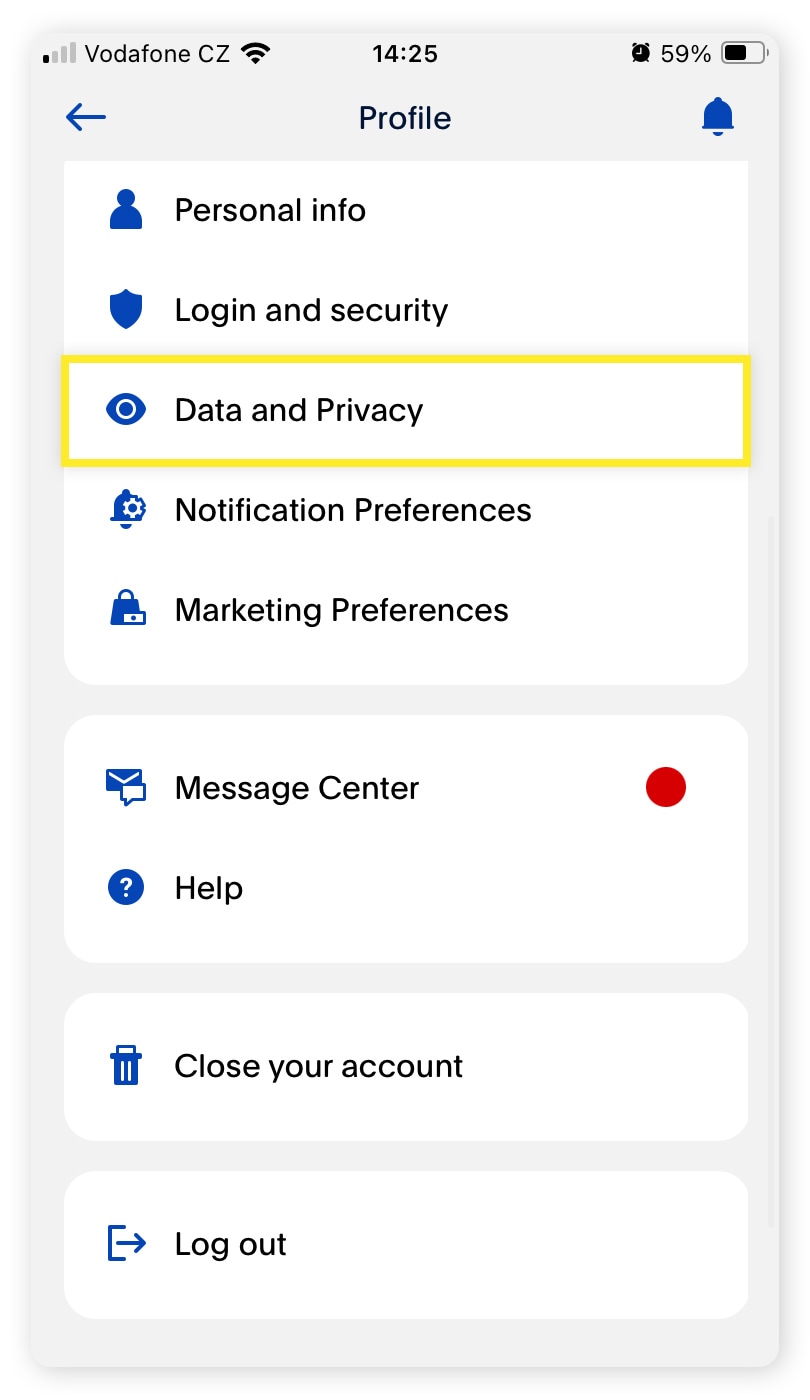
For users concerned about data privacy but still wishing to keep the account active for occasional use, a thorough review and adjustment of PayPal’s privacy settings is an effective strategy. PayPal typically offers controls over how your data is used for marketing, personalized experiences, and sharing with third parties. Navigate to the “Privacy” or “Data & Privacy” section within your account settings and meticulously review and modify these preferences to align with your personal privacy requirements. This can significantly reduce your digital footprint without outright deletion.
Contacting Customer Support for Specific Issues
If your reason for considering deletion stems from a specific technical issue, a security concern, or a dissatisfaction that you believe can be resolved, contacting PayPal’s customer support might be a more appropriate first step. Their support team can often assist with account limitations, security breaches, dispute resolutions, or technical glitches that might otherwise lead a user to conclude that deletion is the only recourse. Many complex digital account management issues can be addressed through direct interaction with the platform’s technical support.
Post-Deletion Considerations and Digital Security Best Practices
The process of deleting your PayPal account doesn’t conclude once you receive the confirmation email. A robust approach to digital account management requires ongoing vigilance and adherence to cybersecurity best practices, particularly following a significant action like account deletion.
Monitoring Linked Accounts
Even after successfully deleting your PayPal account, it is prudent to monitor other linked financial and service accounts for a period. Check your bank statements and credit card activity for any unauthorized charges or unexpected payment issues. While you’ve removed all links, a short monitoring period provides an extra layer of assurance that all connections have been severed and that no legacy billing attempts occur.
Updating Financial Records
Ensure all personal and business financial records are updated to reflect the closure of your PayPal account. This includes updating any budgeting software, accounting systems, or personal finance spreadsheets. Clearly mark the date of closure and note that PayPal is no longer an active payment method or financial tool in your portfolio. This maintains accurate financial hygiene.
Password Management and Cybersecurity Hygiene
Deleting one account is an excellent opportunity to reinforce broader cybersecurity habits. If you used the same password for PayPal on other platforms (which is generally not recommended), this is a critical moment to change those passwords. Employ strong, unique passwords for all your online accounts, ideally using a reputable password manager. Enable two-factor authentication (2FA) wherever possible. This proactive approach elevates your overall digital security posture across all your online interactions.
The Future of Digital Account Management
The decision to delete a PayPal account reflects a growing trend towards greater control over one’s digital life. As technology evolves, so too will the complexities of managing our online identities and financial tools. Understanding how to securely and effectively close digital accounts is a fundamental skill in this evolving landscape. It empowers users to make conscious choices about their data, privacy, and digital footprint, aligning their online presence with their personal values and security needs. By following a structured approach, you ensure that the end of your PayPal journey is as secure and controlled as its beginning.
aViewFromTheCave is a participant in the Amazon Services LLC Associates Program, an affiliate advertising program designed to provide a means for sites to earn advertising fees by advertising and linking to Amazon.com. Amazon, the Amazon logo, AmazonSupply, and the AmazonSupply logo are trademarks of Amazon.com, Inc. or its affiliates. As an Amazon Associate we earn affiliate commissions from qualifying purchases.