
In today’s digitally driven world, web applications have become ubiquitous, forming the backbone of everything from social media platforms and e-commerce sites to sophisticated enterprise tools and personal productivity apps. Unlike traditional desktop software, web apps offer unparalleled accessibility, cross-device compatibility, and ease of deployment, making them an attractive solution for businesses and individuals alike seeking to deliver dynamic, interactive experiences over the internet.
Creating a web app might seem like a daunting task, fraught with technical complexities and design challenges. However, by breaking down the process into manageable stages and understanding the underlying principles, aspiring developers and entrepreneurs can embark on this journey with confidence. This comprehensive guide will walk you through the essential steps, from initial concept to successful deployment and beyond, empowering you to build a robust and engaging web application.

1. Conceptualizing Your Web App Idea
Every successful web app begins with a clear, well-defined idea. This initial phase is critical for laying a solid foundation and ensuring that your efforts are directed towards building a product that genuinely solves a problem or fulfills a need.
Defining Your Purpose and Target Audience
Before writing a single line of code, ask yourself: What problem does your web app solve? Who is it for? A clear understanding of your app’s core purpose and its intended users will guide every subsequent decision, from feature selection to design aesthetics. For instance, an e-commerce platform aims to facilitate online transactions for shoppers and sellers, while a project management tool seeks to streamline collaboration for teams. Identifying your target audience involves understanding their demographics, pain points, and existing solutions they might be using. This clarity ensures that your app is built with user value at its core.
Market Research and Competitive Analysis
Once you have a preliminary idea, conduct thorough market research. Is there a demand for your proposed solution? Are there existing competitors? Analyzing the competitive landscape isn’t about discouraging your efforts; it’s about identifying opportunities for differentiation. What unique value proposition can your app offer? Perhaps it’s a more intuitive user experience, a niche focus, superior performance, or a more accessible price point. Understanding what works and what doesn’t in similar applications can provide invaluable insights and help you carve out your unique space in the market. This phase helps validate your idea and refines your vision, ensuring you’re not building a solution for a non-existent problem.
Feature Prioritization and MVP (Minimum Viable Product)
Resist the temptation to build every conceivable feature from the outset. A crucial step in web app development is feature prioritization. Identify the absolute core functionalities that deliver the primary value proposition to your users. These constitute your Minimum Viable Product (MVP). An MVP is the simplest version of your web app that can be launched to the market, gather user feedback, and demonstrate its core utility. Building an MVP allows for quicker iteration, reduces initial development costs, and helps validate your concept with real users before investing heavily in secondary features. Think about what your app must do, rather than what it could do.
2. Choosing the Right Technology Stack
The technology stack refers to the combination of programming languages, frameworks, libraries, servers, and databases used to build and run your web application. The choices made here will impact development speed, scalability, performance, and the cost of maintenance.
Frontend Technologies (Client-Side)
The frontend is what users interact with directly in their web browsers. It dictates the visual layout, user experience, and interactive elements of your application.
- HTML (HyperText Markup Language): The standard language for creating web pages and defining their structure.
- CSS (Cascading Style Sheets): Used for styling the HTML elements, controlling colors, fonts, layouts, and overall visual presentation.
- JavaScript: The programming language that brings interactivity to web pages.
- JavaScript Frameworks/Libraries: Modern web app development heavily relies on frameworks like React, Angular, and Vue.js. These provide structured ways to build complex user interfaces efficiently, manage application state, and improve developer productivity. Each has its strengths and community support, and the choice often depends on project requirements, team expertise, and desired performance characteristics.
Backend Technologies (Server-Side)
The backend is the “brains” of your web app, handling server logic, database interactions, user authentication, and API endpoints. It’s what users don’t see but is crucial for the app’s functionality.
- Programming Languages: Popular choices include Python (often with frameworks like Django or Flask), Node.js (JavaScript runtime with frameworks like Express.js), Ruby (with Ruby on Rails), PHP (with Laravel or Symfony), and Java (with Spring Boot). The selection often hinges on performance needs, ecosystem maturity, and developer familiarity.
- Databases: Web apps need to store and retrieve data.
- SQL Databases (Relational): PostgreSQL, MySQL, SQL Server, Oracle. Ideal for structured data where relationships between data points are critical.
- NoSQL Databases (Non-relational): MongoDB, Cassandra, Redis, DynamoDB. Suitable for unstructured or semi-structured data, offering high scalability and flexibility.
- APIs (Application Programming Interfaces): These define how the frontend and backend communicate. RESTful APIs are a common standard, allowing the frontend to request and send data to the backend.
Cloud Platforms and Hosting
Once your app is built, it needs to be hosted on servers that are accessible via the internet. Cloud computing platforms offer scalable and reliable hosting solutions.
- Amazon Web Services (AWS), Google Cloud Platform (GCP), Microsoft Azure: These are leading cloud providers offering a vast array of services, from virtual servers (EC2, Compute Engine, Virtual Machines) and managed databases to serverless functions and content delivery networks (CDNs). They provide immense flexibility and scalability but can have a steeper learning curve.
- Heroku, Vercel, Netlify: These platforms offer simplified deployment processes, often preferred for smaller projects or MVPs due to their ease of use and developer-friendly features, including automatic deployments and built-in CI/CD.
Considerations for Scalability and Future Growth
When choosing your tech stack, consider not just your immediate needs but also the future growth of your application. Will your chosen technologies be able to handle a significant increase in users, data, or features? Factors like the maturity of the ecosystem, community support, availability of skilled developers, and the ease of integrating new services should influence your decisions to ensure long-term viability and avoid costly refactoring down the line.
3. The Development Process: From Design to Code
With your concept clear and technology stack chosen, the actual development phase begins, transforming ideas and designs into functional code.
UI/UX Design (User Interface/User Experience)
Good design is paramount for web app success.
- User Experience (UX): Focuses on making the app intuitive, efficient, and enjoyable to use. This involves understanding user behavior, creating user flows, and conducting usability testing.
- User Interface (UI): Deals with the visual elements users interact with – buttons, menus, forms, colors, typography. A well-designed UI is aesthetically pleasing and consistent.
This stage often involves creating wireframes (basic structural outlines), mockups (visual representations), and interactive prototypes to test design hypotheses before development begins. Tools like Figma, Sketch, and Adobe XD are commonly used for this.
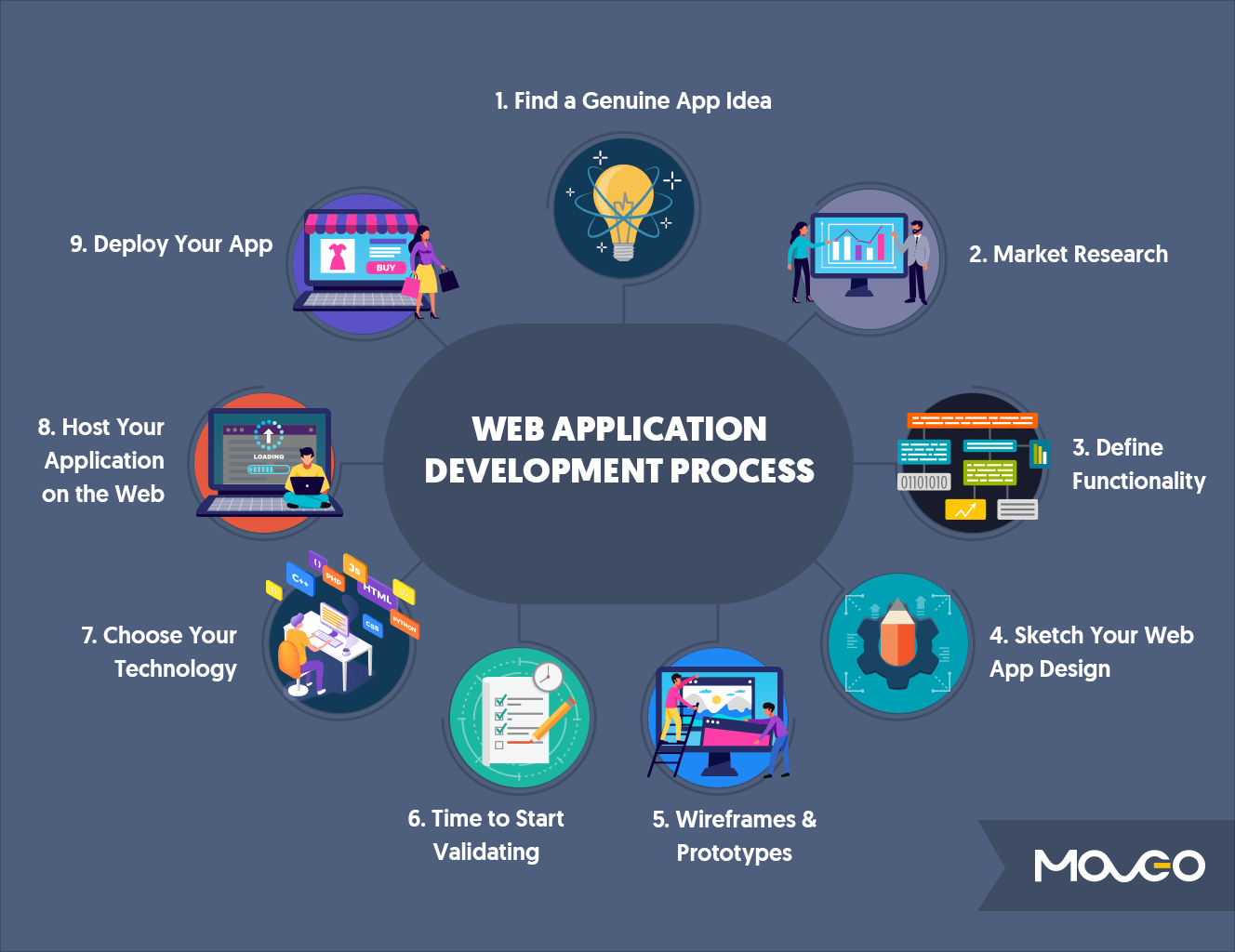
Frontend Development
This involves bringing the UI/UX design to life using HTML, CSS, and JavaScript (often with a chosen framework like React). Frontend developers build the user-facing parts of the application, ensuring responsiveness across different devices, implementing interactive components, and handling client-side logic. The goal is to create a seamless and engaging experience for the end-user. This stage heavily interacts with the backend through APIs to fetch and display data.
Backend Development
Backend developers focus on building the server-side logic, managing databases, and creating the APIs that the frontend consumes. This includes setting up the server, defining database schemas, writing code to process requests, perform computations, interact with the database, and handle authentication/authorization. This work ensures the application’s core functionality, data integrity, and security.
API Development and Integration
The Application Programming Interface (API) acts as the communication bridge between the frontend and backend. Backend developers expose a set of endpoints that the frontend can call to send data (e.g., user login, form submission) or request data (e.g., fetching a list of products, user profile information). Ensuring robust, well-documented, and secure APIs is crucial for a smooth and efficient interaction between the client and server sides of the web app.
Testing and Quality Assurance
Testing is not an afterthought; it’s an integral part of the development lifecycle.
- Unit Tests: Verify individual components or functions of the code work as expected.
- Integration Tests: Ensure that different parts of the application (e.g., frontend and backend, or various backend modules) work correctly together.
- End-to-End Tests: Simulate real user scenarios to ensure the entire application flow functions correctly from start to finish.
- Performance Testing: Assess how the app performs under various loads.
- Security Testing: Identify vulnerabilities.
Rigorous testing helps catch bugs early, ensures reliability, and maintains a high quality standard for the application.
4. Deployment and Post-Launch Strategies
Building the app is only half the battle; getting it into the hands of users and keeping it running smoothly is equally important.
Setting Up Your Deployment Environment
Deployment is the process of making your web app accessible to users. This involves configuring servers, databases, and network settings. Modern deployment often utilizes:
- CI/CD (Continuous Integration/Continuous Deployment) Pipelines: Automate the process of building, testing, and deploying code changes, allowing for rapid and consistent updates.
- Containerization (Docker): Packages your application and all its dependencies into a single, isolated unit, ensuring it runs consistently across different environments.
- Orchestration (Kubernetes): Manages and scales containerized applications, particularly useful for complex, microservices-based architectures.
Setting up an efficient deployment environment streamlines updates and reduces manual errors.
Launching Your Web App
This is the moment your web app goes live! It involves registering a domain name, configuring your chosen hosting platform (e.g., AWS, Heroku), setting up SSL certificates for secure communication (HTTPS), and pointing your domain to your hosted application. Ensure all configurations are correct and that the app is accessible and functional to a broader audience. A phased launch (e.g., to a small group of beta testers) can be beneficial before a full public release.
Monitoring and Analytics
Post-launch, continuous monitoring is essential.
- Performance Monitoring: Tools like New Relic, Datadog, or Google Analytics track website traffic, user behavior, server response times, and identify bottlenecks.
- Error Logging: Implement systems (e.g., Sentry, ELK stack) to capture and analyze errors, allowing for quick identification and resolution of issues.
Analytics provide crucial insights into how users interact with your app, informing future development decisions and helping to understand areas for improvement.
Maintenance, Updates, and Iteration
A web app is never truly “finished.” It requires ongoing maintenance, security updates, and feature enhancements.
- Regular Updates: Apply security patches, update dependencies, and keep your software stack current.
- Bug Fixing: Address any issues reported by users or identified through monitoring.
- Feature Iteration: Based on user feedback, market trends, and your initial roadmap, continuously add new features, refine existing ones, and improve the user experience.
This iterative process of building, launching, learning, and improving is key to the long-term success and relevance of your web application.
5. Security and Performance Best Practices
Building a functional web app is one thing; ensuring it’s secure, fast, and reliable is another. These aspects are critical for user trust and retention.
Implementing Robust Security Measures
Security should be embedded at every stage of development, not an afterthought.
- Data Encryption: Encrypt data both in transit (using HTTPS/SSL) and at rest (database encryption) to protect sensitive information.
- Authentication and Authorization: Implement strong user authentication mechanisms (e.g., OAuth, JWT, multi-factor authentication) and granular authorization rules to control what users can access and do within the app.
- Input Validation: Sanitize and validate all user inputs to prevent common attacks like SQL injection and Cross-Site Scripting (XSS).
- Protection Against Common Vulnerabilities: Be aware of and protect against vulnerabilities outlined in resources like the OWASP Top 10, including broken authentication, sensitive data exposure, and security misconfigurations. Regular security audits and penetration testing are highly recommended.
Optimizing for Performance
A slow web app can quickly drive users away. Performance optimization is crucial for a positive user experience.
- Code Optimization: Write efficient, clean code, particularly for critical paths.
- Caching: Implement caching strategies (browser caching, server-side caching, CDN caching) to store frequently accessed data and reduce server load and response times.
- Content Delivery Networks (CDNs): Use CDNs to deliver static assets (images, CSS, JavaScript files) from servers geographically closer to your users, significantly speeding up load times.
- Responsive Design: Ensure your app is optimized for various screen sizes and devices, providing a consistent experience across desktops, tablets, and smartphones.
- Database Optimization: Optimize database queries, use appropriate indexing, and choose the right database for your data needs to ensure fast data retrieval.
Scalability Considerations
As your user base grows, your web app must be able to handle increased traffic and data.
- Load Balancing: Distribute incoming network traffic across multiple servers to ensure no single server is overloaded, improving responsiveness and availability.
- Horizontal vs. Vertical Scaling: Understand when to scale up (add more resources to a single server) versus scale out (add more servers). Web apps often benefit more from horizontal scaling (adding more instances of servers or database replicas).
- Serverless Architectures: Consider serverless computing (e.g., AWS Lambda, Google Cloud Functions) for parts of your application, which automatically scales resources based on demand, eliminating server management overhead.

Conclusion
Creating a web app is a multi-faceted journey that combines creativity, technical expertise, and strategic planning. From the initial spark of an idea to the continuous iteration post-launch, each stage plays a vital role in shaping a successful digital product. By diligently conceptualizing your app, making informed technology choices, following a structured development process, meticulously planning for deployment, and prioritizing security and performance, you lay the groundwork for an application that not only functions flawlessly but also delights its users.
The landscape of web technology is ever-evolving, underscoring the importance of continuous learning and adaptability. Embrace the iterative nature of development, gather user feedback relentlessly, and always strive to enhance your application. With dedication and a commitment to best practices, your vision for a powerful and impactful web app can become a reality, ready to make its mark in the digital world.
aViewFromTheCave is a participant in the Amazon Services LLC Associates Program, an affiliate advertising program designed to provide a means for sites to earn advertising fees by advertising and linking to Amazon.com. Amazon, the Amazon logo, AmazonSupply, and the AmazonSupply logo are trademarks of Amazon.com, Inc. or its affiliates. As an Amazon Associate we earn affiliate commissions from qualifying purchases.