
The ability to seamlessly convert between decimal and fraction forms is a fundamental skill in mathematics, crucial for various fields from engineering and finance to culinary arts and everyday measurements. While manual conversion can be enlightening, modern calculators offer a swift and precise method to perform this operation, streamlining complex calculations and ensuring accuracy. This guide delves into the mechanisms, steps, and nuances of converting decimals to fractions using the very devices designed to simplify numerical tasks.
The Foundation: Understanding Decimals and Fractions
Before diving into the mechanics of conversion, it’s essential to have a clear grasp of what decimals and fractions represent and why their interconversion is so valuable. Both are different ways of expressing numbers that are not whole, yet they offer distinct advantages depending on the context.
Decimals: Precision in Base Ten
Decimals represent fractional parts of a whole number using a base-ten system. They are characterized by a decimal point separating the whole number part from the fractional part. Each digit after the decimal point signifies a power of ten: tenths, hundredths, thousandths, and so on. For instance, 0.75 means 75 hundredths, and 3.14159 represents three and one hundred forty-one thousand five hundred ninety hundred-thousandths. Decimals are particularly useful for calculations involving metric systems, scientific measurements, and financial transactions due to their straightforward addition, subtraction, and comparison. Their inherent linearity makes them easy to order and integrate into digital systems.
Fractions: Representing Parts of a Whole
Fractions, on the other hand, express a part of a whole as a ratio of two integers: a numerator (the top number) and a denominator (the bottom number). The numerator indicates how many parts of a whole are being considered, while the denominator indicates the total number of equal parts the whole is divided into. For example, 3/4 signifies three parts out of a total of four equal parts. Fractions are invaluable in scenarios requiring exact values, such as recipes, musical notation, and architectural plans. They can clearly illustrate proportional relationships and are often preferred in mathematical proofs and theoretical contexts where precision cannot be compromised by rounding.
Why Conversion Matters
The need to convert between these forms arises frequently. Sometimes, a decimal might be easier for a calculator to process initially, but a fractional answer provides better context or is required for a specific application (e.g., fitting a part based on a fractional measurement). Engineers might convert a decimal measurement from a CAD program back to a fraction for manufacturing processes. Chefs might convert metric weights (decimal) to imperial fractions for older recipes. Understanding how to switch between these representations on demand empowers users with greater flexibility and accuracy in their numerical work.
Mastering Your Calculator: Step-by-Step Guides
Modern calculators, from basic scientific models to advanced graphing calculators, are equipped with functions specifically designed for decimal-to-fraction conversion. While the exact button sequence may vary between brands and models, the underlying principle remains consistent.
Scientific Calculators: The Workhorse
Scientific calculators are ubiquitous in academic and professional settings. They typically feature a dedicated function or a menu option to convert decimals to fractions and vice versa.
-
Common Button Sequences:
- Casio fx-series (e.g., fx-991EX, fx-300ES PLUS): Most Casio scientific calculators use the [S<=>D] button (or sometimes [a b/c] or [F<=>D]).
- Enter your decimal number.
- Press the [S<=>D] button (which might be labeled with two arrows pointing in opposite directions, or similar). If your calculator displays the answer as a fraction, you’re done. If it displays as a mixed number, you might need to press [SHIFT] then [S<=>D] to convert between improper and mixed fractions.
- Some models might require pressing [SHIFT] before [a b/c] or [F<=>D] to access the fraction conversion function.
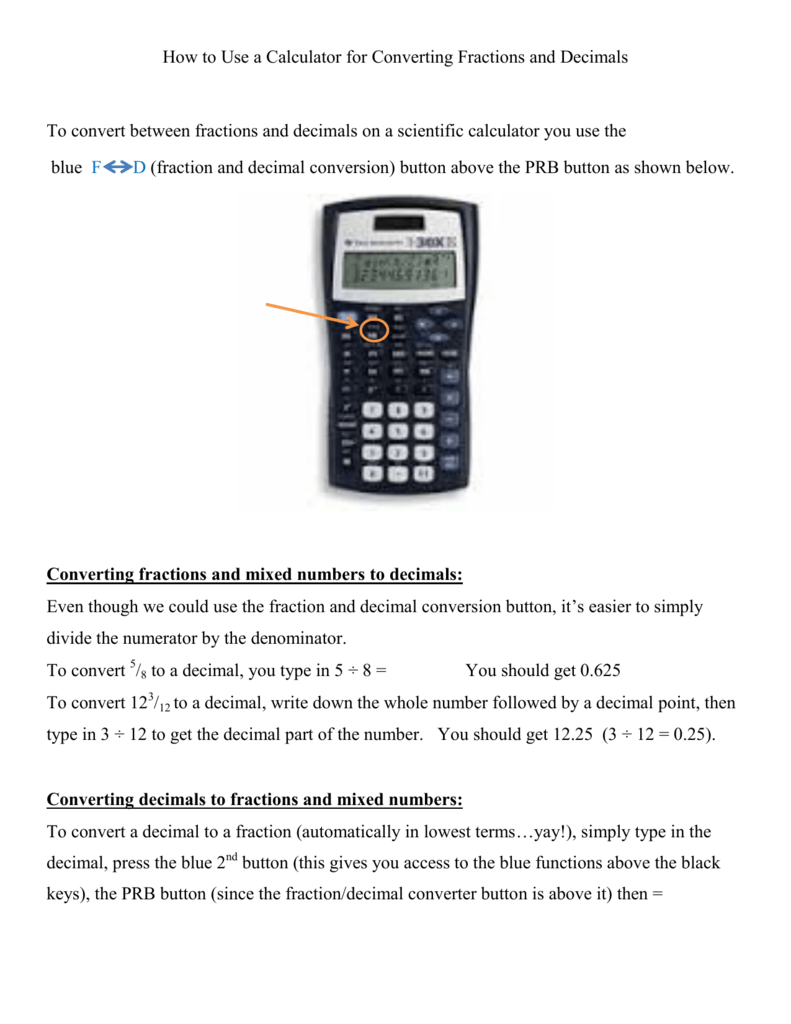
- Texas Instruments (TI) scientific calculators (e.g., TI-30X IIS, TI-36X Pro): TI calculators usually have a [F<=>D] button or a [MATH] menu.
- Enter your decimal number.
- For some models, press the [F<=>D] button directly.
- For others, you might need to press [MATH], then select the “->FRAC” or “FRAC” option (often option 1). Then press [ENTER].
- If the calculator gives a mixed number and you need an improper fraction (or vice-versa), look for a “->DMS” or similar function within the [MATH] menu that might offer this secondary conversion.
- Casio fx-series (e.g., fx-991EX, fx-300ES PLUS): Most Casio scientific calculators use the [S<=>D] button (or sometimes [a b/c] or [F<=>D]).
-
Handling Mixed Numbers and Improper Fractions: Many calculators default to displaying fractions as mixed numbers (e.g., 2 1/2). If you require an improper fraction (e.g., 5/2), there’s usually a secondary function (often activated with [SHIFT] or [2nd]) associated with the fraction button to toggle between these forms. Understanding this distinction is crucial for calculations that involve multiplying or dividing fractions.
Graphing Calculators: Advanced Functionality
Graphing calculators, such as the TI-83, TI-84 Plus, or Casio fx-CG series, offer similar, often more robust, conversion capabilities, typically found within a dedicated “MATH” menu.

-
Texas Instruments (TI-83, TI-84 Plus series):
- Enter your decimal number onto the home screen.
- Press the [MATH] button (usually located on the left side of the keypad).
- The first option in the MATH menu is typically “1: ▶Frac”. Select this option by pressing [1] or highlighting it and pressing [ENTER].
- Press [ENTER] again to execute the conversion. The calculator will display the decimal as a fraction in its simplest form.
- Graphing calculators automatically convert to improper fractions if the decimal is greater than one (e.g., 2.5 becomes 5/2).
-
Casio fx-CG series (e.g., fx-CG50):
- Enter your decimal number.
- Press [F2] (for Type) or locate a similar function within the “Run-Matrix” or “Math” menu.
- Select “d/c” or “F<=>D” option if available.
- The Casio graphing calculators often have a dedicated button for fraction display toggle, typically labeled with a fraction symbol or similar to [S<=>D].
Navigating Key Functions: F<=>D, a b/c, MATH->FRAC
While labels vary, these common indicators point to the conversion function:
- F<=>D (Fraction to Decimal / Decimal to Fraction): A toggle button that switches the display of a number between its fractional and decimal forms. This is one of the most direct methods.
- a b/c (Mixed Number/Fraction Button): Often used for inputting mixed numbers or fractions directly, this button (sometimes combined with a shift function) can also be part of the conversion process, especially for displaying results.
- MATH->FRAC (Math Menu -> Fraction): Found in more advanced calculators, this indicates a dedicated function within the math operations menu that explicitly converts the displayed (or last answer) decimal into a fraction.
Practical Applications and Common Challenges
Understanding the “how” is only half the battle; knowing “when” and “why” to convert decimals to fractions, along with recognizing potential pitfalls, makes the skill truly invaluable.
Real-World Scenarios for Conversion
- Measurement and Fabrication: An engineer might design a part with a dimension of 0.375 inches. Converting this to 3/8 inch is critical for machinists who often work with fractional drill bits and material thicknesses.
- Cooking and Recipes: Scaling a recipe might yield decimal quantities (e.g., 0.66 cups of flour). Converting this to 2/3 cup is far more practical for home cooks.
- Finance and Ratios: While finance heavily uses decimals for currency, specific financial ratios or stock splits might be better understood or communicated in fractional form. For example, a stock price change expressed as a fraction of its original value.
- Physics and Engineering Calculations: Many formulas in physics and engineering require exact fractional values to avoid cumulative rounding errors in multi-step calculations.
- Mathematics Education: For students, converting between decimals and fractions helps reinforce their understanding of number properties and equivalency.
Dealing with Rounding and Precision
One of the most significant challenges in decimal-to-fraction conversion, especially with calculators, arises from rounding. Calculators have a finite display and internal precision.
- Terminating Decimals: Decimals that end (e.g., 0.25, 0.375) convert perfectly to fractions (1/4, 3/8).
- Non-Terminating, Repeating Decimals: Decimals like 0.333… (1/3) or 0.142857142857… (1/7) pose a challenge. Calculators will typically display a truncated version (e.g., 0.33333333). When you attempt to convert such a truncated decimal, the calculator will return a fraction that approximates the decimal, not its exact infinite fractional form. For example, 0.33333333 might convert to 33333333/100000000, which is not 1/3.
- Solution: For repeating decimals, it’s often best to work with the exact fraction (e.g., 1/3) throughout your calculation if possible, or understand the inherent limitations of calculator conversion for these numbers. Some advanced calculators might recognize common repeating decimals if entered precisely enough.
Limitations with Repeating Decimals
Most standard scientific and graphing calculators are designed to convert finite decimals to fractions. They cannot inherently “understand” and perfectly convert an arbitrarily long string of a repeating decimal into its true fractional form unless it’s one they’re programmed to recognize or if the input is a perfect terminating approximation that happens to be equivalent to a simple fraction within the calculator’s precision. For example, if you enter “0.6666666666” (many 6s), a calculator might approximate it as 2/3, but this depends on the number of decimal places you entered and the calculator’s internal algorithms for simplification. If you enter “0.66”, it will likely give you 33/50, which is mathematically correct for 0.66, but not for 2/3.
Beyond the Handheld: Digital Tools and Best Practices
While handheld calculators are incredibly useful, the digital age offers other powerful tools for decimal-to-fraction conversion, coupled with best practices for maximizing accuracy and efficiency.
Online Converters and Software
Numerous websites and software applications offer instant decimal-to-fraction conversion. These tools can often handle higher precision and even provide detailed steps for manual conversion, which can be invaluable for learning.
- Advantages:
- High Precision: Many online tools can handle decimals with many more digits than a typical calculator display.
- Step-by-Step Explanations: Some provide the full process, aiding in understanding.
- Special Cases: Better at recognizing and handling repeating decimals more accurately than standard handheld calculators.
- Examples: Websites like Calculator.net, WolframAlpha, and various math resource sites offer dedicated decimal to fraction converters. Spreadsheet software like Microsoft Excel or Google Sheets can also be programmed to perform these conversions, although it often requires custom formulas.

Tips for Efficiency and Accuracy
- Know Your Calculator: Familiarize yourself with your specific calculator model’s manual. The exact button presses and menu navigation are crucial.
- Simplify First (Manually if Needed): For very simple decimals (e.g., 0.5, 0.25), you might not even need a calculator. Knowing common decimal-fraction equivalences saves time.
- Be Mindful of Precision: When converting long decimals or numbers with many significant figures, be aware that your calculator might round the fractional result. Always consider the context of your problem and the required level of accuracy.
- Verify Your Results: Especially for critical calculations, manually check your conversion or use a different method/tool to verify. For example, convert the fraction back to a decimal to see if it matches your original input.
- Understand the “Why”: Don’t just rely on the calculator blindly. Understand the underlying mathematical concept of how decimals become fractions to better interpret results and troubleshoot errors.
In conclusion, the ability to convert decimals to fractions on a calculator is a powerful tool in any numerical toolkit. By understanding the types of numbers involved, mastering the specific functions on your device, and being aware of the practical implications and potential limitations, you can leverage technology to enhance precision and efficiency across a multitude of applications. This seemingly simple function bridges different mathematical representations, offering clarity and exactitude in an increasingly data-driven world.
aViewFromTheCave is a participant in the Amazon Services LLC Associates Program, an affiliate advertising program designed to provide a means for sites to earn advertising fees by advertising and linking to Amazon.com. Amazon, the Amazon logo, AmazonSupply, and the AmazonSupply logo are trademarks of Amazon.com, Inc. or its affiliates. As an Amazon Associate we earn affiliate commissions from qualifying purchases.