
In the modern financial landscape, the ability to move capital quickly and efficiently between platforms is more than a convenience—it is a necessity for effective personal finance management. Venmo and PayPal represent two of the most significant pillars in the peer-to-peer (P2P) payment ecosystem. While both platforms are owned by PayPal Holdings, Inc., they operate as distinct entities with different user interfaces, social features, and fee structures. For individuals looking to consolidate their digital assets or bridge the gap between their social spending and professional billing, understanding how to “connect” these two ecosystems is vital.
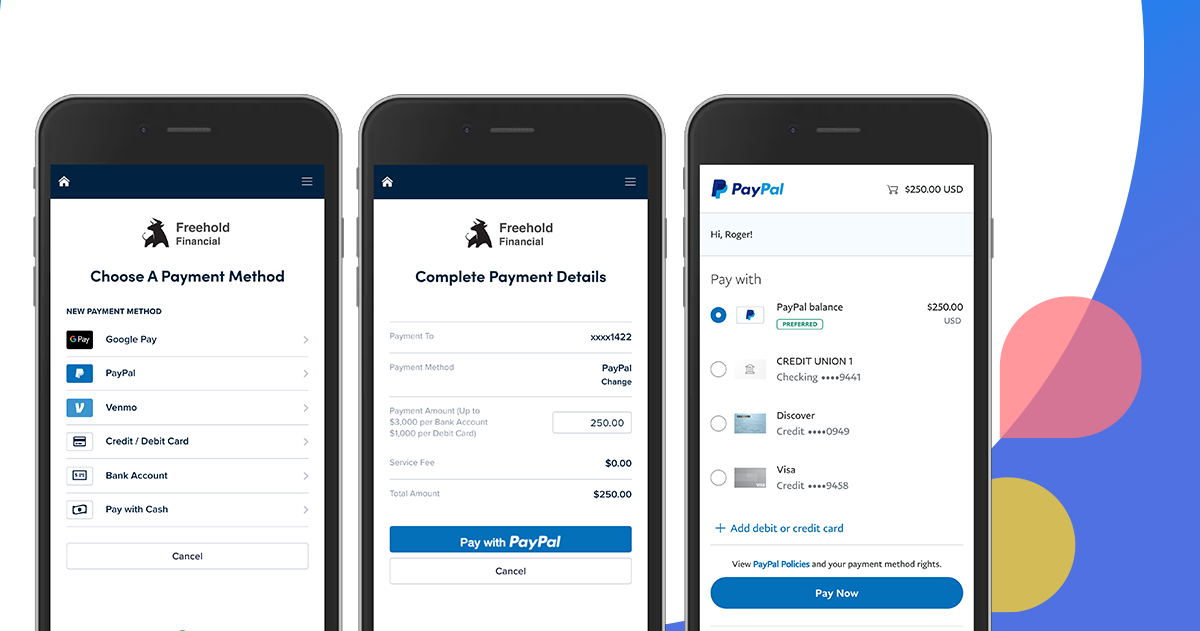
Because there is no native, one-click button to sync a Venmo balance directly to a PayPal balance, users must employ strategic financial “bridges.” This guide explores the methodologies for linking these platforms, the nuances of liquidity management, and the best practices for maintaining security within your digital wallet architecture.
The Financial Architecture: Why Link Venmo and PayPal?
Before diving into the technical steps, it is essential to understand the strategic value of integrating these two services. PayPal has long been the gold standard for international transactions, e-commerce, and professional invoicing. It offers robust buyer and seller protections that make it ideal for business-grade transactions. Venmo, conversely, was designed with a social-first philosophy, focusing on micro-transactions, splitting bills among friends, and domestic P2P transfers within the United States.
For the savvy financial manager, the desire to connect these accounts often stems from a need for liquidity. You may receive a significant payment via Venmo from a side hustle or a roommate, but you need those funds in your PayPal account to pay a freelance contractor or make an international purchase. By creating a fluid pipeline between these two accounts, you treat your digital wallets not as isolated silos, but as a unified financial ecosystem. This approach enhances your capital velocity—the speed at which you can deploy your money where it is needed most.
Establishing the Bridge: The Shared Bank Account Method
The most reliable and common way to connect Venmo and PayPal is through a shared “bridge” account—typically a traditional checking account or a high-yield savings account. Since both platforms allow you to link external banking institutions, the bank account acts as a clearinghouse for your transfers.
Step 1: Linking a Common Bank Account
To begin, you must ensure that the same bank account is verified on both platforms. In the PayPal interface, navigate to the “Wallet” section and select “Link a bank account.” You will likely need to go through a verification process, which may involve logging in via a secure portal like Plaid or confirming two small “micro-deposits” sent by PayPal.
Once the bank is active on PayPal, repeat the process in the Venmo app. Go to “Settings,” then “Payment Methods,” and select “Add a bank or card.” Using the same bank account on both platforms creates a closed-loop system, allowing you to move money from Venmo to the bank, and then from the bank to PayPal.
Step 2: Executing the Transfer
When you want to move funds from Venmo to PayPal, you must first initiate a “Transfer to Bank” within Venmo. Users have two choices here:
-
Standard Transfer: This is free of charge but typically takes one to three business days. From a personal finance perspective, this is the most efficient choice for non-urgent capital rebalancing.
-
Instant Transfer: For a small percentage fee (usually 1.75% with a cap), you can move funds to your bank debit card within minutes.
Once the funds have landed in your bank account, log in to PayPal and select “Transfer Money,” then “Add money to your balance.” Select the shared bank account and enter the amount. While PayPal does not charge for adding money from a bank account, it may take 3-5 business days for the funds to clear into your PayPal balance unless you are using a linked debit card for an instant pull.
Step 3: Managing the Float
A key component of sophisticated money management is understanding “the float”—the time money spends in transit between institutions. When moving money from Venmo to PayPal via a bank, your capital is temporarily “out of the market” or unavailable for use. Strategic users plan these transfers toward the beginning of the week to avoid weekend delays, ensuring that their liquidity remains high.
The PayPal Debit Card “Hack”: A Direct Connection

For those who require a more direct connection without waiting for multi-day bank clearings, the PayPal Business or Personal Debit Mastercard offers a clever workaround. This method essentially treats your PayPal balance as a funded debit card that Venmo can draw from.
Integrating the PayPal Card into Venmo
If you have a PayPal Debit Card, you can add it to Venmo as a “Debit Card” payment method. This is a game-changer for digital asset management. Once the card is linked and verified in Venmo, you can send payments to other Venmo users using your PayPal balance as the source.
When you initiate a payment on Venmo, you simply select the PayPal Debit Card as your funding source. Venmo treats this as a standard debit transaction. On the backend, PayPal deducts the funds from your PayPal balance. This effectively “connects” the two accounts for outgoing payments, bypassing the need to manually transfer money to a bank account first.
Strategic Advantages of the Card Method
Using the PayPal Debit Card within Venmo offers several financial advantages:
-
Real-Time Utilization: You can spend your PayPal earnings on Venmo instantly without waiting for bank transfers.
-
Consolidated Records: For those using PayPal for business income, using the debit card on Venmo creates a clear digital paper trail of business-sourced funds being used for specific expenditures.
-
Avoidance of Instant Transfer Fees: By using the card as a funding source, you avoid the 1.75% fee Venmo charges for instant transfers to bank accounts, provided your PayPal balance is already funded.
Security Protocols and Financial Best Practices
As you increase the connectivity between your financial apps, your “attack surface” for potential security breaches also increases. Managing multiple linked accounts requires a disciplined approach to digital security and financial oversight.
Implementing Multi-Factor Authentication (MFA)
Because your bank account, Venmo, and PayPal are now intertwined, a compromise in one could potentially lead to unauthorized transfers across all three. It is mandatory for any serious financial manager to enable hardware-based or app-based Multi-Factor Authentication (such as Google Authenticator or YubiKey) rather than relying solely on SMS-based codes, which are susceptible to SIM-swapping attacks.
Monitoring Transaction Limits and Fees
Both Venmo and PayPal impose limits on transfers based on account verification status. For instance, unverified Venmo accounts have much lower weekly rolling limits than verified ones. To ensure your “bridge” doesn’t break during a large transfer, take the time to complete the “Identity Verification” process on both platforms. This usually involves providing your Social Security Number (SSN) or Taxpayer Identification Number (TIN).
Furthermore, always be mindful of the “Money” category’s primary rule: minimize unnecessary friction costs. While “Instant Transfers” are convenient, the fees can aggregate over time, eating into your net worth. A 1.75% fee on a $1,000 transfer is $17.50—a significant amount for a simple digital movement. Planning your transfers in advance to utilize “Standard” free transfers is a hallmark of disciplined financial behavior.
Optimizing the Ecosystem for Business and Side Hustles
For entrepreneurs and side-hustlers, connecting Venmo and PayPal is often about separating “Consumer” behavior from “Commercial” behavior. PayPal is frequently used to receive payments from global platforms like eBay, Etsy, or freelance marketplaces. Venmo is often the preferred method for local clients or social-selling (like a local farmers’ market).
Centralizing for Tax Purposes
By funneling all Venmo business income through a shared bank account and into a primary PayPal Business account, you simplify your end-of-year accounting. PayPal provides robust reporting tools and 1099-K forms that are often more comprehensive for business auditing than Venmo’s social-centric interface.

The Future of the PayPal-Venmo Synergy
As the fintech landscape evolves, we can expect PayPal Holdings, Inc. to create even deeper integrations. We are already seeing the “Pay with PayPal” and “Pay with Venmo” buttons appearing together at major retail checkouts. By mastering the connection between these two today, you are positioning yourself to take full advantage of future “super-app” features that will likely allow for seamless, instantaneous balance transfers as the regulatory environment for digital wallets matures.
In conclusion, while a “Sync” button does not currently exist, the strategic use of shared bank accounts and the PayPal Debit Card provides a powerful framework for moving money between Venmo and PayPal. By understanding the mechanics of these transfers, respecting the security requirements, and planning around transfer timelines, you can maintain a highly liquid and efficient digital financial life. This integration allows you to leverage the social ease of Venmo with the professional power of PayPal, giving you the best of both worlds in the palm of your hand.
aViewFromTheCave is a participant in the Amazon Services LLC Associates Program, an affiliate advertising program designed to provide a means for sites to earn advertising fees by advertising and linking to Amazon.com. Amazon, the Amazon logo, AmazonSupply, and the AmazonSupply logo are trademarks of Amazon.com, Inc. or its affiliates. As an Amazon Associate we earn affiliate commissions from qualifying purchases.