
Deciding to close a bank account is often a significant personal finance decision, whether driven by a desire for better services, lower fees, or simply a need to streamline your financial life. For many Bank of America customers, the process can seem daunting, but with proper preparation and understanding of the steps involved, it can be a smooth and straightforward transition. This comprehensive guide will walk you through everything you need to know to close your Bank of America account efficiently and without any unwelcome surprises, ensuring your financial health remains undisturbed.

Why Consider Closing Your Bank of America Account?
Before diving into the mechanics of account closure, it’s insightful to reflect on the common motivations behind such a decision. Understanding your “why” can reinforce your choice and help you identify what you truly seek in your banking relationships moving forward.
Changing Financial Needs and Goals
As life evolves, so do our financial requirements. A checking or savings account that once served you perfectly might no longer align with your current lifestyle or future aspirations. Perhaps you’ve moved to a new city where another bank has a more convenient branch network, or your income has grown, leading you to seek premium banking services or better interest rates. For instance, a student checking account is rarely suitable for a mid-career professional. Conversely, if you’re consolidating finances ahead of retirement or simplifying your portfolio, reducing the number of active accounts becomes a priority. Evaluating if your current Bank of America account truly meets these evolving needs is a critical first step.
Dissatisfaction with Services or Fees
One of the most common reasons individuals opt to switch banks is dissatisfaction. This can manifest in various forms: persistent high monthly maintenance fees that erode your savings, inadequate customer service experiences, inconvenient online banking interfaces, or a lack of desired features like competitive interest rates on savings accounts or robust budgeting tools. Bank of America, like any large institution, has its operational nuances that might not resonate with every customer. If you find yourself consistently frustrated by unexpected charges, long wait times, or a banking experience that feels impersonal, exploring alternatives and closing an unsatisfactory account becomes a prudent financial move.
Streamlining Your Financial Portfolio
In today’s complex financial landscape, it’s easy to accumulate multiple bank accounts over time, often from different institutions. While having several accounts can offer diversification, it can also lead to fragmentation, making it harder to track your spending, manage your budget, and achieve your financial goals. Closing dormant or rarely used accounts, including those at Bank of America, can significantly streamline your financial portfolio. This simplification not only reduces mental clutter but also minimizes the risk of overlooked fees or potential security vulnerabilities associated with accounts you don’t actively monitor. A concise and well-managed set of accounts allows for clearer financial oversight and more effective personal finance management.
Essential Preparations Before Initiating Closure
The key to a smooth account closure lies in thorough preparation. Rushing the process without attending to crucial details can lead to significant headaches, financial disruptions, or even unexpected fees. Consider these preparatory steps as your checklist to ensure a seamless transition.
Transferring Funds and Setting Up a New Account
The very first step is to ensure you have an alternative banking solution in place. This means opening a new checking and/or savings account at another financial institution and transferring all necessary funds from your Bank of America account. Do not initiate the closure process until your new account is fully operational, funded, and you are comfortable with its features. Transferring funds can take a few business days, especially for larger sums, so factor this into your timeline. Utilize electronic transfers (ACH), wire transfers, or even cashier’s checks to move your money safely and efficiently. Remember to leave a small buffer amount in your Bank of America account initially to cover any lingering transactions or fees before completely zeroing it out.
Updating Direct Deposits and Automatic Payments
One of the most critical and often overlooked aspects is managing your recurring financial transactions. Compile a comprehensive list of all direct deposits (e.g., payroll, government benefits, investment dividends) and automatic payments (e.g., utility bills, loan payments, subscription services, gym memberships, rent). You must individually update each of these with your new bank account information. This process can take several billing cycles for some entities, so start early. Failing to update these can result in missed payments, late fees, or disruption in income, all of which can negatively impact your financial standing and credit score. Use online banking portals or contact service providers directly to make these changes.
Resolving Outstanding Balances and Fees
Before closing, ensure your Bank of America account has a zero balance or, ideally, a slightly positive balance to absorb any final, unanticipated fees. If you have any pending transactions, wait for them to clear. If your account has a negative balance or outstanding fees, you will need to settle these before Bank of America will permit closure. Banks generally will not close an account with a negative balance, and attempting to do so could lead to the account being sent to collections, severely impacting your credit score. Review your recent statements meticulously for any charges that might be processed just as you’re trying to close the account.
Downloading Transaction History and Statements
For tax purposes, budgeting, or simply for your personal financial records, it is imperative to download or request physical copies of your complete transaction history and bank statements from your Bank of America account. Most banks allow you to access several years of statements through their online banking portal. Download them as PDFs and store them securely. Once the account is closed, accessing these records can become significantly more difficult or even impossible without a fee, making this a crucial pre-closure step. Aim to gather at least the last 5-7 years of statements, as recommended for tax record keeping.
Step-by-Step Guide to Closing Your Bank of America Account
With preparations complete, you are now ready to formally initiate the account closure process. Bank of America offers several avenues for this, each with its own set of advantages and requirements.
Online Banking and Mobile App Options
For some basic accounts or in specific circumstances, Bank of America may offer an option to close an account through their online banking platform or mobile app. This is typically the most convenient method if available. Log in to your Bank of America online banking account and navigate to the customer service or account management section. Look for options related to “Close Account” or “Manage Accounts.” Follow the on-screen prompts, which will usually involve verifying your identity and confirming that all funds have been transferred out and recurring payments updated. Be aware that not all account types or situations will be eligible for online closure, especially if there are any complexities.
Visiting a Branch In-Person

For many, visiting a Bank of America branch is the most direct and often preferred method, especially if you want immediate confirmation or need to address any specific issues. Bring a valid government-issued photo ID (driver’s license, passport) and any debit cards or checks associated with the account. A banking representative will guide you through the process, confirm your identity, ensure the account balance is zero, and provide you with documentation confirming the closure. This method allows you to ask questions and receive immediate assistance, making it ideal for those who prefer face-to-face interaction or have unique circumstances.
Contacting Customer Service by Phone
If an in-person visit isn’t feasible, calling Bank of America’s customer service can be an effective alternative. Locate the customer service number on your statements or on the official Bank of America website. Be prepared to verify your identity with personal information (account number, Social Security number, mother’s maiden name, etc.). Explain your intention to close the account. The representative will walk you through the necessary steps, confirm your balance, and process the request. Ensure you ask for a confirmation number or, even better, a written confirmation of account closure to be mailed or emailed to you. This provides a valuable paper trail for your records.
Written Request by Mail (Less Common, but a Formal Option)
While less common and generally slower, a formal written request can also be used to close an account, particularly if you’re unable to access other methods or require a highly documented process. Your letter should clearly state your intent to close the account, include your full name, account number(s), and contact information, and explicitly request written confirmation of the closure. It’s advisable to send this letter via certified mail with a return receipt requested, providing proof that Bank of America received your request. Ensure the account balance is zero before sending the letter. This method is often reserved for situations where direct contact has been difficult or when a legal record is desired.
What to Expect During the Process
Regardless of the method chosen, the bank will typically perform a final review of your account. They will confirm that there are no pending transactions, outstanding fees, or hold orders. They may ask for the reason for closure (though you are not obligated to provide one). Once confirmed, they will process the closure. You will usually receive a formal notification, either immediately (in-branch) or via mail/email, stating that your account has been successfully closed. Keep this document for your records. The entire process, from initiation to final confirmation, might take anywhere from a few days to a couple of weeks, depending on pending transactions and internal bank processing times.
Post-Closure Considerations and Best Practices
Closing your Bank of America account doesn’t always mark the absolute end of the process. Several best practices and post-closure considerations will help ensure no loose ends remain and protect your financial integrity.
Verifying Account Closure
Even after receiving confirmation, it’s wise to double-check. A few weeks after initiating the closure, log into your Bank of America online banking account (if still accessible, which it might be for a short period), or try to contact customer service one last time to confirm that the account indeed shows as “closed.” You can also check your credit report periodically; closed accounts should eventually reflect this status. This diligence helps prevent scenarios where an account might remain open due to an administrative error, potentially accruing fees.
Retaining Records for Tax Purposes
As previously mentioned, holding onto your old bank statements is crucial. Financial records, including bank statements, are important for tax preparation, disputing incorrect charges, or verifying payments if audited. The IRS generally recommends keeping tax-related documents for at least three years, but some situations may require longer (e.g., seven years for certain income-reporting issues). Securely store your downloaded or printed statements in a digital archive or a physical filing system.
Monitoring for Erroneous Activity
For a few months after closing, keep a vigilant eye on your new bank account statements and credit report for any unauthorized or erroneous activity linked to your old Bank of America account. While rare, it’s possible for an old direct deposit or automatic payment to attempt to process against the closed account, or for an identity thief to attempt to use your old account details. Early detection is key to resolving any such issues quickly, protecting your credit, and preventing financial loss.
Credit Score Implications
For standard checking or savings accounts, closing them generally has no direct impact on your credit score. These types of accounts are not typically reported to credit bureaus. However, if you had an overdraft line of credit or a checking account that went into collections due to an unpaid negative balance, that would negatively affect your credit. Assuming you followed all the preparatory steps and closed the account in good standing, you shouldn’t see any adverse effects on your credit rating. It’s important to differentiate this from closing credit card accounts, which can indeed influence your credit utilization and age of credit history.
Common Pitfalls and How to Avoid Them
Even with careful planning, some common issues can arise during or after account closure. Being aware of these can help you navigate the process more smoothly.
Unexpected Fees Post-Closure
The most frequent pitfall is encountering unexpected fees. This can happen if you don’t zero out your account completely, allowing a small, lingering fee to push it into the negative. Banks might charge dormant account fees, overdraft fees, or even closure fees (though less common for basic accounts). To avoid this, always leave a small positive buffer (e.g., $10-$20) until you receive final confirmation of closure, then transfer out the remaining pennies. Also, inquire explicitly about any potential closure fees or final balance requirements when you contact Bank of America.
Forgetting Recurring Payments
Forgetting to update all recurring payments or direct deposits is another significant source of post-closure headaches. A payment attempted against a closed account will bounce, potentially incurring late fees from the merchant and possibly even a negative mark on your credit if it’s a loan payment. Develop a detailed checklist of all automatic transactions well in advance and systematically update each one, giving ample time for the changes to take effect before the next payment cycle.
Not Confirming Account Status
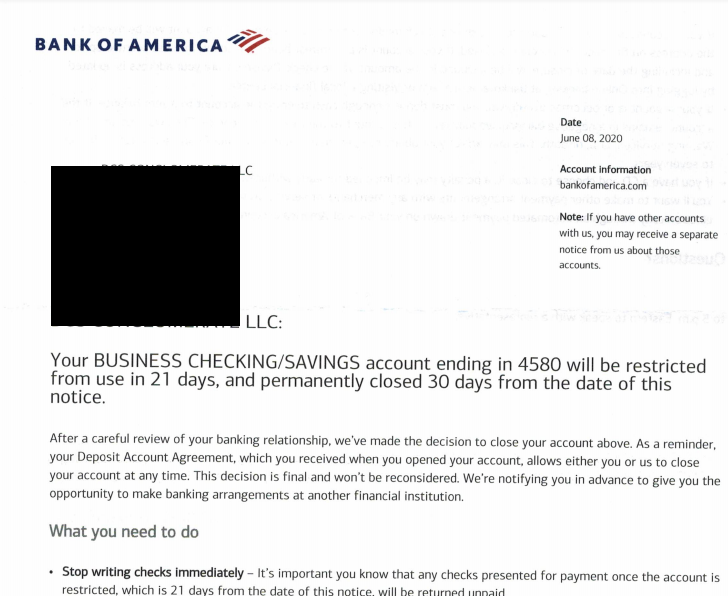
Simply requesting closure isn’t enough; you must confirm it. Relying solely on a verbal confirmation without any written proof can lead to problems down the line. Always request written documentation, either physical or digital, confirming the account’s closed status and the effective date. This official record is your best defense against any future claims of outstanding balances or activity on the account.
By following these guidelines, you can navigate the process of closing your Bank of America account with confidence, ensuring a clean break and a seamless transition to your new financial arrangements. Remember, meticulous planning and diligent follow-through are the cornerstones of responsible personal finance management.
aViewFromTheCave is a participant in the Amazon Services LLC Associates Program, an affiliate advertising program designed to provide a means for sites to earn advertising fees by advertising and linking to Amazon.com. Amazon, the Amazon logo, AmazonSupply, and the AmazonSupply logo are trademarks of Amazon.com, Inc. or its affiliates. As an Amazon Associate we earn affiliate commissions from qualifying purchases.