
In the modern financial landscape, agility is a cornerstone of personal wealth management. As consumer needs evolve, many individuals find that the banking institutions they once relied on no longer align with their current financial goals, whether due to fee structures, interest rates, or the desire for a more specialized digital experience. Chase Bank, one of the “Big Four” in the United States, offers an extensive suite of products, but there comes a time when closing an account is the most strategic move for your financial health.

Fortunately, the days of being required to visit a physical branch to terminate a banking relationship are largely behind us. This guide provides an in-depth exploration of how to close a Chase bank account online, the strategic considerations to keep in mind before doing so, and how to ensure a seamless transition to your next financial home.
1. Strategic Reasons for Closing Your Chase Account
Before diving into the “how,” it is essential to analyze the “why.” Managing multiple bank accounts can lead to “financial fragmentation,” where your assets are spread too thin to benefit from tiered interest rates or where maintenance fees quietly erode your savings.
Evaluating Fee Structures and Minimum Balances
One of the primary drivers for moving away from traditional brick-and-mortar institutions like Chase is the fee schedule. Chase typically requires a minimum daily balance or monthly direct deposits to waive maintenance fees on their Total Checking or Savings accounts. If your financial patterns have shifted—perhaps due to a career change or a move toward a high-yield online savings account—you may find yourself paying $12 to $25 a month simply to keep an account open. Over a year, these fees represent a significant loss in potential capital growth.
Consolidating for Better Financial Oversight
In the era of “Money Niche” management, simplicity is often synonymous with success. Closing underutilized accounts allows for better tracking of net worth and a clearer view of cash flow. When your capital is consolidated, it is easier to automate investments and monitor for fraudulent activity. If your Chase account has become a “zombie account”—one that sits idle with a small balance—closing it is a vital step in “financial decluttering.”
Seeking Higher Yields in a Digital-First World
Traditional banks often offer interest rates on savings accounts that hover near 0.01%. In contrast, high-yield savings accounts (HYSAs) and neobanks often offer rates significantly higher. Moving your liquidity from a low-yield Chase account to a more competitive vehicle is a fundamental move for anyone serious about maximizing their passive income.
2. The Step-by-Step Digital Process for Account Closure
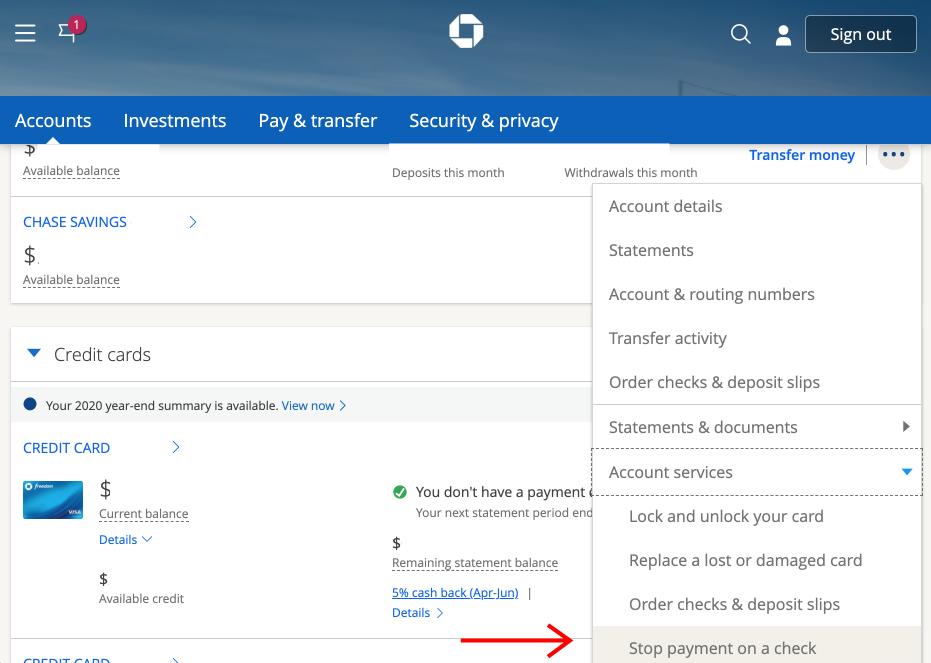
Chase provides a relatively streamlined digital interface for managing accounts, but they do not always make the “Close Account” button immediately obvious. To close your account without visiting a branch, you have two primary digital avenues: the Secure Message Center and the Chase Mobile App.
Utilizing the Secure Message Center (Desktop)
The most reliable way to close a Chase account online is through the Secure Message Center. This method creates a written paper trail, which is crucial for your financial records.
- Log In: Access your account via the official Chase website.
- Navigate to Messages: Click on the “Menu” icon (three horizontal lines) in the top left corner and select “Secure messages.”
- Compose a New Message: Select “New Message” and choose the topic related to “Account Inquiry” or “Closing an Account.”
- Draft Your Request: Be concise. State clearly: “I am writing to request the closure of my [Account Type] ending in [Last 4 Digits]. I have verified that all transactions are cleared and the balance is zero.”
- Submit and Monitor: Chase typically responds within 1 to 2 business days. They may ask a follow-up question regarding why you are leaving, but they are legally obligated to process your request if the account is in good standing.
Closing via the Chase Mobile App
For those who prefer a mobile-first approach, the app offers a similar secure messaging feature. While you cannot usually click a single button to “Delete Account,” you can initiate the process through the “Help & Support” section.
- Open the App: Ensure you are running the latest version for security.
- Access the Profile Icon: Usually located at the top right.
- Secure Messages: Just like the desktop version, use the message center to send a formal request.
- Check for Chat Options: Occasionally, Chase enables a live chat feature for certain customers. If available, this is the fastest way to close an account, as you can speak with a representative in real-time to confirm the closure.
Phone Verification and Secondary Security
In some instances, Chase may require a brief follow-up phone call to verify your identity. This is a standard anti-fraud measure. If they request this, have your account number and personal identification details ready to expedite the process.
3. The Essential Pre-Closure Checklist: Protecting Your Capital
Closing an account is more than just sending a message; it requires a meticulous audit of your financial life to prevent “zombie charges” and missed payments.
Managing Outstanding Transactions and Direct Deposits
The most common mistake in closing a bank account is forgetting an automated payment. Before you initiate the closure, review the last three months of bank statements.
- Redirect Direct Deposits: Ensure your employer or any government benefits are redirected to your new account at least one full pay cycle before closing the Chase account.
- Update Subscription Services: From Netflix to your gym membership, ensure every merchant has your new debit or credit card information.
- Check for Pending Checks: If you still use paper checks, ensure every check you’ve written has been cashed and cleared. A check presented to a closed account will bounce, leading to hefty fees from the merchant.
Transferring Your Final Balance
Your Chase account balance must be $0.00 before the bank will officially close it. However, avoid withdrawing every cent until you are certain all pending transactions have cleared.
- Electronic Transfer (ACH): The most efficient method is to link your new bank account and transfer the funds digitally.
- Internal Transfer: If you have other Chase accounts (like a credit card), you can move the funds there to pay off a balance.
- Requesting a Check: If you choose to close the account with a balance remaining, Chase will mail a paper check to your address on file. Note that this can take 7–10 business days, during which your money is out of the market and not earning interest.
Securing Your Financial Data
Once an account is closed, your access to the online portal may be restricted or revoked entirely. Before you hit “send” on that closure request, download your historical data.
- Download Statements: Most financial experts recommend keeping seven years of bank statements for tax purposes and audits.
- Export CSV Files: If you use budgeting software like YNAB or Mint (now redirected), export your transaction history in CSV format for your personal records.
4. Troubleshooting Common Hurdles in Account Closure
Not every account closure is straightforward. Several factors can “lock” an account, preventing you from closing it online until specific conditions are met.
Dealing with Negative Balances or Fees
Chase will not close an account with a negative balance. If you owe money due to an overdraft or an unpaid monthly service fee, you must bring the balance to zero first. In some cases, if the fee was the result of a misunderstanding or a first-time occurrence, you can request a “fee reversal” through the secure message center before closing.
Joint Accounts and Legal Restrictions
If you share an account with a spouse or business partner, the online closure process becomes slightly more complex. Generally, both parties must consent. If you are attempting to close a joint account, Chase may require a signed document from both parties or a joint phone call to their customer service line.
Impact on Credit Score
A common myth in the “Money Niche” is that closing a bank account affects your credit score. To clarify: closing a checking or savings account has no direct impact on your credit score. Unlike credit cards, where closing an account affects your credit utilization ratio and age of accounts, bank accounts are not reported to the major credit bureaus (Equifax, Experian, TransUnion). However, ensure you don’t have any linked “overdraft protection” lines of credit that might be closed simultaneously, as those could influence your credit profile.
5. Transitioning to Your Next Financial Institution
Closing your Chase account is the final step in one chapter, but the beginning of another. Finding the right home for your money is essential for long-term wealth building.
Identifying the Best High-Yield Options
If you are moving away from Chase because of low interest rates, look toward online-only institutions. Banks like Ally, SoFi, or Marcus by Goldman Sachs often offer rates that are 10x to 20x higher than traditional banks. For a consumer with $10,000 in savings, this could mean the difference between earning $1 a year or over $400 a year in interest.
The Role of Credit Unions
For those who still value a human touch but want lower fees, credit unions are an excellent alternative. Because they are member-owned cooperatives, they often return profits to members in the form of higher interest on deposits and lower rates on loans.

Final Verification of Closure
After you receive confirmation that your Chase account is closed, keep the confirmation number or the PDF of the secure message. Monitor your mail for a final statement showing a $0 balance and a “Closed” status. This document is your final safeguard against any future claims of unpaid fees or “zombie” activity.
By following this strategic approach, you ensure that your transition away from Chase is not just an administrative task, but a calculated move toward a more efficient and profitable financial future. Managing your money requires proactive decisions, and knowing when—and how—to close a bank account is a vital skill in every savvy investor’s toolkit.
aViewFromTheCave is a participant in the Amazon Services LLC Associates Program, an affiliate advertising program designed to provide a means for sites to earn advertising fees by advertising and linking to Amazon.com. Amazon, the Amazon logo, AmazonSupply, and the AmazonSupply logo are trademarks of Amazon.com, Inc. or its affiliates. As an Amazon Associate we earn affiliate commissions from qualifying purchases.