
In an increasingly digital world, the expectation of managing all financial affairs from the comfort of our homes is becoming the norm. From opening investment accounts to applying for loans, many financial tasks have migrated online, offering unparalleled convenience. However, when it comes to the seemingly simple act of closing a bank account, especially with a major institution like Bank of America, the online pathway can often appear less clear-cut. This article will delve into the nuances of closing your Bank of America account, focusing on how you can leverage online tools and digital processes to streamline what can sometimes be a cumbersome task, ensuring a smooth transition to your next financial chapter.
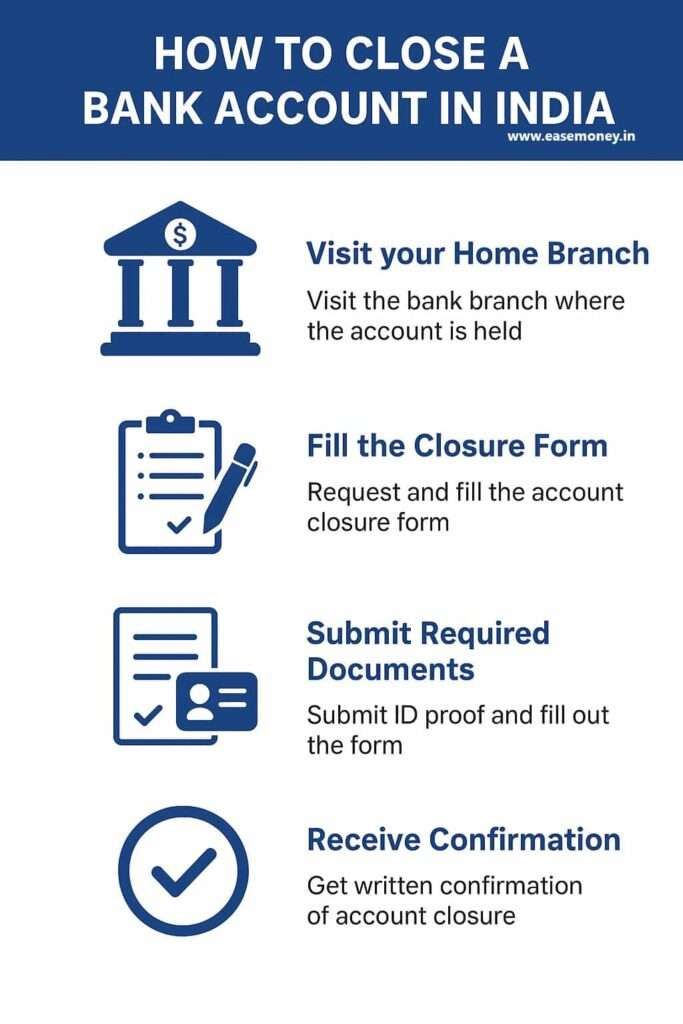
Closing a bank account isn’t just about hitting a “delete” button; it’s a financial decision with implications for your money management, credit history, and future banking relationships. Whether you’re consolidating accounts, seeking better financial services elsewhere, or simply tidying up your personal finance portfolio, understanding the proper procedure is paramount. We’ll guide you through preparing for closure, the realistic extent of online capabilities, and best practices to safeguard your financial well-being throughout the process.
Leveraging Online Tools to Prepare for Account Closure
While the act of finalizing an account closure with a large bank like Bank of America often requires direct communication beyond a simple online form, the digital realm offers powerful tools to prepare you thoroughly. By taking advantage of these online resources, you can significantly reduce friction and ensure a more efficient closure process, even if the last step requires a phone call or an in-person visit.
Consolidating Funds and Managing Transactions Digitally
Before even thinking about closure, the first critical step is to consolidate your funds and manage any outstanding transactions. Bank of America’s online banking portal is your primary tool for this. Log in to your account and meticulously review all recent transactions. Look for any pending deposits, automated withdrawals, or checks that have yet to clear. The goal is to bring your account balance to zero without causing overdrafts or missed payments.
Use the online portal to initiate transfers of your funds to an external account at another bank or to a new Bank of America account if you’re merely changing account types. Remember that transfers to external banks can take a few business days to process. If you have significant funds, consider making smaller transfers over several days or using a wire transfer for larger, urgent sums (though wire transfers often incur fees). Ensure you leave enough time for all funds to clear and settle before proceeding with the closure request. For instance, if you write a check, allow a week or two for it to be cashed and processed by the recipient’s bank. Digital transaction histories and statement downloads available through online banking are invaluable for this audit.
Updating Direct Deposits and Automatic Payments via Online Portals
One of the most common pitfalls when closing an account is forgetting to update recurring financial activities. Direct deposits, such as your salary or government benefits, and automatic payments for utilities, subscriptions, or loan installments, must be rerouted to a new account before you close your Bank of America account.
Many employers and service providers now offer online portals or digital forms to update banking information. Access your employer’s HR portal or payroll system to update your direct deposit information. Similarly, log in to the websites of your utility companies, streaming services, credit card issuers, and other billers to switch your automatic payments to your new bank account. If an online option isn’t available, make a list of all recurring transactions and contact each entity directly. It’s often helpful to keep the old account open with a minimal balance for a short period (a week or two) after updating these to catch any stragglers or ensure everything has successfully rerouted. Your Bank of America online banking portal can help you identify these recurring transactions through its transaction history and bill pay features.
Accessing Account Statements and Information Online
Long after an account is closed, you might need access to past statements for tax purposes, financial reviews, or dispute resolution. Bank of America’s online banking platform allows you to download up to several years of account statements as PDFs. Before initiating closure, make sure to download and save all necessary statements to a secure location, such as a cloud storage service or an external hard drive. This foresight can save you significant hassle and potential fees if you need to retrieve old records after the account is closed. Furthermore, having your account number, routing number, and other pertinent details readily available will be crucial when you finally communicate with the bank regarding closure.
The Direct Approach: Communicating with Bank of America
While the term “online” implies a fully digital, self-service process, major banks like Bank of America typically require direct communication—often via phone or in-person—to finalize an account closure due to security protocols and regulatory requirements. However, your online preparation significantly streamlines this interaction.
Initiating Contact via Online Messaging or Secure Mail
Bank of America’s online banking platform often includes a secure messaging system or an “email us” feature. While you may not be able to close the account via a message, you can use this channel to initiate the process, ask specific questions about required documentation, or confirm the correct procedure for your account type. Sending a secure message allows you to have a written record of your initial inquiry and can serve as a preliminary step, potentially reducing the length of a subsequent phone call. Be clear and concise in your message, stating your intent to close the account and inquiring about the exact steps you need to take. This often directs you to the most efficient channel for closure.
Understanding Bank of America’s Official Closure Policy
Before making contact, it’s beneficial to briefly review Bank of America’s publicly available information regarding account closures. While detailed policies may not be immediately obvious, common practices include:
- Zero Balance Requirement: Accounts must have a $0 balance at the time of closure.
- Negative Balances/Fees: Any outstanding fees or negative balances must be paid off. The bank will not close an account that owes money.
- Holds: Funds on hold (e.g., from a recent deposit) must clear before closure.
- Joint Accounts: All account holders for a joint account typically need to authorize the closure.
- Linked Accounts: If your checking account is linked to a savings account for overdraft protection, or if it’s tied to other Bank of America products (e.g., a credit card for payment), these links may need to be severed or reconfigured first.

While you won’t find a direct “close account” button online, understanding these policies through their FAQs or terms and conditions helps you approach the conversation with the bank more informed and prepared.
What to Expect During the Phone Call (The Most Common “Online-Assisted” Closure Method)
For most standard checking and savings accounts, a phone call to Bank of America customer service is the most common and efficient way to finalize closure. This is where your online preparation pays off.
- Gather Your Information: Have your account number(s), personal identification (e.g., last four digits of your Social Security Number), and any relevant notes from your online preparation readily available.
- Call the Right Number: Use the customer service number listed on Bank of America’s official website or on the back of your debit card.
- State Your Intent Clearly: Inform the representative that you wish to close your specific account(s).
- Confirm Zero Balance: The representative will likely verify that your account has a zero balance and that all pending transactions have cleared. If there’s a small residual balance, they might transfer it to another BofA account if you have one, or mail you a check for amounts under a certain threshold.
- Address Linked Accounts: They will inquire about any linked services (overdraft protection, credit cards, etc.) and guide you on how to manage them.
- Joint Accounts: If it’s a joint account, all primary account holders might need to be on the call or provide separate consent.
- Request Confirmation: Crucially, ask for a confirmation number or a written statement of closure to be mailed or emailed to you. This is your proof that the account is officially closed. Note the date and time of your call, and the name of the representative.
While not fully “online” closure, leveraging the phone after thorough online preparation makes this the quickest and most straightforward digital-era approach.
Post-Closure Best Practices and Financial Hygiene
Closing a bank account is not the final step; it’s a transition. What you do immediately after closure and in the subsequent months is crucial for maintaining your financial health and ensuring no loose ends remain.
Verifying Account Closure and Obtaining Documentation
After your phone call or branch visit, follow up to ensure the account is indeed closed. Wait a few business days, then attempt to log into your Bank of America online banking. Ideally, the closed account should no longer appear, or you might receive a message indicating its closure. More importantly, await the official confirmation letter or email from Bank of America. This document serves as definitive proof that the account has been closed and can be critical if any discrepancies arise later. Store this documentation securely with your other financial records. Without this official confirmation, consider your account potentially still open and follow up with the bank.
Monitoring Your Credit Report
While closing a checking or savings account doesn’t directly impact your credit score like a credit card closure would, unexpected issues can sometimes arise. For instance, an account closed with a negative balance that goes to collections could negatively affect your credit. It’s good practice to monitor your credit report periodically (you can get a free report annually from each of the three major credit bureaus: Experian, Equifax, and TransUnion via AnnualCreditReport.com). Look for any unfamiliar accounts or unexpected entries that might indicate a problem. This due diligence ensures your financial history remains clean.
Safely Disposing of Old Account Information
Once you’ve confirmed closure and secured all necessary statements and documentation, it’s time to safely dispose of any physical items related to the old account. This includes debit cards, unused checks, and any physical bank statements you no longer need. Shredding these items thoroughly prevents identity theft and fraudulent use. Do not simply throw them in the trash. Digitally, ensure any saved passwords or account details are updated or removed from password managers if you no longer require them.
Strategic Considerations for Your Next Financial Move
Closing an account with Bank of America is often a step towards optimizing your personal finance strategy. It’s an opportunity to re-evaluate your banking needs and make informed decisions for your future.
Evaluating New Banking Options (Online Banks, Credit Unions)
If you’re closing your Bank of America account because you’re dissatisfied with fees, interest rates, or customer service, this is the perfect time to explore alternatives.
- Online Banks: Many online-only banks offer significantly higher interest rates on savings, lower (or no) fees, and innovative digital tools, albeit with fewer physical branch locations. They excel in convenience for digitally native users.
- Credit Unions: These member-owned non-profits often provide more personalized service, lower loan rates, and higher savings rates than traditional banks, with a community focus.
- Traditional Banks: If you prefer brick-and-mortar access, research other traditional banks in your area, comparing their checking, savings, and loan products, and fee structures. Look for banks that align with your financial goals, whether it’s maximizing interest, minimizing fees, or accessing specific services.
Setting Up Your New Account Seamlessly
Once you’ve chosen a new financial institution, make the setup process as smooth as the closure. Open your new account well in advance of closing your old one. This gives you ample time to:
- Transfer Funds: Gradually move your money to the new account.
- Update Direct Deposits: Provide your new account information to your employer and any other sources of recurring income.
- Reroute Automatic Payments: Change all automatic bill payments to draw from your new account.
- Order New Checks/Debit Cards: Get these ready before fully transitioning.
By staggering these steps, you minimize the risk of missed payments or delayed deposits. Use the online banking features of your new institution to set up alerts and manage transactions effectively.
The Long-Term Benefits of Strategic Account Management
The decision to close an account and open another is part of a larger financial strategy. Regularly reviewing your banking relationships ensures they continue to meet your evolving needs. By being proactive in managing your accounts, leveraging online tools for efficiency, and understanding the complete lifecycle of your financial products, you empower yourself to make smarter financial decisions. This strategic approach to account management contributes significantly to your overall financial health and well-being, paving the way for greater savings, reduced fees, and a more robust financial future.
aViewFromTheCave is a participant in the Amazon Services LLC Associates Program, an affiliate advertising program designed to provide a means for sites to earn advertising fees by advertising and linking to Amazon.com. Amazon, the Amazon logo, AmazonSupply, and the AmazonSupply logo are trademarks of Amazon.com, Inc. or its affiliates. As an Amazon Associate we earn affiliate commissions from qualifying purchases.