
The modern traveler’s journey begins long before they reach the airport tarmac. In the era of digital transformation, the check-in process has evolved from a manual, paper-heavy chore into a sophisticated technological workflow. Spirit Airlines, known for its ultra-low-cost model, relies heavily on its digital infrastructure to streamline operations and reduce overhead. Understanding how to navigate Spirit Airlines’ digital check-in ecosystem—comprising mobile applications, web interfaces, and on-site hardware kiosks—is essential for any tech-savvy passenger looking to optimize their travel experience.
Navigating the Spirit Airlines Mobile App Architecture
The Spirit Airlines mobile application serves as the primary touchpoint for the majority of travelers. Designed for both iOS and Android platforms, the app is a consolidated hub for reservation management, real-time flight tracking, and, most importantly, the check-in protocol. By shifting the check-in burden to the user’s smartphone, the airline leverages the “Bring Your Own Device” (BYOD) trend to minimize physical contact points and maximize efficiency.

Downloading and Authenticating the Spirit App
To begin the digital check-in process, users must first ensure they are using the latest version of the Spirit Airlines app available on the Apple App Store or Google Play Store. Regular updates are critical, as they often contain patches for security vulnerabilities and UI/UX improvements that facilitate a smoother check-in flow. Once installed, authentication can be performed using the passenger’s last name and confirmation code—a unique six-digit alphanumeric string (PNR – Passenger Name Record). For frequent flyers, logging into a “Free Spirit” account provides a more seamless experience, utilizing stored credentials to bypass manual data entry.
The UX of Mobile Check-In: A Step-by-Step Walkthrough
The mobile check-in window opens exactly 24 hours prior to departure and closes 60 minutes before the flight. The user interface is designed to guide the passenger through a series of “upsell” logic gates—such as seat selection and baggage additions—before reaching the final check-in confirmation. From a technical perspective, this process involves real-time API calls to Spirit’s central reservation system to verify seat availability and weight/balance constraints. Users should ensure they have a stable data connection (4G/5G or Wi-Fi) during this phase to prevent session timeouts or data synchronization errors.
Managing Digital Boarding Passes and Wallet Integration
Upon successful completion of the check-in sequence, the app generates a dynamic 2D barcode (typically a QR code or PDF417 format). The most efficient way to manage this digital asset is to utilize native OS features like Apple Wallet or Google Pay. By exporting the boarding pass to these digital wallets, the passenger ensures that the pass is accessible offline, preventing issues at security checkpoints where cellular reception might be degraded. Furthermore, these wallets often utilize location-based services to push the boarding pass to the lock screen as the passenger nears the airport geofence.
The Web-Based Interface: Leveraging Desktop Portals for Seamless Boarding
While mobile apps offer portability, the desktop web portal remains a robust alternative for those who prefer a larger screen for document management or for those traveling in large groups where multiple boarding passes need to be handled simultaneously. Spirit’s website uses a responsive web design that mimics the app’s logic but offers more granular control over printer settings and document downloads.
Browser Compatibility and Security Protocols
When accessing the check-in portal via a web browser, it is imperative to use a modern, updated browser such as Chrome, Firefox, or Safari. The site utilizes HTTPS encryption to protect sensitive passenger information, including passport numbers and payment details for any last-minute baggage fees. Tech-conscious users should ensure that “Do Not Track” settings or aggressive ad-blockers do not interfere with the JavaScript-heavy check-in scripts, which are necessary for the interactive seating maps and payment gateways to function correctly.
Troubleshooting Common Login and Scripting Errors
One of the most frequent technical hurdles in web-based check-in is the “Session Expired” error or failure of the confirmation page to load. This is often caused by a cache mismatch or a failure in the browser’s cookie handling. Clearing the browser cache or utilizing an “Incognito” or “Private” window can often resolve these synchronization issues between the client-side browser and Spirit’s server-side database. If the web portal fails to generate a PDF boarding pass, it is usually a sign of a blocked pop-up or a failure in the server’s PDF-rendering engine; switching to the mobile app is the recommended fail-safe in these scenarios.
On-Site Hardware: Interacting with Airport Kiosk Technology

For passengers who do not have access to a mobile device or a printer, Spirit Airlines provides on-site hardware in the form of self-service kiosks. These kiosks are specialized industrial computers running proprietary software designed for high-volume public interaction.
RFID and Barcode Scanning at the Hub
The hardware interface of a Spirit kiosk includes a touchscreen, a document scanner, and a thermal printer. Users can initiate the check-in process by scanning their passport’s Machine Readable Zone (MRZ) or by scanning the barcode found on their initial confirmation email. The kiosk software then queries the airline’s backend via a secure local area network (LAN) to retrieve the flight data. The integration of RFID technology in some newer airport terminals also allows for faster identification if the passenger is carrying a biometric passport.
Interface Synchronization: From Mobile to Physical Kiosk
One of the sophisticated elements of Spirit’s tech stack is the omnichannel synchronization between devices. If a passenger begins the check-in process on their mobile device but stops before completion, the kiosk can often “pick up” the progress. This is made possible through state-management software that tracks the passenger’s progress within the PNR record. However, users should be aware that utilizing a kiosk for printing a boarding pass often incurs a technical service fee, a cost-recovery mechanism for the hardware maintenance and paper supplies used.
Digital Security and Privacy During the Check-In Process
In the digital age, checking in for a flight involves the transmission of sensitive Personal Identifiable Information (PII). Spirit Airlines must comply with global data protection standards, including the General Data Protection Regulation (GDPR) for certain international routes and various US-based cybersecurity frameworks.
Protecting Personal Identifiable Information (PII)
During check-in, passengers may be required to input or verify their Date of Birth, Passport Number, and Redress Number. Spirit’s infrastructure utilizes end-to-end encryption to ensure that this data is not intercepted during transmission. From a user perspective, it is critical to avoid checking in over public, unencrypted Wi-Fi networks found in hotels or cafes without the use of a Virtual Private Network (VPN). A VPN creates an encrypted tunnel, adding an extra layer of security between the user’s device and the airline’s servers.
Encryption Standards in Aviation Software
Aviation software relies on the Secure Socket Layer (SSL) and its successor, Transport Layer Security (TLS), to secure data. When you see the padlock icon in your browser’s address bar on the Spirit check-in page, it indicates that a TLS handshake has occurred, establishing a secure connection. For the mobile app, this security is baked into the API calls (Representational State Transfer or REST APIs) that the app makes to the airline’s backend. Understanding these underlying protocols gives travelers peace of mind that their digital identity is being handled with industry-standard care.
The Future of Spirit’s Tech Stack: Biometrics and AI Integration
The trajectory of Spirit Airlines’ check-in technology is moving toward a “frictionless” future, where manual data entry is replaced by automated systems and artificial intelligence.
Self-Service Bag Drops and Automation
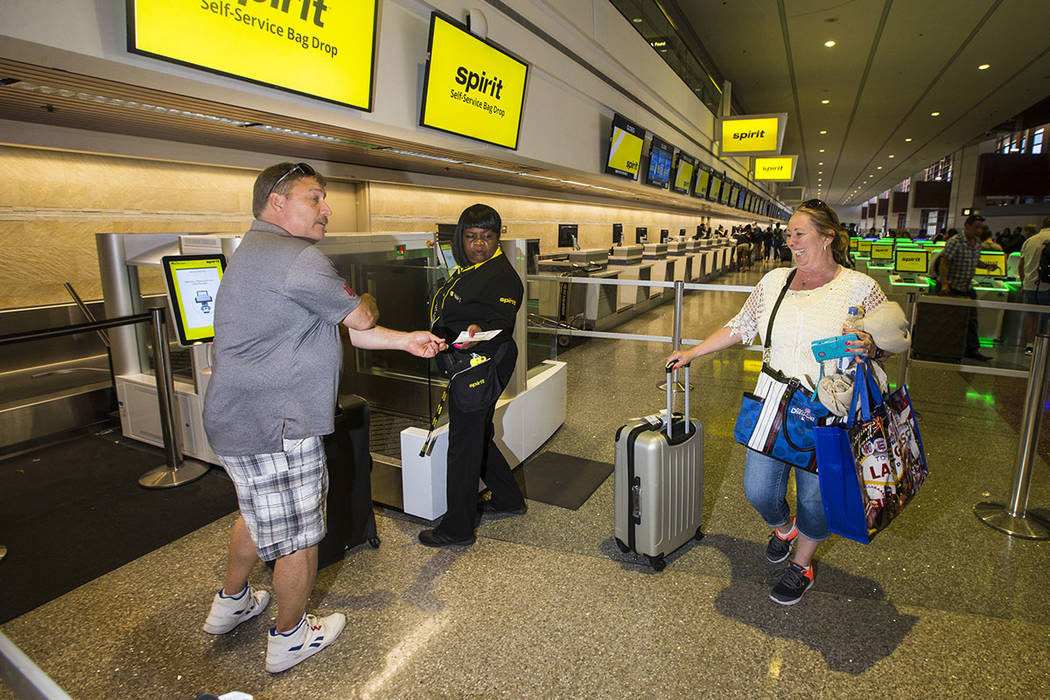
Spirit has already begun implementing automated self-service bag drops at several major hubs. These machines utilize computer vision and weight sensors to verify that a passenger’s luggage matches the dimensions and weight limits associated with their digital check-in record. By scanning the digital boarding pass at the bag drop station, the hardware automatically prints a thermal luggage tag, further reducing the need for human intervention and speeding up the terminal throughput.
Anticipating AI-Driven Customer Service in the Check-In Pipeline
Artificial Intelligence (AI) is increasingly being integrated into the check-in workflow to handle troubleshooting. Spirit’s digital assistant is designed to use Natural Language Processing (NLP) to understand passenger queries regarding check-in errors, baggage rules, or flight delays. In the near future, we can expect AI to predict potential check-in bottlenecks—such as high traffic at security checkpoints—and send push notifications to passengers’ devices suggesting they check in earlier. Additionally, biometric facial recognition is being tested to replace the traditional boarding pass entirely, allowing the passenger’s face to serve as their digital “key” for the entire journey.
By mastering the various digital tools provided by Spirit Airlines, passengers can navigate the complexities of modern air travel with technical precision. From the initial API call on a mobile app to the final thermal print at a kiosk, the check-in process is a testament to the power of integrated software and hardware in the travel industry.
aViewFromTheCave is a participant in the Amazon Services LLC Associates Program, an affiliate advertising program designed to provide a means for sites to earn advertising fees by advertising and linking to Amazon.com. Amazon, the Amazon logo, AmazonSupply, and the AmazonSupply logo are trademarks of Amazon.com, Inc. or its affiliates. As an Amazon Associate we earn affiliate commissions from qualifying purchases.