
In the vast ecosystem of digital subscriptions and services, it’s surprisingly common to find oneself questioning the status of a particular membership. Among the most prevalent is Amazon Prime, a multifaceted subscription service that has become a ubiquitous part of online shopping and digital entertainment. Whether you’re considering signing up, suspect an old free trial might have rolled into a paid subscription, or are simply sharing an account and want to verify access, knowing how to definitively check your Amazon Prime status is a fundamental digital literacy skill. This guide will walk you through the essential steps, help you understand the nuances of your membership, and empower you to manage this crucial aspect of your digital life with confidence.
Why Verifying Your Amazon Prime Status Matters
In an age where digital subscriptions can quietly accumulate, keeping track of your active services is more than just a matter of curiosity; it’s a critical component of personal digital management and financial oversight. For Amazon Prime, specifically, a quick check can illuminate several important aspects.
Avoiding Unnecessary Subscriptions
One of the most straightforward reasons to check your Prime status is to ensure you’re not paying for a service you no longer use or didn’t intend to subscribe to in the first place. Free trials are notorious for automatically converting to paid memberships if not canceled before the trial period ends. Similarly, gift subscriptions can expire, or a shared household account might have been altered without your immediate knowledge. Verifying your status helps prevent redundant charges and keeps your digital spending in check, aligning with sound financial management within the tech sphere.
Maximizing Your Membership Benefits
Conversely, if you do have an active Amazon Prime membership, understanding its status and what it entails allows you to fully leverage its extensive suite of benefits. Many users primarily associate Prime with free two-day shipping, but the subscription encompasses a wealth of other perks: streaming thousands of movies and TV shows via Prime Video, ad-free listening with Amazon Music Prime, access to a rotating selection of ebooks and magazines with Prime Reading, exclusive gaming content through Prime Gaming, and even discounts at Whole Foods Market. Knowing you’re subscribed empowers you to explore and utilize these diverse offerings, ensuring you get the most value from your investment in the Amazon ecosystem.
Financial Oversight and Budgeting
Even if the monthly or annual fee for Amazon Prime seems minor on its own, cumulative subscription costs can add up significantly. Regularly checking your Prime status, alongside other digital services, contributes to a clearer picture of your recurring expenses. This tech-driven financial oversight helps in budgeting, identifying areas for potential savings, and maintaining control over your digital footprint. It’s about taking an active role in managing your digital wallet, rather than letting subscriptions quietly drain funds.
Account Security and Family Sharing
For households that share Amazon accounts or utilize the Amazon Household feature, verifying Prime status is also an important aspect of account security and management. It allows you to confirm who has access to Prime benefits, understand the billing responsibility, and ensure that your account isn’t being used without your knowledge. In the context of digital security, understanding access permissions and active subscriptions is a key practice.
The Primary Methods to Confirm Your Prime Membership
Amazon has made the process of checking your Prime membership status relatively straightforward, offering several intuitive paths to this crucial information. Whether you prefer using a web browser or a mobile device, the steps are designed to be user-friendly.
Via Your Amazon Account Online
This is arguably the most comprehensive method, as it provides a full overview of your membership details, billing cycle, and management options.
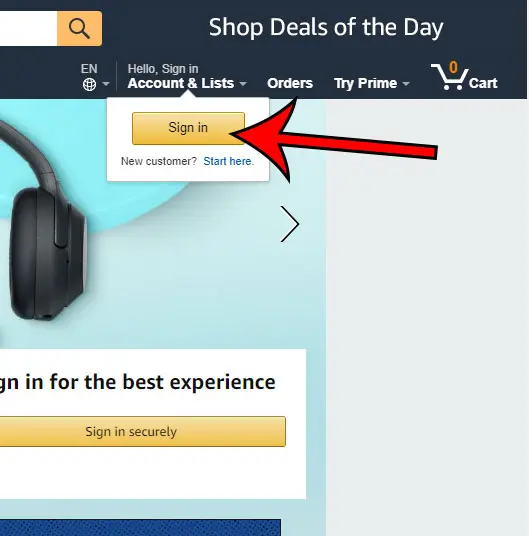
- Log In to Amazon: Open your web browser and navigate to Amazon.com. Ensure you are logged in to the Amazon account you believe might have Prime. If you have multiple Amazon accounts (e.g., for different regions, or a personal and a business account), make sure you’re using the correct one.
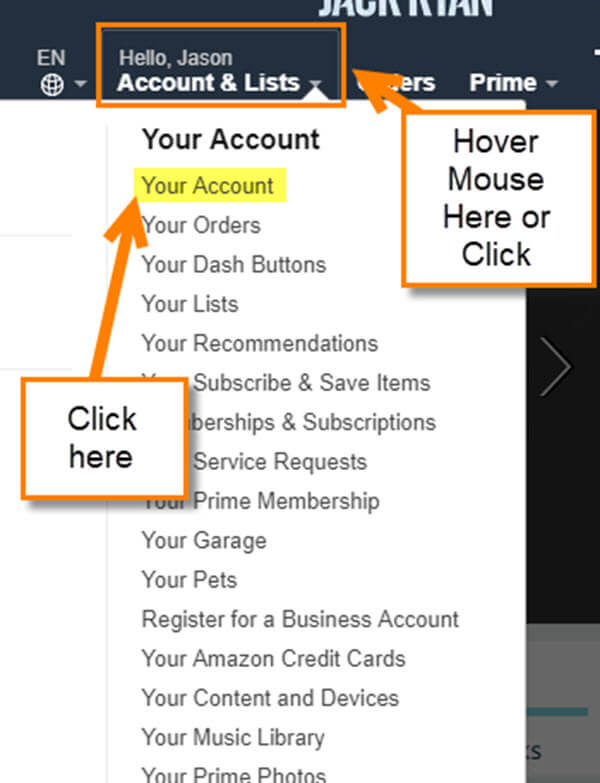
- Access Your Account & Lists: Hover your mouse over “Accounts & Lists” in the top right corner of the Amazon homepage. A dropdown menu will appear.
- Navigate to Prime Membership: In the dropdown menu, look for “Your Prime Membership” or simply “Prime Membership” under the “Your Account” section. Click on it.
- Review Your Status: This page is your central hub for all things Prime. You’ll immediately see whether your membership is active, its type (e.g., monthly, annual, Prime Student, Household member), and your next billing date or the expiration date if it’s a trial. If you don’t have Prime, this page will typically prompt you to sign up for a free trial or join Prime.
Through the Amazon Mobile App
The Amazon mobile app offers a similarly streamlined experience for checking your Prime status on the go.
- Open the Amazon App: Launch the Amazon Shopping app on your smartphone or tablet. Ensure you are logged into the correct account.
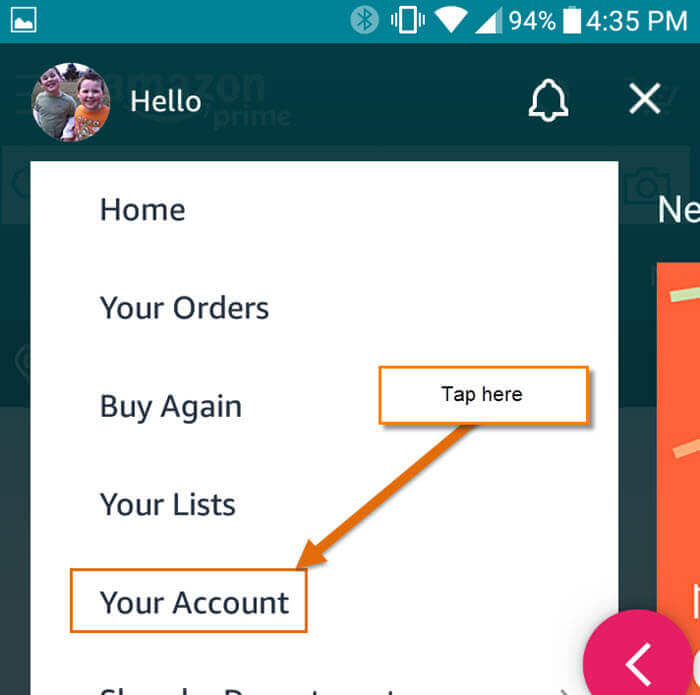
- Tap the Profile Icon: At the bottom of the screen, you’ll typically see a navigation bar. Tap the profile icon (often represented by a person silhouette or “You”).
- Go to “Your Account”: On the profile screen, scroll down and tap on “Your Account.”
- Find “Manage Prime Membership”: Under the “Account Settings” section, you’ll find an option titled “Manage Prime Membership” or “Prime Membership.” Tap on this.
- Verify Status: Similar to the website, this screen will display your current Prime status, membership details, and renewal information.
Checking Recent Orders for Prime Badges
While not a definitive method, reviewing your past orders can offer a strong clue about your Prime status.
- Access Your Orders: On Amazon.com or in the app, navigate to “Your Orders.”
- Look for Prime Indicators: Browse through recent orders. If you see the “Prime” badge next to items, or if shipping options for past orders indicate “FREE Prime Shipping,” it’s a strong indication that the order was placed under an active Prime membership. Keep in mind, however, that sometimes non-Prime items can ship for free under certain conditions, so this isn’t foolproof but rather a good first indicator.
Reviewing Your Email Inbox
Your email inbox can serve as an archive of your subscription history.
- Search Your Email: Log in to the email account associated with your Amazon account.
- Use Keywords: Search for terms like “Amazon Prime confirmation,” “Prime membership update,” “Your Prime benefits,” “Prime renewal,” or “Amazon Prime receipt.”
- Look for Official Communications: You should find welcome emails if you recently joined, renewal notices before your subscription is charged, or billing receipts confirming past payments. The absence of such emails might suggest you don’t have an active subscription or that the emails are going to a different account.
Understanding Your Prime Membership Details and Benefits
Once you’ve confirmed your Prime status, the next step is to delve deeper into the specifics of your membership. This helps in understanding what you’re paying for and how to best utilize it.
Identifying Your Membership Type
Amazon offers various types of Prime memberships, each with slightly different characteristics:
- Full Annual/Monthly: The standard subscription, either paid once a year or monthly.
- Prime Student: A discounted membership for eligible college students, often including an extended free trial.
- Amazon Household Member: If you’re part of an Amazon Household, you might be sharing Prime benefits from another primary member’s account. This means you don’t have your own direct Prime subscription but access its perks.
- Prime Video Only: In some regions, a standalone Prime Video subscription is available, which doesn’t include the full suite of Prime benefits like free shipping.
- Free Trial: An active trial period before conversion to a paid membership.
Understanding your specific membership type is crucial for managing expectations regarding benefits and understanding billing.
Key Benefits to Look For
Beyond the type, confirming your benefits helps you maximize value:
- Expedited Free Shipping: The hallmark of Prime, including free two-day, one-day, and in some areas, same-day delivery on eligible items.
- Prime Video: Unlimited streaming of movies and TV shows.
- Prime Music: Ad-free access to millions of songs and podcasts.
- Prime Reading: Access to a rotating selection of ebooks, magazines, and comics.
- Prime Gaming: Free games, in-game content, and a free Twitch channel subscription.
- Whole Foods Market Discounts: Exclusive savings and 5% back on eligible purchases for Prime Rewards Visa Cardholders.
- Amazon Pharmacy Savings: Discounts on prescription medications.
- Try Before You Buy (formerly Prime Wardrobe): Try on clothes at home before you buy.
Each of these benefits represents a unique opportunity to save money or enhance your digital experience, all stemming from your single Prime subscription.
Billing Cycle and Next Renewal Date
Crucially, your Prime membership page will clearly display your next billing date or renewal date. This information is vital for budgeting and deciding whether to continue your subscription. For annual memberships, this date might come as a surprise if you’ve forgotten when you originally signed up. Keeping track of this date ensures you can make informed decisions before you’re charged again.
Troubleshooting Common Prime Membership Issues
Even with clear methods for checking, sometimes things don’t go as expected. Here are some common issues and how to troubleshoot them.
“I Thought I Had Prime, But It Says I Don’t”
This is a frequent point of confusion, often stemming from one of several reasons:
- Wrong Account/Email Address: The most common culprit. You might be logged into a different Amazon account than the one associated with your Prime membership. Double-check the email address used for your supposed Prime account.
- Free Trial Expired: Your free trial might have simply ended without you realizing it converted to a paid membership, or perhaps it just ended and you didn’t continue.
- Membership Canceled: You or another member of your Amazon Household might have canceled the membership.
- Payment Method Failed: If your payment method on file expired or failed, Amazon might have paused or canceled your Prime membership. Check your payment settings under “Your Account.”
“My Benefits Aren’t Working”
If your Prime status indicates active, but you’re not seeing free shipping or can’t access Prime Video content:
- Signed into the Wrong Account: Again, ensure you’re signed into the correct Amazon account that has the active Prime membership.
- Need to Refresh: Sometimes, simply refreshing your browser or restarting the Amazon app can resolve temporary glitches.
- Specific Benefit Restrictions: Certain benefits, like Prime Video content, might be region-locked or have other specific eligibility requirements. Check the terms of service for that particular benefit.
Contacting Amazon Customer Service
If you’ve exhausted all troubleshooting steps and are still experiencing issues, contacting Amazon Customer Service is the next logical step. They can access your account details and provide specific assistance. You can typically find options for chat, phone, or email support on the “Help” or “Customer Service” pages within Amazon.com or the app. Be prepared to provide your account details and explain your issue clearly.
Managing Your Amazon Prime Subscription
Knowing your Prime status is just the first step; managing it effectively allows you to tailor the service to your needs. This goes beyond just checking your status and delves into actively controlling your subscription.
Upgrading or Downgrading Your Plan
Your “Your Prime Membership” page is also where you can modify your plan. You might switch from a monthly to an annual plan to save money, or vice-versa if your usage fluctuates. Students might need to transition from Prime Student to a full membership upon graduation. These options are typically presented clearly on your membership management page.
Changing Your Payment Method
Keeping your payment information current is essential to avoid service interruptions. If your credit card expires or you wish to use a different payment method, you can update this information directly within your Prime membership settings. This ensures continuous access to benefits without any hiccups.
Canceling Your Prime Membership
If you decide Amazon Prime no longer meets your needs, the cancellation process is straightforward. From your “Your Prime Membership” page, you’ll find an option to “End Membership” or “Manage Membership,” which will lead you to cancellation options. Amazon usually provides information on potential refunds based on how much of the service you’ve used since your last billing cycle. For instance, if you’ve barely used Prime benefits within a recently renewed annual subscription, you might be eligible for a full refund.
Exploring Amazon Household
For families, the Amazon Household feature is a powerful tool for sharing Prime benefits without needing multiple paid subscriptions. It allows two adults and up to four teens and four children to share digital content and Prime benefits. From your Prime membership page, you can often invite other adults to join your household, extending access to shipping, streaming, and more. This is an excellent way to maximize the value of a single Prime subscription across multiple users.
In conclusion, understanding how to check and manage your Amazon Prime status is a fundamental skill in today’s digital landscape. By taking a few simple steps, you can ensure you’re only paying for what you use, fully leveraging the benefits available to you, and maintaining sound oversight of your digital subscriptions. This active engagement with your tech services not only saves you money but also empowers you with greater control over your online experience.
aViewFromTheCave is a participant in the Amazon Services LLC Associates Program, an affiliate advertising program designed to provide a means for sites to earn advertising fees by advertising and linking to Amazon.com. Amazon, the Amazon logo, AmazonSupply, and the AmazonSupply logo are trademarks of Amazon.com, Inc. or its affiliates. As an Amazon Associate we earn affiliate commissions from qualifying purchases.