
Updating your contact information with financial institutions is a fundamental aspect of responsible personal finance management. For Bank of America account holders, ensuring your residential address is current is not just a matter of convenience; it’s a critical step that impacts security, access to funds, and the accurate processing of vital financial documents. Neglecting this simple administrative task can lead to significant disruptions, from missed communications to potential security vulnerabilities. This guide will walk you through the essential process of changing your address with Bank of America, detailing the available methods, necessary information, and the broader financial implications of keeping your records impeccable.
Why Updating Your Bank of America Address is Crucial for Financial Health
Maintaining an accurate address with your bank is more than just a formality; it’s a cornerstone of sound financial practice and personal security. An outdated address can expose you to a range of risks and inconveniences that could otherwise be easily avoided.
Ensuring Account Security and Preventing Fraud
One of the most critical reasons to update your address promptly is security. Financial institutions frequently send sensitive information via mail, including new credit or debit cards, PINs, account statements, and important security alerts. If these items are sent to an old address, they could fall into the wrong hands, significantly increasing your risk of identity theft or account fraud. Fraudsters often target misdirected mail to gain access to personal financial data. An up-to-date address ensures that all sensitive communications reach you directly, safeguarding your assets and personal information.
Maintaining Access to Critical Financial Communications
Beyond security, an accurate address ensures you receive timely and important communications about your accounts. This includes statements that help you monitor spending and identify discrepancies, notices about changes to terms and conditions, updates on loan or mortgage agreements, and reminders for upcoming payments. Missing these communications can lead to late fees, penalties, or even default on financial obligations, all of which can negatively impact your credit score and financial standing.
Accurate Tax Documentation
Each year, banks issue various tax forms, such as 1099-INT for interest earned, 1099-DIV for dividends, or 1098 for mortgage interest paid. These documents are essential for filing your income taxes correctly. If your address on file is incorrect, these critical tax forms might be delayed, lost, or sent to a previous residence. This could complicate your tax filing process, potentially leading to delays in receiving refunds or even triggering an audit if your reported income doesn’t match what the IRS receives from the bank.
Impact on Credit Reporting
While updating your address with Bank of America directly updates their internal records, it indirectly supports the accuracy of your credit report. Credit reporting agencies rely on consistent personal information across various financial accounts. Discrepancies in your address information across different lenders could potentially lead to minor issues when applying for new credit or could make it harder for lenders to verify your identity. Ensuring all your financial data is uniform and current contributes to a robust and reliable credit profile.
Step-by-Step Guide to Updating Your Address with Bank of America
Bank of America offers several convenient methods for updating your residential address, catering to different preferences and needs. Choosing the right method depends on your comfort with technology and your urgency.
Online Banking: The Fastest and Most Convenient Method
Updating your address through Bank of America’s online banking platform is often the quickest and most straightforward approach.
-
Log In: Visit the official Bank of America website (bankofamerica.com) and log in to your online banking account using your User ID and Passcode.
-
Navigate to Profile/Settings: Once logged in, look for a section typically labeled “Profile & Settings,” “Customer Service,” or “Account Management.” The exact wording may vary slightly.
-
Find Address Change Option: Within this section, locate an option such as “Update Contact Information,” “Change Address,” or “Personal Details.”
-
Enter New Address: Carefully input your new residential address, ensuring all details (street number, street name, apartment/suite number, city, state, ZIP code) are accurate. You may also be prompted to specify an effective date for the change.
-
Verify Identity: For security purposes, Bank of America will likely require you to verify your identity. This could involve receiving a one-time passcode via text message or email to your registered phone or email address, or answering security questions.
-
Confirm Changes: Review the entered information and confirm the update. You should receive an on-screen confirmation and potentially an email confirmation.
Mobile Banking App: On-the-Go Updates
The Bank of America mobile app provides a similar streamlined experience for address changes, ideal for those who manage their finances via smartphone or tablet.
-
Open and Log In: Launch the Bank of America mobile app on your device and log in using your credentials, Face ID, or fingerprint authentication.
-
Access Profile: Tap on the “More” or “Menu” icon (often represented by three horizontal lines or dots), then navigate to “Profile,” “Settings,” or “Manage Profile.”
-
Select Address Update: Look for an option like “Update Contact Info” or “Address.”
-
Input and Verify: Enter your new address details and proceed with the identity verification steps, similar to the online banking process.
-
Confirm: Confirm the changes.
Via Phone Call: Direct Assistance
If you prefer speaking with a representative or encounter issues with online methods, updating your address by phone is a viable option.
-
Locate Customer Service Number: Find the appropriate customer service number for Bank of America. This can usually be found on the back of your debit/credit card, your account statements, or the official Bank of America website.
-
Prepare Information: Before calling, have your account numbers, Social Security Number, previous address, and your new address readily available.
-
Pass Security Verification: The representative will ask a series of security questions to verify your identity. Be prepared to answer questions related to your account history or personal details.
-
Provide New Address: Clearly state your new residential address and any effective date you wish for the change.
-
Request Confirmation: Ask the representative for confirmation that the change has been processed and if there’s a reference number for your record.
In-Person at a Bank of America Financial Center: Personalized Service
For those who prefer face-to-face interaction or need assistance with multiple accounts, visiting a Bank of America financial center is an option.
-
Gather Documents: Bring a valid, government-issued photo ID (e.g., driver’s license, passport). It’s also advisable to bring proof of your new address, such as a recent utility bill or a lease agreement, though this may not always be required.
-
Speak with a Representative: Inform the representative that you wish to change your address.
-
Fill Out Forms (If Required): You may be asked to fill out a brief form.
-
Get Confirmation: The representative will process the change and provide immediate confirmation. This method offers the highest level of assurance due to direct interaction.
By Mail: The Traditional (and Slowest) Method
While less common due to the speed and convenience of other methods, you can still change your address by mail. This is generally not recommended for urgent changes.
-
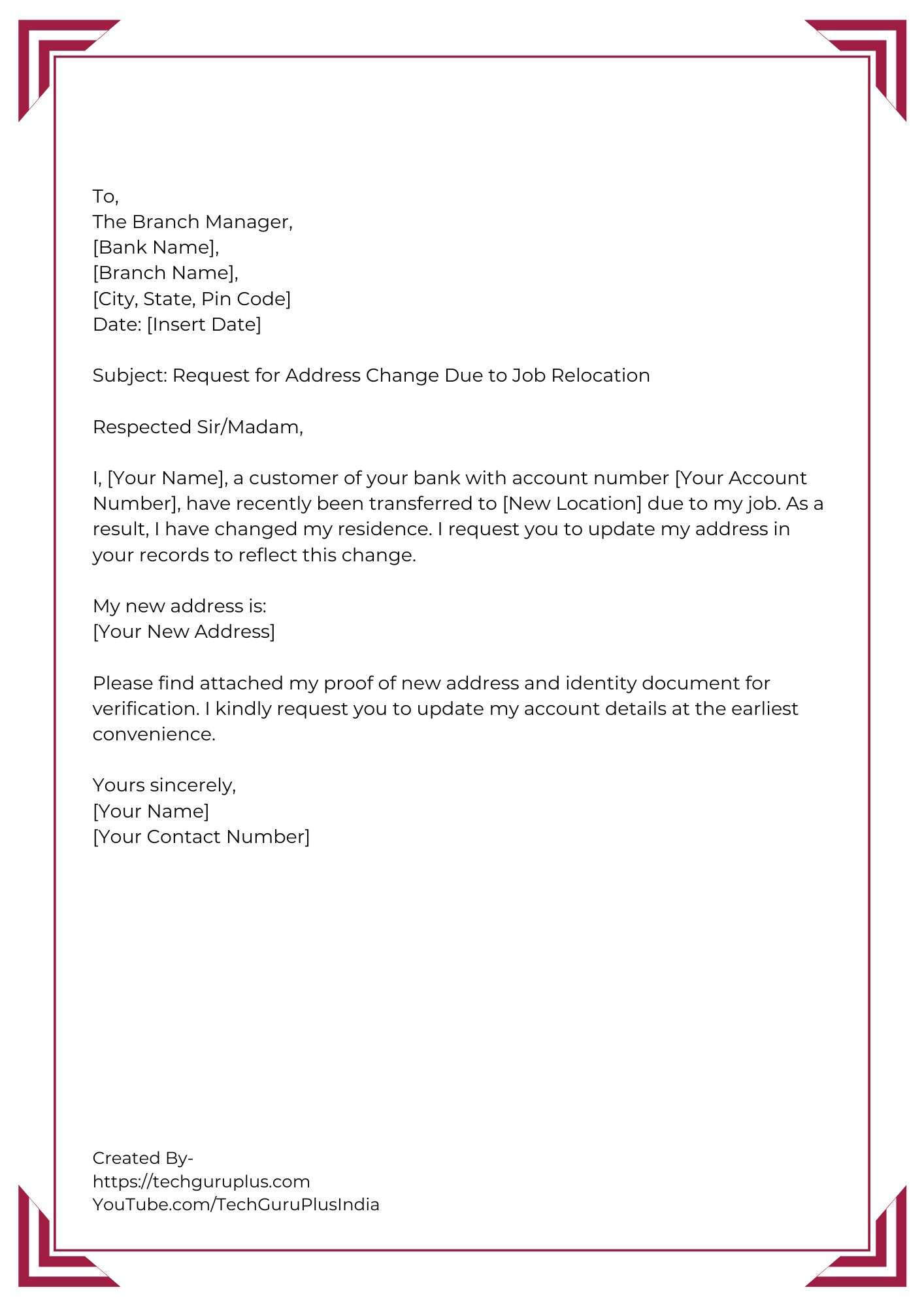
Draft a Letter: Write a clear, signed letter including your full name, old address, new address, all relevant Bank of America account numbers, and a contact phone number.
-
Include Identification: Attach clear photocopies of relevant identification (do not send originals).
-
Mail to Correct Address: Find the appropriate mailing address for customer service or address changes on the Bank of America website.
-
Expect Delays: Be aware that processing by mail can take several business days or even weeks.
Information and Verification Requirements
Regardless of the method chosen, Bank of America maintains strict protocols to protect your financial information. This means you’ll need to provide specific details and undergo identity verification.

Standard Information Required
To facilitate an address change, you will typically need to provide:
-
Full Name: As it appears on your accounts.
-
Previous Address: Your old residential address on file.
-
New Address: Your complete and accurate new residential address.
-
Account Number(s): For all relevant checking, savings, credit card, mortgage, or investment accounts.
-
Social Security Number (SSN) or Taxpayer Identification Number (TIN): Essential for identity verification and compliance.
-
Date of Birth: Another key identifier.
-
Phone Number and Email Address: To ensure you can receive critical alerts and for verification purposes.
Verification Methods
Bank of America employs various methods to verify your identity and ensure that only authorized individuals can change your address:
-
Online/App: Password authentication, security questions, and one-time passcodes (OTPs) sent to your registered phone or email address.
-
Phone: Account number, SSN confirmation, answers to personal security questions (e.g., mother’s maiden name, recent transaction details).
-
In-Person: A government-issued photo ID (e.g., driver’s license, passport). In some cases, a utility bill or lease agreement showing your new address may also be requested as secondary proof.
The rigor of these verification steps is paramount. They are in place not to inconvenience you, but to prevent unauthorized access and changes to your accounts, complying with “Know Your Customer” (KYC) regulations designed to combat financial crime and identity theft.
Beyond the Address Change: Financial Implications and Next Steps
Updating your address with Bank of America is a crucial first step, but it’s part of a larger financial management picture. A move often requires a cascade of updates across all your financial relationships.
Update All Relevant Accounts
Remember that an address change with Bank of America might not automatically update all your accounts if they operate under different systems or subsidiaries. Ensure you’ve updated the address for:
-
Checking and Savings Accounts
-
Credit Cards: Even if issued by Bank of America, credit card divisions sometimes require separate notification.
-
Mortgage Accounts: If your mortgage is with Bank of America.
-
Investment Accounts: If you have brokerage accounts or other investments managed through Bank of America Merrill Lynch.
-
Business Accounts: If you have business banking with Bank of America, ensure both personal and business addresses are updated if applicable.
Review Pending Mail and Opt for E-Statements
If you’ve recently moved, consider setting up a mail forwarding service with the postal service for a temporary period. This acts as a safety net for any mail that might still be sent to your old address before the bank’s records are fully updated. Furthermore, consider opting for e-statements and electronic notifications for all your accounts. This not only reduces paper waste but significantly enhances security by minimizing the risk of sensitive financial documents being lost or stolen in the mail.
Tax Implications and Credit Reporting
Confirm that your tax-related documents (such as 1099s) will be sent to the correct address for the next tax cycle. If you anticipate tax forms, double-check that your new address is reflected well in advance of tax season. Additionally, while your bank updates its records, it’s a good practice to also update your address with the three major credit bureaus (Experian, Equifax, TransUnion) if you haven’t already done so. This helps maintain consistent information across all your credit files, which is important for your credit score and future credit applications.
Other Financial Institutions and Providers
The address change with Bank of America is just one piece of the puzzle. Make a comprehensive list of all other financial institutions, loan providers, insurance companies, employers, and government agencies (like the IRS or Social Security Administration) that need your updated address. Consistency across all these entities is vital for uninterrupted financial services and to prevent administrative headaches down the line.
Security Best Practices When Managing Your Bank Information
When making changes to your financial information, especially your address, it’s imperative to maintain vigilance regarding security. Proactive measures can safeguard your accounts from potential threats.
Use Strong, Unique Passwords and Enable Two-Factor Authentication
Always use complex, unique passwords for your online banking account. Avoid using easily guessable information or recycling passwords from other websites. Furthermore, enable two-factor authentication (2FA) whenever possible. This adds an essential layer of security, requiring a second form of verification (like a code sent to your phone) in addition to your password, making it significantly harder for unauthorized individuals to access your account.
Be Wary of Phishing Scams
Fraudsters often exploit common administrative tasks, like address changes, through phishing attempts. Be extremely cautious of unsolicited emails, text messages, or phone calls claiming to be from Bank of America that ask for sensitive personal or account information. Bank of America will never ask for your full Social Security Number, complete account numbers, or passwords via unsecured channels. Always verify the sender’s legitimacy before clicking links or providing information, and if in doubt, contact Bank of America directly using official contact numbers.
Regularly Review Account Activity
After changing your address, make it a point to regularly review your bank statements and online account activity for several months. Look for any unauthorized transactions, suspicious withdrawals, or unfamiliar charges. Promptly report any discrepancies to Bank of America. Early detection is key to mitigating potential financial losses from fraud.
Securely Dispose of Old Financial Documents
Do not simply discard old bank statements, bills, or any documents containing your previous address or other personal information. These can be goldmines for identity thieves. Invest in a cross-cut shredder and securely shred all sensitive documents before disposing of them. This simple step prevents your personal data from falling into the wrong hands.
Exercise Caution on Public Wi-Fi
Avoid accessing your online banking or making sensitive account changes when connected to unsecured public Wi-Fi networks. These networks can be vulnerable to eavesdropping, allowing malicious actors to intercept your login credentials or personal data. If you must conduct banking on the go, use a secure, private network or your mobile data connection.
By diligently updating your address with Bank of America and adhering to these financial and security best practices, you ensure the integrity of your financial records and protect yourself from potential risks, fostering greater peace of mind in your financial life.
aViewFromTheCave is a participant in the Amazon Services LLC Associates Program, an affiliate advertising program designed to provide a means for sites to earn advertising fees by advertising and linking to Amazon.com. Amazon, the Amazon logo, AmazonSupply, and the AmazonSupply logo are trademarks of Amazon.com, Inc. or its affiliates. As an Amazon Associate we earn affiliate commissions from qualifying purchases.