
In our increasingly digital world, managing online accounts effectively is paramount, especially for platforms like Amazon that serve as central hubs for shopping, entertainment, and even smart home integration. A critical, yet often overlooked, aspect of this management is keeping your contact information, particularly your phone number, up-to-date. Far from a mere formality, an updated phone number on your Amazon account is a cornerstone of digital security, account recovery, and seamless access to services. This guide delves into the why and how, offering a professional, insightful, and engaging tutorial to ensure your Amazon experience remains secure and uninterrupted.
The Imperative of Keeping Your Amazon Contact Information Current
The dynamic nature of our personal and digital lives means that details like phone numbers can change with surprising frequency. Neglecting to update these changes on crucial platforms like Amazon can lead to significant inconveniences, security vulnerabilities, and even complete loss of account access. Understanding the critical role your phone number plays is the first step towards proactive account management.
Why an Updated Phone Number Matters for Your Digital Security
At the heart of modern digital security lies the concept of multi-factor authentication (MFA), and for many, two-factor authentication (2FA) via a phone number is the primary safeguard. Your registered phone number on Amazon is often the first line of defense against unauthorized access. When you attempt to log in from an unrecognized device or location, or when making certain sensitive changes, Amazon frequently sends a verification code (One-Time Password or OTP) to your registered mobile number. If this number is outdated or inaccessible, you could be locked out of your own account, even with the correct password.
Furthermore, an updated phone number is indispensable for account recovery. Should you forget your password, or if your account is compromised, Amazon often uses your phone number to verify your identity and facilitate the recovery process. Without access to this number, recovering your account can become a lengthy and frustrating ordeal, potentially requiring extensive communication with customer support and submission of additional identity verification documents. This reliance highlights the phone number’s role not just as a contact detail but as a critical security credential.
Common Scenarios Necessitating a Phone Number Update
Life changes, technological advancements, and personal preferences all contribute to the need for phone number updates. Recognizing these scenarios can prompt timely action, preventing future headaches.
- New Phone or Service Provider: Switching mobile carriers often comes with the option of getting a new phone number. Similarly, upgrading to a new device might be accompanied by a SIM card change, which, while not always altering the number, can prompt users to review their account details.
- Lost or Stolen Device: In unfortunate events like a lost or stolen phone, it’s crucial to update your Amazon account immediately. If the old number is still linked, and someone gains access to your phone, they could potentially intercept verification codes and attempt to compromise your account.
- Inactive or Discontinued Number: Phone numbers can become inactive if not used for a certain period, especially with prepaid services. If you stop using a number, your service provider might reassign it to someone else. Imagine a stranger receiving your Amazon verification codes – a significant security lapse that an updated number prevents.
- Privacy Concerns: Sometimes, individuals simply prefer to use a new number for privacy reasons or to consolidate their digital footprint. Keeping your Amazon profile aligned with your current, preferred contact details is a matter of personal privacy and control.
- Travel and International Numbers: For frequent travelers, or those relocating internationally, updating your Amazon phone number to a local, active number can be essential for receiving timely notifications and verification codes without incurring roaming charges or relying on potentially unreliable international SMS delivery.
Navigating the Amazon Account Settings: A Step-by-Step Tutorial
Changing your phone number on Amazon is a straightforward process, designed to be user-friendly. However, knowing the exact steps and potential pitfalls can make the experience even smoother. This section walks you through the precise actions required.
Pre-requisites and Preparation Before You Begin
Before you embark on updating your phone number, ensure you have a few things in order to avoid interruptions:
- Active Login Credentials: Make sure you have your Amazon email/phone number and password readily available. If you’ve forgotten your password, reset it before attempting to change your phone number.
- Stable Internet Connection: A reliable internet connection is crucial to prevent timeouts or errors during the process.
- Access to Your Old and New Numbers (if possible): While you primarily need access to your new number for verification, having access to your old number can sometimes simplify the process, especially if Amazon sends a notification or verification to it as a security measure. If you no longer have access to the old number, don’t worry, the process is still possible but might involve an extra step or two.
Accessing Your Account and Security Settings
The journey begins by logging into your Amazon account, whether through a web browser or the mobile app. The steps are largely similar but may have slight interface variations.
Via Web Browser (Recommended for clearer navigation):
- Open your web browser and go to amazon.com (or your respective regional Amazon domain).
- Hover over “Accounts & Lists” in the top right corner.
- Click on “Sign in” if you’re not already logged in. Enter your credentials.
- Once signed in, hover over “Accounts & Lists” again.
- From the dropdown menu, click on “Your Account.”
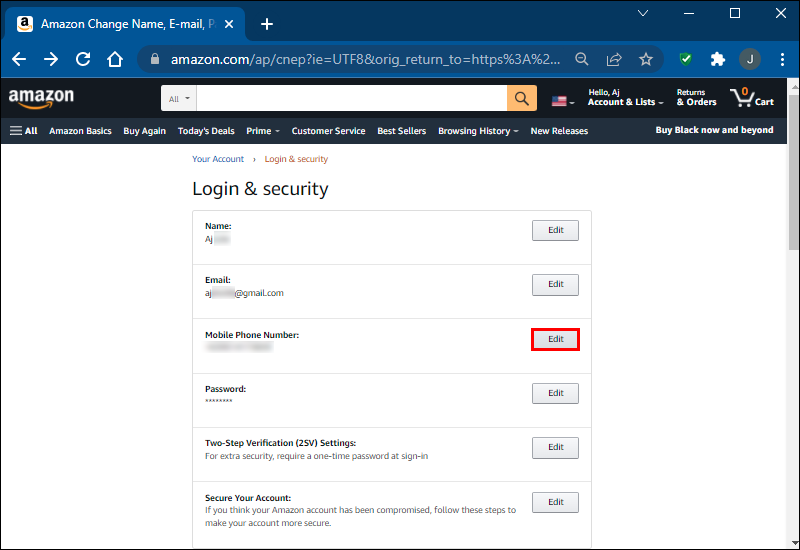
- On the “Your Account” page, locate the “Login & security” section and click on it. You might be prompted to re-enter your password for security verification.
Via Amazon Mobile App:
- Open the Amazon Shopping app on your smartphone or tablet.
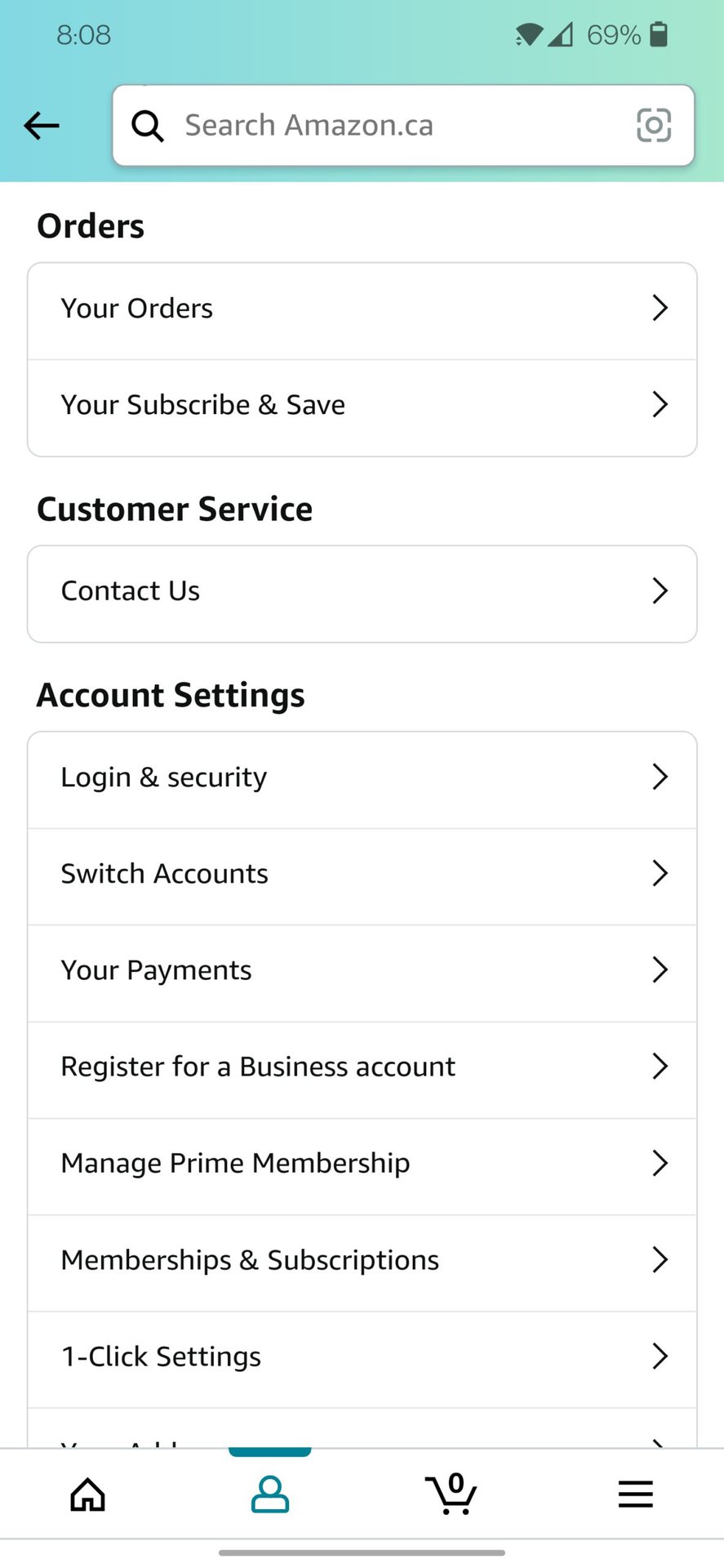
- Tap on the profile icon (usually a person icon or “You”) at the bottom navigation bar.
- Tap on “Your Account.”
- Scroll down to the “Account Settings” section and tap on “Login & Security.” You might be prompted to re-enter your password.
The Process: Updating Your Primary Phone Number
Once you’re in the “Login & Security” section, you’ll see various editable fields for your account information.
- Locate the “Mobile Phone Number” field: You’ll typically see options to edit your name, email, password, and mobile phone number.
- Click “Edit”: Next to your current mobile phone number, there will be an “Edit” button. Click it.
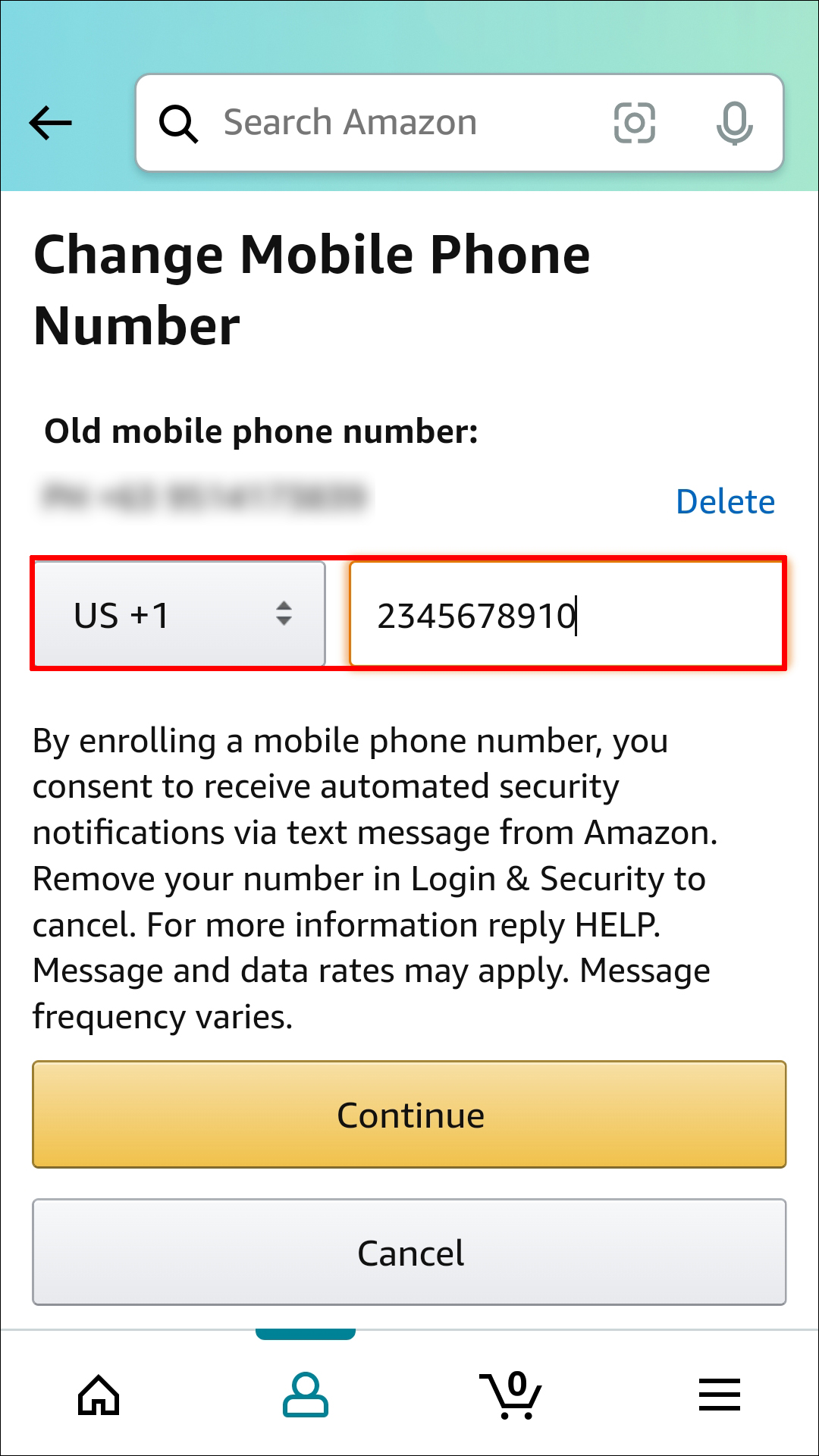
- Enter Your New Phone Number: A new screen will appear, prompting you to enter your new mobile phone number. Be sure to include the correct country code if it’s not automatically selected or inferred.
- Confirm and Send OTP: After entering the new number, click “Continue” or “Add Mobile Number.” Amazon will then send a One-Time Password (OTP) or verification code to this new number via SMS.
- Enter the OTP: Check your phone for an SMS containing the code. Enter this code into the designated field on Amazon’s website/app.
- Click “Verify” or “Submit”: Once the correct OTP is entered, click the button to verify the number.
Verifying the Change and Confirmation
Upon successful verification of the OTP, your new phone number will be officially linked to your Amazon account. You should receive an on-screen confirmation message. Additionally, Amazon often sends an email notification to your primary email address associated with the account, confirming that your phone number has been updated. This email serves as an extra layer of security and a record of the change. Review this email to ensure all details are correct.
Beyond the Basics: Advanced Considerations and Connected Services
Changing a phone number on Amazon isn’t just about updating a contact field; it has ripple effects across your entire Amazon ecosystem. Understanding these broader implications is crucial for maintaining seamless service and robust security.
Two-Factor Authentication (2FA) and Its Reliance on Your Phone Number
For many Amazon users, especially those with 2FA enabled, the registered phone number is the primary method for receiving authentication codes. When you change your phone number, you are essentially changing the device through which these critical security codes are delivered.
- Potential Disruption: If you have 2FA enabled and your old phone number is no longer active, you might temporarily lose access to your account if you’re logging in from a new device before the number update. This is because the system will still try to send the 2FA code to the old, inaccessible number.
- Re-enabling 2FA (if necessary): After updating your phone number, it’s a good practice to revisit the “Login & Security” section and ensure your 2FA settings are correctly configured with your new number. In some cases, depending on Amazon’s security protocols, you might need to re-enable or re-verify 2FA for complete peace of mind, especially if you were previously using an authenticator app linked to the old number or device. Consider using an authenticator app (like Google Authenticator or Authy) as a more robust 2FA method that isn’t solely tied to your phone number for future flexibility.
Impact on Amazon Devices and Services
Your Amazon account is often the central identity for a myriad of connected devices and services. Changing your phone number can have subtle implications:
- Alexa and Echo Devices: While your Echo devices don’t directly use your phone number for their primary function, they are linked to your Amazon account. Any critical account-related notifications or recovery processes initiated through Alexa might rely on the updated number.
- Kindle and Fire Tablets: Similarly, your Kindle library and Fire tablet access are tied to your Amazon account. The change won’t directly impact device functionality, but account-level security updates will rely on the new contact information.
- Amazon Pay and Other Financial Services: If you use Amazon Pay or have other financial services linked through your Amazon account, these highly sensitive transactions will benefit from the enhanced security offered by an updated, active phone number for verification purposes.
- Prime Video and Other Digital Content: Your access to Prime Video, Amazon Music, and other digital content services remains tied to your Amazon account. While immediate viewing or listening won’t be affected, any password resets or security checks for these services will now correctly use your new phone number.
What Happens if You Lose Access to Your Old Number?
It’s a common scenario: you’ve lost or deactivated your old phone number before updating it on Amazon. This situation can be more challenging but is by no means insurmountable.
- Account Recovery Options: Amazon has robust account recovery mechanisms. If you can still log in with your password, you can follow the steps outlined above to update your number. The primary hurdle arises if you’re also locked out of your account (e.g., forgot password and 2FA is sending codes to the old number).
- Customer Support Intervention: In cases where you cannot log in and do not have access to the old number, your best course of action is to contact Amazon Customer Support. Be prepared to provide detailed information to verify your identity, such as:
- The email address associated with your account.
- Recent order numbers or payment details.
- Your full billing and shipping addresses.
- Your date of birth.
- Any other security questions you might have set up.
They will guide you through a manual verification process, which might involve photo ID submission, to regain access and update your contact details.
Troubleshooting Common Issues and Ensuring Smooth Transitions
While Amazon’s system is designed for ease of use, technical glitches or user errors can occasionally arise. Knowing how to troubleshoot common issues can save time and frustration.
Dealing with Verification Code Delays or Non-Receipt
One of the most frequent issues encountered when updating a phone number is not receiving the verification code.
- Check Your Signal and Network: Ensure your phone has a strong cellular signal. Poor reception can delay or prevent SMS delivery.
- Verify the Number Entered: Double-check that you’ve entered the new phone number correctly in Amazon’s system, including the country code. A single digit error can redirect the code.
- Check Spam/Junk Folders (Email): While verification codes typically arrive via SMS, if Amazon sends an email notification, check your email’s spam or junk folders.
- Wait and Request Again: Sometimes, there’s a slight delay in SMS delivery due to network congestion. Wait a few minutes. If it still doesn’t arrive, use the “Resend Code” or “Didn’t receive code?” option on Amazon’s page. Be mindful not to request too many codes in quick succession, as this might temporarily block delivery.
- Clear App Cache/Browser Cookies: For app-related issues, try clearing the app’s cache. For browser issues, clear browser cookies and cache, or try a different browser.
Account Access Challenges During the Update Process
If you encounter difficulties logging in or making changes during the update, several factors could be at play.
- Forgot Password: If you can’t log in at all, use the “Forgot your password?” link on the sign-in page. This process might also rely on your phone number or email for verification, so ensure you have access to at least one of these.
- Temporary Account Lockout: Repeated failed login attempts can temporarily lock your account as a security measure. Wait for the specified period (usually a few hours) before trying again.
- Browser/App Issues: Try switching between the Amazon website and the mobile app. Sometimes, a specific interface might be experiencing a temporary glitch. Ensure your app is updated to the latest version.
- Suspicious Activity Flag: If Amazon detects unusual activity, it might temporarily restrict certain account modifications. If this is the case, you’ll likely receive a notification and will need to follow Amazon’s instructions to verify your identity.
When to Contact Amazon Customer Support
For persistent issues that you cannot resolve yourself, contacting Amazon Customer Support is the most reliable path.
- Inability to Log In: If you’re locked out of your account, cannot reset your password, and cannot receive verification codes, customer support is essential.
- Verification Code Not Arriving (After Multiple Attempts): If you’ve tried all troubleshooting steps for code delivery and it’s still not working, they can investigate backend issues.
- Account Compromise Concerns: If you suspect your account has been compromised, or if you see unauthorized changes, contact support immediately.
- Technical Glitches: For any unexpected errors or bugs encountered during the update process, their technical team can provide specific guidance.
When contacting support, be prepared with all relevant account details and a clear description of the problem. Patience is key, as they may need to go through several verification steps to ensure you are the legitimate account holder.
Best Practices for Ongoing Amazon Account Security
Updating your phone number is a crucial step in maintaining account security, but it’s part of a broader strategy for safeguarding your digital life.
Regularly Reviewing and Updating Your Profile Information
Proactive security isn’t a one-time task; it’s an ongoing commitment. Make it a habit to periodically review all your profile information on Amazon. Check your email addresses, shipping addresses, payment methods, and phone numbers. Ensure they are all current and accurate. This prevents issues with order delivery, payment processing, and, most importantly, keeps your account resilient against potential threats. A quick annual or bi-annual check can prevent a multitude of problems.
Leveraging Strong, Unique Passwords and Biometric Security
While your phone number is vital for 2FA, it complements, rather than replaces, a strong primary password. Always use a unique, complex password for your Amazon account – one that you don’t use for any other service. Password managers can greatly assist in generating and storing these strong passwords. Furthermore, if your device supports it, enable biometric security (fingerprint or facial recognition) for the Amazon app for an extra layer of protection and convenient access.
Recognizing and Avoiding Phishing Attempts
Scammers frequently attempt to gain access to Amazon accounts through sophisticated phishing schemes. Be extremely wary of unsolicited emails or text messages claiming to be from Amazon, asking you to update your information by clicking on a link. Always navigate directly to the Amazon website or use the official app to make any changes. Look for suspicious URLs, grammatical errors, or unusual requests for personal information. A legitimate Amazon communication will never ask for your password via email or text, nor will it direct you to a non-Amazon URL for account updates. Educating yourself about common phishing tactics is a powerful defense against account compromise.
By meticulously following these steps and adopting a proactive approach to your digital security, you can ensure that your Amazon account remains secure, accessible, and an uninterrupted gateway to your online shopping and entertainment needs. Keeping your phone number current is a small action with significant security benefits, empowering you with greater control over your digital identity.
aViewFromTheCave is a participant in the Amazon Services LLC Associates Program, an affiliate advertising program designed to provide a means for sites to earn advertising fees by advertising and linking to Amazon.com. Amazon, the Amazon logo, AmazonSupply, and the AmazonSupply logo are trademarks of Amazon.com, Inc. or its affiliates. As an Amazon Associate we earn affiliate commissions from qualifying purchases.