
In an increasingly digitized world, managing the security of your financial instruments is paramount. Your debit card Personal Identification Number (PIN) serves as a critical first line of defense against unauthorized access to your funds. Regularly updating this PIN, or changing it when you suspect compromise, is a fundamental aspect of digital financial hygiene. This comprehensive guide will walk you through the various technological pathways available through Bank of America to modify your debit card PIN, ensuring your digital assets remain secure and accessible only to you.
The Digital Imperative: Understanding PIN Security in the Modern Age
In an era defined by pervasive digital connectivity, the security of personal and financial data has become a critical concern. Your debit card PIN, though seemingly a simple four-digit code, is a sophisticated security feature that authenticates your identity and authorizes transactions. Understanding its technological significance and the best practices for its management is no longer optional but a necessity.

The Cryptographic Role of a Strong PIN
At its core, a PIN acts as a cryptographic key, albeit a simple one, designed to unlock access to your account via a debit card. When you enter your PIN, the system performs a rapid, encrypted comparison against the stored value associated with your card. This process is designed to be instantaneous and secure, preventing brute-force attacks by limiting attempts. A strong PIN, meaning one that isn’t easily guessable (e.g., birth dates, sequential numbers), significantly enhances this cryptographic defense. The ease with which cybercriminals or opportunistic thieves can deduce common PINs underscores the importance of choosing complex, non-obvious combinations. Furthermore, the secure transmission and storage of your PIN by the bank, often involving tokenization and advanced encryption standards, highlight the layered technological defenses in place.
When Technology Demands a PIN Update
Several scenarios necessitate a prompt PIN change, often driven by technological vulnerabilities or security best practices. The most obvious is a suspected compromise: if your card data was part of a data breach, or if you’ve used your card at a suspicious ATM or point-of-sale terminal, a PIN change is a non-negotiable step. Similarly, if you’ve shared your PIN (which is strongly discouraged) or if a trusted individual has gained knowledge of it, the integrity of your security is compromised. Proactive changes are also recommended periodically, perhaps annually, as a general digital security measure, much like updating passwords for online accounts. This minimizes the window of opportunity for any potential, undetected compromise to escalate into financial loss, serving as a preventative security patch for your financial identity.
Digital Pathways: Leveraging Bank of America’s Online and Mobile Platforms
Bank of America provides robust digital tools that empower customers to manage their accounts, including the ability to change a debit card PIN, from virtually anywhere. These platforms leverage secure network protocols and multi-factor authentication to ensure the integrity of your requests.
Step-by-Step Guide for Online Banking
Changing your PIN through Bank of America’s online banking portal is a streamlined process designed for user convenience and security.
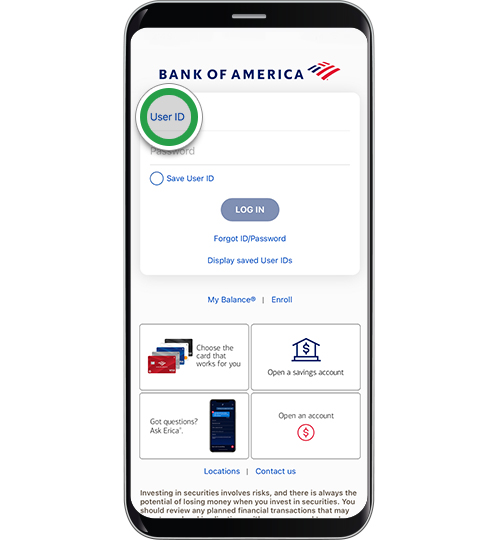
- Access the Secure Portal: Begin by navigating to the official Bank of America website. It’s crucial to always type the URL directly or use a trusted bookmark to avoid phishing sites. Log in using your Online ID and Passcode. These credentials are protected by several layers of security, including encryption during transmission.
- Navigate to Card Services: Once logged in, locate the “Account Services” or “Customer Service” section. Within this area, you’ll typically find an option related to “Debit Card Services” or “Manage My Card.” This interface is designed to centralize all card-related functions.
- Select “Change PIN”: Look for a clear link or button labeled “Change Debit Card PIN” or similar. Clicking this will initiate the PIN change process.
- Identity Verification: To protect against unauthorized access, the system will prompt you for additional identity verification. This may involve receiving a one-time passcode (OTP) via text message or email to a registered device, or answering security questions. This is a critical multi-factor authentication step, confirming that the person attempting the change is indeed the legitimate account holder.
- Enter New PIN: Follow the on-screen instructions to enter your new four-digit PIN. The system will typically require you to enter it twice to ensure accuracy. Remember the best practices for choosing a strong, memorable, yet unguessable PIN. Avoid sequential numbers, repeated digits, or easily identifiable personal information.
- Confirmation: Upon successful entry, you will receive a confirmation message indicating that your PIN has been updated. Keep this confirmation for your records. The change is usually effective immediately.
Leveraging the Bank of America Mobile App
For users who prefer managing their finances on the go, the Bank of America mobile app offers a similarly intuitive and secure experience for PIN management.
- Launch and Authenticate: Open the Bank of America mobile app on your smartphone or tablet. Authenticate using your Online ID and Passcode, or leverage biometric login features such as fingerprint or facial recognition, if enabled. These biometric methods add a layer of sophisticated security, linking your identity directly to your physical characteristics.
- Access Card Management: From the app’s main dashboard, navigate to the specific debit card you wish to manage. Look for a “Manage Card” or “Card Services” option. This section consolidates all functions related to your card, from temporary locking to PIN changes.
- Initiate PIN Change: Select the “Change PIN” option. Similar to online banking, the app will guide you through the process.
- Security Challenge: The app will likely trigger an additional security challenge, such as sending an OTP to your registered mobile number or email. This mobile-centric multi-factor authentication ensures that even if your phone is compromised, the PIN change cannot be made without the OTP.
- Set New PIN: Enter your desired new four-digit PIN and confirm it. The app’s interface is designed for touch-screen input, ensuring a user-friendly experience.
- Receive Confirmation: A confirmation message within the app will signify the successful update of your debit card PIN.
ATM Kiosks: The Physical-Digital Interface for PIN Management
While online and mobile channels offer unparalleled convenience, Automated Teller Machines (ATMs) remain a robust and widely accessible technological interface for managing your debit card, including PIN changes. These self-service terminals blend physical interaction with digital processing.
Navigating the ATM Menu for PIN Services
ATMs are specialized computers designed for financial transactions, including PIN management.
- Insert Your Card: Begin by inserting your Bank of America debit card into the ATM’s card reader. The machine will electronically read your card’s data, which is often encrypted on the EMV chip for enhanced security.
- Enter Current PIN: The ATM will prompt you to enter your current PIN to access your account. This is the initial authentication step, confirming you are the legitimate cardholder.
- Access Main Menu: Once authenticated, the ATM’s main menu will display various transaction options. Look for “More Options,” “Other Services,” “PIN Services,” or “Change PIN.” The exact wording may vary slightly depending on the ATM’s software version.
- Select “Change PIN”: Choose the “Change PIN” option from the menu. The ATM’s graphical user interface (GUI) is designed for straightforward interaction.
- Enter New PIN: The machine will instruct you to enter your desired new four-digit PIN. You will then be asked to re-enter it for confirmation. The ATM’s keypad is a direct input device, and your entries are processed internally and securely.
- Transaction Confirmation: The ATM will display a message confirming that your PIN has been successfully changed. You may also be offered a printed receipt as a physical record of the transaction. Remove your card and receipt, ensuring no sensitive information is left behind.
Best Practices at an ATM
When utilizing an ATM for any transaction, especially one involving security features like a PIN change, adhering to certain best practices enhances your personal and digital security:
- Be Aware of Your Surroundings: Before approaching an ATM, scan the area for anything suspicious. This minimizes the risk of physical threats or “shoulder surfing” attempts to observe your PIN entry.
- Protect Your PIN Entry: Always cover the keypad with your hand when entering your PIN. This simple physical barrier defeats hidden cameras or observers trying to capture your keystrokes.
- Inspect the ATM: Briefly check the card reader and keypad for any signs of tampering, such as unusual attachments or loose parts. Criminals sometimes install “skimming” devices to steal card data and PINs.
- Use Only Bank-Branded ATMs: Whenever possible, use Bank of America-branded ATMs located in secure, well-lit areas, preferably inside bank branches. These machines are regularly inspected and maintained by the bank, reducing the risk of tampering.
- Retrieve Your Card and Receipt: Always ensure you retrieve your debit card and any transaction receipts before leaving the ATM. Receipts can contain sensitive information if not properly disposed of.
Alternative Methods and Enhanced Security Protocols
While digital and ATM channels are the most common, Bank of America also offers alternative methods for PIN management, often leveraging different forms of technology or human interaction to ensure accessibility and security. Furthermore, understanding broader security protocols helps maintain overall digital account health.
Phone Banking and Interactive Voice Response (IVR) Systems
For those who prefer voice interaction or face challenges with digital interfaces, phone banking offers a viable solution.
- Dial the Official Number: Call Bank of America’s customer service number, which can be found on the back of your debit card or the official website. Ensure you are calling an authenticated number to avoid vishing (voice phishing) scams.
- Navigate the IVR: You will likely interact with an Interactive Voice Response (IVR) system. This automated system uses speech recognition or touch-tone input to direct your call. Listen carefully for options related to “Debit Card Services” or “PIN Change.”
- Authenticate Your Identity: The IVR or a customer service representative will ask for various pieces of personal information to verify your identity. This typically includes your account number, Social Security number (SSN), date of birth, and possibly answers to security questions. This is a crucial security checkpoint.
- Speak with a Representative (if needed): If the IVR cannot fully process your request, you will be connected to a live customer service representative. They will guide you through the PIN change process, verbally confirming your new PIN in a secure manner. The bank’s internal systems are designed to process these changes securely, often with dual authentication by the representative.
- Confirmation: The representative will confirm the successful PIN change, often indicating when it will become active.
In-Branch Digital Assistance
Visiting a Bank of America branch provides a face-to-face option, combining human assistance with the bank’s internal digital systems. While you might not directly interact with a terminal to change your PIN, a teller or personal banker can facilitate the change through their secure workstations.
- Visit a Branch: Locate your nearest Bank of America branch.
- Speak with Staff: Inform a teller or personal banker that you wish to change your debit card PIN.
- Identity Verification: You will be required to present a valid government-issued photo ID (e.g., driver’s license, passport) to verify your identity. This is the most stringent form of authentication, linking your physical presence directly to your account.
- System-Facilitated Change: The bank employee will use their secure internal system to process the PIN change request. They will guide you on entering your new PIN discreetly, often using a secure terminal or by providing a temporary PIN that you can change immediately at an ATM.
Proactive Security Measures Beyond PINs
While PINs are vital, they are just one component of a holistic digital security strategy. Bank of America implements and encourages customers to utilize additional technological safeguards:
- Fraud Alerts: Enroll in Bank of America’s fraud alert system, which sends real-time notifications via text or email for suspicious account activity. This technology uses sophisticated algorithms to detect unusual spending patterns.
- Card Controls: Leverage the mobile app’s card control features, allowing you to temporarily lock or unlock your debit card, set spending limits, or restrict transactions to specific regions or merchant types. These controls offer granular oversight of your card’s digital footprint.
- Secure Browsing: Always ensure your device’s operating system and web browser are updated to the latest versions, applying critical security patches. Use strong, unique passwords for your online banking account and consider a password manager.
- Public Wi-Fi Caution: Avoid conducting financial transactions, including accessing online banking, over unsecured public Wi-Fi networks, which are vulnerable to eavesdropping. Use a Virtual Private Network (VPN) for an encrypted connection if public Wi-Fi is unavoidable.
By understanding and utilizing the technological avenues available for PIN management, alongside broader digital security best practices, you can effectively safeguard your Bank of America debit card and, by extension, your financial well-being in the digital landscape. Regular vigilance and proactive engagement with these security features are your best defense.
aViewFromTheCave is a participant in the Amazon Services LLC Associates Program, an affiliate advertising program designed to provide a means for sites to earn advertising fees by advertising and linking to Amazon.com. Amazon, the Amazon logo, AmazonSupply, and the AmazonSupply logo are trademarks of Amazon.com, Inc. or its affiliates. As an Amazon Associate we earn affiliate commissions from qualifying purchases.