
In the landscape of personal finance, maintaining the accuracy of your personal information is as critical as monitoring your investment portfolio or balancing your checkbook. For clients of Bank of America, one of the world’s largest financial institutions, an address change is more than a simple clerical update; it is a fundamental step in ensuring the security of your assets, the continuity of your financial records, and your compliance with federal banking regulations.
Moving to a new home involves a mountain of logistics, and while updating your bank records might seem like a secondary task compared to hiring movers or setting up utilities, it should sit at the top of your priority list. This guide provides an in-depth exploration of how to change your address at Bank of America, the various methods available to you, and the broader financial implications of keeping your profile current.

The Importance of Keeping Your Financial Information Up to Date
In an era defined by digital banking, it is easy to assume that physical addresses have become obsolete. However, for a major institution like Bank of America, your residential and mailing addresses serve as primary identifiers and crucial logistical anchors.
Security and Fraud Prevention
The most immediate reason to update your address is security. Financial institutions regularly send sensitive documents through the mail, including replacement debit and credit cards, tax forms, and annual privacy notices. If these items are sent to an old address, they could fall into the hands of unauthorized individuals, significantly increasing the risk of identity theft.
Furthermore, Bank of America utilizes sophisticated fraud detection systems that analyze transaction locations. If you are using your card in a new city while your profile remains registered to an old one, the bank’s security protocols may flag your legitimate purchases as suspicious, leading to inconvenient account freezes. By updating your address, you align your physical presence with your digital profile, ensuring seamless transaction processing.
Regulatory Compliance and Tax Implications
From a regulatory standpoint, banks are required under the USA PATRIOT Act to maintain accurate records of their customers’ physical locations. This “Know Your Customer” (KYC) requirement is essential for preventing money laundering and other financial crimes.
On a more personal level, your address dictates your tax obligations. Bank of America issues various tax forms, such as the 1099-INT for interest earned or 1098 for mortgage interest paid. Ensuring these forms are sent to the correct address is vital for timely tax filing. Additionally, some financial products and interest rates are state-specific. Moving across state lines may alter the terms of certain accounts or the availability of specific financial tools, making an immediate update necessary for accurate financial planning.
Step-by-Step Methods to Change Your Address at Bank of America
Bank of America provides several channels for updating your contact information, catering to different preferences for digital or in-person interaction.
Using the Bank of America Online Banking Portal
For most users, the online banking portal is the most efficient way to manage account details. This method provides an immediate digital paper trail and allows you to update multiple accounts simultaneously.
-
Log In: Access your account via the official Bank of America website using your secure credentials.
-
Navigate to Profile & Settings: Once logged in, look for the “Profile & Settings” link, typically located near the top of the screen or within a sidebar menu.
-
Select Contact Information: Within the settings menu, choose the “Contact Information” option. Here, you will see your current residential and mailing addresses.
-
Edit Address: Click the “Edit” button next to the address you wish to change. You will be prompted to enter your new street address, city, state, and zip code.
-
Review and Save: The system may use a verification tool to suggest the standardized USPS format for your new address. Review the changes carefully. You can often choose which specific accounts (checking, savings, credit cards) should be updated with this new information.
-
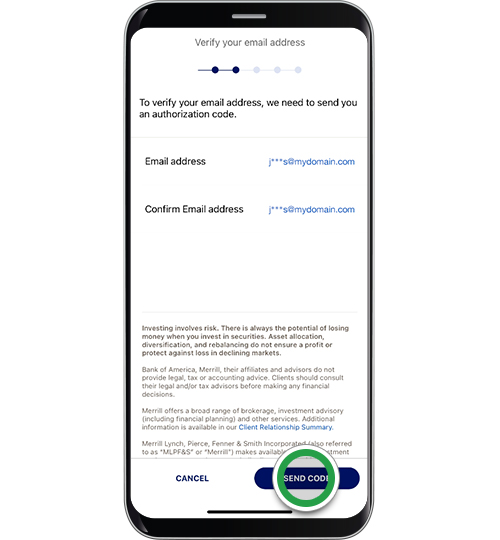
Security Verification: To prevent unauthorized changes, the bank may require a secondary form of authentication, such as a code sent to your mobile device or email.
Navigating the Mobile Banking App
The Bank of America mobile app offers a streamlined experience for those who prefer managing their finances on the go. The process is remarkably similar to the desktop version but optimized for touch interfaces.
-
Open the App: Log in using your biometric data (FaceID/Fingerprint) or passcode.
-
Access the Menu: Tap the “Menu” icon (often represented by three horizontal lines).
-
Settings & Profile: Scroll down to find “Settings” and then select “Profile & Settings.”
-
Update Address: Select “Contact Info.” Tap on the address field to initiate the update.
-
Submit: Follow the prompts to enter the new details and confirm the change.
Changing Address via Telephone Customer Service
For those who prefer a human touch or have complex account structures—such as joint accounts or trust accounts—calling customer service is a reliable option.
-
Prepare Your Information: Before calling, have your account number, Social Security number, and your old and new addresses ready.
-
Dial the Number: Contact Bank of America customer service at 800.432.1000. For international calls, use the specific international collect number provided on the back of your debit card.
-
Verification: The representative will put you through a series of security questions to verify your identity before making any changes to the record.
Visiting a Financial Center in Person
In certain scenarios, such as moving to a new country or updating a business account, an in-person visit may be required. This is also the best method if you need to provide physical documentation of your new residence.
-
Locate a Branch: Use the “Locations” tool on the Bank of America website to find the nearest financial center.
-
Bring ID: You will need to bring a valid, government-issued photo ID.
-
Speak with a Relationship Manager: They can walk you through the update and ensure that all linked services, including safe deposit boxes or specialized investment accounts, are correctly transitioned to your new location.
Essential Considerations Before and After the Change
Changing your address is not a “set it and forget it” task. To maintain a healthy financial life, you must consider how this change affects your broader ecosystem of tools and services.
The Impact on Linked Accounts and Credit Cards
If you have multiple products with Bank of America—such as a Merrill investment account, a home equity line of credit (HELOC), or various co-branded credit cards—it is important to verify that the address change has cascaded through all systems. While the bank attempts to sync these records, some specialized accounts may require individual updates.
Furthermore, your billing address is a key component of the Address Verification System (AVS) used by merchants. If you update your address at the bank but forget to update it on a frequently used e-commerce site, your next transaction might be declined because the billing address provided to the merchant does not match the bank’s records.
Updating Third-Party Payment Services
In the modern gig economy and digital marketplace, our bank accounts are often linked to third-party platforms like PayPal, Venmo, or Apple Pay. These services rely on the accuracy of your bank data. After updating your address with Bank of America, take a moment to refresh your profile on these platforms to prevent payment disruptions. This is especially important for side hustles or small business owners who use these tools for income and expenses.
Ordering New Checks and Debit Cards
While your existing debit card will continue to function after an address change, any checks you write will still feature your old address. While most merchants accept checks with an outdated address (as long as the account and routing numbers are correct), it can lead to friction or additional verification steps. If you frequently use physical checks, it is a wise financial move to order a new set with your current information.
Troubleshooting Common Issues During the Address Update Process
Occasionally, account holders encounter hurdles when trying to transition their information. Understanding these potential issues can save time and frustration.
International Address Changes
Moving abroad presents a unique set of challenges. Bank of America’s online portal may not always support the formatting of international addresses. In these cases, you will likely need to contact the international service department or submit specific forms via secure mail. Be aware that maintaining a U.S. bank account while living abroad may have different tax reporting requirements (such as FBAR or FATCA), and you should consult with a financial advisor regarding these complexities.
Address Discrepancies and Verification Delays
If you are moving to a brand-new development, the bank’s address verification software may not yet recognize your new street. If the system rejects your address, you may need to provide a utility bill or a lease agreement to a branch representative to manually override the system. Additionally, address changes can take one to two billing cycles to fully propagate through all systems, so keep an eye on your statements during the transition period.
Best Practices for Holistic Personal Finance Management
An address change is an excellent time to conduct a “financial health checkup.” As you navigate the Bank of America settings, consider the following:
-
Go Paperless: If you haven’t already, switch to electronic statements. This eliminates the risk of sensitive mail being sent to the wrong location and keeps your financial records organized digitally.
-
Review Beneficiaries: Moving is a major life event. Take this opportunity to ensure your account beneficiaries are up to date.
-
Audit Automatic Payments: Ensure that any recurring bill payments linked to your account are still relevant to your new location (e.g., canceling old utility payments and setting up new ones).
By approaching a Bank of America address change with a professional and detail-oriented mindset, you do more than just update a line of text in a database. You protect your identity, ensure the continuity of your financial operations, and maintain the integrity of your personal financial ecosystem. Whether you use the mobile app or visit a local branch, the key is proactivity and thoroughness.
aViewFromTheCave is a participant in the Amazon Services LLC Associates Program, an affiliate advertising program designed to provide a means for sites to earn advertising fees by advertising and linking to Amazon.com. Amazon, the Amazon logo, AmazonSupply, and the AmazonSupply logo are trademarks of Amazon.com, Inc. or its affiliates. As an Amazon Associate we earn affiliate commissions from qualifying purchases.