
Cash App has become a ubiquitous financial tool, simplifying peer-to-peer payments and offering a robust platform for managing personal funds. For many users, the primary goal after receiving money or accumulating a balance is to access those funds in a tangible way. Understanding the various methods, associated costs, and best practices for cashing out ensures efficient management of your personal finances. This comprehensive guide delves into the mechanisms of withdrawing money from your Cash App, empowering you to control your funds effectively.
Understanding Your Cash App Balance
Before initiating any withdrawal, it’s crucial to grasp what your Cash App balance represents and how it functions within the broader landscape of personal finance tools.
Cash App as a Financial Tool
Cash App transcends being merely a payment application; it operates as a sophisticated financial hub for millions. Users can receive direct deposits from employers, manage funds, invest in stocks or Bitcoin, and, critically, access their money when needed. It functions similarly to a digital wallet or a simplified bank account, making it an integral part of many individuals’ financial ecosystems. Treating your Cash App balance as part of your overall financial liquidity is essential for sound money management.
Differentiating Available Balance
Your Cash App balance displays the total amount of funds readily available for use. This includes money received from others, direct deposits, and proceeds from sales or investments within the app. It’s distinct from pending transactions or funds held for verification. This ‘available balance’ is what you can immediately spend using your Cash Card, send to another user, or cash out to an external bank account. Understanding this immediate liquidity is key to planning your withdrawals and ensuring you have sufficient funds for your desired transaction.
Methods for Cashing Out from Cash App
Cash App offers several flexible options for users to access their funds, catering to different needs and urgency levels. Each method comes with its own set of considerations regarding speed and fees, directly impacting your financial outlay.
Standard Deposit to Bank Account
The most common and often preferred method for cashing out is initiating a standard transfer to a linked bank account. This process is straightforward and typically free.
To do this:
-
Open the Cash App on your mobile device.
-
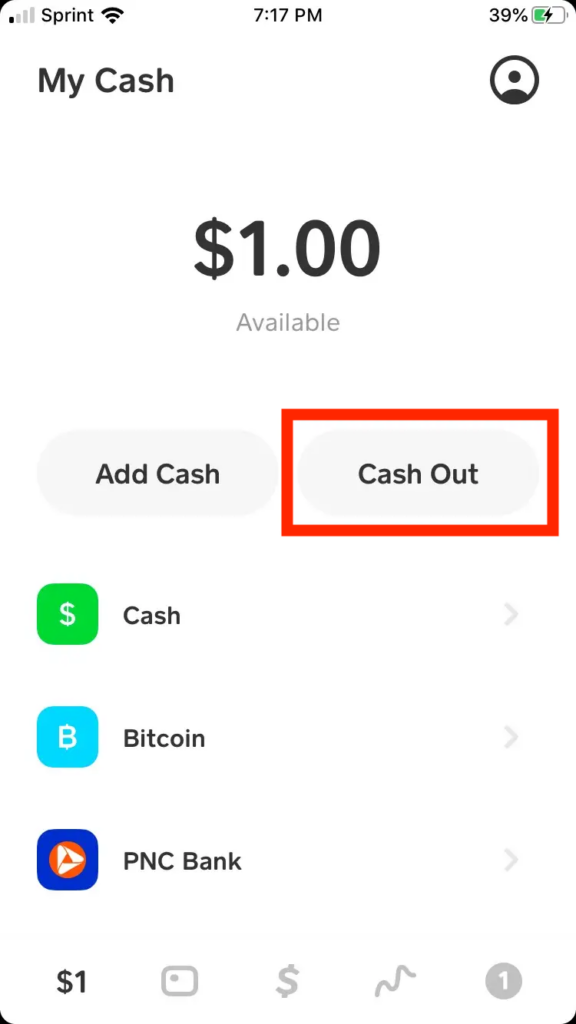
Tap the ‘Banking’ tab (the house icon) on the bottom left.
-
Tap ‘Cash Out’.
-
Enter the amount you wish to transfer.
-
Select ‘Standard’ as the deposit speed.
-
Confirm the transfer.
Funds usually arrive in your linked bank account within 1-3 business days. While this option requires a bit more patience, it’s the most cost-effective approach for routine financial transfers, allowing you to retain the full value of your withdrawal.
Instant Deposit to Bank Account
For situations requiring immediate access to funds, Cash App provides an instant deposit option. This method transfers money from your Cash App balance to your linked debit card almost instantaneously, often within minutes.
The steps are similar to a standard deposit:
-
Navigate to the ‘Banking’ tab and tap ‘Cash Out’.
-
Enter the desired amount.
-
Select ‘Instant’ as the deposit speed.
-
Confirm the transaction.
It’s important to note that instant deposits incur a fee, typically ranging from 0.5% to 1.75% of the transferred amount, with a minimum charge of $0.25. This fee is a trade-off for the immediate convenience, and users should factor it into their financial planning when choosing this option.
Using the Cash Card for Withdrawals
The Cash Card, a free, customizable debit card linked directly to your Cash App balance, offers another convenient way to access your funds. It can be used anywhere Visa is accepted, both online and in physical stores.
For direct cash withdrawals:
-
Locate an ATM that accepts Visa.
-
Insert your Cash Card.
-
Enter your PIN.
-
Select ‘Withdrawal’ and specify the amount.
While Cash App allows ATM withdrawals, be aware of potential fees. Cash App may charge a $2 fee for ATM withdrawals if you haven’t set up direct deposit into your Cash App account. Additionally, the ATM operator may levy their own fees. However, if you have qualifying direct deposits totaling $300 or more in a given month, Cash App waives its ATM fee, making it a more economical option for regular cash access. This feature makes the Cash Card a flexible tool for managing everyday expenses and accessing physical cash from your digital balance.
Sending Funds to Another Cash App User
While not a traditional “cash out” to your personal bank account or physical cash, sending funds to another Cash App user effectively moves money out of your balance. This is particularly useful for paying friends, family, or vendors who also use Cash App.
To send money:
-
Open the Cash App.
-
Enter the amount you wish to send.
-
Tap ‘Pay’.
-
Enter the recipient’s $Cashtag, phone number, or email.
-
Add a note (optional) and tap ‘Pay’.
This method is typically free for personal use and instant, providing a seamless way to reallocate funds from your balance for payments without needing to transfer them to your bank first.
Fees and Limits Associated with Cashing Out
Understanding the financial implications of each withdrawal method is paramount for effective personal finance management. Fees and transaction limits directly impact how much money you can access and at what cost.
Standard vs. Instant Deposit Fees
As previously mentioned, opting for a standard deposit to your linked bank account comes at no cost, allowing you to transfer your entire desired amount without any deductions. This makes it the most economical choice for non-urgent transfers.
Conversely, instant deposits are subject to a fee, which is a percentage of the transaction amount, usually between 0.5% and 1.75%, with a minimum fee of $0.25. For example, cashing out $100 instantly might cost you $1-$1.75. This fee is automatically deducted from the amount you’re transferring, so you receive slightly less than the amount you initiated. Savvy financial planning involves weighing the urgency against this fee to determine the most cost-effective approach.
ATM Withdrawal Limits and Fees
When using your Cash Card at an ATM, you’ll encounter specific limits and potential fees. Cash App typically imposes a limit of $310 per transaction, $1,000 per day, and $1,000 per week for ATM withdrawals. These limits are designed for security and to comply with financial regulations.
In terms of fees:
-
Cash App Fee: If you have not enabled direct deposit into your Cash App account or if your monthly direct deposit amount is below $300, Cash App charges a $2 fee per ATM withdrawal.
-
ATM Operator Fee: The ATM owner may also charge a separate service fee, which varies by machine and institution. This fee is separate from Cash App’s fee.
To avoid Cash App’s $2 fee, ensure you have direct deposit set up and receive at least $300 in direct deposits within a rolling 31-day period. This can significantly reduce the cost of accessing physical cash from your balance.
Daily and Weekly Transaction Limits
Beyond specific withdrawal limits, Cash App also has overarching daily and weekly transaction limits that can indirectly affect your ability to cash out large sums. These limits pertain to how much money you can send and receive, as well as how much you can spend using your Cash Card.
For unverified accounts (those without full identity verification), limits are considerably lower. For instance, an unverified account might only be able to send up to $250 per week and receive up to $1,000 per month. Verified accounts, which require providing your full legal name, date of birth, and the last four digits of your Social Security Number (SSN), enjoy significantly higher limits, often allowing you to send up to $7,500 per week and receive unlimited amounts.
If you plan to frequently cash out large amounts, verifying your account is a critical step to ensure you don’t hit these internal limits and disrupt your financial flows.
Best Practices for Secure and Efficient Cash Outs
Maximizing the efficiency and security of your Cash App withdrawals requires adopting a few key best practices. These steps help prevent delays, protect your funds, and ensure smooth financial transactions.
Linking and Verifying Your Bank Account
The foundation of smooth Cash App withdrawals lies in correctly linking and verifying your bank account. Ensure that the bank account details (routing number and account number) are accurate. Cash App often uses micro-deposits (two small deposits followed by one withdrawal) to verify account ownership. Promptly confirming these amounts in the app is crucial. An incorrectly linked or unverified account is a primary cause of delayed or failed cash outs, potentially leading to significant inconvenience and even temporary loss of access to funds. Double-checking these details safeguards your money and streamlines the process.
Enhancing Account Security
Protecting your Cash App account is synonymous with protecting your financial assets. Employ robust security measures to prevent unauthorized access and fraudulent withdrawals.
-
PIN/Touch ID/Face ID: Always enable these authentication methods within the app. This adds an essential layer of security, ensuring that only you can authorize transactions.
-
Two-Factor Authentication (2FA): Enable 2FA for your Cash App account. This typically involves a code sent to your registered phone number or email, making it significantly harder for unauthorized users to gain access even if they have your password.
-
Monitor Activity: Regularly review your transaction history for any unfamiliar activity. Promptly report any suspicious transactions to Cash App support.
These security protocols are not just conveniences; they are vital components of responsible digital financial management.
Planning for Larger Withdrawals
If you intend to cash out a substantial amount of money from your Cash App balance, strategic planning is essential.
-
Be Aware of Limits: Always keep in mind Cash App’s daily, weekly, and transactional limits, especially if your account is not fully verified. Attempting to withdraw an amount exceeding these limits will result in a declined transaction.
-
Consider Standard Transfer: For large sums, prioritize using the standard deposit to your bank account. The absence of fees for this method can save you a significant amount compared to instant transfers, where a 1% or 1.75% fee on a large withdrawal can add up quickly.
-
Break Down Withdrawals: If an immediate large withdrawal is needed and you’re hitting limits, consider breaking it down into smaller, manageable amounts over a few days or using a combination of methods (e.g., some via instant deposit, some via Cash Card, and the rest via standard transfer).
Proactive planning prevents frustration and ensures you access your funds in the most financially advantageous way.
Troubleshooting Common Cash Out Issues
Even with careful planning, occasional issues can arise when cashing out from Cash App. Knowing how to diagnose and address these common problems can save you time and stress, maintaining the smooth flow of your personal finances.
Delayed Deposits
One of the most frequent issues users encounter is a delay in funds reaching their bank account.
-
Bank Processing Times: Standard deposits typically take 1-3 business days. Remember that weekends and holidays do not count as business days. If you initiated a transfer on a Friday, it might not appear until Tuesday or Wednesday of the following week.
-
Incorrect Bank Information: A common culprit for delays is inaccurate routing or account numbers. Double-check these details if your deposit is taking longer than expected.
-
Bank Holds: Sometimes, your receiving bank might place a temporary hold on larger incoming transfers for security purposes. Contact your bank directly if the delay seems unusual and Cash App confirms the transfer was sent.
-
Cash App Status: Check Cash App’s status page or in-app notifications for any system-wide issues that might be affecting transactions.
If a standard deposit hasn’t arrived after 3-5 business days, contact Cash App support with your transaction details.
Declined Transactions
A declined cash-out transaction can be frustrating, but often, the cause is easily identifiable.
-
Insufficient Funds: The most straightforward reason: you attempted to cash out more than your available Cash App balance.
-
Exceeding Limits: You might have exceeded your daily, weekly, or transactional limits set by Cash App, especially if your account is unverified.
-
Incorrect Card/Account Details: For instant transfers, ensure your linked debit card details (number, expiration, CVV) are current and correct.
-
Security Flags: Cash App’s fraud prevention system might flag a transaction as suspicious, leading to a decline. This can happen with unusual activity or large, infrequent transfers. In such cases, Cash App might prompt you for additional verification.
-
Bank Rejection: Your linked bank might reject the incoming transfer due to internal reasons or if the name on the Cash App account doesn’t perfectly match the bank account holder’s name.

Account Verification Challenges
Difficulty in verifying your account can limit your ability to cash out, particularly for larger amounts.
-
Identity Requirements: Cash App requires certain personal information (full name, DOB, last 4 of SSN) to verify your identity, especially for higher transaction limits. If the information provided doesn’t match official records, verification can fail.
-
Document Submission: Sometimes, Cash App may request additional documentation (e.g., photo ID) to complete verification. Respond promptly and accurately to these requests.
-
Age Restrictions: Cash App is available to users 13 and older, but certain features, like the Cash Card and investing, have age restrictions or require parental consent. Full cash-out functionality might be tied to being 18+.
If you face persistent verification issues, reaching out to Cash App support with clear details of your problem is the most effective way to resolve them and unlock full access to your funds.
aViewFromTheCave is a participant in the Amazon Services LLC Associates Program, an affiliate advertising program designed to provide a means for sites to earn advertising fees by advertising and linking to Amazon.com. Amazon, the Amazon logo, AmazonSupply, and the AmazonSupply logo are trademarks of Amazon.com, Inc. or its affiliates. As an Amazon Associate we earn affiliate commissions from qualifying purchases.