
In the era of digital transformation, the travel industry has migrated almost entirely to complex software ecosystems known as Online Travel Agencies (OTAs). Expedia, one of the pioneers in this space, operates a sophisticated platform that integrates global distribution systems (GDS), real-time inventory databases, and user-centric interface designs. Navigating these systems to manage or cancel a reservation requires an understanding of the platform’s digital architecture. Whether you are using the web-based portal or the mobile application, the process of canceling a reservation is a sequence of database queries and API handshakes designed to update your travel status across multiple vendor systems simultaneously.
Navigating the Expedia Digital Ecosystem
The Expedia interface is a masterclass in UI/UX design, intended to streamline the user journey from discovery to booking. However, the “post-purchase” phase—specifically cancellation—requires navigating deeper layers of the account management software.
Accessing the User Dashboard
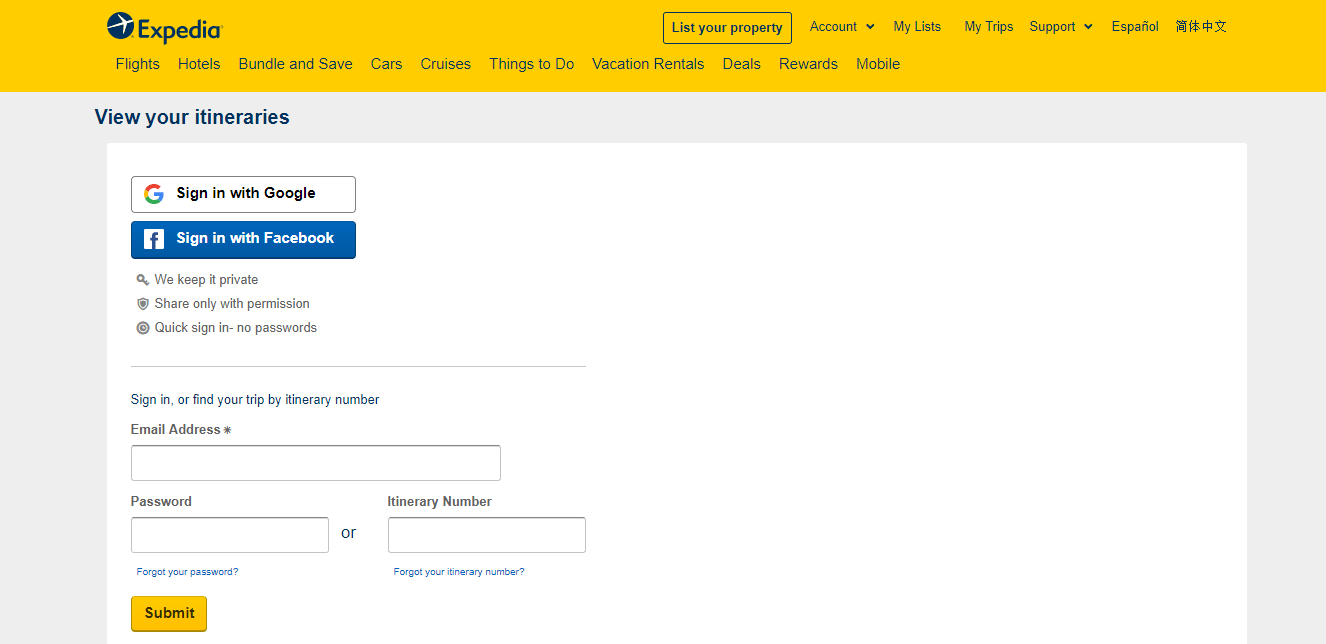
To initiate a cancellation, the user must first authenticate their session. This involves a secure login process that utilizes encrypted credentials to access the “My Trips” or “Manage Trips” section of the site. From a technical standpoint, this dashboard serves as a front-end visualization of the user’s specific data entries within Expedia’s relational database. Every itinerary is assigned a unique alphanumeric locator code, which acts as the primary key for all actions taken on that specific reservation.
The “My Trips” Interface: Data Syncing and Cloud Storage
When you click on “My Trips,” the platform executes a real-time call to the cloud servers where your itinerary data is stored. This data is not static; it is constantly synced with third-party service providers such as airlines, hotel chains, and car rental agencies. If a flight is delayed or a hotel room type changes, the software updates the dashboard via a series of API integrations. Understanding this synchronization is crucial when canceling, as the platform must send a “void” or “cancel” command back through these same channels to ensure the vendor’s internal systems reflect the change.
Step-by-Step Cancellation Protocols via Web and Mobile App
The workflow for canceling a reservation varies slightly depending on the hardware and operating system being used, but the underlying logic remains consistent.
Browser-Based Cancellation Workflow
For users on a desktop or laptop, the web interface provides the most comprehensive view of the cancellation parameters. Once you have navigated to the specific itinerary:
-
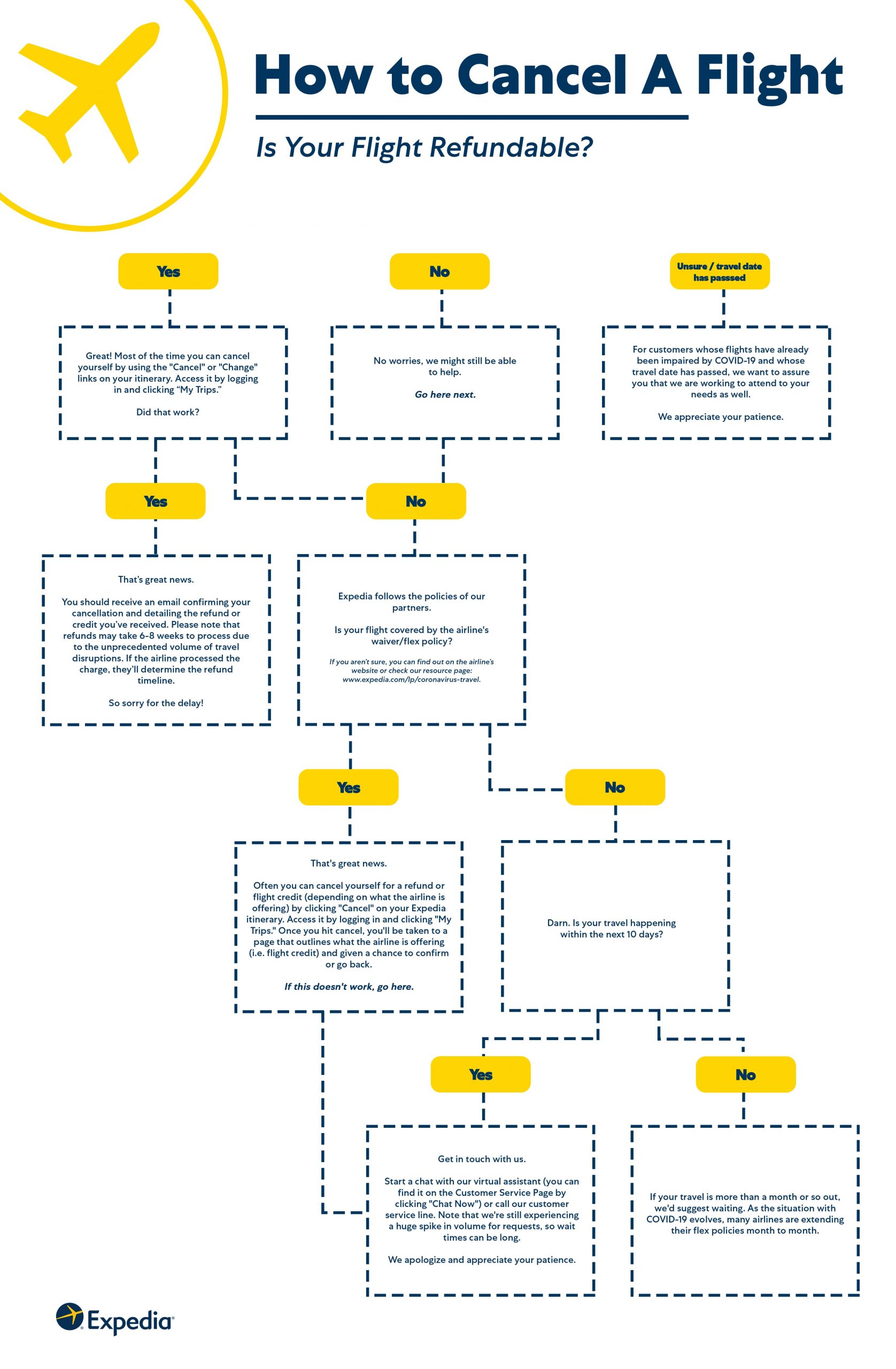
Identify the Record: Select the specific component of the trip (Flight, Hotel, or Package) you wish to cancel.
-
Trigger the Action: Look for the “Cancel Room” or “Cancel Flight” hyperlinks, which are usually located within the itinerary details pane.
-
The Logic Gate: Clicking this will trigger a pop-up or a new page that displays the “Cancellation Policy.” Technically, this is a logic gate where the software checks the current timestamp against the vendor’s deadline settings.
-
Confirmation: Upon confirming, the system sends a request to the server to change the status of the booking from “Confirmed” to “Cancelled.”
The Expedia App Experience: iOS and Android Optimization
The mobile application is optimized for touch-based navigation and utilizes mobile-specific APIs to handle requests. In the app, the “Trips” icon at the bottom of the navigation bar serves as the entry point. The cancellation process here is streamlined to reduce “taps,” but it follows the same verification steps. One technological advantage of the app is the use of push notifications; once a cancellation is processed, the app uses a notification gateway to provide immediate visual confirmation on the user’s device, ensuring the local cache is updated with the new reservation status.
Handling Virtual Assistants and AI Chatbots
Expedia has integrated advanced Natural Language Processing (NLP) through its Virtual Assistant. This AI-driven tool can handle cancellations without the user needing to navigate through menus. By typing “Cancel my hotel,” the AI parses the intent, identifies the most recent upcoming reservation, and executes the cancellation protocol. This represents a shift from GUI-based interaction to conversational UI, leveraging machine learning to interpret user needs and interact with the backend database.
Understanding the Backend: Refund Algorithms and Processing Security
When a cancellation is initiated, the software does more than just delete a record. It triggers a complex sequence of financial and logistical events.
API Integrations with Airlines and Hotels
Expedia operates as an intermediary. When you click “Cancel,” the platform sends a structured data packet—usually via a RESTful API—to the airline’s or hotel’s internal system. This packet includes the reservation ID and the user’s request. The vendor’s system then processes the request based on its own internal logic (e.g., checking if the ticket is non-refundable) and sends back a response code. If the code is “Success,” Expedia updates its UI to show the cancellation is complete.
Encryption and Financial Data Security During Voids
The financial aspect of cancellation involves the “voiding” of a transaction or the initiation of a refund. This process is governed by PCI-DSS (Payment Card Industry Data Security Standard) protocols. To protect user data, Expedia does not store full credit card numbers in a way that is accessible during the cancellation process. Instead, it uses tokens. When a refund is triggered, the system tells the payment gateway to return funds to the original tokenized account. This ensures that even during a sensitive transaction like a refund, the user’s financial data remains encrypted and secure from end-to-end.
Troubleshooting Common Digital Friction Points
Despite the robustness of the platform, technical issues can arise during the cancellation process. Understanding the “why” behind these glitches can help users navigate them effectively.
Synchronization Errors and Cache Issues
Sometimes, a user may cancel a reservation, yet it still appears as “Confirmed” on their dashboard. This is often a result of browser caching or a latency issue in the API handshake between Expedia and the hotel. In these instances, the local version of the webpage (the cache) is not fetching the updated data from the server. Performing a “hard refresh” (Ctrl+F5 on Windows or Cmd+Shift+R on Mac) or clearing the browser’s cookies can force the software to pull the most recent data from the cloud.
Navigating Complex Non-Refundable Logic Gates
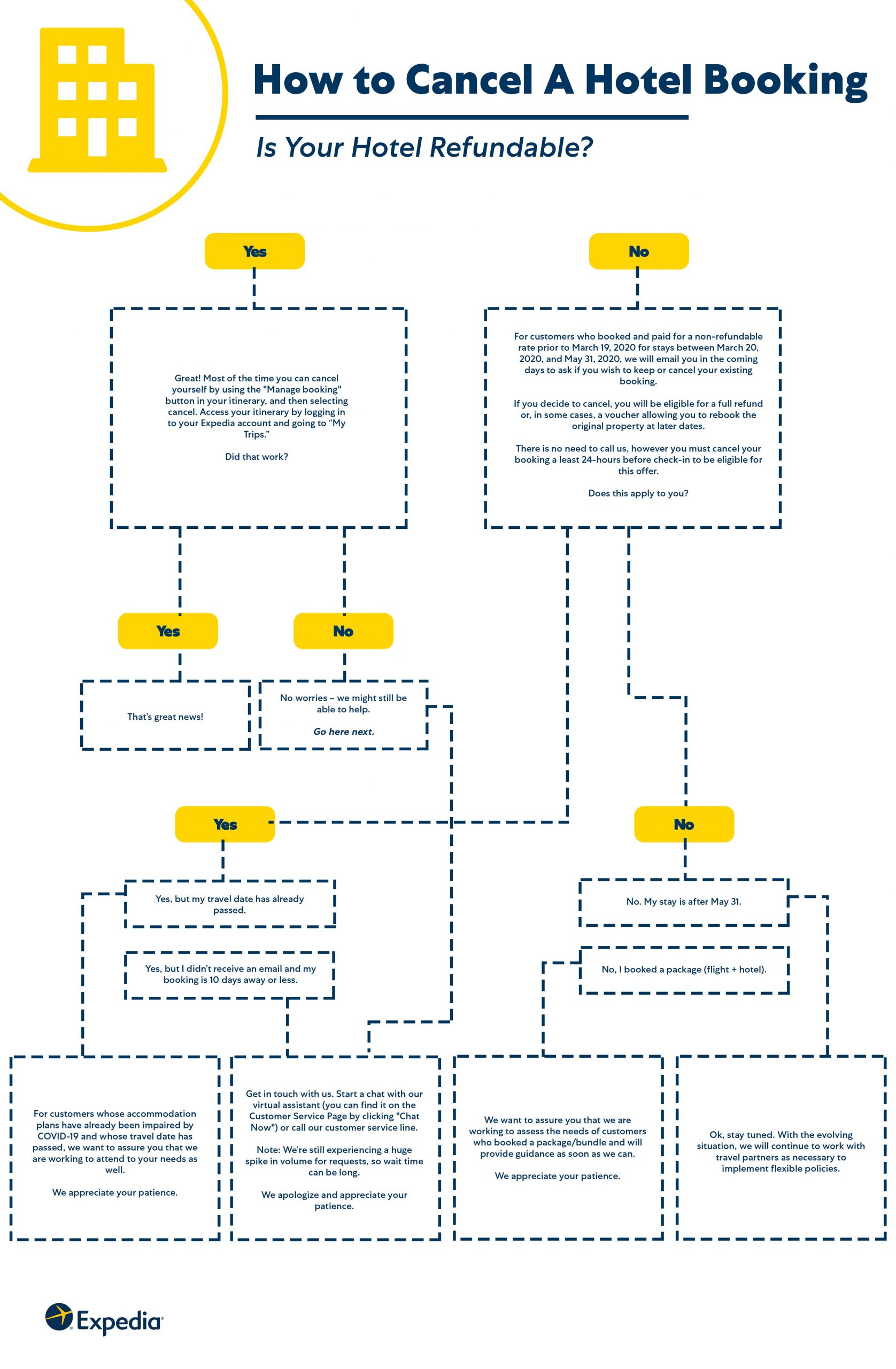
Some reservations are hard-coded as “non-refundable” within the system’s metadata. If the “Cancel” button is greyed out or missing, it is typically because the software has identified that the current date has passed the cancellation window defined in the booking’s JSON object. In these cases, the automated system cannot process the request, and the user must escalate to a manual override, which involves the Expedia support team using administrative tools to bypass the standard logic gates.
Future-Proofing Your Digital Travel Management
As travel technology evolves, the way we manage cancellations is becoming more automated and data-driven.
Leveraging Multi-Device Syncing
The modern traveler often switches between a smartphone, a tablet, and a desktop. Expedia uses a centralized cloud profile to ensure that a cancellation made on a laptop is instantly reflected on the mobile app. This cross-platform synchronization is managed through persistent user sessions and real-time database updates. For the best experience, users should ensure they are signed into the same account across all devices to maintain a consistent data state.
Automated Monitoring and Alert Systems
Newer iterations of travel software are beginning to incorporate proactive cancellation features. For example, if an airline cancels a flight, Expedia’s system can automatically trigger a notification to the user, offering a one-tap cancellation or rebooking option. This proactive UI reduces the friction of manual management and leverages real-time data feeds from the FlightAware API and other aviation data aggregators.
By understanding the technological framework of the Expedia platform—from its API integrations to its UI design—users can manage their travel itineraries with greater precision and confidence. The ability to cancel a reservation is not just a customer service feature; it is a sophisticated digital process that highlights the intersection of cloud computing, cybersecurity, and user-centered software engineering. As these systems continue to integrate more AI and automation, the process will only become more seamless, allowing travelers to manage their digital footprints with unprecedented ease.
aViewFromTheCave is a participant in the Amazon Services LLC Associates Program, an affiliate advertising program designed to provide a means for sites to earn advertising fees by advertising and linking to Amazon.com. Amazon, the Amazon logo, AmazonSupply, and the AmazonSupply logo are trademarks of Amazon.com, Inc. or its affiliates. As an Amazon Associate we earn affiliate commissions from qualifying purchases.