
The landscape of modern gaming has shifted dramatically from physical media to cloud-based ecosystems. NVIDIA’s GeForce Now stands as a titan in this space, offering high-performance GPU power over the internet to devices that would otherwise struggle to run demanding AAA titles. However, the nature of software-as-a-service (SaaS) means that user needs are constantly evolving. Whether you are transitioning back to a local high-end PC build, switching to a competing cloud service, or simply taking a break from gaming, knowing how to navigate the administrative side of your NVIDIA account is essential.

Canceling a GeForce Now subscription is a straightforward process, but because the service integrates with various platforms—including Windows, macOS, Android, and even smart TVs—the path to cancellation can vary depending on how you originally signed up. This guide provides a comprehensive technical walkthrough for terminating your paid membership and transitioning your account back to the free tier.
Step-by-Step Cancellation Procedures Across Platforms
NVIDIA manages GeForce Now subscriptions primarily through its web portal, but users who subscribed via third-party app stores (like Google Play or the Apple App Store) or integrated television interfaces (like LG or Samsung) must follow specific protocols dictated by those ecosystems.
Canceling via Web Browser or Desktop App
For the majority of users who signed up directly through NVIDIA’s website, the browser-based account portal is the most reliable method for managing a subscription.
-
Access the NVIDIA Account Portal: Open your preferred web browser and navigate to the official NVIDIA website. Click on the “Account” icon in the top-right corner and log in with your credentials. If you use the GeForce Now desktop application on Windows or Mac, you can click on your profile name and select “Account Settings,” which will redirect you to this same web portal.
-
Navigate to the GeForce Now Section: Once logged in, you will see a dashboard of your NVIDIA services. Look for the “GeForce Now” tab or section. This area displays your current membership level—whether it be Priority or Ultimate—and your billing cycle details.
-
Manage Subscription: Click on the “Manage” button located near your membership details. This will open the subscription management interface.
-
Select the Free Tier: NVIDIA does not technically “delete” your gaming account when you cancel a paid plan. Instead, you are opting to “Downgrade” to the Free tier. Select the “Free” membership option from the list of available plans.
-
Confirm the Change: A prompt will appear asking you to confirm the downgrade. NVIDIA may provide a brief survey asking for your reason for leaving; you can complete this or skip it. Once confirmed, your status will update to show that your paid membership is set to expire at the end of the current billing period.
Managing Subscriptions on Mobile Devices
If you initiated your GeForce Now subscription through an in-app purchase on an Android or iOS device, the billing is handled by Google or Apple, not NVIDIA directly.
-
For Android Users: Open the Google Play Store app. Tap your profile icon at the top right, then select “Payments & subscriptions” followed by “Subscriptions.” Find GeForce Now in the list and select “Cancel subscription.”
-
For iOS/iPadOS Users: Although GeForce Now runs via a web app on iOS, some users may have linked billing through Apple services in specific regions or via related NVIDIA apps. Go to “Settings,” tap your name at the top, and select “Subscriptions” to ensure no active billing is present.
Television and Provider-Linked Accounts
Some users access GeForce Now through bundles provided by Internet Service Providers (ISPs) or integrated apps on LG and Samsung Smart TVs. If your subscription is part of an ISP bundle, you must log in to your ISP’s customer portal to remove the add-on. For TV-integrated apps, the “Account” section within the app will usually provide a QR code or a URL to the NVIDIA management portal mentioned above.
Technical Implications of Canceling Your Membership
Understanding what happens to your data and your digital footprint after canceling is just as important as the cancellation process itself. GeForce Now is a “bring your own games” (BYOG) service, which creates a unique dynamic compared to services like Xbox Game Pass.
Access and the Billing Cycle
When you cancel a Priority or Ultimate membership, you do not lose access immediately. Your account remains active with all premium features—such as RTX ON, longer session lengths, and priority server access—until the final day of your current billing cycle. For example, if your subscription renews on the 15th of the month and you cancel on the 2nd, you still have 13 days of premium service remaining.
The Transition to the Free Tier
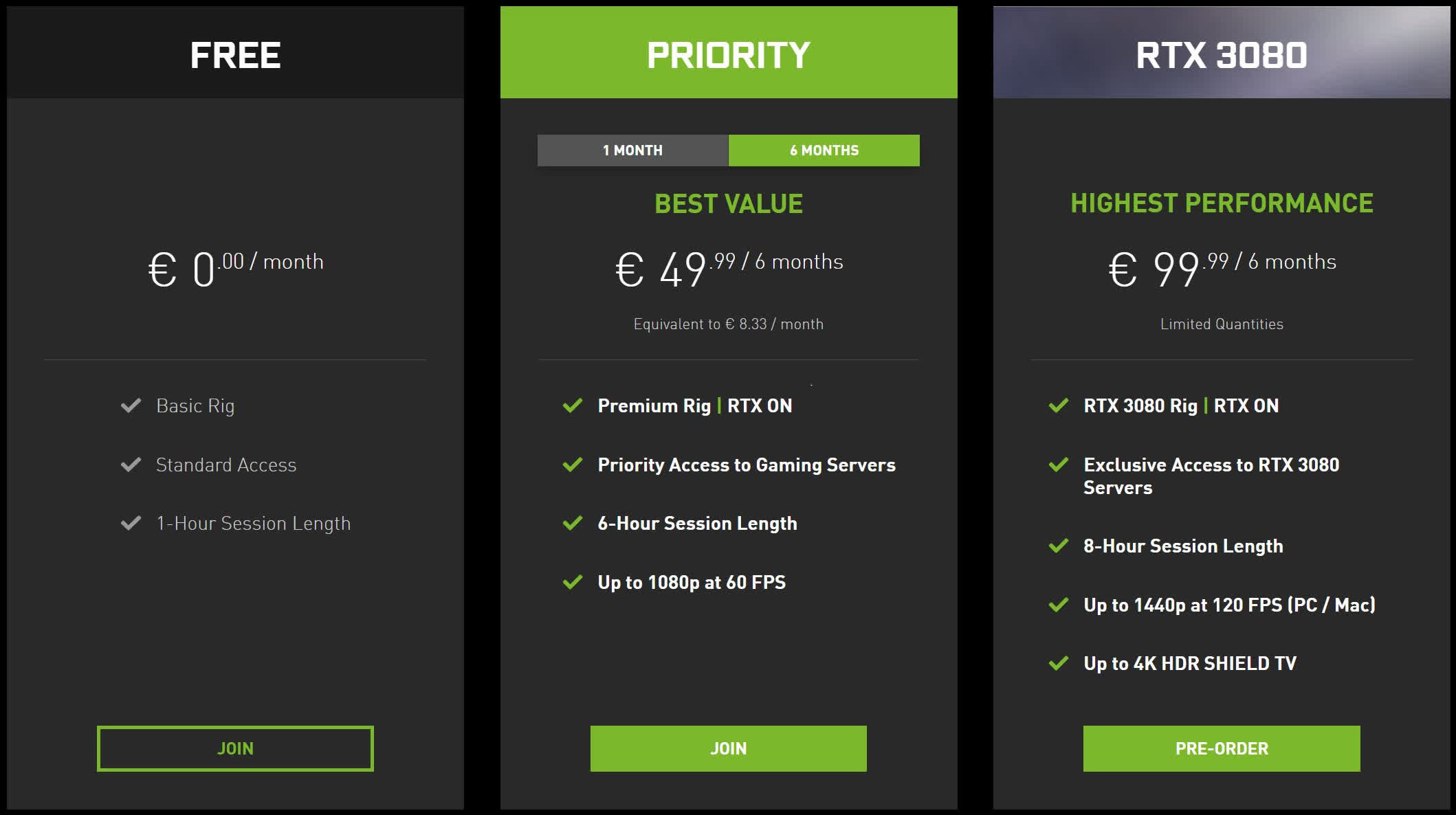
Once the billing cycle concludes, your account automatically reverts to the “Free” tier. It is important to recognize the technical limitations of this tier to manage your expectations:
-
Standard Access: You will likely encounter queues during peak hours, as paid members are given priority in the server stack.
-
Basic Rig Performance: You lose access to the high-end RTX 4080-equivalent rigs (Ultimate) or RTX-capable servers (Priority), reverting to basic GTX-level performance.
-
Session Limits: Your gaming sessions will be capped at one hour, after which you must rejoin the queue to continue playing.
Data Persistence and Game Saves
One of the most common technical concerns is the safety of game progress. Because GeForce Now syncs with digital storefronts like Steam, Epic Games Store, Ubisoft Connect, and GOG, your save files are generally stored in the “Cloud Save” systems of those respective platforms.

Canceling GeForce Now does not delete your save files or your library. Your ownership of the games remains tied to the original storefront. If you decide to build a local PC or resubscribe to GeForce Now a year later, your progress will be waiting for you, provided that the game supports cloud saves on its native platform. NVIDIA also retains your “GeForce Now Settings” (such as in-game graphical configurations synced to the cloud) for a period of time, though these may eventually be cleared if the account remains inactive on the Free tier for an extended duration.
Troubleshooting Common Cancellation Issues
Technological ecosystems are rarely perfect, and users may occasionally encounter hurdles when attempting to terminate their service.
The “Manage” Button is Missing
If you log into your NVIDIA account and cannot find the option to manage or cancel your subscription, it usually indicates one of two things:
-
Account Mismatch: You may be logged into an NVIDIA account (perhaps used for GeForce Experience drivers) that is different from the one used for the gaming service. Verify the email address in your confirmation receipts.
-
Third-Party Billing: As noted earlier, if the button is missing, your billing is likely being handled by a third party like Google, Apple, or a mobile carrier. Check your bank statements to see if the charge is listed as “NVIDIA” or “Google Play/Apple Bill.”
Double Billing and Pending Charges
Occasionally, a user may see a “pending” charge even after canceling. This is often an authorization hold if the cancellation occurred within 24 hours of the renewal date. Technically, NVIDIA’s systems require a lead time to process the stop-payment. If a charge goes through after you have a cancellation confirmation, NVIDIA’s support infrastructure generally requires the “Cancellation Confirmation Email” as proof to initiate a refund. Always keep a digital copy of the confirmation screen or email.
Regional Account Locks
GeForce Now is operated by NVIDIA in many regions, but in others (such as parts of South America, Eastern Europe, or Southeast Asia), it is managed by “Alliance Partners.” If you are in a region served by an Alliance Partner (like Game+ or StarHub), the standard NVIDIA.com portal will not work for cancellation. You must log in to the specific partner’s website to manage your billing.
The Broader Context: Choosing an Alternative
The decision to cancel GeForce Now often stems from a change in technical requirements or a desire to explore different segments of the gaming market. As the industry matures, several alternatives offer different value propositions.
Xbox Cloud Gaming (Beta)
For users who want a “Netflix for Games” model rather than the BYOG model of NVIDIA, Xbox Cloud Gaming (included with Game Pass Ultimate) is the primary competitor. While it lacks the raw graphical fidelity of NVIDIA’s Ultimate tier (which offers 4K at 120+ FPS), it provides a massive library of titles included in the subscription cost.
PlayStation Plus Premium
Sony’s cloud offering is a strong alternative for users embedded in the PlayStation ecosystem. It allows for the streaming of hundreds of titles, including legacy PS3 and PS2 games, to a PS5 or a Windows PC. Its technical infrastructure is more restrictive than NVIDIA’s, but its content library is a significant draw.
Shadow PC
For users who need more than just a gaming interface, Shadow PC offers a full Windows 10/11 instance in the cloud. This is a “desktop-as-a-service” (DaaS) model. While more expensive than GeForce Now, it allows for modding games, video editing, and using any game launcher, not just those supported by NVIDIA.
Returning to Local Hardware
The most significant trend in 2024 and 2025 has been the stabilization of the GPU market. Many users who turned to GeForce Now during the semiconductor shortages are now finding it viable to purchase mid-range cards like the RTX 4070 or 4060 Ti. Moving back to local hardware eliminates latency and the need for a high-speed internet connection, providing a more consistent experience for competitive gamers.
Final Technical Considerations
Canceling your GeForce Now subscription is a simple administrative task that, when done correctly, ensures you aren’t charged for a service you no longer use while preserving your gaming legacy. The cloud gaming market is built on flexibility; the ability to scale your subscription up or down based on your current hardware situation or the release of a specific blockbuster game is one of the platform’s greatest strengths. By understanding the hierarchy of account management and the technicalities of data persistence, you can move between gaming ecosystems with confidence and ease.
aViewFromTheCave is a participant in the Amazon Services LLC Associates Program, an affiliate advertising program designed to provide a means for sites to earn advertising fees by advertising and linking to Amazon.com. Amazon, the Amazon logo, AmazonSupply, and the AmazonSupply logo are trademarks of Amazon.com, Inc. or its affiliates. As an Amazon Associate we earn affiliate commissions from qualifying purchases.