
In the increasingly digitized landscape of travel, platforms like Expedia serve as indispensable tools for planning and booking journeys. Yet, the dynamic nature of life often necessitates changes to meticulously laid plans, chief among them being the need to cancel a reservation. Understanding the technical intricacies of navigating Expedia’s digital ecosystem to execute a cancellation is not just practical; it’s a fundamental skill for the modern traveler. This guide delves into the step-by-step process, leveraging a tech-centric perspective to empower users with the knowledge to efficiently manage their bookings directly through the platform and its associated digital tools.
Understanding Expedia’s Digital Ecosystem for Cancellations
Expedia, at its core, is a sophisticated web application designed to aggregate travel services. Its functionality extends far beyond simple booking, encompassing a robust set of tools for managing, modifying, and, crucially, canceling reservations. Mastering the art of cancellation begins with a firm grasp of how the platform structures and presents information within its digital framework.
Navigating Your Expedia Account Interface
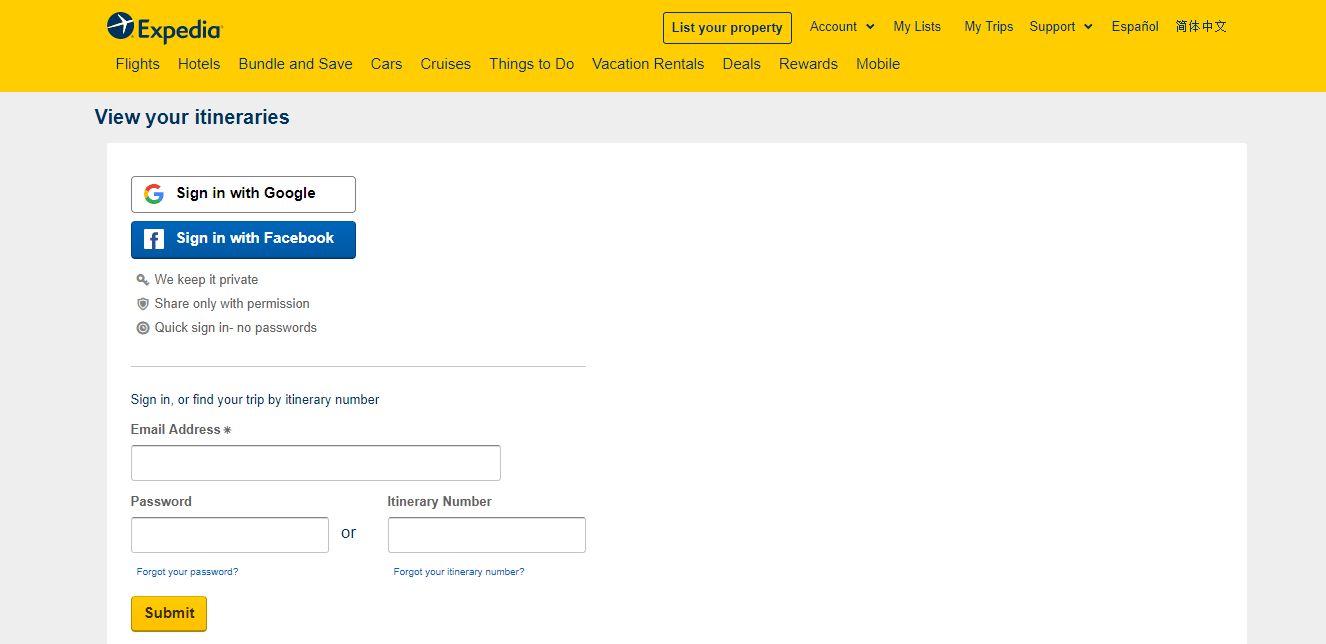
The gateway to managing any reservation on Expedia is your personal user account. This centralized digital hub stores all your past, present, and upcoming bookings, acting as a personal travel dashboard. Upon logging in, users are greeted with an interface designed for intuitive navigation, typically featuring a prominent “My Trips” or “Bookings” section. This area is more than just a list; it’s a dynamic interface where each reservation is a clickable module, leading to a dedicated page with detailed information and actionable options. Understanding that this interface is your primary control panel is key. It’s where the backend logic of Expedia’s reservation system translates into a user-friendly frontend experience, enabling direct interaction with your booked services without needing to engage a human representative for routine tasks. The platform’s design prioritizes self-service, placing the power of management directly into the user’s hands, provided they know where to look and what to click.
The Importance of Digital Confirmation and Policy Access
Every booking made through Expedia generates a digital confirmation. This isn’t just an email; it’s a unique identifier within Expedia’s database, linking your payment, personal details, and the specific service (flight, hotel, car rental, activity). Crucially, this digital confirmation also acts as the primary repository for the specific cancellation policies pertinent to your booking. Unlike traditional travel agents where policies might be verbal or scattered across various documents, Expedia integrates these terms directly into your booking details page. The platform’s algorithms retrieve and display the relevant policies from the service provider (airline, hotel chain, etc.) at the time of booking and make them readily accessible post-booking. This digital transparency is a cornerstone of effective online travel management, as it allows users to review potential fees, deadlines, and refund eligibility directly within the same interface where they initiate the cancellation. It underscores the tech platform’s role in consolidating complex information into an easily digestible format, enabling informed decisions.
Step-by-Step Guide: Initiating Your Online Cancellation
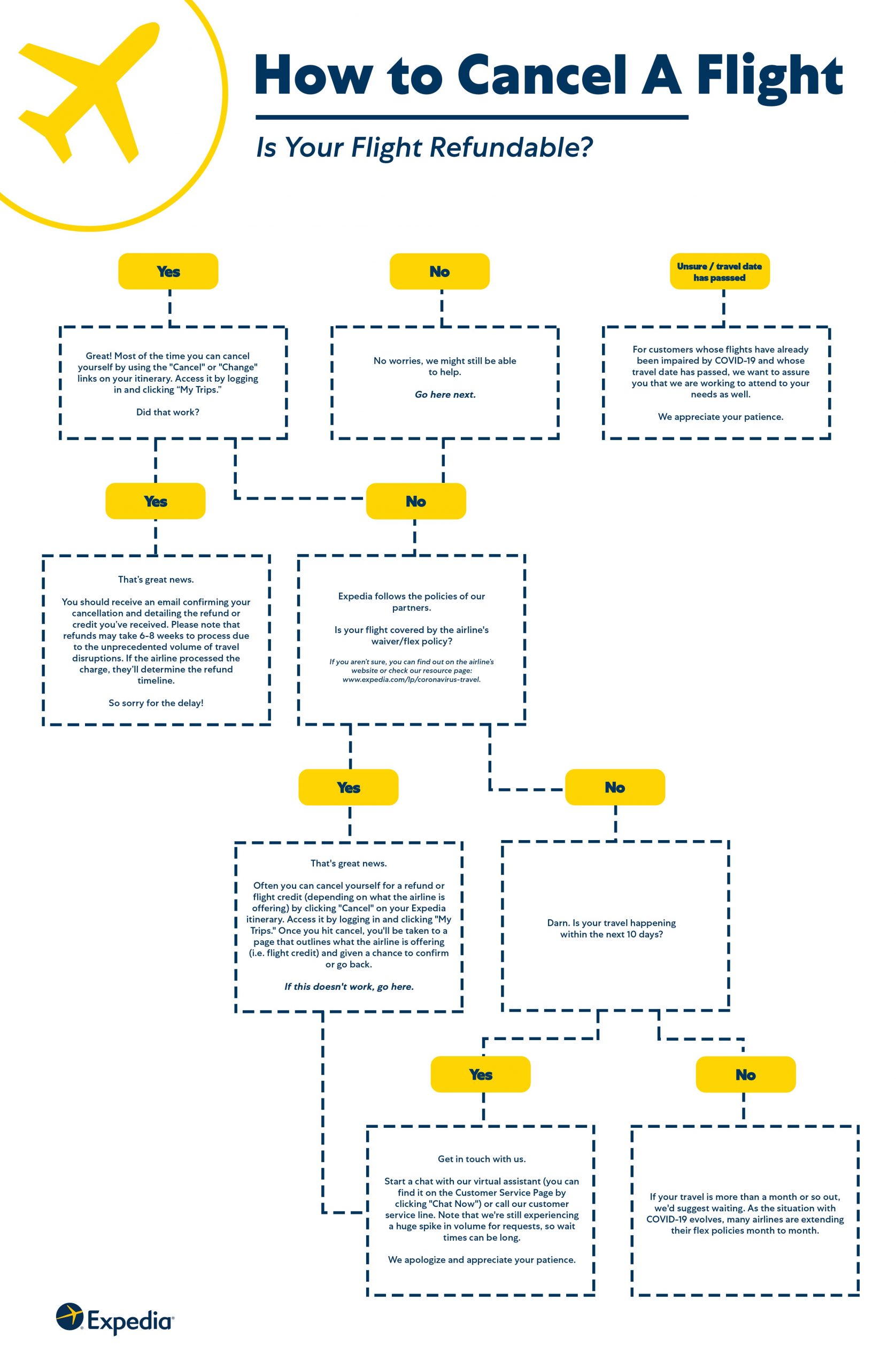
The process of canceling a reservation on Expedia is designed to be largely self-service, leveraging the platform’s robust digital tools. Following a structured approach ensures efficiency and minimizes potential missteps.
Locating Your Reservation within the Platform
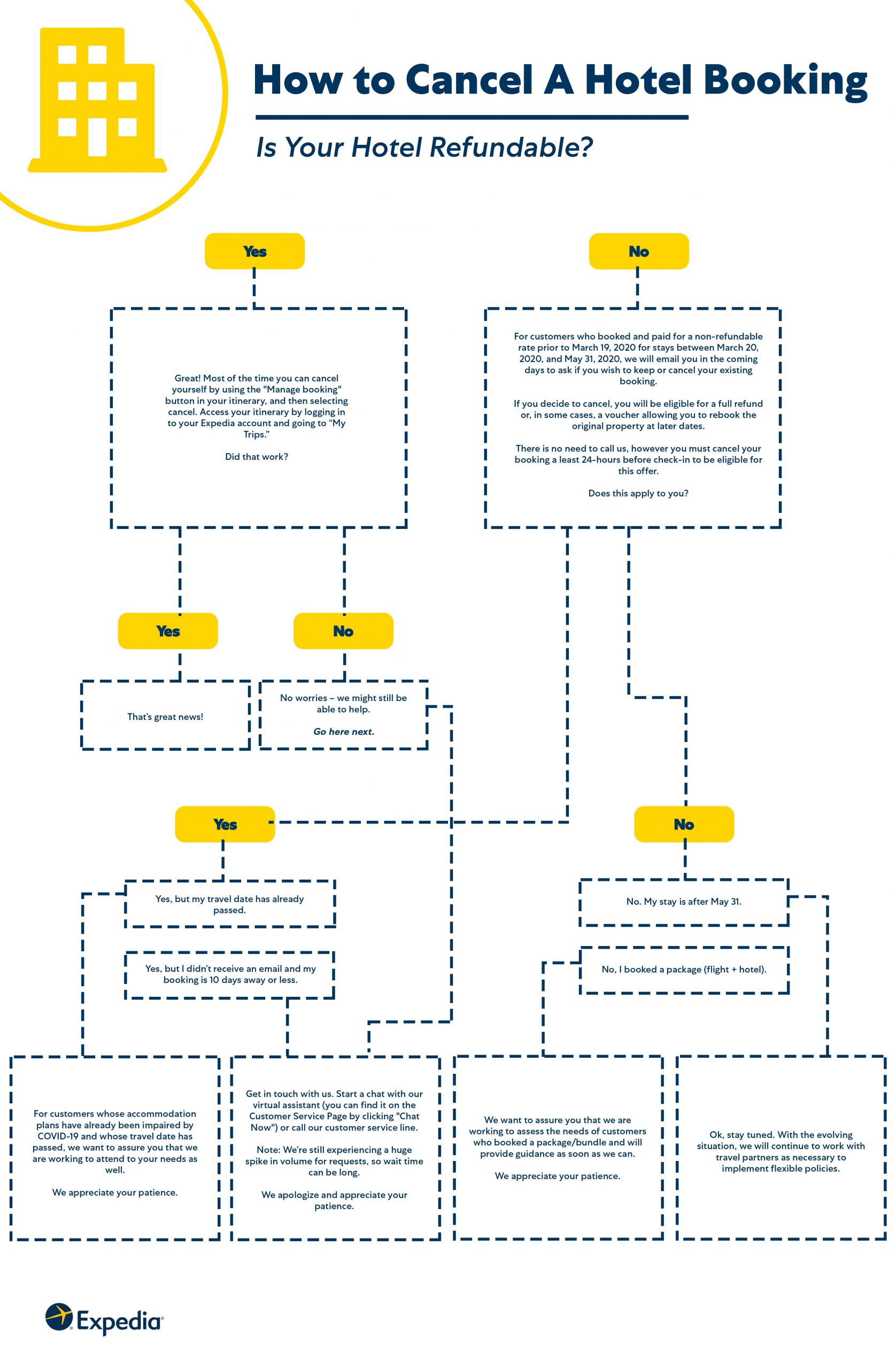
Once logged into your Expedia account, the first step is to locate the specific reservation you intend to cancel. Navigate to the “My Trips” or “Bookings” section, typically accessible from the main navigation menu or your account dashboard. Here, you will find a list of your upcoming and past trips. Each trip is usually represented by a card or a line item. Click on the trip that contains the reservation you wish to cancel. This action will take you to a detailed itinerary page, which breaks down all components of that particular trip – flights, hotels, car rentals, activities. For multi-component trips, identify the specific part you need to cancel (e.g., just the hotel, not the flight). The platform’s intuitive UI generally makes it clear which section pertains to which service, often with separate “manage” or “view details” links for each.
Accessing Cancellation Options and Understanding Prompts
On the detailed itinerary page for your specific reservation (e.g., a hotel booking), look for options labeled “Cancel Booking,” “Change or Cancel,” or “Manage Reservation.” These links are strategically placed to be easily discoverable. Upon clicking a cancellation-related option, Expedia’s system will typically initiate a series of prompts. These prompts are crucial as they guide you through the process, often asking for confirmation that you understand the implications of canceling. The platform might also present a summary of the booking and highlight key dates or conditions before proceeding. This interactive step-by-step approach ensures that users are fully aware of their actions before committing to the final cancellation, a standard user experience design pattern for critical actions within web applications.
Reviewing Cancellation Policies and Potential Fees (Tech-Centric View)
Before you finalize the cancellation, Expedia’s platform will present you with the specific cancellation policy applicable to your reservation, often reiterating information already available in your booking details. This is where the digital presentation of information becomes critical. The system will clearly display whether the reservation is refundable, partially refundable, or non-refundable. It will also calculate and show any potential cancellation fees or the exact refund amount you can expect. This calculation is performed in real-time by the platform’s backend algorithms, based on the provider’s rules, your booking date, and the current date relative to your travel dates. The user interface typically presents this information in an unambiguous manner, often with bold text or dedicated sections for “Refund Amount” and “Cancellation Fee.” It’s imperative to thoroughly review this digital display to understand the financial implications before proceeding, as clicking “confirm” acknowledges your acceptance of these terms.
Confirming Your Cancellation Digitally
Once you have reviewed and understood the cancellation policy and any associated fees, the final step is to digitally confirm your decision. This usually involves clicking a “Confirm Cancellation” or similar button. After confirmation, Expedia’s system will process the request. You should immediately receive an on-screen confirmation message indicating that your cancellation has been successful. Crucially, a digital confirmation email will also be sent to the email address associated with your Expedia account. This email serves as your official record of the cancellation, detailing the reservation cancelled, the date and time of cancellation, and any refund amounts or charges. This digital paper trail is vital for any future queries or disputes, emphasizing the importance of keeping your email account secure and accessible.
Leveraging Expedia’s Tech Support for Complex Scenarios
While Expedia’s self-service tools are robust, certain complex scenarios might necessitate direct engagement with their support infrastructure. Understanding how to access and utilize these tech-enabled support channels is crucial.
Utilizing In-App Chat and Virtual Assistants
For many common issues or questions about cancellations, Expedia offers in-app chat support and virtual assistants (chatbots). These AI-powered tools are designed to provide immediate answers to frequently asked questions, guide users through processes, or help troubleshoot minor issues without human intervention. The chatbot can often access your reservation details contextually, making its responses highly relevant. This real-time, digital communication channel is highly efficient, allowing users to get help without waiting on hold. It’s a prime example of how modern tech platforms leverage AI and natural language processing to enhance the user experience and offload simple queries from human agents, providing instant gratification and problem-solving within the app itself. Knowing how to initiate a chat within the Expedia app or website can save significant time and effort.
Direct Contact through Digital Channels (Phone/Email)
Should the virtual assistant or self-service options prove insufficient for your specific cancellation challenge – perhaps due to an unusual circumstance, a technical glitch, or a policy ambiguity – direct contact with Expedia’s customer service becomes necessary. While phone lines are available, Expedia often prioritizes digital channels for initial contact, urging users to find phone numbers or email forms within the “Help” or “Customer Service” sections of their website or app. When contacting via phone, having your digital confirmation number readily available is paramount, as this is the key identifier for agents to access your booking within their systems. For email inquiries, clearly stating the issue, providing your booking reference, and attaching any relevant digital screenshots can expedite the resolution process. These digital touchpoints are designed to funnel queries efficiently, ensuring that when human intervention is required, agents are equipped with the necessary digital context to assist effectively.
The Role of the Expedia App in Managing Cancellations On-the-Go
The Expedia mobile application is a powerful extension of its web platform, offering unparalleled convenience for managing reservations on the go. The app typically mirrors the functionality of the website, allowing users to view, modify, and cancel bookings directly from their smartphone or tablet. This mobile-first approach is incredibly valuable, especially for last-minute changes or unexpected circumstances when a desktop computer might not be accessible. Push notifications within the app can also keep users informed about important updates related to their bookings, including cancellation status or refund processing. The app’s optimized interface for smaller screens ensures that the cancellation process is as seamless and intuitive as it is on the desktop, cementing its role as a critical digital tool for the modern traveler.
Post-Cancellation Procedures and Digital Records
Successfully canceling a reservation isn’t the final step; understanding the subsequent digital procedures and maintaining proper records is equally important for a seamless experience.
Verifying Cancellation Status Electronically
After initiating a cancellation, it’s crucial to verify its successful processing. The primary method for this verification is through the digital confirmation email sent by Expedia. This email serves as irrefutable proof that the cancellation has been processed by their system. Additionally, you should log back into your Expedia account and check the “My Trips” or “Bookings” section. The cancelled reservation should either disappear from your “Upcoming Trips” or be clearly marked as “Cancelled.” If, after a reasonable amount of time (e.g., a few hours), you do not receive a confirmation email or the status on your account doesn’t update, it’s advisable to contact Expedia customer service using the tech-enabled channels discussed previously. This digital verification loop ensures that users have multiple ways to confirm the status of their actions, reducing ambiguity and providing peace of mind.
Understanding Digital Refunds and Processing Timelines
If your cancellation is eligible for a refund, understanding the digital refund process is next. Expedia’s platform will typically provide an estimated timeline for when the refund will be processed and appear on your original payment method (credit card, PayPal, etc.). These timelines can vary based on the service provider’s policies and the processing speed of banks. While Expedia processes the refund on its end, the actual appearance of funds in your account depends on external financial systems. The platform will usually send a separate “refund confirmation” email once the funds have been dispatched from their system. It’s important to monitor your bank or credit card statements electronically to confirm the refund’s arrival. This entire process, from initiation of refund to its appearance in your financial accounts, is a digital chain of transactions, where each link must be successfully completed.
Archiving Digital Communications for Future Reference
In the digital age, maintaining a robust archive of communications is a best practice. This applies strongly to travel bookings and cancellations. All confirmation emails, cancellation notifications, and any correspondence with Expedia customer service (especially chat transcripts or email exchanges) should be digitally archived. Create a dedicated folder in your email client or a cloud storage service to store these documents. This digital paper trail is invaluable if any discrepancies arise regarding refunds, cancellation fees, or booking status. Having immediate access to these electronic records, complete with timestamps and reference numbers, significantly strengthens your position in resolving potential issues, highlighting the long-term utility of digital documentation.
Best Practices for Tech-Savvy Travel Management
Embracing Expedia’s technological capabilities goes beyond mere cancellation; it involves proactive engagement with its features to streamline your entire travel experience.
Proactive Engagement with Booking Details
A cornerstone of tech-savvy travel management is proactive engagement with booking details from the outset. Before even confirming a reservation, utilize Expedia’s platform to thoroughly review all terms and conditions, especially the cancellation policy. The platform makes these details readily accessible, often requiring a click to “read full policy” or similar. By understanding these parameters upfront, you can make more informed decisions, potentially choosing flexible options if your plans are uncertain, even if they come at a slightly higher cost. This initial deep dive into the digital fine print leverages the platform’s transparency to prevent future complications and underscores the importance of not just clicking through but actively interacting with the information provided.
Staying Informed with Expedia App Notifications
The Expedia mobile app isn’t just for booking; it’s a powerful tool for staying informed. By enabling push notifications, you can receive real-time updates regarding your reservations. This could include flight status changes, hotel check-in reminders, or, critically, updates related to any cancellation requests. These automated alerts, powered by the app’s integration with various travel data feeds, ensure that you are always aware of the latest developments without needing to constantly check your email or log into the website. Leveraging this feature transforms your smartphone into a personal travel assistant, providing critical information directly to your device.
The Power of Digital Self-Service
Ultimately, mastering “how to cancel a reservation on Expedia” is about recognizing and harnessing the power of digital self-service. Expedia, like many modern tech platforms, is designed to empower users to manage their own affairs efficiently and independently. From booking to cancellation, the tools are provided within the platform itself. By understanding the interface, knowing where to find policies, and confidently navigating the step-by-step processes, users can take full control of their travel arrangements. This not only saves time but also builds confidence in utilizing digital platforms for complex tasks, representing a core skill in an increasingly digital world.
Conclusion
The ability to effectively cancel a reservation on Expedia is a prime example of leveraging technology to manage personal affairs in an interconnected world. From understanding the digital architecture of your account interface to meticulously following the step-by-step cancellation process, every action is mediated through Expedia’s sophisticated software. By utilizing in-app support, mobile features, and diligently maintaining digital records, travelers can navigate the complexities of plan changes with confidence and ease. This comprehensive tech tutorial underscores that mastering platforms like Expedia is not just about making bookings, but about gaining full command over the digital tools that empower a flexible and responsive approach to modern travel. Embracing these technological capabilities transforms potential travel headaches into manageable digital tasks, truly putting the power of self-service into the hands of the informed user.
aViewFromTheCave is a participant in the Amazon Services LLC Associates Program, an affiliate advertising program designed to provide a means for sites to earn advertising fees by advertising and linking to Amazon.com. Amazon, the Amazon logo, AmazonSupply, and the AmazonSupply logo are trademarks of Amazon.com, Inc. or its affiliates. As an Amazon Associate we earn affiliate commissions from qualifying purchases.