
In an era increasingly defined by digital convenience and optimized experiences, air travel continues to evolve. For the modern traveler, efficiency and security are paramount. TSA PreCheck stands as a cornerstone of this paradigm, offering expedited security screening at U.S. airports. However, merely possessing a Known Traveler Number (KTN) isn’t enough; the true advantage lies in seamlessly integrating this digital credential with your airline bookings. This comprehensive guide, firmly rooted in the Tech domain, will walk you through the precise steps to add your TSA PreCheck KTN to American Airlines, ensuring a smoother, more predictable journey facilitated by intelligent digital system interaction.

Understanding the Digital Nexus: What is TSA PreCheck and Why Link It?
Before diving into the “how-to,” it’s crucial to grasp the underlying digital architecture and strategic benefits of TSA PreCheck. At its core, TSA PreCheck is a U.S. government program that allows pre-approved travelers to undergo expedited security screening at participating airports. This privilege is granted after a rigorous background check, making you a “known traveler” to the Transportation Security Administration. The benefit manifests as shorter lines, no need to remove shoes, belts, light jackets, laptops from bags, or liquids from carry-ons. For American Airlines passengers, integrating this service means leveraging technology to transform their pre-flight experience from potentially stressful to remarkably streamlined.
The KTN: Your Digital Key to Expedited Screening
Your Known Traveler Number (KTN) is the unique identifier that links you to your TSA PreCheck approval status. It’s a numerical code, typically 9 digits, that serves as your digital credential within the TSA’s secure system. When you enroll in TSA PreCheck, or other programs like Global Entry, NEXUS, or SENTRI (which also confer PreCheck benefits), you are assigned this KTN. It is the critical piece of digital information that airlines, including American Airlines, use to verify your eligibility for expedited screening. Without this KTN accurately entered into your booking or profile, the digital system cannot flag you for PreCheck, rendering your enrollment practically useless for that specific flight. Think of it as a digital handshake between your traveler identity and the airline’s operational software.
Streamlining Your Travel Experience Through Digital Integration
The primary reason to link your KTN to your American Airlines profile or individual bookings is to enable the digital systems to communicate effectively. When your KTN is correctly associated with your reservation, American Airlines’ passenger processing software sends this information to the TSA. The TSA’s system then cross-references your KTN with your flight details and confirms your eligibility for PreCheck. This verification happens behind the scenes, long before you even arrive at the airport, and is reflected on your boarding pass, often with a “TSA Pre” indicator. This digital integration ensures that when you scan your boarding pass at the security checkpoint, the TSA’s automated gates recognize your status, directing you to the expedited lane. It’s a prime example of how digital security protocols and airline operational technology converge to enhance the customer experience, reducing friction and saving valuable time.
Navigating American Airlines’ Digital Platforms to Add Your KTN
The process of adding your TSA PreCheck KTN to American Airlines is primarily a digital endeavor, leveraging their website and mobile application. Understanding the various touchpoints for KTN integration is key to ensuring your status is always active, regardless of how you book your flights.
Updating Your AAdvantage Profile Online: The Primary Digital Gateway
The most efficient and recommended method for consistent TSA PreCheck application is to add your KTN directly to your AAdvantage frequent flyer profile. This ensures that every future booking made while logged into your AAdvantage account will automatically include your KTN, eliminating the need to re-enter it each time.
- Log In: Begin by navigating to the official American Airlines website (AA.com) and logging into your AAdvantage account. Ensure you are using your correct username and password.
- Access Your Profile: Once logged in, locate and click on your name or the “My Account” section, which typically leads to your personal profile dashboard.
- Edit Personal Details: Within your profile, look for a section related to “Personal Information,” “Traveler Information,” or “Secure Traveler Information.”
- Enter KTN: You should find a dedicated field labeled “Known Traveler Number” or “TSA PreCheck Number.” Carefully enter your KTN into this field. Double-check for accuracy, as even a single incorrect digit will prevent the system from recognizing your PreCheck status.
- Save Changes: After entering your KTN, ensure you click “Save,” “Update Profile,” or a similar button to commit the changes to American Airlines’ database.
By following these steps, your KTN is now digitally linked to your AAdvantage profile, and any new bookings made under that profile should automatically inherit your PreCheck status. This proactive digital management is the most robust approach to ensuring consistent application of your PreCheck benefits.
Integrating KTN During Booking: Real-Time Digital Input
Even if you haven’t added your KTN to your AAdvantage profile, or if you’re booking a flight for someone else, American Airlines’ online booking engine provides a clear opportunity to input the KTN during the reservation process.
- Passenger Information Section: As you proceed through the online booking flow on AA.com, you will reach a page where you are required to enter passenger details, including name, date of birth, and gender.
- Locate KTN Field: On this page, usually alongside or below other personal identification fields, there will be a specific field for “Known Traveler Number” or “TSA PreCheck Number.”
- Input KTN: Enter the KTN for each respective passenger in this designated field. If you are booking for multiple passengers, ensure each KTN is entered correctly for the corresponding individual.
- Review and Confirm: Before finalizing your purchase, carefully review all passenger information, including the KTN, to ensure accuracy. Confirming the booking with an incorrect KTN can lead to issues later.
This method allows for granular control over KTN application for individual bookings, which is particularly useful for travelers who do not have AAdvantage accounts or prefer to manage KTN on a per-trip basis.
Leveraging the American Airlines Mobile App for KTN Management
For travelers who prefer managing their trips on the go, the American Airlines mobile app offers a convenient, touch-friendly interface for KTN integration. The app mirrors much of the website’s functionality but presents it in an optimized mobile format.
- Download and Log In: Ensure you have the latest version of the American Airlines app installed on your smartphone or tablet and log in with your AAdvantage credentials.
- Access Profile/Trips:
- For Profile: Similar to the website, navigate to the “Profile” or “My Account” section. Look for “Personal Information” or “Secure Traveler” details to add or edit your KTN.
- For Existing Trips: If you’ve already booked a flight and need to add the KTN, go to “My Trips” or “Trips.” Select the relevant flight, then look for options to “Edit Passenger Information” or “Manage Trip Details.” You should find a field to input the KTN there.
- Enter and Save: Input your KTN into the appropriate field and save the changes. The app’s interface is designed for ease of use, making this a quick process.
The mobile app provides flexibility, allowing travelers to update their digital security credentials even when away from a desktop computer, ensuring that their TSA PreCheck status is always up-to-date with their American Airlines itineraries.
Troubleshooting Common Digital Integration Issues
Even with careful input, digital systems can sometimes encounter glitches or miscommunications. Understanding how to diagnose and rectify common issues related to KTN integration is crucial for a seamless PreCheck experience.
Verifying KTN Accuracy and Name Matching: A Critical Digital Check
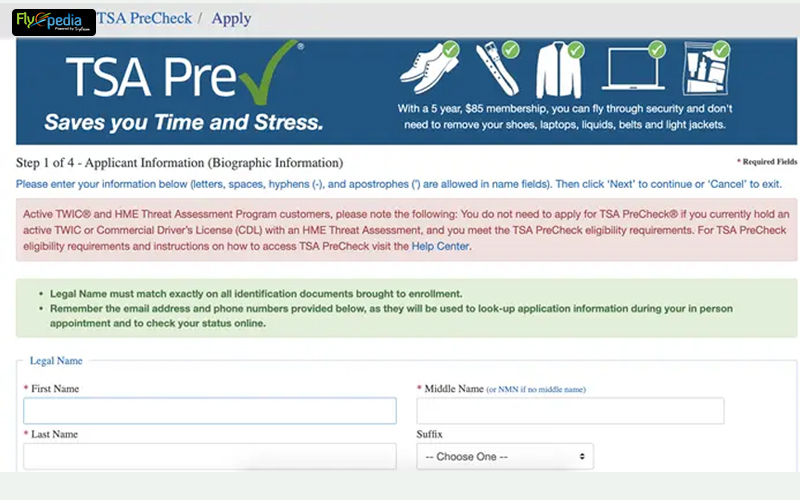
The most frequent reason for TSA PreCheck not appearing on a boarding pass despite KTN entry is a mismatch in personal information. The TSA’s system performs a strict digital comparison.
- Exact Name Match: Ensure the name on your American Airlines booking (and in your AAdvantage profile) exactly matches the name under which you enrolled in TSA PreCheck. This includes middle names, hyphens, and suffixes. Even a single letter difference can trigger a mismatch in the digital verification process.
- Date of Birth and Gender: Similarly, confirm that your date of birth and gender on your American Airlines profile/booking are identical to what is registered with your KTN. These are crucial data points for identity verification.
- KTN Accuracy: Double-check that your KTN itself is entered correctly. A transposed digit or a missed character will prevent the system from finding your record. You can verify your KTN by logging into the Universal Enroll website (where you applied for PreCheck).
These meticulous digital checks are vital because the security protocols are designed to be stringent. Any discrepancy means the digital system cannot definitively link your booking to your known traveler status.
When Digital Systems Don’t Sync: Contacting Support and Manual Intervention
Sometimes, despite all checks, the “TSA Pre” indicator doesn’t appear. In such cases, direct intervention might be necessary.
- Call American Airlines Customer Service: If your KTN is correctly entered and verified, but PreCheck isn’t on your boarding pass, contact American Airlines’ customer service. Explain that your KTN is on file but not reflecting on your boarding pass. They can manually review your reservation and resubmit the KTN to the TSA’s system.
- Airport Agent Assistance: As a last resort, if you are at the airport and still without PreCheck, an American Airlines agent at the check-in counter or gate may be able to assist. While their capabilities for last-minute fixes can be limited, they might be able to re-print your boarding pass after verifying the KTN in the system. However, relying on this is not ideal, as it doesn’t always guarantee a fix.
It’s important to remember that the TSA itself cannot add a KTN to an airline reservation; this responsibility lies solely with the airline’s digital infrastructure.
Post-Booking KTN Addition: Modifying Your Digital Itinerary
If you forgot to add your KTN during booking or enrolled in PreCheck after purchasing your ticket, you can still add it to an existing American Airlines reservation.
- Online Via “Manage Trip”: Go to AA.com and select “Manage Trip.” Enter your last name and record locator (the six-character alphanumeric code for your booking). Once your trip is retrieved, look for an option to “Edit Passenger Information” or “Add/Edit Secure Traveler Details.” Input your KTN and save.
- Via Mobile App: Use the American Airlines mobile app, navigate to “My Trips,” select your flight, and look for similar editing options as on the website to add your KTN.
- Calling Reservations: If the online/app methods prove difficult, a quick call to American Airlines reservations can resolve this. Provide your record locator and KTN, and the agent will update your digital itinerary.
It’s recommended to add the KTN at least 72 hours before your flight to allow ample time for the digital systems to process the update and for the TSA to verify your status, ensuring the “TSA Pre” indicator appears on your boarding pass.
Beyond the Link: Maximizing Your Digital Travel Security Profile
Adding your KTN to American Airlines is a vital step, but it’s part of a broader strategy for digital travel security and efficiency. Understanding the ecosystem of trusted traveler programs and best practices for managing your digital identity can further enhance your journey.
The Broader Digital Ecosystem: Global Entry vs. TSA PreCheck
While both enhance travel, Global Entry and TSA PreCheck serve distinct digital functions within the travel security landscape.
- TSA PreCheck primarily focuses on expedited domestic airport security screening.
- Global Entry provides expedited customs and immigration processing for international arrivals into the U.S. Crucially, Global Entry membership includes TSA PreCheck benefits.
For the frequent international traveler, Global Entry offers a more comprehensive digital security solution, streamlining both arrival and departure processes. If you have Global Entry, you will use your Global Entry PASSID as your KTN for TSA PreCheck. This unified digital ID simplifies management while expanding your trusted traveler benefits. Choosing the right program depends on your travel patterns and maximizes the digital tools available to you.
Best Practices for Digital Travel Identity Management
Maintaining an accurate and up-to-date digital travel identity is crucial for consistent travel benefits and security.
- Keep KTN Accessible: Store your KTN in a secure, easily retrievable location, such as a password manager or a secure note on your phone.
- Regular Profile Audits: Periodically review your American Airlines AAdvantage profile (and other airline loyalty profiles) to ensure all personal information, especially your name, date of birth, and KTN, is accurate and current.
- Unified Information: Strive for consistency across all travel-related accounts – your passport, driver’s license, loyalty programs, and trusted traveler programs should all reflect identical personal details. This minimizes friction with digital verification systems.
- Stay Informed: Keep abreast of changes in TSA PreCheck policies, airline system updates, and new digital tools that could impact your travel experience. Many airlines, including American, offer app notifications and email updates for such changes.
By adhering to these digital best practices, travelers can proactively manage their secure identity, ensuring that programs like TSA PreCheck consistently deliver their intended benefits.
The Future of Digital Travel: Seamless Integration and Emerging Technologies
The process of adding TSA PreCheck to American Airlines is a testament to how digital integration has already transformed air travel. However, the future promises even more sophisticated technologies that aim to make the journey not just faster, but truly seamless and touchless.
Biometrics and Touchless Travel: The Next Frontier
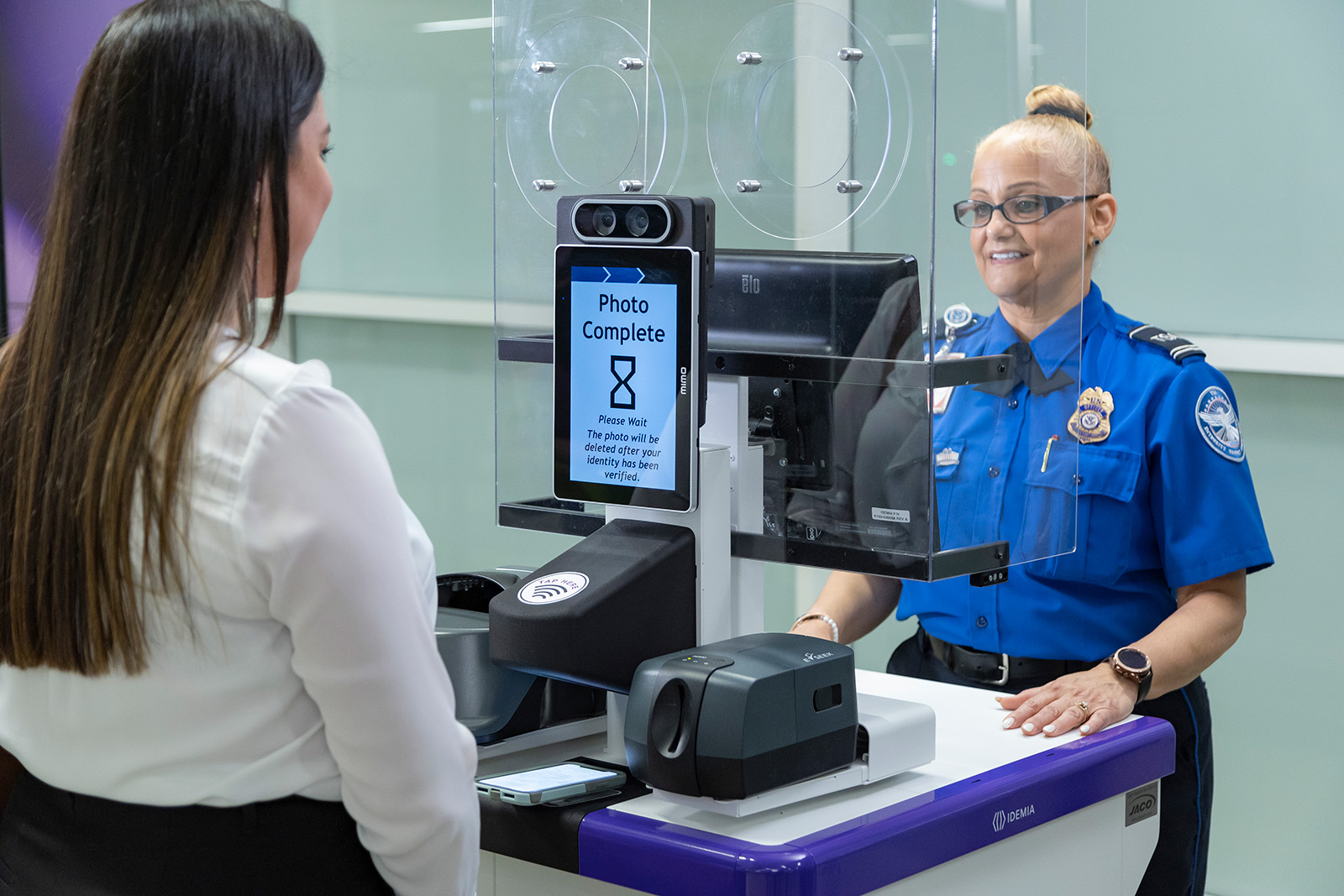
The current method of entering a KTN is a significant digital step, but the horizon includes advanced biometric authentication. American Airlines, like many carriers, is actively experimenting with facial recognition technology for bag drop and boarding processes. Imagine a future where your enrollment in TSA PreCheck or Global Entry is directly linked to your biometric data (e.g., facial scan). Instead of scanning a boarding pass or even entering a KTN, your presence alone, verified through biometrics, could seamlessly grant you access to expedited security lanes and boarding gates. This eliminates the need for physical documents and manual data entry, representing the pinnacle of digital identity integration in travel.
The Role of AI in Personalized Travel Security
Artificial intelligence (AI) is poised to play an increasingly significant role in travel security and personalization. AI algorithms could analyze individual travel patterns, security clearances, and real-time airport conditions to offer hyper-personalized security guidance or even dynamic routing recommendations within the airport. For instance, AI could intelligently predict potential bottlenecks, suggest optimal times to clear security based on your PreCheck status, and integrate this information directly into the American Airlines app, making your digital travel assistant even more proactive and insightful. This goes beyond merely linking a KTN; it envisions an intelligent system that understands and anticipates your needs based on a vast array of digital data points, continuously optimizing your travel security experience.
In conclusion, adding your TSA PreCheck KTN to American Airlines is a fundamental digital task for any modern traveler seeking efficiency. By understanding the digital platforms, meticulously entering your information, and adopting best practices for identity management, you can unlock the full potential of expedited screening. As technology continues to advance, our reliance on integrated digital systems will only grow, promising an even more intuitive and secure future for air travel.
aViewFromTheCave is a participant in the Amazon Services LLC Associates Program, an affiliate advertising program designed to provide a means for sites to earn advertising fees by advertising and linking to Amazon.com. Amazon, the Amazon logo, AmazonSupply, and the AmazonSupply logo are trademarks of Amazon.com, Inc. or its affiliates. As an Amazon Associate we earn affiliate commissions from qualifying purchases.