
In the rapidly evolving landscape of digital finance, peer-to-peer (P2P) payment applications have become indispensable tools for managing everyday transactions. Among these, Cash App stands out as a highly popular choice, offering a streamlined way to send, receive, and invest money. At the heart of its functionality lies the ability to seamlessly link a debit card, transforming your smartphone into a powerful financial hub. This guide will walk you through the essential steps, security considerations, and advanced tips for effectively integrating your debit card with Cash App, ensuring a smooth and secure digital payment experience.
Understanding Cash App and Its Core Functionality
Cash App, developed by Block, Inc. (formerly Square, Inc.), has revolutionized the way millions handle their personal finances. More than just a simple money transfer service, it’s a comprehensive platform designed for modern financial needs, and knowing its basic structure is key to leveraging its full potential.
What is Cash App?
At its core, Cash App is a mobile payment service that allows users to transfer money to one another using a unique identifier known as a “$Cashtag.” It functions as a digital wallet, enabling users to store funds, send payments, receive money, and even buy Bitcoin or invest in stocks. Its user-friendly interface and focus on speed make it an attractive alternative to traditional banking methods for many day-to-day transactions. The application is available on both iOS and Android devices, ensuring broad accessibility.
Why Link a Debit Card?
Linking a debit card to your Cash App account is not merely an option; it’s a foundational step that unlocks the vast majority of the app’s features. Without a linked card, your ability to fund your Cash App balance, send money to others, or even cash out funds to your external bank account is severely limited.
- Funding Transactions: Your debit card serves as the primary source of funds for sending money to friends, family, or businesses through Cash App. When you initiate a payment, the app can instantly draw funds from your linked debit card if your Cash App balance is insufficient.
- Cashing Out: Conversely, when you receive money on Cash App, your linked debit card facilitates the transfer of those funds from your Cash App balance back to your traditional bank account. This is crucial for accessing your money outside the app.
- Identity Verification: In some cases, linking a debit card can help Cash App verify your identity, which is often required to unlock higher spending limits or access features like Bitcoin trading and stock investing.
- Convenience: It provides unparalleled convenience, allowing you to manage payments on the go without needing to log into multiple banking platforms.
Security Considerations for Linked Cards
Integrating financial instruments like debit cards with any digital platform inherently raises security concerns. Cash App employs a multi-layered security infrastructure to protect user data and transactions.
- Encryption: All information exchanged between your device and Cash App’s servers is encrypted, safeguarding your card details from interception.
- Fraud Protection: Cash App incorporates fraud detection algorithms and real-time monitoring to identify and prevent unauthorized transactions. In the event of suspicious activity, accounts can be temporarily locked, and users are notified.
- PIN Protection & Biometrics: Users can secure their app with a PIN, Touch ID, or Face ID, adding an extra layer of protection against unauthorized access to their account even if their phone is compromised.
- PCI DSS Compliance: Cash App adheres to Payment Card Industry Data Security Standard (PCI DSS) requirements, which are a set of security standards designed to ensure that all companies that process, store, or transmit credit card information maintain a secure environment.
While Cash App takes significant measures, user vigilance is also paramount. Regularly reviewing transaction history, enabling two-factor authentication, and being cautious of phishing attempts are vital for maintaining personal financial security within the app.
Step-by-Step Guide: Adding Your Debit Card
Adding your debit card to Cash App is a straightforward process designed for simplicity and speed. However, having all necessary information ready and understanding each step can prevent common hiccups.
Prerequisites Before You Start
Before you begin the card linking process, ensure you have the following readily available:
- The Cash App Installed: Download and install the Cash App on your smartphone from the Apple App Store (for iOS) or Google Play Store (for Android).
- An Active Cash App Account: You should have already created and logged into your Cash App account.
- Your Physical Debit Card: Have your physical debit card in hand, as you will need to input details like the card number, expiration date, and CVV.
- Stable Internet Connection: A reliable Wi-Fi or cellular data connection is essential to prevent interruptions during the process.
- Your Billing ZIP Code: You will need the ZIP code associated with your debit card’s billing address.
Navigating the Cash App Interface
The Cash App interface is designed to be intuitive. Here’s how to find the relevant section for adding your card:
- Open Cash App: Launch the Cash App on your device.
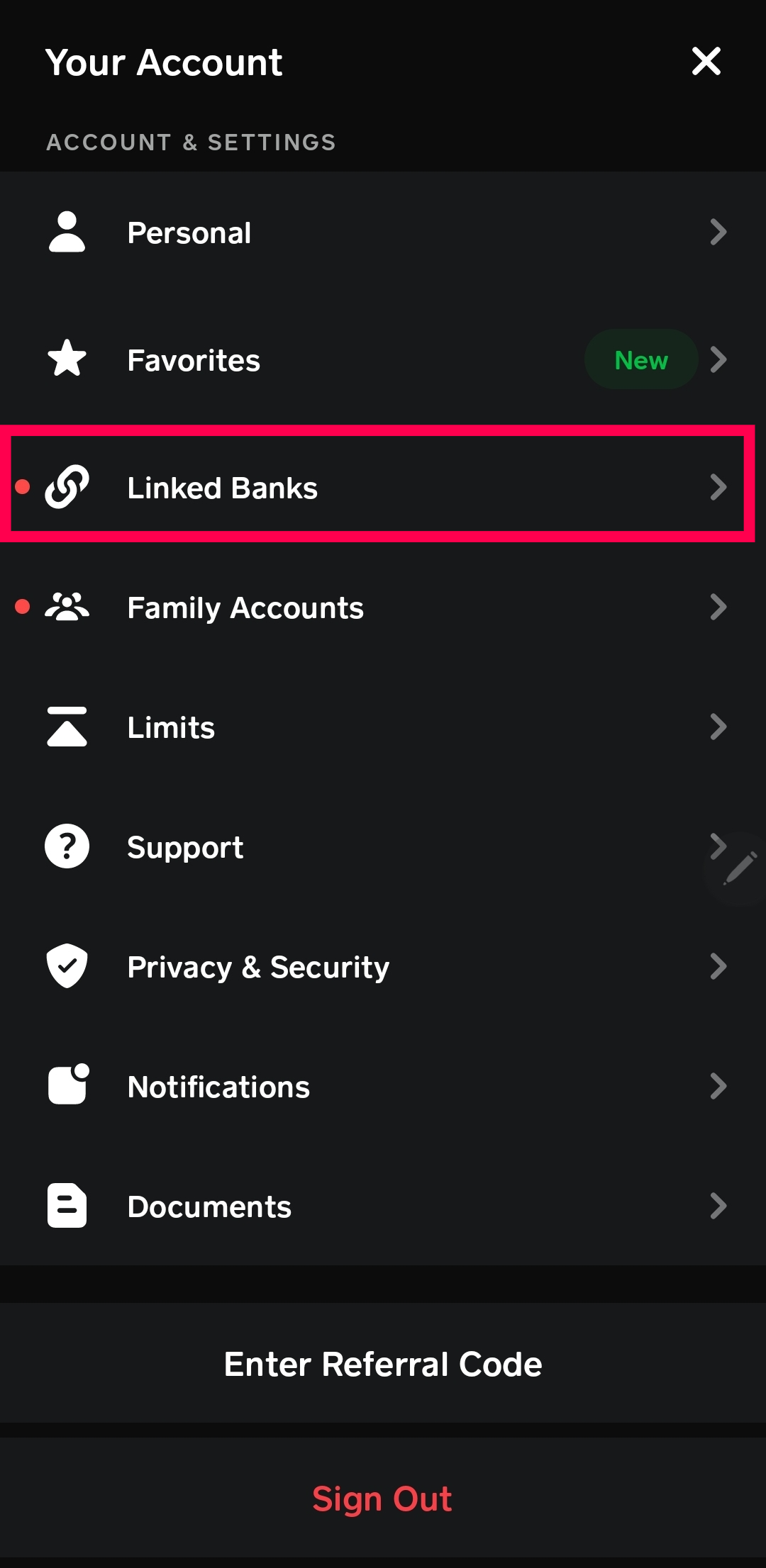
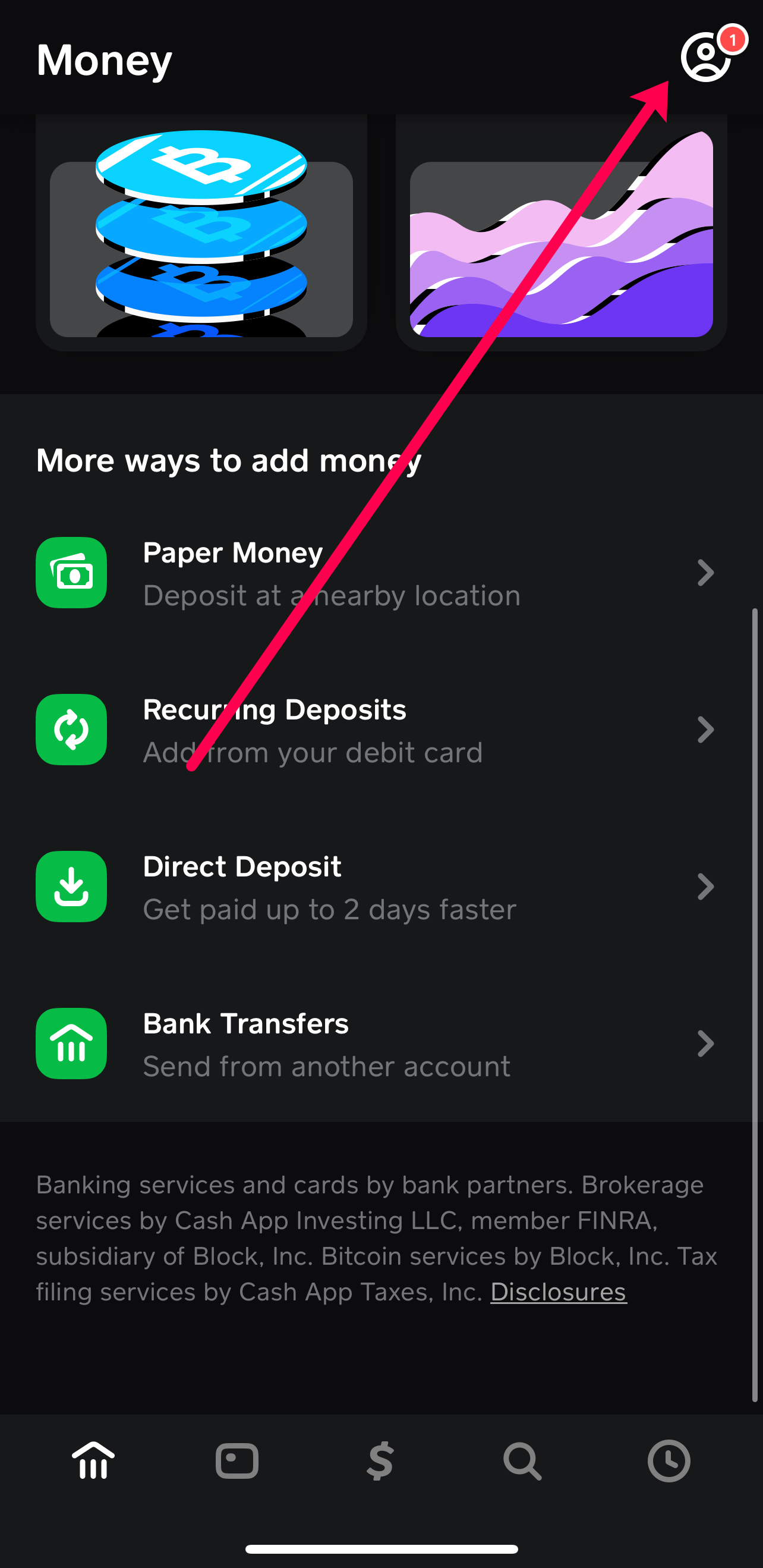
- Access the Banking Tab: Look for the “Banking” tab, often represented by a bank building icon or a home icon, usually located on the bottom left of the main screen. Tapping this will take you to your Cash App balance and linked accounts.
- Find “Linked Banks” or “Add Bank”: On the Banking screen, scroll down or look for an option titled “Linked Banks,” “Link Bank,” or “Add Bank.” This is where you manage your financial connections. Sometimes, you might see “Link Debit Card” directly.
Entering Your Debit Card Details
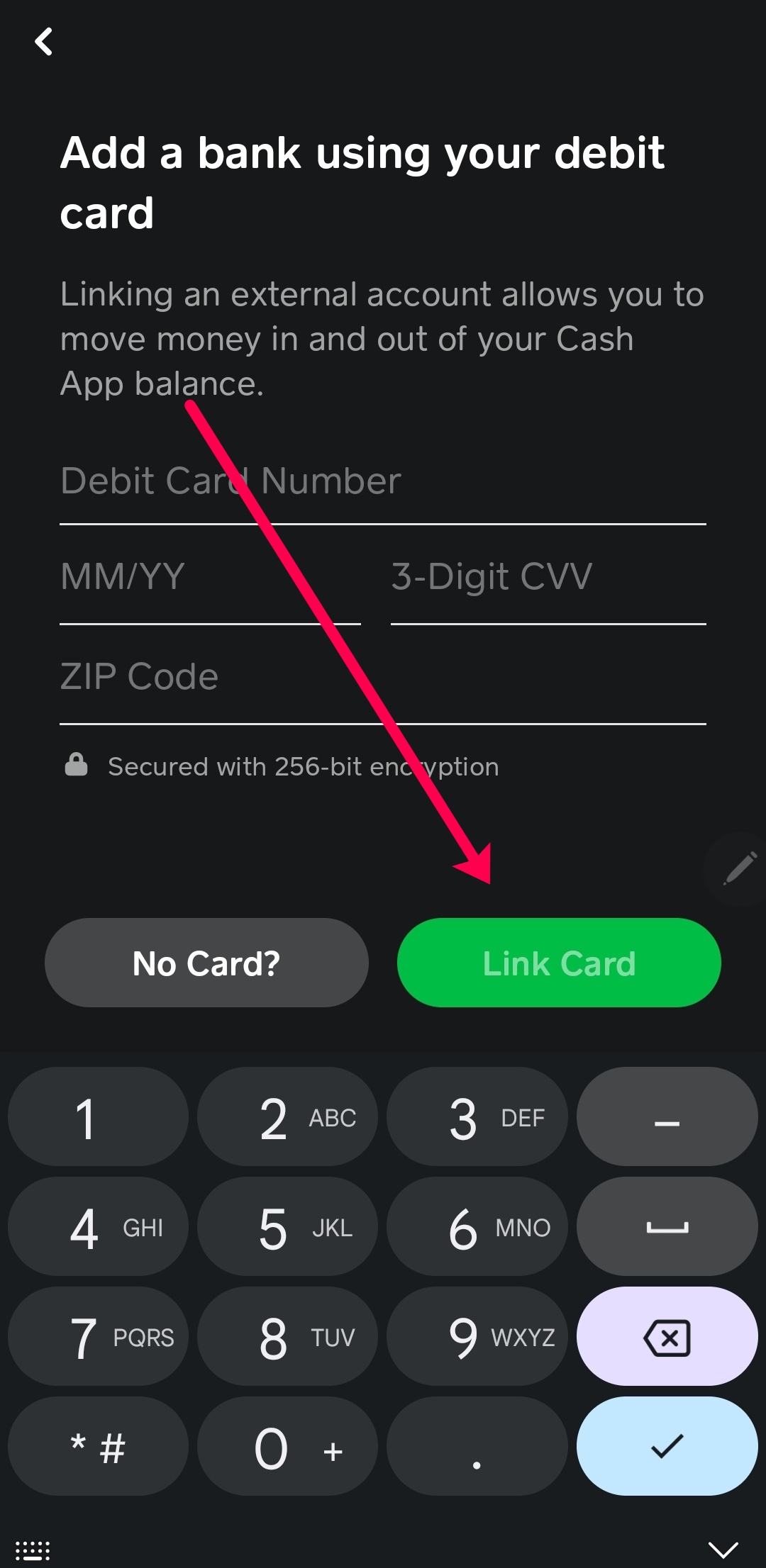
Once you’ve navigated to the “Add Bank” or “Link Debit Card” section, you’ll be prompted to input your card’s information:
- Enter Debit Card Number: Carefully type in the 16-digit number found on the front of your debit card. Double-check for any typos.
- Enter Expiration Date: Input the month and year your card expires (e.g., 08/25).
- Enter CVV/CVC: This is the 3-digit security code found on the back of your debit card, typically on the signature strip. For American Express cards, it’s a 4-digit code on the front.
- Enter Billing ZIP Code: Provide the ZIP code associated with the billing address of your debit card. This is a crucial security measure to verify you are the legitimate cardholder.
- Tap “Link Card”: Once all the details are accurately entered, tap the “Link Card” button to finalize the process.
Verification Process
In some instances, Cash App may require an additional verification step to confirm your ownership of the debit card.
- Instant Verification: For many major banks, Cash App can instantly verify your card.
- Micro-deposits: Less commonly, Cash App might send one or two small, random deposits (e.g., $0.05, $0.12) to your bank account. You would then need to check your bank statement (online banking is fastest) and enter these exact amounts back into Cash App to confirm. This process can take 1-2 business days.
- Plaid Integration: Cash App, like many other fintech apps, often uses services like Plaid to securely link your bank account directly by prompting you to log in to your bank’s online portal through a secure intermediary. While this is more common for linking bank accounts, it can sometimes be part of a broader verification process when adding a debit card.
Follow any on-screen prompts carefully to complete the verification. Once successful, your debit card will be linked, and you can begin using Cash App’s full suite of features.
Troubleshooting Common Issues and Optimizing Your Experience
While adding a debit card to Cash App is generally smooth, users can occasionally encounter issues. Knowing how to troubleshoot these and optimize your setup can save time and enhance security.
Card Not Accepted or Invalid?
If Cash App rejects your debit card, consider these common reasons and solutions:
- Typographical Errors: The most frequent issue. Double-check the card number, expiration date, CVV, and billing ZIP code for any mistakes.
- Expired Card: Ensure your card has not expired. If it has, you’ll need to use an active card.
- Unsupported Card Type: Cash App primarily supports Visa, MasterCard, American Express, and Discover debit cards. Prepaid cards, business debit cards, or certain government-issued cards may not be accepted.
- Bank Restrictions: Your bank might have security restrictions that prevent linking to third-party apps. Contact your bank to inquire if this is the case and if they can lift the restriction.
- Insufficient Funds (for verification): While rare, some micro-deposit verification methods might require a small balance.
- Previous Account Link: If the debit card was previously linked to another Cash App account (e.g., an old account or one belonging to a family member), it might cause conflicts.
Dealing with Verification Problems
If you’re stuck in a verification loop or can’t complete the process:
- Check Bank Statements Thoroughly: If micro-deposits are involved, ensure you’re looking at the correct account and for the exact amounts. Sometimes, these small transactions can be hard to spot amidst others.
- Wait for Bank Processing: Micro-deposits aren’t always instant. Give it 1-2 business days for them to appear.
- Contact Cash App Support: If all else fails, reach out to Cash App’s customer support through the app or their official website. Provide them with details of the issue, and they can often provide specific guidance or manually resolve verification problems.
- Try a Different Card: If you have another eligible debit card, trying that might resolve an issue specific to the first card or bank.
Managing Multiple Debit Cards
Cash App allows you to link multiple debit cards. This can be useful for managing different income streams or having a backup.
- Adding Another Card: Follow the same steps as above to add a second or third debit card.
- Setting a Default: You can designate one card as your default funding source from the “Linked Banks” section.
- Removing a Card: If a card expires or you no longer wish to use it with Cash App, you can easily remove it by tapping on the card in the “Linked Banks” section and selecting the “Remove Card” option. This is a crucial security step if a card is lost or stolen.
Enhancing Security Measures
Beyond Cash App’s built-in security, you can take proactive steps:
- Enable Two-Factor Authentication (2FA): Always enable 2FA for your Cash App account. This requires a code sent to your phone or email in addition to your password, significantly boosting security.
- Use Strong, Unique Passwords: Ensure your Cash App password is complex and not reused on other sites.
- Monitor Activity Regularly: Periodically review your Cash App transaction history for any unauthorized activity. Set up notifications for all transactions.
- Be Wary of Phishing Scams: Cash App will never ask for your PIN, login details, or full card number via unofficial channels. Be suspicious of unsolicited messages or emails claiming to be from Cash App.
- Keep Your App Updated: Ensure your Cash App is always updated to the latest version to benefit from the newest security patches and features.
Leveraging Your Linked Debit Card on Cash App
Once your debit card is securely linked, Cash App transforms into a powerful financial tool, offering a suite of functionalities that extend far beyond simple P2P payments.
Sending and Receiving Money
The most fundamental use of a linked debit card on Cash App is facilitating instant money transfers.
- Instant Transfers: When you send money from your Cash App balance, it’s often instant. If your balance is low, the app will seamlessly pull funds from your linked debit card. This speed is a major advantage over traditional bank transfers.
- Receiving Funds: Money sent to your $Cashtag appears directly in your Cash App balance. From there, you can choose to keep it in the app, spend it using a Cash Card, or cash it out to your linked debit card’s bank account.
Using Cash App for Purchases
Your linked debit card also plays a role in enabling purchases:
- Cash Card: After linking your debit card and verifying your identity, you can order a free Cash Card, which is a customizable, physical Visa debit card linked to your Cash App balance. This allows you to spend your Cash App funds anywhere Visa is accepted, online or in stores, effectively turning your Cash App balance into a traditional bank account balance accessible via a card.
- Square Integration: For businesses that use Square (Cash App’s sister company), you can often pay directly using your Cash App balance, drawing funds from your linked debit card if necessary, streamlining transactions at participating merchants.
Cashing Out to Your Bank Account
A crucial feature is the ability to transfer funds from your Cash App balance back to your bank account via your linked debit card.
- Standard Transfers: These are free and typically take 1-3 business days to arrive in your bank account.
- Instant Deposits: For a small fee (usually 0.5% to 1.75% of the transfer amount, with a minimum fee of $0.25), you can instantly transfer funds to your linked debit card’s bank account. This is ideal when you need immediate access to your money. Your linked debit card is essential for this feature to work.
Exploring Cash App Boosts and Features
Cash App offers “Boosts” — instant discounts that you can add to your Cash Card for specific merchants or categories.
- Activating Boosts: These boosts are often tied to using your Cash Card, which in turn is funded by your Cash App balance, which itself can be funded by your linked debit card. This creates a powerful ecosystem where your linked card indirectly enhances your spending power through app-exclusive deals.
- Integrated Services: Beyond payments, Cash App also allows users to buy and sell Bitcoin and invest in stocks. While these might not directly use your debit card for every transaction, linking a card facilitates the initial funding of your Cash App balance, which is then used to purchase these assets.
In conclusion, integrating your debit card with Cash App is a foundational step that unlocks a world of digital financial possibilities. By understanding the process, being mindful of security, and leveraging its myriad features, you can transform your smartphone into an efficient and secure tool for managing your money in the modern digital age. The convenience, speed, and evolving functionalities offered by Cash App, underpinned by your linked debit card, make it a powerful ally in personal finance.
aViewFromTheCave is a participant in the Amazon Services LLC Associates Program, an affiliate advertising program designed to provide a means for sites to earn advertising fees by advertising and linking to Amazon.com. Amazon, the Amazon logo, AmazonSupply, and the AmazonSupply logo are trademarks of Amazon.com, Inc. or its affiliates. As an Amazon Associate we earn affiliate commissions from qualifying purchases.