
Navigating the digital payment landscape has become an integral part of modern financial management. Among the plethora of mobile payment applications, Cash App has emerged as a popular choice for peer-to-peer transactions, stock investing, and Bitcoin trading. A common point of entry and a crucial functionality within Cash App is the ability to link a credit card. This process, while generally straightforward, involves understanding the mechanics, potential benefits, and crucial considerations for security and financial well-being. This guide will walk you through the steps of adding a credit card to your Cash App account, delve into why you might want to do so, and highlight important practices to ensure a smooth and secure experience.
Understanding the Cash App Ecosystem and Credit Card Integration
Cash App, developed by Square, Inc., operates as a digital wallet that facilitates various financial transactions. While primarily designed for direct bank account linking, the integration of credit cards offers users additional flexibility and, in certain scenarios, potential benefits. Understanding this integration within the broader context of the app’s features is key to maximizing its utility.
The Mechanics of Linking a Credit Card
Adding a credit card to Cash App is designed to be a simple, user-friendly process. The app prioritizes a clean interface that guides users through each step.
Step-by-Step Guide to Adding Your Credit Card
- Open the Cash App: Launch the Cash App application on your smartphone. Ensure you have the latest version installed from your device’s app store (Apple App Store or Google Play Store).
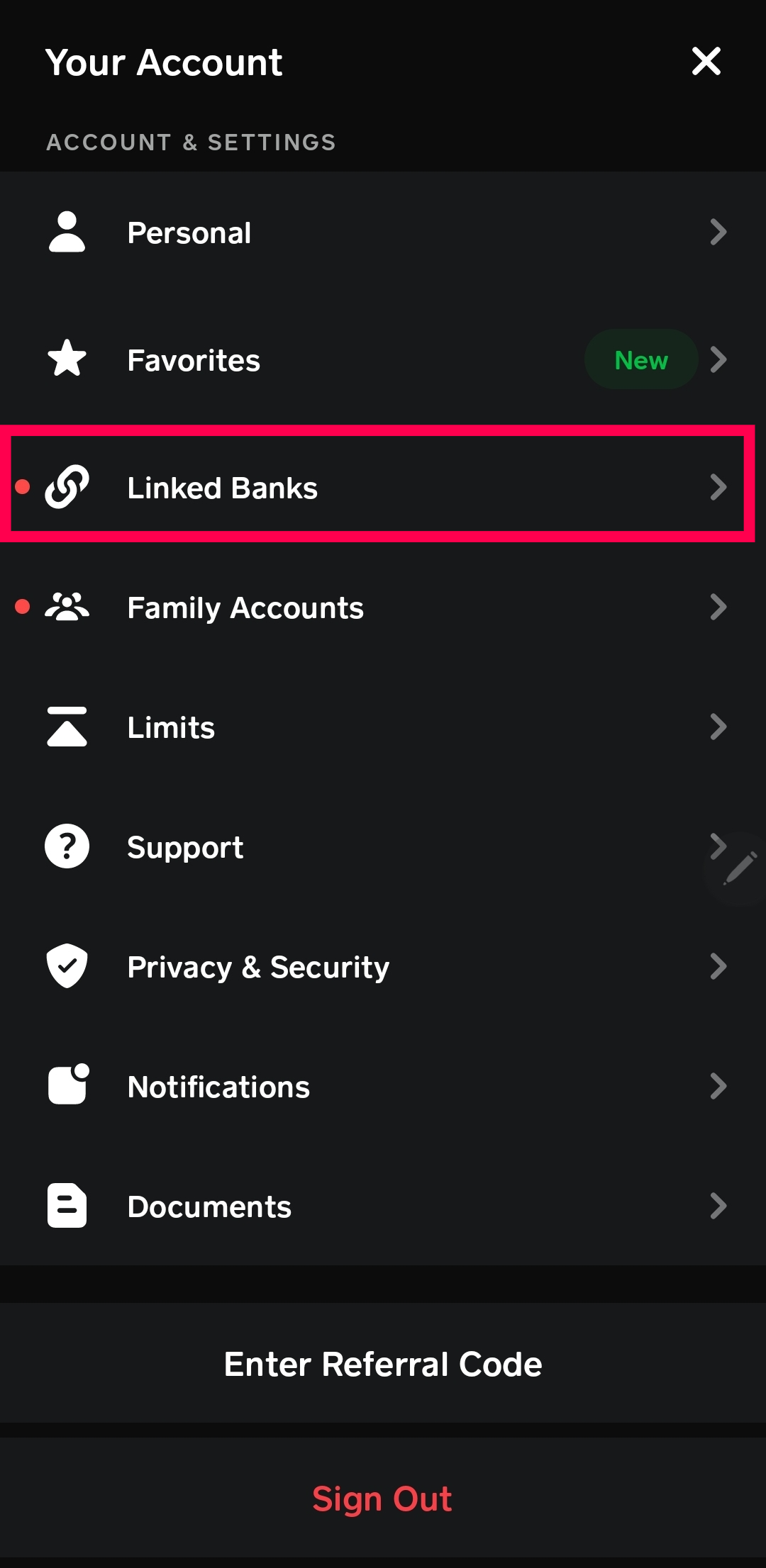
- Navigate to Payment Settings: On the main Cash App screen, locate the banking tab, typically represented by a building icon or a card icon. Tap on this icon.
- Initiate Card Addition: Within the payment settings, you should see an option to “Add Bank” or “Add Cash Card.” Select the option that allows you to add an external payment method.
- Choose “Credit Card”: When prompted to select the type of payment method, choose “Credit Card.” This will differentiate it from linking a bank account.
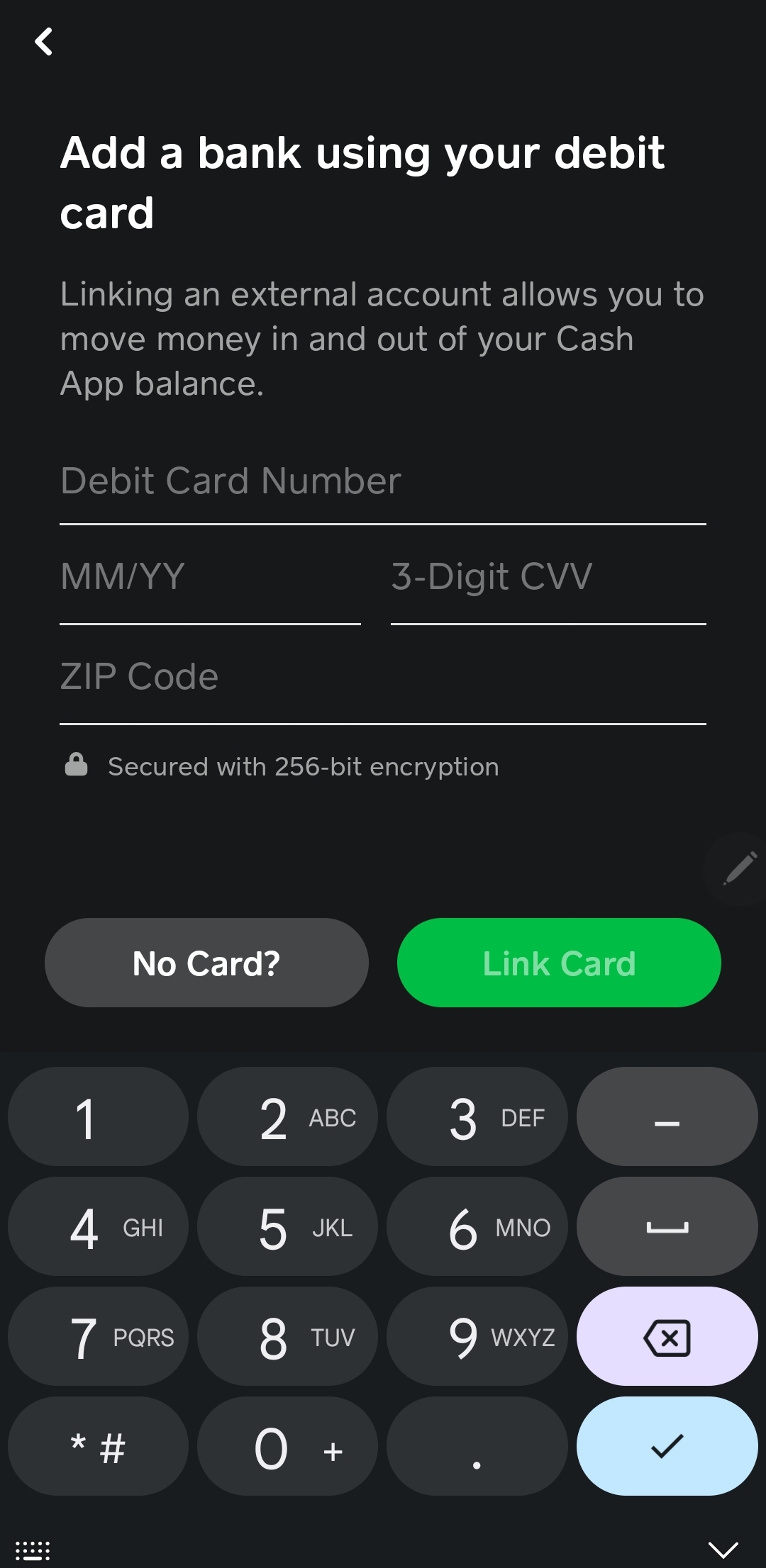
- Enter Card Details: You will be presented with fields to input your credit card information. This includes:
- Card Number: The 16-digit number prominently displayed on the front of your credit card.
- Expiration Date: The month and year the card expires, usually found on the front of the card.
- CVV Code: The 3 or 4-digit security code, typically found on the back of the card (for Visa, Mastercard, Discover) or the front (for American Express).
- Billing Zip Code: The zip code associated with your credit card’s billing address. This is a critical security measure to verify your identity and location.
- Confirm and Save: After entering all the required details, review them for accuracy. Tap on the “Done” or “Add Card” button to finalize the process. Cash App will then attempt to verify the card with your issuing bank.
- Verification (if necessary): In some cases, your bank may require an additional verification step, such as a one-time passcode sent to your phone or a confirmation through your bank’s mobile app. Follow any on-screen prompts to complete this verification.
Once successfully added, your credit card will appear as a payment option within your Cash App account. You can then select it as your preferred method for sending money, making purchases, or funding other Cash App features.
Why Link a Credit Card to Cash App?
While linking a bank account is often the primary method for direct fund transfers, adding a credit card to Cash App can offer distinct advantages for specific user needs and financial strategies.
Benefits and Use Cases
- Convenience and Accessibility: For users who frequently carry credit cards but may not always have their debit card or bank account information readily accessible, adding a credit card offers immediate payment capability. It streamlines the process of sending money to friends and family without needing to link a bank account directly, which some users prefer for privacy reasons.
- Maximizing Credit Card Rewards: Many credit cards offer rewards programs, such as cashback, travel miles, or points, on purchases. By using your credit card through Cash App for payments that would otherwise be made from a bank account, you can potentially accrue these rewards on transactions that might not typically qualify. This is especially relevant if Cash App purchases are categorized in a way that aligns with your card’s bonus categories.
- Temporary Fund Management: In situations where immediate funds are not available in a linked bank account, a credit card can serve as a temporary bridge. It allows users to make urgent payments through Cash App, thereby avoiding overdraft fees or other financial inconveniences, with the understanding that the credit card balance will need to be settled later.
- Enhanced Purchase Protection: Some credit cards offer built-in purchase protection, extended warranties, or fraud liability coverage. Utilizing these cards through Cash App can extend these protections to your transactions, providing an extra layer of security and peace of mind.
- Separation of Expenses: For individuals who wish to keep their personal spending separate from business expenses, or who want to track specific types of transactions, using a dedicated credit card linked to Cash App can be an effective organizational tool.
Security and Best Practices When Using Credit Cards with Cash App
Integrating financial tools like credit cards with mobile payment apps necessitates a strong emphasis on security and the adoption of best practices. Cash App employs robust security measures, but user vigilance remains paramount in safeguarding financial information.
Safeguarding Your Financial Information
Cash App is committed to protecting user data through encryption and adherence to security protocols. However, understanding these measures and supplementing them with personal security habits is crucial.
Key Security Measures and User Responsibilities
- Encryption: Cash App uses end-to-end encryption to protect the sensitive data transmitted between your device and its servers. This means that your credit card details and transaction information are scrambled and unreadable to unauthorized parties during transit.
- Two-Factor Authentication (2FA): While not universally implemented for every action within Cash App, enabling security locks and PIN/Biometric authentication on your device adds a significant layer of security. This ensures that even if your phone is lost or stolen, unauthorized access to your Cash App account is prevented.
- Regularly Reviewing Transactions: A fundamental security practice is to regularly monitor your credit card statements and your Cash App transaction history. This allows you to quickly identify any unauthorized or suspicious activity and report it immediately to both Cash App and your credit card issuer.
- Never Sharing Login Credentials: Your Cash App login details (username, password, PIN) are your digital keys. Never share them with anyone, even if they claim to be from Cash App support. Official Cash App support will never ask for your password or PIN.
- Secure Network Usage: When accessing Cash App and entering sensitive financial information, ensure you are connected to a secure and trusted Wi-Fi network or use your cellular data. Avoid using public, unsecured Wi-Fi hotspots for financial transactions, as these can be vulnerable to man-in-the-middle attacks.
- Device Security: Keep your mobile device’s operating system updated with the latest security patches. Install reputable antivirus or anti-malware software on your device.
Understanding Fees and Transaction Limits
While the act of adding a credit card is free, there are important considerations regarding fees and limits associated with using credit cards on Cash App, particularly when sending money.
Fee Structures and Usage Constraints
- Instant Deposit Fees: When you receive money in Cash App and choose to deposit it instantly into your linked bank account or debit card, there is often a small fee. If you choose the standard deposit, it may take 1-3 business days but is typically free. The fee structure for instant deposits can sometimes be influenced by the payment method used to receive the funds, although it’s generally a standard fee for the instant deposit service itself.
- Cash App to Cash App Transfers (Credit Card Surcharge): Crucially, when you use a credit card to send money to another Cash App user, Cash App typically imposes a fee. This fee is usually around 3% of the transaction amount. This is because the credit card networks charge Cash App for processing these payments, and Cash App passes that cost on to the user. If you are sending money from a linked bank account, there is generally no fee for standard transfers.
- Credit Card Purchase Fees: If you are using Cash App to make purchases directly with merchants that accept Cash App, or through their Cash Card feature, the fees may differ. However, for peer-to-peer transfers using a credit card, the 3% surcharge is a common practice.
- Transaction Limits: Cash App, like all financial platforms, has daily, weekly, and monthly transaction limits for sending and receiving money. These limits are in place for security and regulatory reasons. Adding and verifying your identity (e.g., by providing your full name, date of birth, and the last four digits of your SSN) can increase these limits. It’s advisable to check the latest limit information within the Cash App’s help section.
- Credit Card Issuer Policies: Be aware that your credit card issuer may also have policies regarding transactions made through payment apps. Some issuers might consider certain Cash App transactions as cash advances, which can incur higher interest rates and fees, and may not earn rewards. It is always a good practice to review your credit card’s terms and conditions or contact your issuer directly if you have questions about how transactions through Cash App are treated.
By understanding these fee structures and transaction limits, users can make informed decisions about when and how to use their credit card with Cash App, thereby optimizing their financial strategies and avoiding unexpected costs.
Advanced Features and Considerations for Credit Card Users
Beyond the fundamental act of adding a credit card, Cash App offers features and integrations that can further enhance the user experience for those leveraging credit cards for their digital transactions. Understanding these can lead to more efficient and rewarding use of the platform.
Utilizing Cash App with Your Credit Card Beyond P2P Payments
Cash App’s functionality extends beyond simple peer-to-peer money transfers, and integrating a credit card can unlock various avenues for spending and managing finances.
Exploring the Cash Card and Other Integrations
- The Cash Card: The Cash Card is a Visa debit card issued by Cash App itself, linked to your Cash App balance. While not directly a credit card, it’s a crucial part of the Cash App ecosystem. Users can choose to fund their Cash Card spending from their Cash App balance, which can be replenished by a linked bank account or a credit card (though using a credit card to fund the Cash Card balance might incur a fee, similar to direct P2P transfers). The Cash Card offers its own set of rewards, such as “Boosts” for discounts at various retailers.
- Direct Merchant Payments: In some instances, merchants may integrate with Cash App for direct payments. If you have a credit card linked, you can potentially use it as the funding source for these purchases, similar to using it in a digital wallet like Apple Pay or Google Pay. However, the availability of this feature depends on the merchant’s integration.
- Bill Pay: Cash App has a bill pay feature that allows users to pay various bills directly through the app. If your credit card is linked, you might be able to use it as the payment method for certain bills, especially if Cash App categorizes these as eligible transactions. This can be another avenue to earn credit card rewards on recurring expenses.
- Investing and Bitcoin: While it’s generally not advisable and often restricted by credit card issuers, some users may explore using credit cards to fund investments in stocks or Bitcoin through Cash App. However, it’s critical to understand that this can be a high-risk strategy. Credit card companies often treat such transactions as cash advances, which come with high fees and interest rates, and do not typically earn rewards. Furthermore, the volatility of investments means you could end up owing more on your credit card than you gained from the investment.
Troubleshooting Common Issues with Adding Credit Cards
Despite the straightforward process, users may occasionally encounter challenges when attempting to add a credit card to their Cash App account. Addressing these common issues can help ensure a smooth integration.

Resolving Card Addition Problems
- Incorrect Card Details: The most frequent cause of a failed card addition is a simple typo in the card number, expiration date, CVV, or billing zip code. Double-check all entered information against your physical credit card.
- Expired Card: Ensure that the credit card you are attempting to add has not expired.
- Billing Address Mismatch: The billing zip code must precisely match the billing address associated with your credit card account. If you have recently moved, ensure you have updated this information with your credit card issuer.
- Card Issuer Restrictions: Some credit card issuers may block transactions to payment processors or specific types of applications for security reasons. If you consistently fail to add your card, contact your credit card company to inquire about any potential restrictions. They may need to authorize Cash App as a merchant.
- Insufficient Funds or Credit Limit: While adding a card doesn’t immediately charge it, the verification process may involve a small temporary authorization hold by your bank to confirm the card’s validity. If your credit limit is maxed out, or if there are other account issues with your credit card, this could cause a problem.
- Cash App Server Issues: Occasionally, Cash App itself might experience temporary technical difficulties. If you’ve confirmed all your details are correct and your credit card issuer has no restrictions, try again later.
By understanding these advanced features and troubleshooting common issues, users can more effectively integrate and utilize their credit cards within the Cash App platform, transforming it from a simple payment app into a more versatile financial management tool.
aViewFromTheCave is a participant in the Amazon Services LLC Associates Program, an affiliate advertising program designed to provide a means for sites to earn advertising fees by advertising and linking to Amazon.com. Amazon, the Amazon logo, AmazonSupply, and the AmazonSupply logo are trademarks of Amazon.com, Inc. or its affiliates. As an Amazon Associate we earn affiliate commissions from qualifying purchases.