
Cash App has revolutionized peer-to-peer payments, making it remarkably simple to send and receive money with just a few taps. At its core, the application’s functionality hinges on the seamless integration of external financial instruments, primarily debit and credit cards. For new users, or even seasoned ones seeking to update their payment methods, understanding the precise technical steps and underlying considerations for linking a card is paramount. This guide will walk you through the process, delve into the nuances of different card types, address potential technical hurdles, and emphasize the digital security protocols that safeguard your financial information within the Cash App ecosystem.
Understanding Cash App and its Card Integration
Before diving into the mechanics, it’s essential to grasp what Cash App is and why card integration is fundamental to its operation. As a fintech application, Cash App acts as a digital wallet, facilitating a spectrum of financial transactions.
What is Cash App? An Overview of its Core Functionality
Cash App, developed by Block, Inc. (formerly Square, Inc.), is primarily known for its peer-to-peer money transfer capabilities. Users can send and receive funds instantly, often without incurring fees for standard transfers. Beyond P2P, Cash App has expanded its features to include direct deposit, allowing users to receive paychecks directly into their Cash App balance, and investment services for stocks and Bitcoin. The platform also offers the “Cash Card,” a customizable Visa debit card linked directly to your Cash App balance, enabling traditional spending. All these functionalities, however, originate from or are heavily reliant on the ability to connect an external funding source.
Why Link a Card? The Importance of Funding Your Account
Linking a debit or credit card to your Cash App account serves as the primary conduit for injecting funds into your digital wallet. Without a linked card, your ability to send money is severely limited, typically restricted to using an existing Cash App balance received from others. A linked card enables:
-
Sending Money: The most common use case. When you send money to another user, and your Cash App balance is insufficient, the app will automatically draw the necessary funds from your linked debit card.
-
Adding Cash: You can manually add funds from your linked debit card to your Cash App balance, effectively topping up your digital wallet.
-
Instant Deposits: While standard deposits from Cash App to your linked bank account are free but take 1-3 business days, a linked debit card enables instant deposits (for a small fee), transferring your Cash App balance to your bank account almost immediately.
Essentially, your linked card acts as the financial anchor for your Cash App account, ensuring liquidity and transactional flexibility.
Types of Cards Supported by Cash App
Cash App supports most major debit and credit cards with a few important distinctions:
-
Debit Cards: Visa, MasterCard, American Express, and Discover debit cards are generally accepted. These are the most common and recommended card types for seamless, fee-free transactions within Cash App for sending money.
-
Credit Cards: Visa, MasterCard, American Express, and Discover credit cards can also be linked. However, it’s crucial to note that Cash App charges a 3% fee for sending money using a linked credit card. This fee compensates for the higher processing costs associated with credit card transactions. Receiving money or adding funds to your own Cash App balance from a credit card does not incur this fee, but sending funds to others does.
-
Prepaid Cards: While some government-issued prepaid cards might work, many standard reloadable prepaid cards are not supported, especially if they are not linked to a billing address and routing number. It’s best to use a traditional debit or credit card for reliability.
Understanding these distinctions is vital for managing transaction costs and ensuring a smooth user experience.
Step-by-Step Guide to Adding a Debit Card
Linking a debit card is the most common and straightforward process. Follow these steps for a hassle-free setup.
Navigating the Cash App Interface
-
Open Cash App: Launch the Cash App application on your smartphone.
-
Access the Banking Tab: Look for the icon that resembles a house or a bank building (often located in the bottom-left corner of the screen). This is your “Banking” or “My Cash” tab, showing your current Cash App balance.
Initiating the Card Addition Process
-
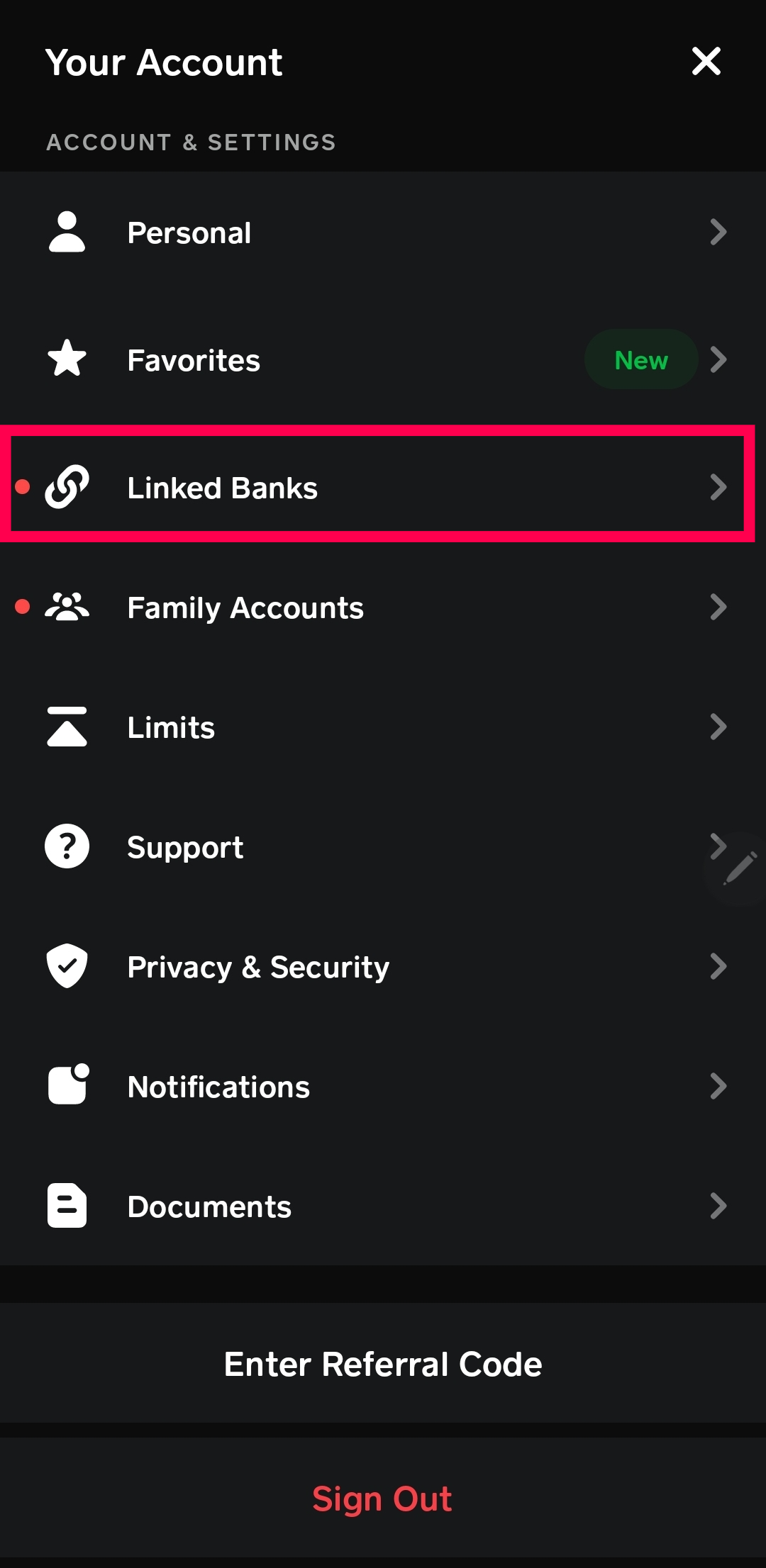
Tap ‘Link Bank’: On the Banking screen, you will see options related to your linked accounts. Tap on “Link Bank” or “Add Bank/Card.”
-
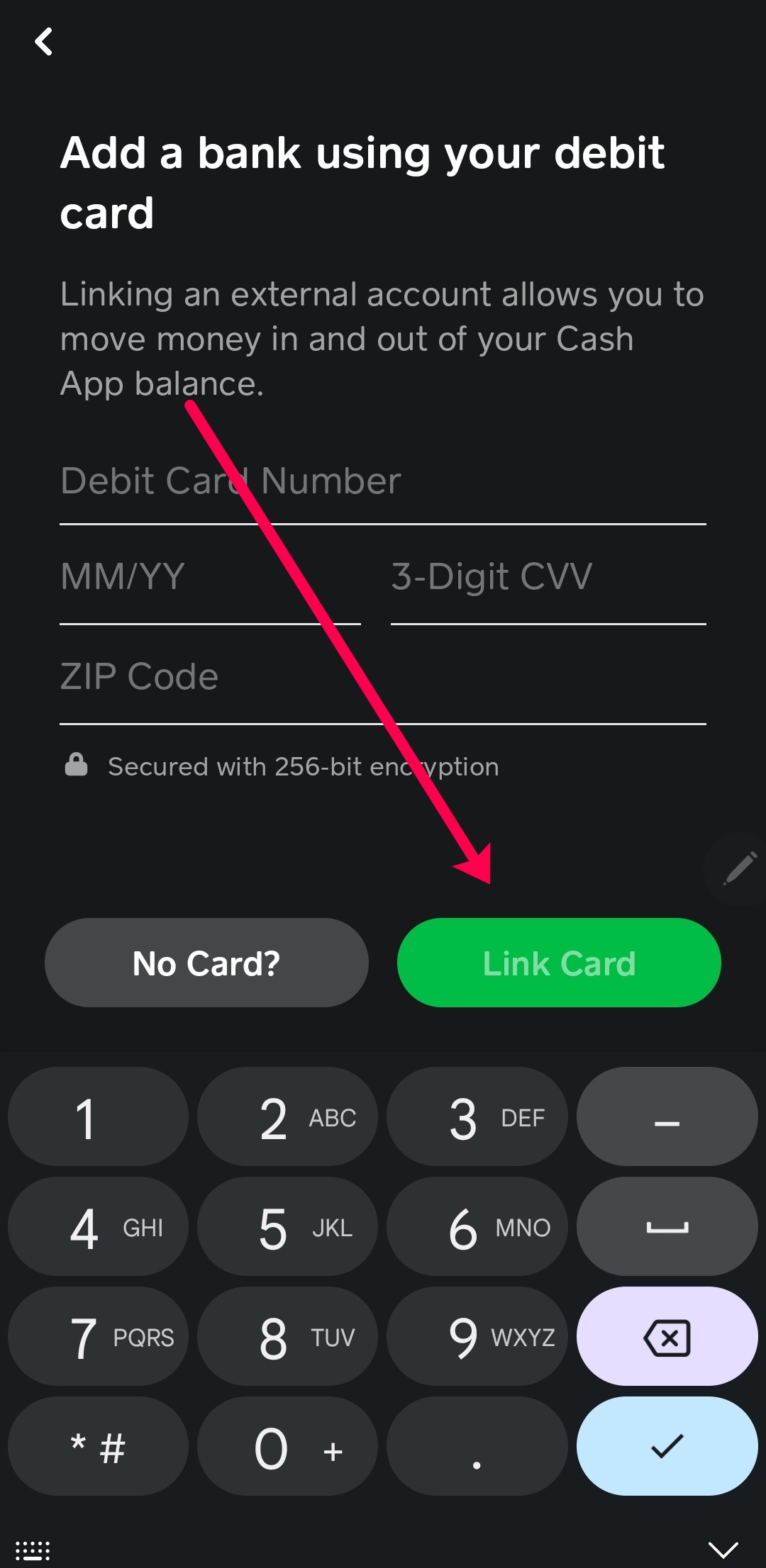
Select ‘Debit Card’: Cash App will ask you what type of account you wish to link. Choose “Debit Card.”
Entering Card Details Manually
-
Enter Card Number: Carefully type in your 16-digit debit card number. Double-check for any typos.
-
Enter Expiration Date: Input the month and year your card expires (MM/YY format).
-
Enter CVV: Locate the 3 or 4-digit Card Verification Value (CVV) on the back of your card (for Visa/MasterCard/Discover) or front (for American Express).
-
Enter ZIP Code: Provide the ZIP code associated with your card’s billing address. This is a crucial security measure to verify your ownership of the card.
-
Tap ‘Add Card’: Once all details are correctly entered, tap the “Add Card” button.
Verification and Confirmation
Cash App will then attempt to verify the card details with your bank. If successful, you will receive a confirmation message stating that your card has been linked. In some rare cases, for security purposes, your bank might send a verification code to your phone or email, which you would then enter into Cash App. Typically, for direct card linking, this step is immediate.
Adding a Credit Card: Considerations and Differences
While the mechanical steps for adding a credit card are similar to a debit card, the financial implications differ significantly.
The Mechanics of Linking a Credit Card
The process mirrors that of a debit card: navigate to the Banking tab, select “Link Bank” or “Add Bank/Card,” choose “Credit Card” (if prompted, though often “Debit Card” flow accommodates credit cards by design), and manually enter the card number, expiration date, CVV, and ZIP code. The interface and input fields are essentially identical.
Understanding Credit Card Fees on Cash App
The primary difference, as mentioned, is the 3% fee Cash App charges when you send money using a linked credit card. This fee is automatically calculated and displayed before you confirm the transaction. For example, if you send $100 using a credit card, you will be charged $103. This fee does not apply when you receive money, add funds to your own Cash App balance from your credit card, or use your Cash Card. It is strictly for P2P payments initiated with a credit card as the funding source.
When to Use a Credit Card vs. Debit Card
Choosing between a credit and debit card for transactions on Cash App depends on your financial strategy:
-
Debit Card: Ideal for everyday P2P transfers and adding funds to your balance. It’s fee-free for sending money, making it the most economical choice.
-
Credit Card: Can be useful in situations where you need to send money but lack immediate funds in your bank account or Cash App balance, or if you’re trying to meet a minimum spend for credit card rewards (though the 3% fee often outweighs typical rewards). It provides a temporary liquidity solution but comes with a cost. Always consider the 3% fee against the convenience or potential rewards.
Troubleshooting Common Issues When Adding a Card
Despite the straightforward process, users sometimes encounter issues. Here’s how to address the most frequent problems.
Incorrect Card Information and Typos
The most common culprit. Even a single digit error in the card number, expiration date, or CVV will cause the linking process to fail.
- Solution: Double-check every single digit and character. It’s often helpful to re-enter all information slowly and deliberately.
Expired Cards or Invalid CVV
An expired card or an incorrect CVV will naturally prevent linking.
- Solution: Ensure your card is current. If it’s expired, use your new card. Verify the CVV is correct; it’s usually on the back for Visa/MC/Discover, or the front for Amex.
Network and App Glitches
Connectivity issues or a temporary app bug can disrupt the process.
-
Solution:
-
Check Internet Connection: Make sure you have a strong Wi-Fi or cellular data connection.
-
Restart Cash App: Close the app completely and reopen it.
-
Update Cash App: Ensure you have the latest version of the app installed from your device’s app store. Outdated versions can sometimes have compatibility issues.
-
Restart Device: As a last resort, restart your smartphone.
-
Bank Restrictions or Decline Issues
Sometimes the issue isn’t with Cash App but with your bank.
-
Solution:
-
Contact Your Bank: Your bank might flag the attempt to link a card as suspicious activity, especially if it’s a new transaction type or from an unrecognized service. Call your bank’s fraud department to authorize the link.
-
Daily Limits: Some banks have daily limits on how much can be added to services like Cash App.
-
Debit Card Not Enabled for Online Use: In rare cases, some debit cards require activation for online transactions.
-
Geolocation and Account Security Flags
Using a VPN or attempting to link a card from an unusual location might trigger security protocols.
- Solution: Disable any VPNs you might be using. Ensure your device’s location services are enabled for Cash App if prompted, as this can help verify legitimate activity.
Enhancing Security and Managing Your Linked Cards
Security is paramount when dealing with financial applications. Cash App employs various measures, but user vigilance is equally important.
Cash App’s Security Measures for Card Data
Cash App utilizes industry-standard encryption and fraud detection technologies to protect your card information. All transactions and card details are encrypted both in transit and at rest. They adhere to Payment Card Industry Data Security Standard (PCI DSS) requirements, ensuring that your card data is handled securely. The app’s continuous monitoring systems are designed to detect and prevent unauthorized activity.
Best Practices for Protecting Your Account
While Cash App secures its platform, users have a critical role in maintaining their own account security:
-
Strong, Unique Passwords/PINs: Use a complex password or PIN that isn’t easily guessable and different from passwords used for other services.
-
Enable Two-Factor Authentication (2FA): This adds an extra layer of security, requiring a code from your phone in addition to your password/PIN for logging in or making certain transactions.
-
Monitor Transactions Regularly: Frequently review your Cash App activity and bank statements for any unauthorized transactions.
-
Do Not Share Credentials: Never share your Cash App PIN, password, or verification codes with anyone, even if they claim to be Cash App support. Cash App will never ask for this information.
-
Be Wary of Phishing: Be cautious of suspicious emails or messages that claim to be from Cash App, asking for personal or financial information.
How to Update or Remove a Linked Card
Managing your linked cards is as simple as adding them:
-
Access Banking Tab: Go to the “Banking” or “My Cash” tab.
-
Select Linked Card: Tap on the specific debit or credit card you wish to manage.
-
Update/Remove Options: You’ll typically see options to “Replace Card” or “Remove Card.”
-
Replace Card: Useful if your card has expired or been reissued with a new number. You’ll be prompted to enter the new card details.
-
Remove Card: This permanently unlinks the card from your account. Confirm your choice when prompted.
-
The Role of Customer Support
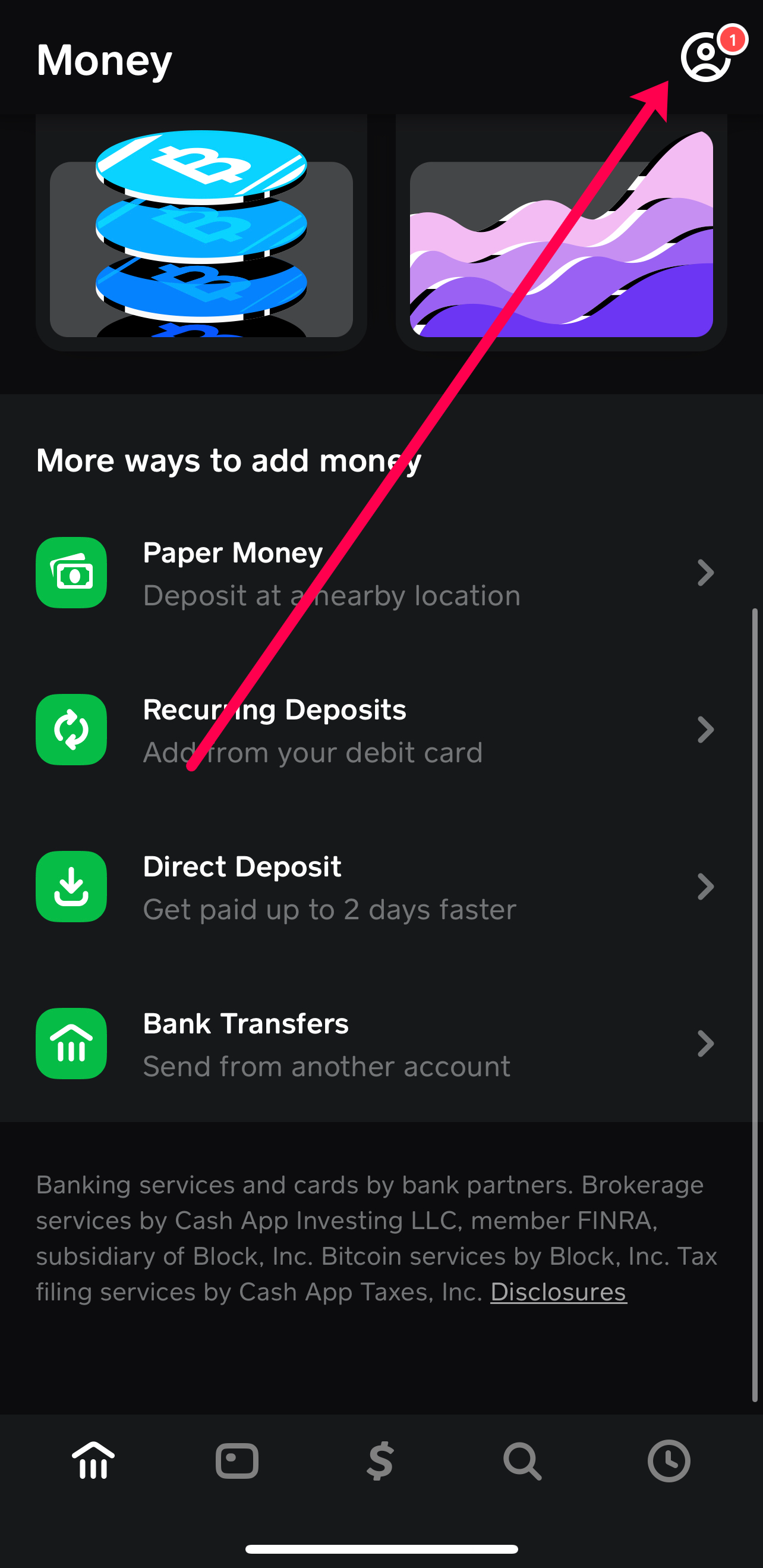
If you encounter persistent issues that cannot be resolved through the troubleshooting steps, contacting Cash App customer support is the next logical step. You can usually find support options within the app itself (via the profile icon, then “Support”) or through their official website. Provide clear, concise details about your issue and any error messages you’ve received to facilitate a quicker resolution.
Adding a card to Cash App is a foundational step in utilizing its full range of financial services. By understanding the process, differentiating between card types, proactively troubleshooting, and adhering to robust security practices, users can ensure a seamless, secure, and efficient experience with this powerful mobile payment application.
aViewFromTheCave is a participant in the Amazon Services LLC Associates Program, an affiliate advertising program designed to provide a means for sites to earn advertising fees by advertising and linking to Amazon.com. Amazon, the Amazon logo, AmazonSupply, and the AmazonSupply logo are trademarks of Amazon.com, Inc. or its affiliates. As an Amazon Associate we earn affiliate commissions from qualifying purchases.