
In the rapidly evolving landscape of digital commerce, mastering the nuances of various payment methods is a key skill for astute consumers. Among these, prepaid gift cards, particularly those from a reputable issuer like American Express, offer a unique blend of convenience, security, and financial control. This guide delves into the practicalities of integrating your Amex gift card into the Amazon ecosystem, transforming a simple payment tool into a strategic asset for managing your personal finances and maximizing your purchasing power. We’ll explore not just the “how-to,” but also the underlying financial principles that make this process valuable for budgeting, spending, and avoiding common pitfalls.
The Financial Utility of Amex Gift Cards on Amazon
At its core, an Amex gift card is more than just a piece of plastic; it’s a pre-funded financial instrument. Its utility on a vast marketplace like Amazon extends beyond mere transaction capability, offering distinct advantages for personal financial management. Understanding these benefits sets the stage for leveraging your gift card effectively.
Budgeting and Expense Control with Prepaid Funds
One of the most compelling financial reasons to use an Amex gift card on Amazon is its inherent ability to enforce a budget. Unlike credit cards, which offer a revolving line of credit and the potential for accumulating debt, a gift card represents a fixed amount of money. When you use a gift card, you are spending funds that have already been allocated and paid for, essentially creating a micro-budget for specific purchases. This can be incredibly effective for:
- Preventing Overspending: By limiting your available funds to the card’s balance, you naturally curb impulse buys and stick to pre-determined spending limits.
- Tracking Specific Expenses: Gift cards can be earmarked for particular categories (e.g., holiday gifts, back-to-school supplies, or a specific treat), making it easier to track and control spending in those areas without dipping into your primary bank account.
- Financial Discipline: For individuals learning to manage their money, using prepaid cards offers a tangible way to practice spending within means, fostering good financial habits.
Unlocking Value: Spending Leftover Balances
A common frustration with gift cards is the small, often forgotten, residual balance after a major purchase. These leftover amounts, though seemingly insignificant individually, can add up to a substantial sum over time. Amazon, with its vast array of products and its convenient reload feature, provides an excellent solution for ensuring every last cent of your Amex gift card is utilized. Instead of letting a $2.50 balance sit idle, you can:
- Combine with Other Payments: As we’ll discuss, Amazon allows for splitting payments, enabling you to use the full gift card balance and pay the remainder with another method.
- Convert to Amazon Gift Card Balance: A highly recommended strategy is to “reload” your Amazon account balance with these small leftover amounts. This consolidates disparate gift card remnants into a single, usable Amazon credit, ensuring no value is wasted and simplifying future transactions. This acts as a form of digital financial consolidation.
A Secure Transaction Method
While not a replacement for robust digital security practices, using an Amex gift card can offer a layer of financial protection in certain scenarios. Since a gift card is not directly linked to your bank account or primary credit line, its exposure in the event of a data breach or fraudulent activity is limited to the balance on the card itself. This can provide peace of mind, especially when making purchases from less familiar online vendors (though Amazon is highly secure, this principle applies more broadly to online shopping). It also means your main financial accounts remain insulated from potential compromise.
Step-by-Step: Seamlessly Integrating Your Amex Gift Card with Amazon
The process of adding an Amex gift card to your Amazon account is straightforward, but attention to detail ensures a smooth transaction. This section provides a clear, actionable roadmap, framing each step as a crucial part of your financial execution.
Pre-Activation and Balance Check: Essential Financial Due Diligence
Before you even think about adding your card to Amazon, two critical preliminary steps are essential. Skipping these can lead to transaction failures and unnecessary frustration.
- Card Activation: Most Amex gift cards require activation before use. This is a security measure to prevent unauthorized use if the card is lost or stolen before reaching the intended recipient. Typically, you’ll visit the website listed on the back of the card (e.g., americanexpress.com/gift) or call the provided toll-free number. Have the card number, security code (CVV), and sometimes an activation code ready. Consider this your initial financial “setup” for the instrument.
- Balance Confirmation: After activation, always check the exact balance on your card. This ensures you know precisely how much purchasing power you have. The activation website usually allows for balance inquiries. Knowing the exact amount prevents “insufficient funds” errors during checkout and allows for precise budgeting.
Adding the Card as a Payment Method
Once your card is active and its balance confirmed, you can proceed to integrate it into your Amazon account.
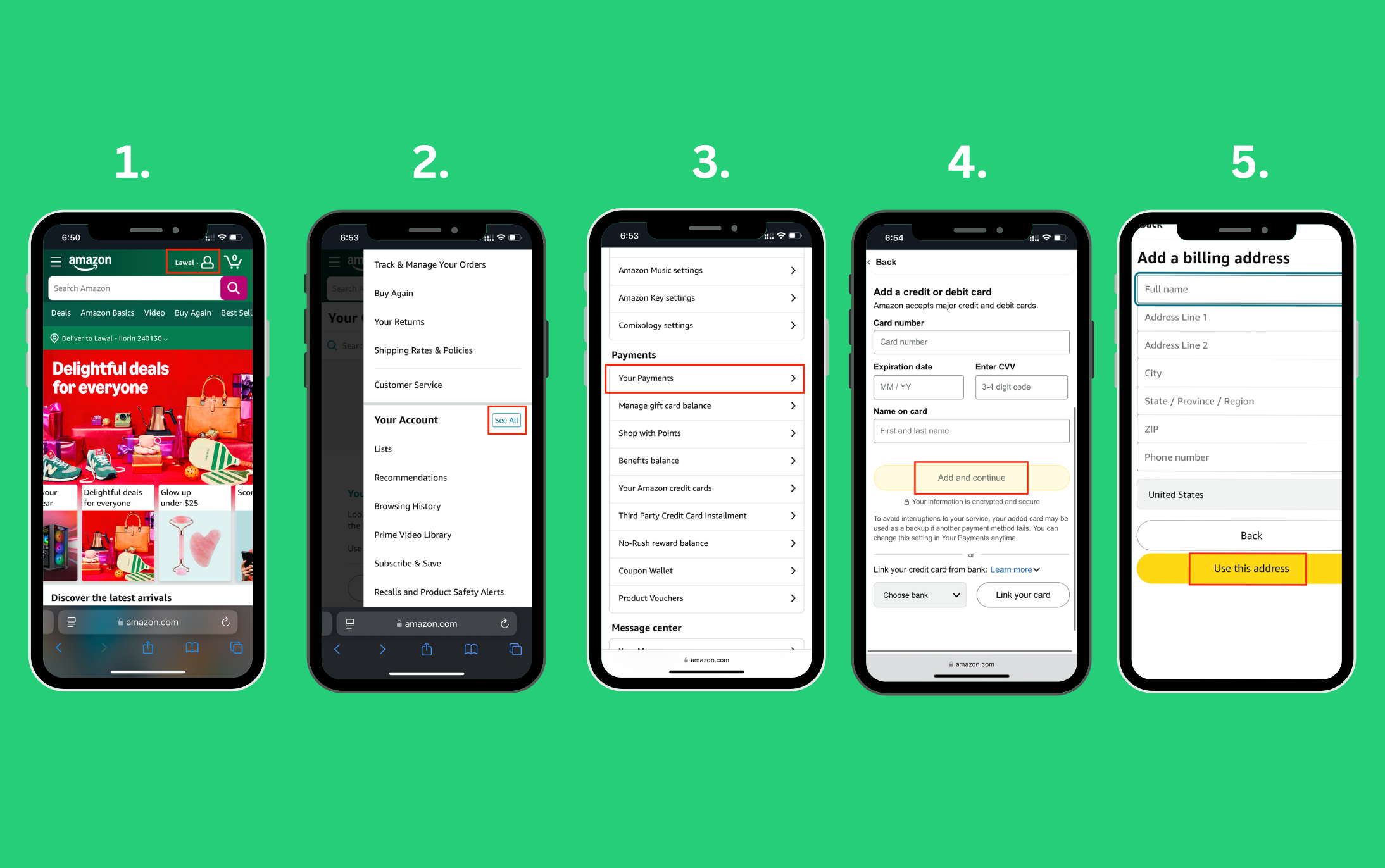
- Log In to Your Amazon Account: Access your account via the Amazon website or mobile app.
- Navigate to Payment Options:
- Website: Go to “Account & Lists” (top right corner) and then select “Your Account.” Under “Ordering and shopping preferences,” click on “Your Payments.”
- App: Tap the three horizontal lines (menu icon), select “Account,” and then scroll down to “Manage Payment Options.”
- Add a New Payment Method: Click on the “Add a payment method” button or “Add a credit or debit card.”
- Enter Card Details:
- Card Number: Carefully input the 15-digit number from the front of your Amex gift card.
- Name on Card: Enter “Gift Card,” “American Express,” or your own name, as the card often isn’t personalized. For Amex gift cards, often any name works, but consistency helps.
- Expiration Date: Input the month and year printed on the card.
- Security Code (CVV): This is typically a 4-digit number on the front of the Amex gift card, above the main card number.
- Add Your Billing Address: Even though it’s a gift card, Amazon requires a billing address for security and verification purposes. Use your own billing address – the one associated with your primary payment methods or your shipping address. This is a crucial step for prepaid cards as they often don’t have a specific “billing address” tied to them, but Amazon needs one for processing.
- Click “Add your card”: Amazon will verify the card details. If successful, the Amex gift card will now appear in your list of payment methods.
Applying Your Gift Card During Checkout
With the card successfully added, using it for a purchase is the final step.
- Shop as Usual: Add items to your cart.
- Proceed to Checkout: When you’re ready to complete your purchase, go to your cart and click “Proceed to checkout.”
- Select Payment Method: On the payment selection screen, you will see your saved payment methods. Select the Amex gift card you just added.
- Review and Place Your Order: Confirm that the gift card is applied to the order total. If the gift card balance doesn’t cover the full amount, Amazon will prompt you to select an additional payment method (e.g., a debit or credit card) to cover the remainder. This is where the financial strategy of splitting payments comes into play.
Strategic Spending: Maximizing Your Amex Gift Card’s Value on Amazon
Beyond simply adding the card, intelligent financial planning can help you extract the full value from your Amex gift card, especially when faced with common scenarios like insufficient funds or small leftover balances.
Handling Insufficient Funds: The Art of Splitting Payments
It’s common for an Amex gift card’s balance to not perfectly match the cost of your desired purchase. Amazon’s system is designed to handle this gracefully, allowing for a strategic financial maneuver: splitting payments.
- Automatic Split: When you select an Amex gift card as your payment method for an order that exceeds its balance, Amazon will automatically apply the full gift card amount first.
- Prompt for Remainder: You will then be prompted to select another payment method (e.g., a credit card, debit card, or another gift card) to cover the remaining balance.
- Financial Advantage: This capability ensures that no portion of your gift card balance goes unused due to a mismatch in values. It’s an efficient way to deplete a prepaid card fully, integrating it seamlessly into a larger financial transaction.
Consolidating Balances: Using Amazon Gift Card Reloads
As mentioned earlier, converting small Amex gift card balances into Amazon credit is a highly effective financial tactic for aggregation.
- Navigate to “Reload Your Balance”: On Amazon, search for “Amazon Reload” or navigate to “Gift Cards” from the main menu and look for the “Reload Your Balance” option.
- Enter Desired Amount: Enter the exact remaining balance of your Amex gift card, even if it’s a very small amount (e.g., $1.73).
- Select Amex Gift Card as Payment: Choose your added Amex gift card as the payment method for this reload.
- Confirm and Reload: Complete the transaction. The amount will immediately be added to your Amazon.com Gift Card Balance, which automatically applies to future eligible purchases.
- Strategic Benefit: This method allows you to pool numerous small, disparate gift card balances into a single, convenient Amazon credit. It prevents “financial leakage” where small amounts might otherwise be forgotten or become inconvenient to spend. This is akin to consolidating various small assets into a single, more manageable fund.
Understanding Expiry Dates and Fees: Protecting Your Investment
While most Amex gift cards in the US do not have expiration dates for the funds themselves, the physical card may have an “active through” date. If the card expires before the funds are depleted, you can typically request a replacement card with the remaining balance. However, it’s always prudent to be aware of these details.
- Read the Terms and Conditions: Always review the fine print accompanying your Amex gift card for any specific terms regarding dormancy fees or expiry, though Amex is generally transparent and consumer-friendly in this regard.
- Proactive Spending: The best financial strategy is to use the card balance promptly, eliminating any concern about expiry or potential fees (even if rare). Consider it an asset that needs to be deployed.
Navigating Potential Pitfalls: Financial Troubleshooting for Amex Gift Card Users
Even with careful planning, sometimes transactions don’t go as smoothly as expected. Knowing how to troubleshoot common issues from a financial perspective can save time and prevent lost value.
Card Not Working? Common Activation and Registration Issues
If your Amex gift card is declined or you receive an error message upon adding it, consider these common financial-related causes:
- Incomplete Activation: Re-verify that the card was fully activated on the Amex gift card website. A partially completed activation can leave the card in a non-functional state.
- Incorrect Card Details: Double-check every digit of the card number, expiration date, and CVV. A single typo can lead to rejection.
- Billing Address Mismatch: This is a frequent culprit for prepaid cards. While an Amex gift card doesn’t have a true “billing address” tied to it in the same way a credit card does, online merchants like Amazon require one for AVS (Address Verification System) checks. Ensure the billing address you entered on Amazon matches your physical address, or at least the shipping address you intend to use. Sometimes, even registering your gift card with your address on the Amex gift card website can help link it for verification purposes.
Decoding Error Messages: Financial Transaction Insights
Specific error messages can offer clues to the underlying financial problem:
- “Payment method invalid” or “Card declined”: This often points to activation issues, incorrect card details, or a billing address mismatch.
- “Insufficient funds”: The card balance is lower than the transaction amount. You’ll need to split the payment or reload your Amazon balance with the gift card first.
- “Security check failed”: This could relate to the billing address or a perceived unusual activity; contacting Amex support might be necessary.
When to Contact Support: Amex vs. Amazon Responsibility
Understanding where to direct your query is crucial for efficient problem resolution:
- Contact American Express Gift Card Support if:
- You can’t activate the card.
- You can’t check the balance on the Amex gift card website.
- You suspect the card has been fraudulently used.
- The card’s details (number, expiry) seem incorrect or damaged.
- You need to request a replacement card for an expired physical card with remaining funds.
- Contact Amazon Customer Service if:
- You’re having trouble adding the card to your Amazon account (after verifying it’s active and has funds).
- You encounter issues specifically during the Amazon checkout process (e.g., the split payment option isn’t working).
- You have questions about an Amazon order for which the gift card was used.
Beyond the Transaction: Broader Financial Implications
Using an Amex gift card on Amazon, while a specific task, fits into larger trends in personal finance and digital commerce.
Gift Cards as a Gifting Strategy
From a financial planning perspective, gift cards offer a flexible and universally accepted gifting solution. They empower recipients with choice, ensuring gifts are genuinely useful, thus optimizing the financial value of the gift. For the giver, they provide a set budget for gifting, preventing overspending during peak seasons like holidays.
Digital Wallets and Financial Modernization
The process of adding a gift card to an online merchant’s payment system is a microcosm of the broader shift towards digital wallets and integrated financial tools. As more transactions move online, understanding how to manage various payment methods within these digital ecosystems becomes an increasingly vital part of modern financial literacy. It’s about more than just spending; it’s about intelligent, informed financial management in a digital world.
By mastering the process of adding and utilizing your Amex gift card on Amazon, you’re not just making a purchase; you’re engaging in a deliberate act of financial management, ensuring every dollar of your prepaid funds is spent wisely and efficiently.
aViewFromTheCave is a participant in the Amazon Services LLC Associates Program, an affiliate advertising program designed to provide a means for sites to earn advertising fees by advertising and linking to Amazon.com. Amazon, the Amazon logo, AmazonSupply, and the AmazonSupply logo are trademarks of Amazon.com, Inc. or its affiliates. As an Amazon Associate we earn affiliate commissions from qualifying purchases.