
Adding a debit card to Cash App is a straightforward process designed to enhance your financial flexibility and streamline transactions within the popular peer-to-peer payment platform. Whether you’re looking to quickly fund your Cash App balance, send money to friends, or pay for goods and services, linking your debit card provides a convenient and immediate gateway to your funds. This tutorial will guide you through each step, ensuring a smooth and secure integration of your debit card with your Cash App account.
Understanding the Benefits of Linking Your Debit Card
Before diving into the “how-to,” it’s essential to grasp the advantages that come with connecting your debit card to Cash App. This integration offers several key benefits that can significantly improve your financial management and transaction efficiency.
Instant Funding and Withdrawal Capabilities
One of the primary benefits of linking a debit card is the ability to instantly fund your Cash App balance. Unlike linking a traditional bank account, which might involve a processing time of 1-3 business days, a debit card allows for immediate transfers. This means if you need to send money urgently, pay a bill, or make a purchase that requires immediate funds, your linked debit card acts as a rapid conduit for your money.
Similarly, when you receive money in your Cash App account, you can opt to instantly transfer these funds to your linked debit card. While standard transfers to a bank account are typically free and take 1-3 business days, instant transfers to a debit card come with a small fee. However, for those situations where immediate access to your funds is paramount, this instant withdrawal feature is invaluable.
Expanding Transaction Options
Cash App is not just for peer-to-peer payments. It has evolved into a comprehensive financial tool that allows users to buy and sell Bitcoin, invest in stocks, and even manage direct deposits. Linking a debit card expands your ability to engage with these features. For instance, if you want to quickly purchase Bitcoin or invest in a stock opportunity that arises, having your debit card linked ensures you can do so without delay. It acts as a readily available source of funds for a wider range of financial activities within the app.
Enhancing Security and Control
While the primary motivation for linking a debit card is convenience, it also contributes to enhanced security and control over your finances. By linking a specific debit card, you designate it as your preferred method for certain transactions. This can help you better track spending associated with Cash App and manage your budget more effectively. Furthermore, Cash App employs robust security measures to protect your linked card information, including encryption and fraud detection. In the event of unauthorized activity, having your debit card linked can also streamline the process of reporting and disputing transactions, as the card issuer can often assist in tracing and reversing fraudulent charges.
Step-by-Step Guide to Adding Your Debit Card
The process of adding a debit card to Cash App is designed to be intuitive and user-friendly. Follow these steps to securely link your card to your account.
Accessing the Payment Methods Section
- Open the Cash App: Launch the Cash App on your smartphone.
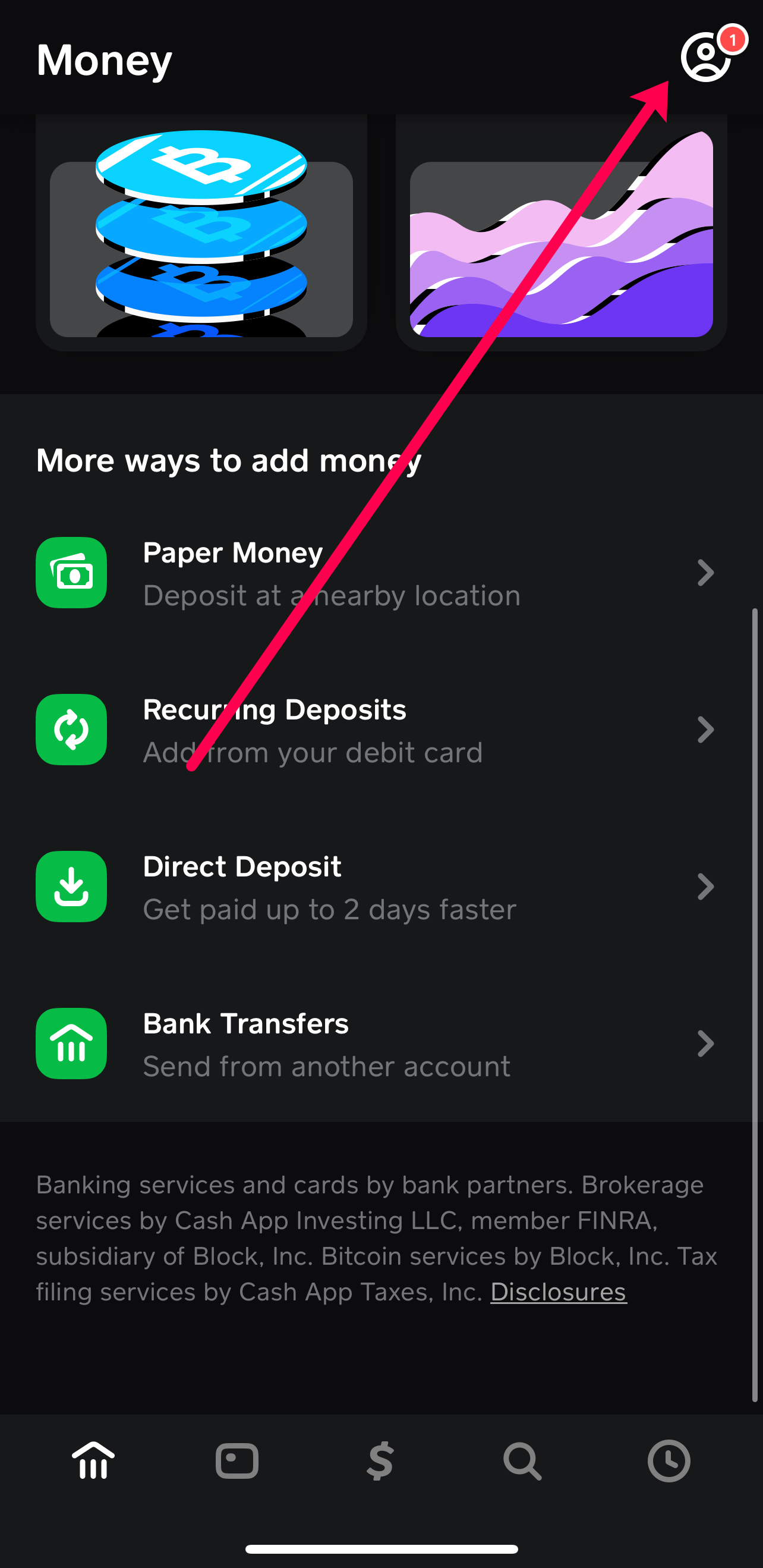
- Navigate to Your Profile: Tap on your profile picture or initial, typically located in the top-left corner of the screen.
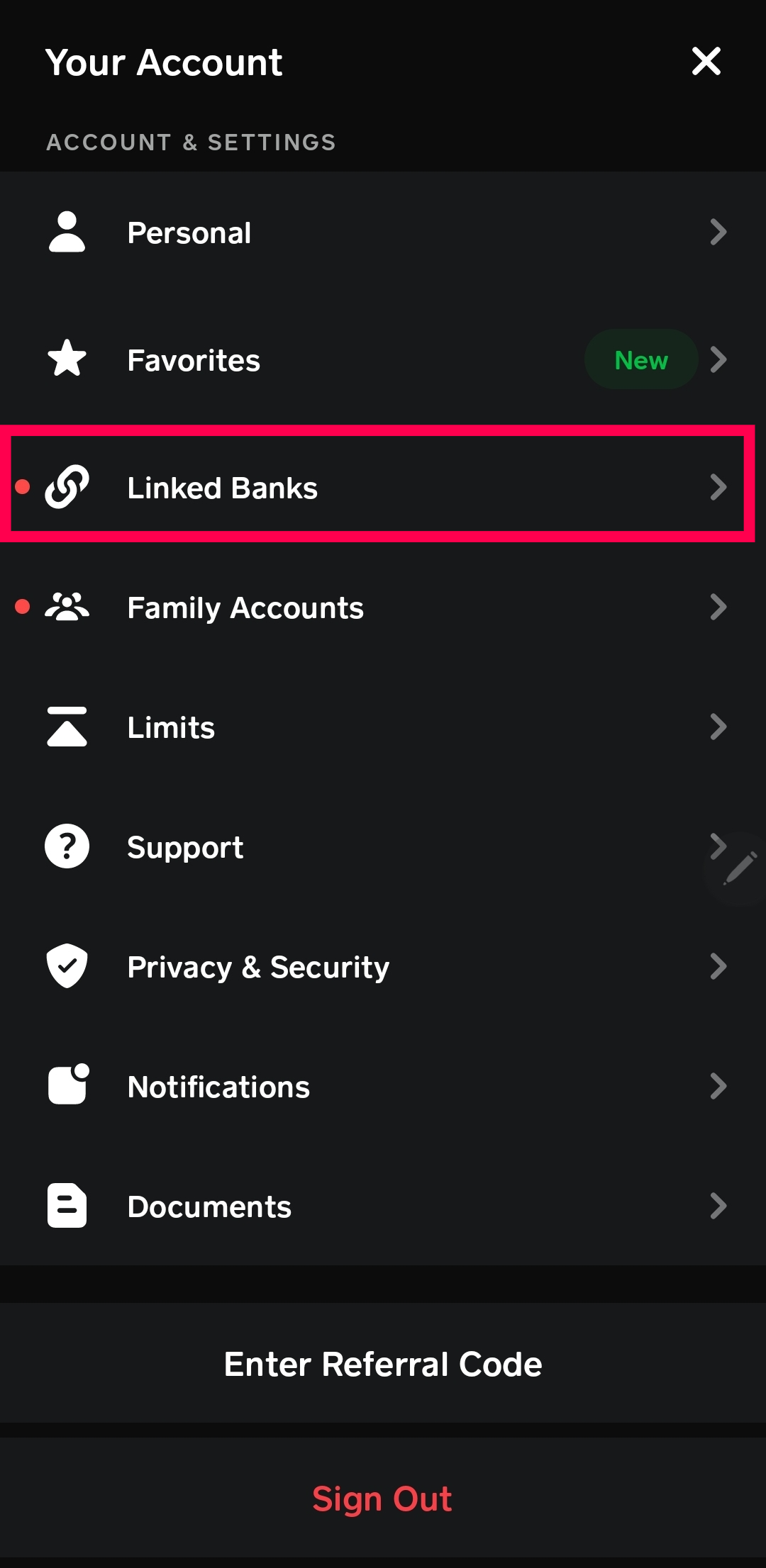
- Select “Payment Methods”: Within your profile settings, scroll down and find the “Payment Methods” option. Tap on it to proceed.
Entering Your Debit Card Details
Once you’re in the “Payment Methods” section, you’ll see an option to add a new payment method.
- Tap “Add Bank”: While the wording might be slightly misleading as you are adding a card, the option is usually presented as “Add Bank” or “Link Bank Account.” This is where you initiate the process of adding both bank accounts and debit cards.
- Choose “Debit Card”: After tapping “Add Bank,” you will likely see options to link a bank account via micro-deposits or to add a debit card. Select the option to add a debit card.
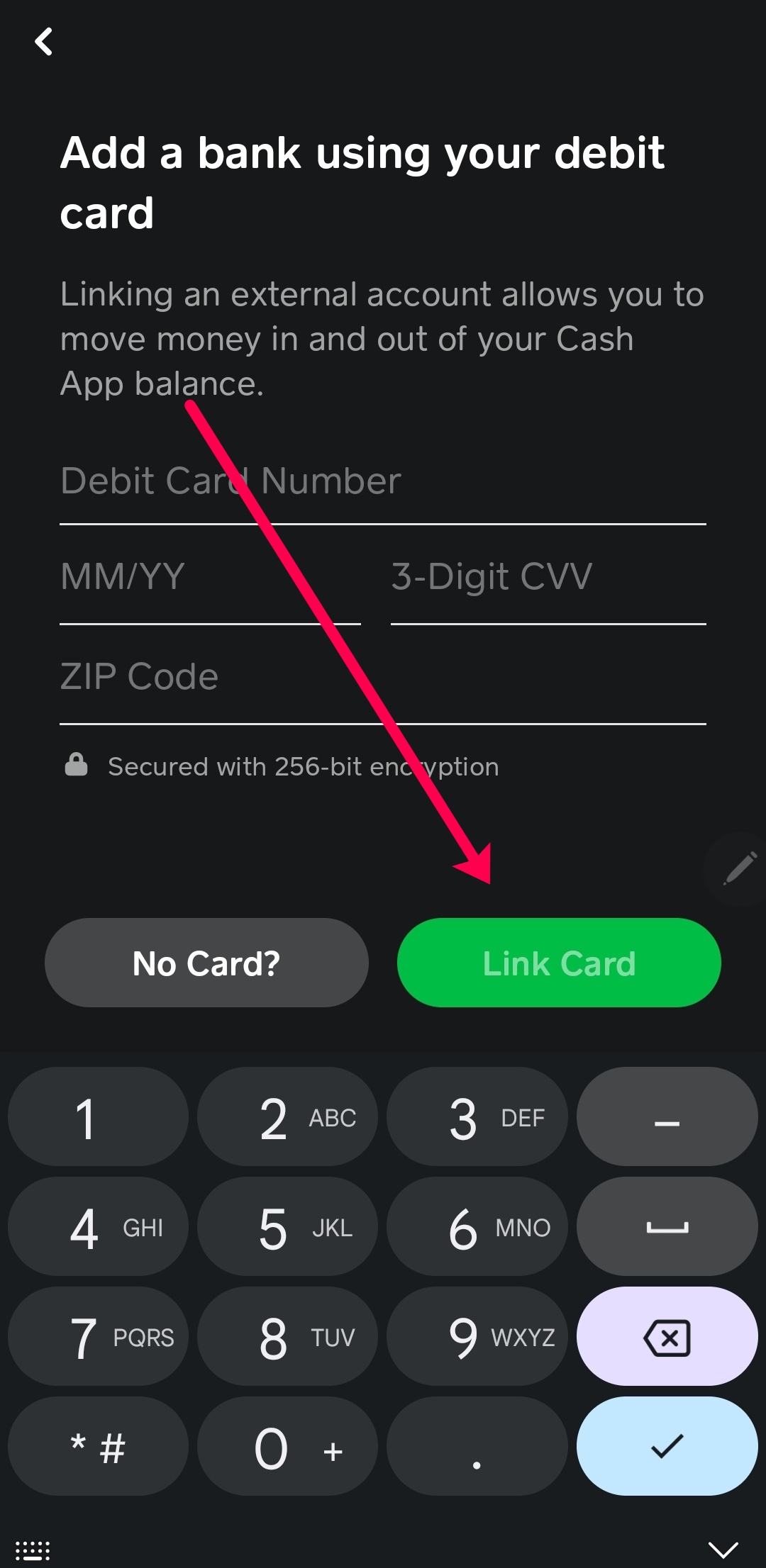
- Input Card Information: You will be prompted to enter your debit card details. This typically includes:
- Card Number: The 16-digit number found on the front of your debit card.
- Expiration Date: The month and year your debit card expires.
- CVV Code: The 3 or 4-digit security code, usually found on the back of your card.
- Billing Zip Code: The zip code associated with your billing address for the card.
- Confirm and Save: After accurately entering all the required information, tap the “Add Card” or “Done” button to save your debit card to your Cash App account.
Cash App may perform a small verification charge (usually $1) to ensure the card is valid and belongs to you. This amount is typically refunded shortly after.
Verifying and Managing Your Linked Debit Card
After successfully adding your debit card, it’s crucial to verify its status and understand how to manage it within the Cash App ecosystem. This ensures everything is functioning as expected and allows you to make adjustments as needed.
Initial Verification Process
Cash App employs a verification process to confirm that the debit card you’ve added is active and belongs to you. This usually involves a small authorization charge.
- Authorization Charge: As mentioned, Cash App may place a temporary authorization hold of a small amount (e.g., $1) on your debit card. This is not a charge, but a way to verify that the card is active and that you have the authority to use it.
- Confirmation within the App: You should see a confirmation within the Cash App that your debit card has been successfully added and verified. You might also receive an email or push notification from Cash App and your bank confirming the authorization.
- Refund of Authorization: The authorization hold will typically be released within a few business days, and the $1 will be refunded to your debit card.
Setting Your Primary Card
Once you have multiple payment methods linked to your Cash App, you can designate one as your primary card. This simplifies transactions, as Cash App will default to using this card unless you choose otherwise.
- Return to “Payment Methods”: Navigate back to the “Payment Methods” section within your Cash App profile.
- Select Your Debit Card: You will see a list of your linked payment methods. Tap on the debit card you wish to set as primary.
- Designate as Primary: Look for an option to “Set as Primary” or a similar designation. Tap on this to make it your default payment method.
Removing a Linked Debit Card
Should you no longer wish to use a particular debit card with Cash App, or if you need to replace an expired card, you can easily remove it.
- Navigate to “Payment Methods”: Go to your profile and select “Payment Methods.”
- Select the Card to Remove: Tap on the debit card you want to remove from your account.
- Tap “Remove Card”: You should see an option to “Remove Card” or “Delete Card.” Tap this to unlink the card from your Cash App. You may be asked to confirm this action.
It’s important to remove a card if it’s lost, stolen, or expired to prevent any potential unauthorized access or issues with transactions.
Troubleshooting Common Issues
While the process of adding a debit card to Cash App is generally smooth, users may occasionally encounter issues. Understanding common problems and their solutions can save you time and frustration.
Card Declined During Addition
If your debit card is declined when you try to add it, several factors could be at play.
- Incorrect Information: Double-check that you have entered all the card details – card number, expiration date, CVV, and billing zip code – accurately. A single typo can cause a decline.
- Insufficient Funds for Verification: Although the verification charge is small, ensure there are sufficient funds available in your linked bank account to cover it, especially if your bank’s system is sensitive to even minor authorizations.
- Bank Restrictions: Some banks may have specific security measures or restrictions on authorizing transactions with third-party apps. Contact your bank to inquire if they are blocking the transaction or if there are any specific settings you need to enable for Cash App.
- Expired or Invalid Card: Verify that your debit card has not expired and is still active.
- Cash App Account Issues: In rare cases, there might be an issue with your Cash App account itself that is preventing the addition of a payment method.
Issues with Funding or Withdrawals
If you’ve successfully added your debit card but are experiencing problems with funding your Cash App balance or withdrawing funds to your card, consider the following:
- Transaction Limits: Cash App has daily and weekly limits for sending, receiving, and withdrawing money. Check Cash App’s support pages for the most current transaction limits. If you’ve hit a limit, you’ll need to wait until the limit resets.
- Card Network Issues: Occasionally, there might be temporary issues with the payment network (Visa, Mastercard, etc.) that Cash App uses. This is usually short-lived.
- Bank Delays: While instant transfers to debit cards are generally quick, there can be rare instances of delays from your bank’s end in processing the incoming funds.
- Card Status: Ensure your debit card is not expired or flagged by your bank for any reason.
Contacting Cash App Support
If you’ve exhausted these troubleshooting steps and are still facing issues, reaching out to Cash App’s customer support is the next logical step.
- In-App Support: The most efficient way to contact Cash App support is through their in-app help feature. Navigate to your profile, tap on “Support,” and follow the prompts to describe your issue. This often leads to a chat interface with a support agent.
- Website Support: You can also find comprehensive help articles and contact options on the official Cash App website.
By following this comprehensive guide, you can confidently add your debit card to Cash App, unlock its full potential, and manage your transactions with ease and security.
aViewFromTheCave is a participant in the Amazon Services LLC Associates Program, an affiliate advertising program designed to provide a means for sites to earn advertising fees by advertising and linking to Amazon.com. Amazon, the Amazon logo, AmazonSupply, and the AmazonSupply logo are trademarks of Amazon.com, Inc. or its affiliates. As an Amazon Associate we earn affiliate commissions from qualifying purchases.