
In an increasingly digital world, the convenience of managing finances and making payments directly from our smartphones has become indispensable. Google Wallet stands as a prominent player in this ecosystem, offering a streamlined way to store payment cards, passes, and more. Yet, with every advancement in convenience comes a crucial question: how secure is it? Understanding the underlying security mechanisms, the potential threats, and the user’s role in maintaining safety is paramount for anyone entrusting their financial information to a digital wallet. This article delves into the multi-layered security framework of Google Wallet, exploring its technological safeguards, Google’s broader security infrastructure, and the essential practices users must adopt to ensure their digital assets remain protected.
The Foundation of Google Wallet Security: Core Technologies
Google Wallet is not merely an app; it’s a sophisticated system built upon robust security technologies designed to protect sensitive financial data. Its architecture integrates several layers of defense, working in unison to create a secure environment for transactions and stored information.
End-to-End Encryption and Data Protection
At the heart of Google Wallet’s security lies comprehensive encryption. When you add a payment card to Google Wallet, your card details are encrypted both during transmission and while stored on Google’s secure servers. This means that even if data were intercepted during transit or accessed from Google’s data centers, it would be unreadable without the appropriate decryption keys, which are tightly controlled and protected.
Google employs industry-standard encryption protocols, such as Transport Layer Security (TLS) for data in transit, to create a secure tunnel between your device and Google’s servers. For data at rest, advanced encryption algorithms like AES-256 (Advanced Encryption Standard with a 256-bit key) are often utilized, making it incredibly difficult for unauthorized parties to decipher the information. This end-to-end encryption ensures that your personal and financial data remains private and confidential from the moment it leaves your device to its secure storage.
Tokenization: Masking Your Real Card Details
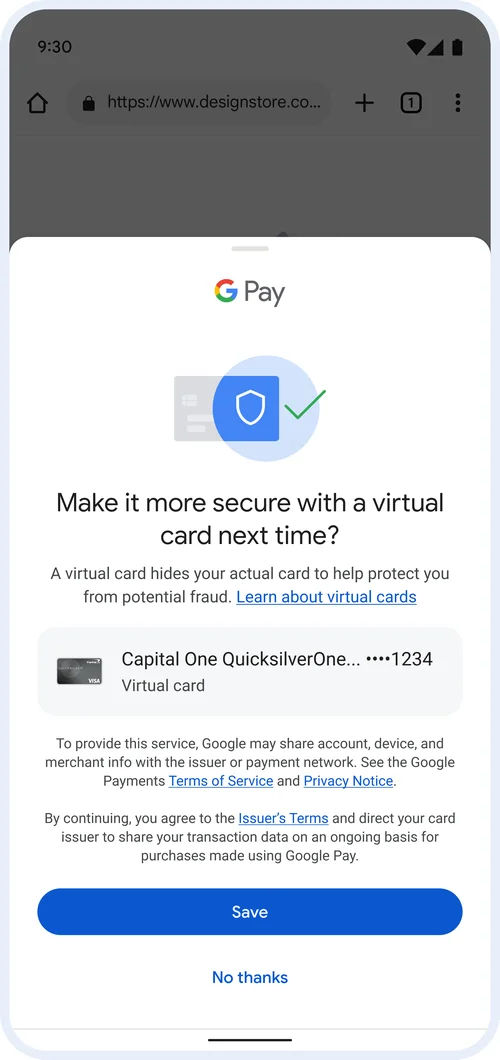
Perhaps one of the most significant security features in Google Wallet is tokenization. When you use Google Wallet to make a purchase, your actual 16-digit credit or debit card number is never shared with the merchant. Instead, a unique, encrypted “token” (a randomly generated, one-time-use number) is generated and transmitted for each transaction. This token is specific to your device and the transaction, acting as a stand-in for your real card number.
If a merchant’s payment system were ever breached, hackers would only obtain these tokens, not your actual card details. These tokens are useless outside of the specific transaction or context for which they were generated, rendering them worthless to fraudsters. This process significantly reduces the risk of credit card fraud and protects your financial information from potential exposure at merchant points of sale. It’s a fundamental shift from traditional payment methods, where your card number is directly exposed with every swipe or online entry.
Advanced Authentication: Biometrics and PINs
Access to your Google Wallet, and by extension your stored cards and passes, is safeguarded by multiple layers of user authentication. The primary methods include biometric verification (fingerprint or facial recognition) and PINs, patterns, or passwords for your device.
Before you can make a purchase using Google Wallet, you are typically required to unlock your phone using a secure method. Furthermore, for certain transactions or after a period of inactivity, Google Wallet may prompt for additional authentication, such as your device’s lock screen PIN, a fingerprint scan, or facial recognition. This ensures that even if your phone falls into the wrong hands, unauthorized individuals cannot simply open Google Wallet and make purchases. The biometric data itself is stored securely on your device’s hardware (often in a Secure Enclave), not on Google’s servers, adding another layer of privacy and protection. These strong authentication measures are critical in preventing unauthorized access to your digital wallet and the funds within it.
Protecting Against Specific Threats and Vulnerabilities
While the core technologies provide a strong foundation, Google Wallet also incorporates features and practices designed to mitigate specific real-world threats that users might encounter.
Device-Level Security: Safeguarding Your Phone
The security of Google Wallet is intrinsically linked to the security of the device it resides on. Google Wallet is designed to work seamlessly with Android’s built-in security features, creating a secure environment. If your phone is lost or stolen, Google’s “Find My Device” service allows you to remotely locate, lock, or even erase your device. Locking your device immediately prevents unauthorized access to all its contents, including Google Wallet. Erasing it ensures that no personal data remains on the device, providing peace of mind even in the worst-case scenario.
Moreover, the requirement for a screen lock (PIN, pattern, password, or biometrics) to unlock your phone is fundamental. Without this initial barrier, the robust security measures within Google Wallet would be significantly weaker. Google continually emphasizes the importance of using strong device-level security to protect the entire ecosystem of data on your smartphone.
Combating Phishing, Malware, and Social Engineering
Cyber threats like phishing, malware, and social engineering pose constant risks to digital users. Google Wallet employs several strategies to combat these:
-
App Vetting: All apps available on Google Play, including Google Wallet, undergo rigorous security checks. Google Play Protect scans billions of apps daily for malware and unwanted software, ensuring that the Google Wallet app itself is legitimate and free from malicious code.
-
Phishing Detection: Google’s broader security infrastructure includes sophisticated systems that detect and warn users about suspicious websites and phishing attempts. While this isn’t directly a Google Wallet feature, it indirectly protects users by preventing them from inadvertently sharing their credentials on fake login pages that could compromise their Google account, which is linked to Wallet.
-
Security Prompts: If Google detects unusual activity or suspicious access attempts related to your Google account, it will often prompt you with security alerts, requiring verification to ensure it’s truly you.
Users are also educated and encouraged to be vigilant, never clicking on suspicious links or sharing personal information in response to unsolicited emails or messages, as these are common vectors for social engineering attacks aimed at gaining access to accounts.
Fraud Protection and Dispute Resolution
Google Wallet benefits from the same fraud protection mechanisms that protect traditional credit and debit cards. If an unauthorized transaction occurs through Google Wallet, card issuers typically offer zero-liability policies, meaning you won’t be held responsible for fraudulent charges.
Additionally, Google itself maintains robust fraud detection systems that monitor transactions for suspicious patterns. If a transaction appears unusual, it may be flagged for review or require additional verification. In the event of a fraudulent transaction, users can work with their bank or card issuer to dispute the charges, much like they would for physical card fraud. This partnership between technological safeguards, financial institutions, and user vigilance creates a comprehensive safety net.
Google’s Ecosystem-Wide Security Commitments
Google Wallet is not an isolated product; it’s deeply integrated into Google’s vast security infrastructure, benefiting from the company’s continuous investment in advanced cybersecurity measures.
Continuous Monitoring and AI-Powered Threat Detection
Google’s security operations centers operate 24/7, employing thousands of security professionals and leveraging advanced artificial intelligence (AI) and machine learning (ML) algorithms. These systems continuously monitor global threat landscapes, analyze vast quantities of data for anomalous behavior, and detect emerging threats in real-time. This proactive approach allows Google to identify and neutralize potential vulnerabilities before they can be exploited. For Google Wallet, this means that unusual login attempts, suspicious transaction patterns, or potential breaches are quickly identified and addressed, often without direct user intervention. The scale of Google’s security intelligence is a significant protective layer for all its services, including Wallet.
Secure Elements and Hardware-Backed Protection
Many modern Android devices include a hardware-based “Secure Element” (SE) or a Trusted Execution Environment (TEE). These are isolated, tamper-resistant environments within the device’s processor specifically designed to store sensitive data (like cryptographic keys, biometric data, and payment tokens) and execute security-critical operations. Google Wallet leverages these hardware security features when available, further isolating your payment information from the rest of the operating system and potential software exploits. This hardware-backed security makes it significantly harder for malicious software or attackers to directly access or compromise your financial data, even if the main operating system is somehow compromised. It’s a physical fortress for your most sensitive digital assets.
Regular Updates and Vulnerability Patches
Google is committed to maintaining the security of its products through ongoing software updates and vulnerability patches. The Google Wallet app, the underlying Android operating system, and Google’s server-side infrastructure are regularly updated to address newly discovered security flaws, enhance existing protections, and introduce new features. These updates are crucial in the ever-evolving cybersecurity landscape, where new threats emerge constantly. Timely application of these patches ensures that any identified weaknesses are promptly remedied, keeping the system resilient against the latest attack vectors. Users are strongly encouraged to enable automatic updates for their apps and operating system to benefit from these continuous security enhancements.
Empowering Users: Best Practices for Enhanced Security
While Google provides a robust security framework, the ultimate security of Google Wallet also heavily depends on the user’s practices. A strong defense is a partnership between the technology provider and the end-user.
The Imperative of Strong Authentication
The most fundamental step a user can take is to implement strong authentication methods for their device and Google account. This includes:
-
Strong, Unique Device Lock: Use a complex PIN, a long password, or reliable biometric authentication (fingerprint, facial recognition) to unlock your phone. Avoid simple patterns or easily guessable PINs like “1234” or your birth date.
-
Two-Factor Authentication (2FA) for Google Account: Enable 2FA for your Google account. This adds an extra layer of security, requiring a second verification step (e.g., a code sent to your phone, a prompt on another trusted device, or a physical security key) in addition to your password, making it significantly harder for unauthorized individuals to access your account even if they somehow obtain your password.
These measures act as the primary gates preventing unauthorized access to your digital wallet and the broader Google ecosystem.
Practicing Digital Vigilance
Users must cultivate a habit of digital vigilance to protect themselves from various cyber threats. This includes:
-
Beware of Phishing: Be skeptical of unsolicited emails, texts, or calls asking for personal or financial information. Always verify the sender before clicking links or providing details. Google will never ask for your password via email.
-
Install Apps from Trusted Sources Only: Only download apps from the official Google Play Store and avoid installing apps from unknown sources, which could harbor malware designed to steal information.
-
Public Wi-Fi Caution: Exercise caution when making transactions over unsecured public Wi-Fi networks. While Google Wallet encrypts data, public networks can be vulnerable to eavesdropping. Consider using a Virtual Private Network (VPN) for added security when on public Wi-Fi.
-
Monitor Account Activity: Regularly review your bank statements and Google Wallet transaction history for any suspicious or unauthorized activity. Report any discrepancies immediately to your bank and Google.

Keeping Your Software Up-to-Date
As mentioned, regular software updates are critical for security. Users should ensure that:
-
Android OS is Updated: Always install the latest Android operating system updates as soon as they are available. These updates often contain critical security patches.
-
Google Wallet App is Updated: Keep the Google Wallet app updated to its latest version. App updates frequently include security enhancements and bug fixes.
-
Antivirus/Anti-Malware: While Android has built-in protections, consider reputable antivirus or anti-malware software for an additional layer of security, especially if you tend to download apps from various sources.
In conclusion, Google Wallet is built upon a formidable security architecture, leveraging encryption, tokenization, biometric authentication, and Google’s extensive cybersecurity infrastructure. It’s a highly secure platform designed to protect your financial information. However, like any digital tool, its ultimate security is a shared responsibility. By understanding and actively implementing best practices—strong authentication, digital vigilance, and timely updates—users can significantly enhance their personal security and confidently leverage the convenience offered by Google Wallet. The synergy between Google’s advanced technology and informed user behavior creates a robust defense against the evolving landscape of cyber threats.
aViewFromTheCave is a participant in the Amazon Services LLC Associates Program, an affiliate advertising program designed to provide a means for sites to earn advertising fees by advertising and linking to Amazon.com. Amazon, the Amazon logo, AmazonSupply, and the AmazonSupply logo are trademarks of Amazon.com, Inc. or its affiliates. As an Amazon Associate we earn affiliate commissions from qualifying purchases.