
For any business owner, from the freelance graphic designer to the CEO of a scaling mid-sized enterprise, the phrase “the cost of doing business” is more than a cliché—it is a daily reality. At the heart of this reality is the need for robust financial management. QuickBooks, developed by Intuit, has long been the gold standard in this arena. However, for those looking to integrate this tool into their financial ecosystem, the most pressing question is often: “How much is QuickBooks?”
The answer is not a single number but a spectrum. QuickBooks has evolved from a simple accounting software into a complex suite of financial tools, each with its own price point and value proposition. To determine the right investment for your business, you must look beyond the monthly subscription fee and analyze the tiered features, hidden operational costs, and the ultimate return on investment (ROI) that automated bookkeeping provides.

Decoding QuickBooks Online Subscription Plans
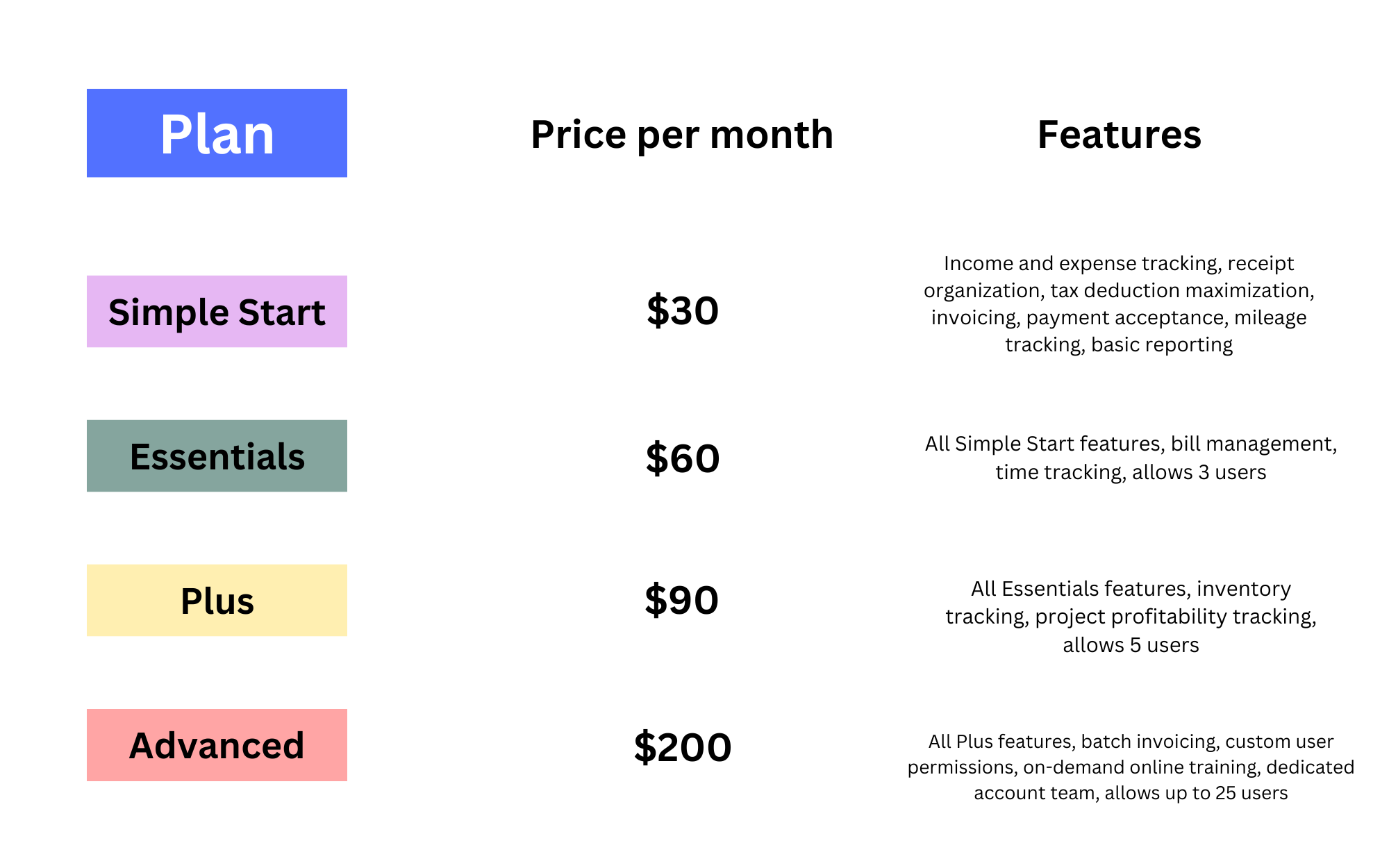
QuickBooks Online is the flagship product for modern businesses. It is a cloud-based solution that allows for real-time financial tracking from any location. Intuit typically offers four primary tiers for QuickBooks Online, each designed to meet a specific stage of business growth.
Simple Start: For the New Entrepreneur
At the entry level, the Simple Start plan usually begins around $30 per month (though promotional rates often apply for the first few months). This plan is tailored for solopreneurs and brand-new startups. It covers the essentials: tracking income and expenses, sending professional invoices, and managing basic tax deductions. While it limits you to a single user, it provides the fundamental financial data necessary to see if a business is profitable or merely “busy.”
Essentials: For Growing Service Businesses
As a business gains momentum, the Essentials plan (roughly $60 per month) becomes the logical next step. This tier allows for up to three users, which is critical for businesses that have started hiring administrative help or an outside bookkeeper. The most significant financial advantage of this tier is “Manage Bills.” By allowing you to track accounts payable, you can manage your cash flow more effectively, ensuring you aren’t paying vendors too early or incurring late fees.
Plus: For Product-Based Businesses and Advanced Tracking
The Plus plan, priced around $90 per month, is where QuickBooks becomes a true business intelligence tool. Supporting up to five users, this plan introduces inventory tracking and project profitability. For a business that sells physical goods, the ability to track COGS (Cost of Goods Sold) in real-time is vital for maintaining margins. Furthermore, the project tracking feature allows you to see exactly which clients are profitable and which are draining your resources.
Advanced: Enterprise-Level Power for Scaling Teams
The Advanced tier is the most expensive, often exceeding $200 per month. It is designed for established businesses with complex needs, allowing up to 25 users. The value here lies in automation and deep analytics. With features like batch invoicing and customized financial reporting, the Advanced plan is for companies where “time is money,” and the cost of the software is easily offset by the hours saved in manual data entry.
Understanding QuickBooks Payroll and Workforce Costs
For many businesses, the subscription fee for the accounting software is only half of the financial picture. If you have employees or plan to hire them, QuickBooks Payroll is an essential—but separate—cost that must be factored into your budget.
Core, Premium, and Elite Tiers
QuickBooks Payroll operates on a “Base Fee + Per Employee” model. The Core payroll plan starts at approximately $45 per month plus $6 per employee. This covers automated tax filings and direct deposits. The Premium ($80 + $8/employee) and Elite ($125 + $10/employee) plans add features like same-day direct deposit, workers’ compensation integration, and HR support centers.
The Financial Strategy of Integrated Payroll
From a business finance perspective, integrating payroll with your accounting software is a strategic move. While you could use a third-party payroll provider, the “hidden cost” of doing so is often the time spent reconciling those payments in your books. QuickBooks Payroll automates the journal entries, ensuring that your labor costs are instantly reflected in your Profit and Loss statements, giving you a more accurate picture of your net income at any given moment.
Hidden Operational Costs: Payments and Integrations
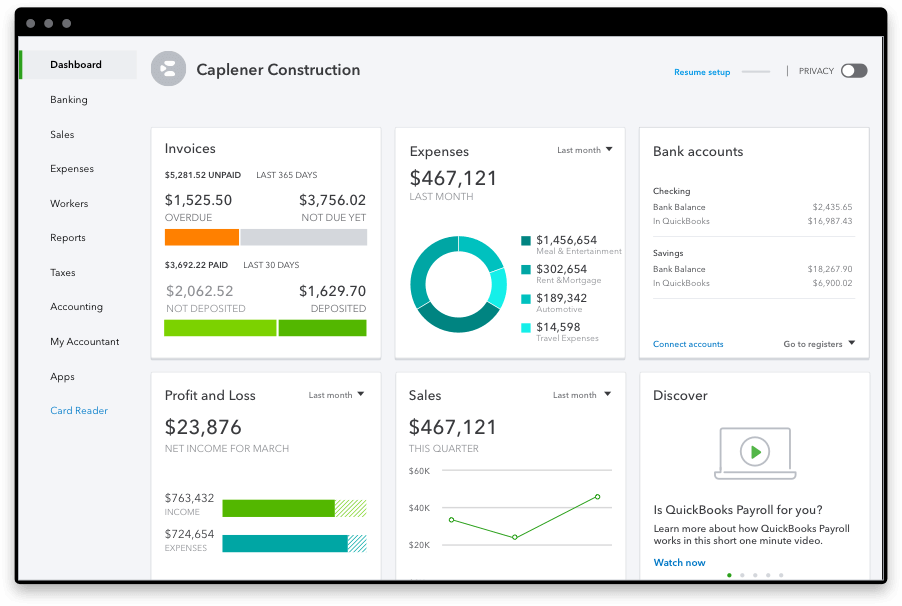
When calculating “how much is QuickBooks,” you must also consider the transactional costs. A business’s financial health depends on how quickly it can collect revenue, and QuickBooks offers an integrated payment processing system to facilitate this.
QuickBooks Payments and Transaction Fees
QuickBooks Payments allows you to accept credit cards and ACH bank transfers directly through your invoices. However, this is not free. You will typically encounter a fee structure similar to other processors: roughly 2.9% for invoiced cards and 1% (capped at a certain amount) for ACH transfers.
While these percentages might seem like a drain on your margins, they often result in a net financial gain. Studies show that businesses using integrated “Pay Now” buttons on invoices get paid up to twice as fast as those waiting for checks. In the world of business finance, improved cash flow velocity is often worth the 2.9% transaction fee.
The Cost of Third-Party App Ecosystems
QuickBooks is designed to be the “hub” of your financial life, but you may need “spokes.” Whether it’s an e-commerce connector like Shopify or a specialized time-tracking tool, many businesses pay for third-party integrations. These can range from $10 to $100 per month. When budgeting for QuickBooks, it is wise to audit your entire “tech stack” to ensure you aren’t paying for overlapping features.
QuickBooks Desktop vs. Online: The Pricing Shift
Historically, many businesses preferred QuickBooks Desktop because it was a one-time purchase. However, the financial landscape has shifted. Intuit has moved QuickBooks Desktop to a subscription-based “Premier Plus” or “Enterprise” model, often with higher annual costs than the Online versions.
The Move to Subscription-Based Models
The Desktop version now requires an annual subscription, often starting around $649 or more per year. For a business focused on “Money,” the choice between Desktop and Online usually comes down to complexity versus accessibility. Desktop offers more robust inventory and multi-company reporting, but it lacks the mobility and automatic backups of the Online version.
Why Online is Often the Better Financial Bet
From a capital expenditure (CapEx) vs. operating expenditure (OpEx) perspective, the Online subscription is an OpEx that is easily scalable. You aren’t tied to a specific machine, and you don’t have to pay for expensive server maintenance or remote access tools. For most modern businesses, the “total cost of ownership” for QuickBooks Online is lower because it eliminates the need for IT overhead.
Maximizing Your Investment: ROI and Tax Efficiency
To truly answer “how much is QuickBooks,” one must consider the money the software saves the business. An accounting system is not just a ledger; it is a tax-mitigation and growth-strategy tool.
Automating Tax Compliance to Save Money
The cost of an IRS audit or a missed tax deduction can be catastrophic. QuickBooks automates the categorization of expenses, ensuring that you are capturing every possible write-off. By the time tax season arrives, your books are “clean,” which significantly reduces the bill from your CPA. If your accountant spends 10 fewer hours fixing your mistakes because the software did it for you, the software has essentially paid for itself for the entire year.
Leveraging Real-Time Financial Reporting for Growth
The most successful business owners do not look at their bank balance to see how they are doing; they look at their Statement of Cash Flows and their Balance Sheet. QuickBooks provides these with a single click. This level of financial visibility allows for “data-driven” decision-making.
Can you afford to hire a new salesperson? Can you afford a $10,000 marketing campaign? QuickBooks provides the financial clarity to answer these questions with confidence. In this sense, the “cost” of QuickBooks is better viewed as an investment in a financial GPS. Without it, you are flying blind, and the cost of a single bad financial decision far outweighs the monthly subscription of even the most expensive QuickBooks plan.
In conclusion, while QuickBooks can cost anywhere from $360 to over $3,000 per year depending on your needs, the price is relative to the scale and complexity of your operations. By choosing the right tier, integrating payroll strategically, and leveraging the reporting power of the platform, you transform an “expense” into a vital engine for financial growth and stability.
aViewFromTheCave is a participant in the Amazon Services LLC Associates Program, an affiliate advertising program designed to provide a means for sites to earn advertising fees by advertising and linking to Amazon.com. Amazon, the Amazon logo, AmazonSupply, and the AmazonSupply logo are trademarks of Amazon.com, Inc. or its affiliates. As an Amazon Associate we earn affiliate commissions from qualifying purchases.