
In the dynamic world of business, effective financial management is not merely a necessity but a cornerstone of success. From tracking income and expenses to managing payroll and preparing for tax season, robust accounting software can be the linchpin that holds a company’s financial health together. Among the myriad options available, QuickBooks stands out as an industry leader, trusted by millions of small and mid-sized businesses worldwide. But as with any critical business investment, the first question that often arises is: “How much does QuickBooks cost?”

This isn’t a simple question with a singular answer. QuickBooks offers a diverse ecosystem of products, each tailored to different business needs, sizes, and complexities. Understanding its pricing involves delving into various plans, features, and the inherent value proposition each brings. This guide aims to demystify the cost of QuickBooks, helping you make an informed decision that aligns with your financial objectives and operational requirements. We’ll explore the various subscription models, highlight the factors that influence pricing, and ultimately, assess the return on investment (ROI) that QuickBooks can deliver.
Understanding the QuickBooks Ecosystem and Its Core Offerings
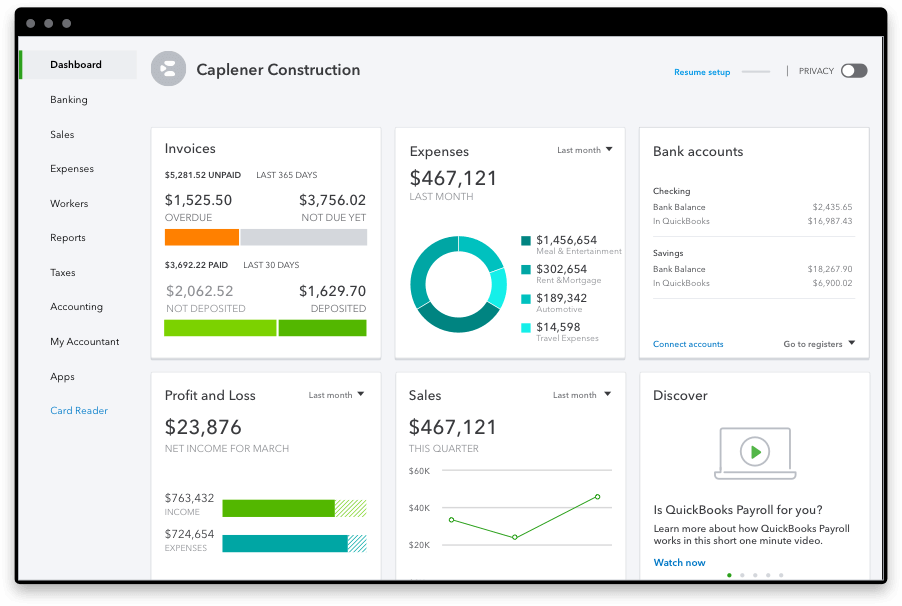
Before we dive into the specific price tags, it’s crucial to understand the broad landscape of QuickBooks offerings. Intuit, the creator of QuickBooks, has developed a suite of products designed to cater to a wide spectrum of businesses, from freelancers to established enterprises. The primary distinction lies between its cloud-based solution, QuickBooks Online (QBO), and its desktop-based software, QuickBooks Desktop.
QuickBooks Online vs. Desktop: Key Distinctions and Cost Implications
The fundamental difference between QuickBooks Online and Desktop impacts not only functionality and accessibility but also pricing structures.
- QuickBooks Online (QBO): This is a subscription-based, cloud-hosted platform, meaning you access it via a web browser from any device with an internet connection. Its primary appeal lies in its flexibility, real-time collaboration capabilities, and automatic updates. QBO is offered through various monthly or annual subscription tiers, which we will detail shortly. The cost is a recurring operational expense.
- QuickBooks Desktop: This traditional software is installed directly onto your computer. Historically, it involved a one-time purchase fee for a perpetual license. However, Intuit has shifted most Desktop versions to an annual subscription model as well, known as QuickBooks Desktop Plus, which includes ongoing updates and support. While a few older versions might still be found with perpetual licenses, the trend is towards subscription. Desktop offers more robust industry-specific features for certain niches (e.g., Enterprise Solutions for manufacturing, retail, contracting). The upfront cost might seem higher for a year, but for some, the perceived control of locally installed software is a draw.
Specialized QuickBooks Solutions: Self-Employed, Payroll, and Advanced Features
Beyond the core Online and Desktop versions, QuickBooks also provides specialized solutions that can either be standalone or integrated add-ons, each with its own cost:
- QuickBooks Self-Employed: Specifically designed for freelancers, independent contractors, and sole proprietors, this stripped-down version focuses on tracking income, expenses, mileage, and tax estimations (e.g., quarterly estimated taxes). It’s typically the most affordable entry point into the QuickBooks ecosystem.
- QuickBooks Payroll: Essential for any business with employees, QuickBooks Payroll integrates seamlessly with QBO and Desktop. It manages paychecks, calculates taxes, handles direct deposits, and files payroll taxes automatically. This is offered as an add-on service with its own tiered pricing based on features and the number of employees.
- QuickBooks Payments: This service allows businesses to accept credit card and bank transfer payments directly within QuickBooks, streamlining reconciliation. It incurs transaction fees, which are separate from your core QuickBooks subscription but are a crucial part of the overall “cost of doing business” with QuickBooks for many.
- QuickBooks Advanced: This is the highest tier of QuickBooks Online, tailored for larger, more complex businesses requiring advanced reporting, user permissions, and dedicated support. It sits at the top of the pricing scale for QBO.
Decoding QuickBooks Online Pricing Tiers and Features
QuickBooks Online is the most popular and actively developed version, making its pricing structure particularly relevant for new businesses. Intuit offers several subscription tiers for QBO, each incrementally adding features and capabilities. Prices are typically quoted per month, often with discounts for annual commitments or promotional periods.
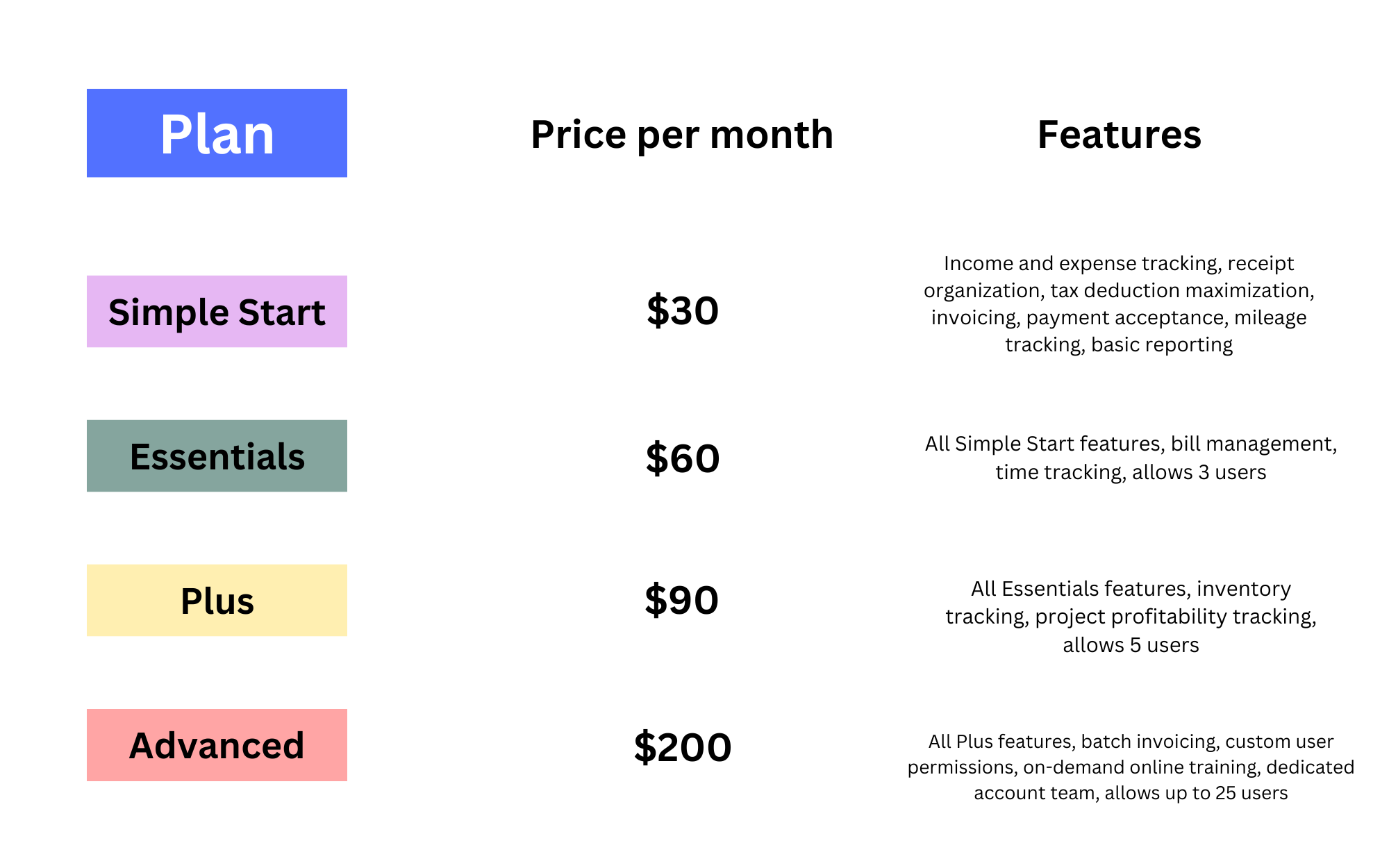
Simple Start: The Essentials for Small Businesses
- Target User: New businesses, freelancers, and very small businesses with basic accounting needs.
- Key Features: Income and expense tracking, invoicing, receipt capture, basic reports, sales tax tracking.
- Cost Insight: This is the most budget-friendly option, providing fundamental financial organization without overwhelming features. It’s ideal for those just starting to digitize their bookkeeping.
Essentials: Expanding Your Financial Management Capabilities
- Target User: Growing small businesses that need more sophisticated control over finances.
- Key Features (in addition to Simple Start): Bill management, time tracking, multi-user access (up to 3 users), recurring transactions.
- Cost Insight: A step up in price, Essentials offers critical features like managing bills (accounts payable) and tracking employee time, which are vital for businesses with contractors or a small team. The ability for multiple users to access simultaneously is a significant value add.
Plus: Comprehensive Business Control
- Target User: Small to medium-sized businesses with inventory, project management, and more robust reporting needs.
- Key Features (in addition to Essentials): Inventory tracking, project profitability tracking, deeper reporting (e.g., class and location tracking), up to 5 users.
- Cost Insight: Plus is often considered the sweet spot for many growing small businesses. The inclusion of inventory management and project costing tools can be invaluable for product-based businesses or those managing client projects, justifying the higher price point through enhanced operational efficiency and insight.
Advanced: Scalability for Growing Enterprises
- Target User: Larger small to mid-sized businesses with complex accounting needs, high transaction volumes, and a need for greater control and insights.
- Key Features (in addition to Plus): Enhanced custom reporting, advanced user permissions, Fathom reporting integration, dedicated account team, up to 25 users.
- Cost Insight: This is the premium QBO offering. Its higher price reflects advanced analytical tools, greater user capacity, and priority support, which are critical for businesses scaling rapidly or those with intricate financial structures. The automation features and dedicated support can save significant time and resources.
Add-on Services: Payroll, Payments, and Live Bookkeeping
Remember, the core QuickBooks subscription often doesn’t include everything. Many businesses will also incur costs for:
- QuickBooks Payroll: Starts with a base fee plus a per-employee per-month charge. Tiers (Core, Premium, Elite) offer increasing features like HR support and tax penalty protection.
- QuickBooks Payments: Involves transaction fees (e.g., percentage + flat fee per transaction for credit cards, lower fees for ACH transfers).
- QuickBooks Live Bookkeeping: An optional service where certified bookkeepers work directly within your QuickBooks account. This is a significant additional cost but offers professional guidance and reconciliation.
Factors Influencing Your QuickBooks Investment
Choosing the right QuickBooks plan isn’t just about picking the cheapest option; it’s about aligning cost with value. Several factors should guide your decision-making process.
Business Size and Complexity
- Start-ups/Freelancers: Simple Start or Self-Employed often suffice for basic income/expense tracking.
- Growing SMBs: Essentials or Plus provide the necessary tools for managing bills, inventory, and multiple users.
- Larger SMBs/Enterprises: Advanced or QuickBooks Desktop Enterprise might be required for complex reporting, high transaction volumes, and extensive user access.
Essential Features and Integrations
Before committing, make a list of “must-have” features. Do you need to track inventory? Manage projects? Handle international currencies? Does your industry have specific reporting requirements? Also, consider what other software you use (e.g., CRM, e-commerce platforms) and ensure QuickBooks integrates smoothly, as these integrations can simplify workflows and enhance data accuracy. The more specialized your needs, the higher the likely cost.
Long-term Value vs. Upfront Cost
While a cheaper monthly plan might seem attractive initially, consider its long-term implications. Will you outgrow it quickly, necessitating an upgrade that costs more in the long run? Or will a slightly more expensive plan, with features like inventory management or enhanced reporting, save you countless hours and provide deeper insights that drive profitability? The true cost isn’t just the subscription fee but the efficiency gains, error reductions, and strategic advantages it offers.
Maximizing ROI: Getting the Most Out of Your QuickBooks Subscription
The “how much” question extends beyond the dollar amount to the value you extract from your investment. QuickBooks, when utilized effectively, can offer a substantial return on investment.
Leveraging Reporting and Analytics
QuickBooks provides a wealth of customizable reports, from profit and loss statements to balance sheets, sales reports, and customer profitability analyses. By regularly reviewing these reports, businesses can identify trends, pinpoint areas for cost reduction, and make data-driven decisions that improve financial performance. The insights gained from advanced reporting in higher tiers can easily outweigh the additional subscription cost.
Streamlining Workflows with Automation
Features like automated invoicing, recurring expenses, bank feed integration, and automated tax calculations save immense amounts of manual data entry and reconciliation time. This automation reduces human error, frees up staff for more strategic tasks, and ensures timely financial processes. The time saved translates directly into cost savings and increased productivity.
Tax Preparation and Compliance Benefits
One of QuickBooks’ most significant advantages is its ability to organize financial data for tax preparation. Categorized expenses, tracked income, and generated reports simplify the process of filing taxes, potentially reducing accounting fees and minimizing the risk of errors or audits. Payroll services, in particular, ensure compliance with complex tax laws, preventing costly penalties.
The True Cost: Beyond the Monthly Subscription
While the subscription fee is the most obvious cost, the “true cost” of QuickBooks can involve other considerations that savvy business owners account for.
Implementation and Training
If you’re migrating from another system or starting from scratch, there might be an initial investment in setting up your QuickBooks account correctly, importing data, and training your team. While many resources are available online, some businesses opt for professional assistance from QuickBooks ProAdvisors, which comes at an hourly or project-based fee. This initial investment ensures proper configuration and maximizes the software’s effectiveness from day one.
Third-Party App Integrations
QuickBooks boasts a vast ecosystem of third-party applications that can extend its functionality, from CRM and e-commerce platforms to industry-specific tools. While these integrations enhance QuickBooks’ power, many come with their own subscription fees. Businesses must factor these additional app costs into their overall financial management budget.
Opportunity Cost of Not Using QuickBooks
Perhaps the most overlooked “cost” is the opportunity cost of not using an effective financial management system like QuickBooks. Without it, businesses might face:
- Increased Manual Work: Leading to inefficiencies, errors, and wasted time.
- Lack of Financial Clarity: Making it difficult to assess profitability, manage cash flow, or make informed strategic decisions.
- Compliance Risks: Higher chances of tax errors, missed deadlines, and potential penalties.
- Stunted Growth: Inability to scale operations effectively due to poor financial oversight.
In essence, the cost of not having QuickBooks, or a similar robust solution, can far outweigh the subscription fees, manifesting as lost revenue, increased operational expenses, and missed growth opportunities.
Conclusion
Determining “how much is QuickBooks” requires a comprehensive assessment of your business needs, current stage of growth, and future aspirations. While the monthly or annual subscription fees are transparent, the true investment encompasses the software itself, potential add-ons, implementation costs, and the invaluable operational efficiencies and financial insights it provides.
QuickBooks isn’t just an expense; it’s a strategic investment in your business’s financial health and long-term viability. By carefully evaluating the different tiers and services, considering the factors that influence value, and committing to leveraging its full potential, businesses can ensure that their QuickBooks expenditure delivers a substantial and enduring return on investment, propelling them towards greater financial success.
aViewFromTheCave is a participant in the Amazon Services LLC Associates Program, an affiliate advertising program designed to provide a means for sites to earn advertising fees by advertising and linking to Amazon.com. Amazon, the Amazon logo, AmazonSupply, and the AmazonSupply logo are trademarks of Amazon.com, Inc. or its affiliates. As an Amazon Associate we earn affiliate commissions from qualifying purchases.