
In the rapidly evolving landscape of digital streaming, Paramount Plus (stylized as Paramount+) has emerged as a cornerstone of the modern “cord-cutting” movement. As a direct-to-consumer digital video-on-demand service owned by Paramount Global, it represents a massive integration of legacy media assets with cutting-edge software delivery. For users asking “how much is a Paramount Plus subscription,” the answer involves more than just a dollar amount; it requires an understanding of different service tiers, technical specifications, and how the platform integrates into a broader home theater ecosystem.

This guide provides a deep dive into the technical and logistical framework of Paramount Plus, helping you decide which tier suits your hardware setup and viewing habits.
1. Analyzing the Paramount Plus Subscription Tiers
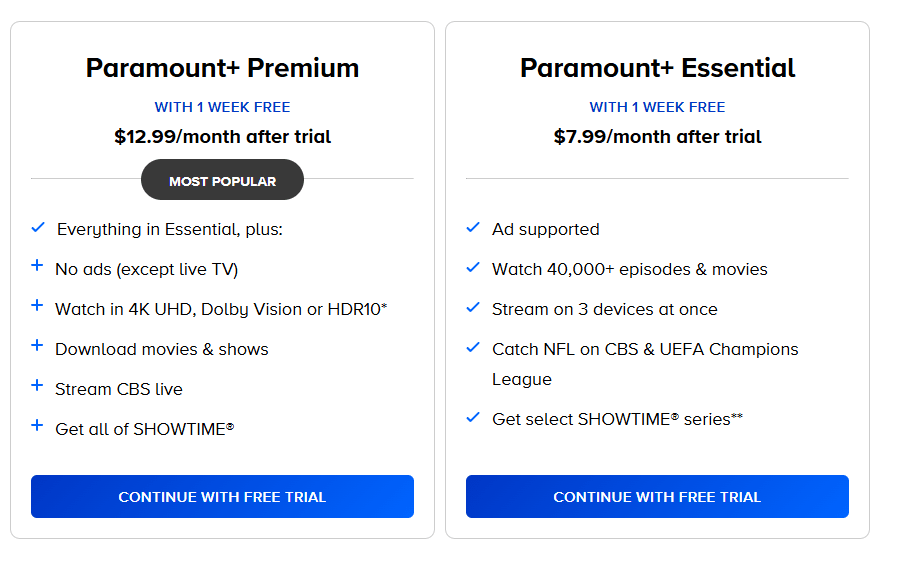
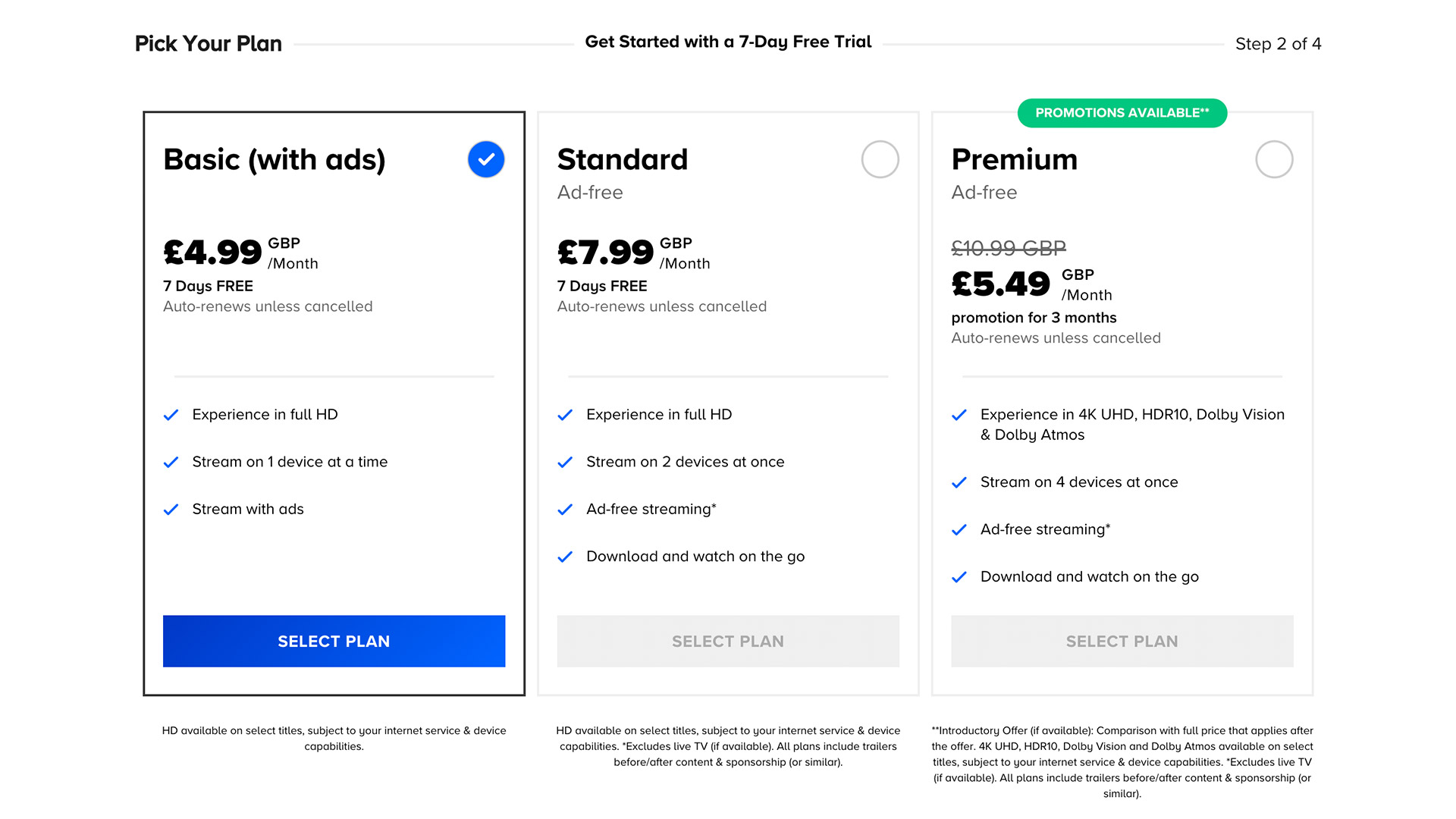
Paramount Plus offers a streamlined approach to its pricing model, divided primarily between two distinct tiers. Each tier is designed to cater to different user priorities, ranging from budget-conscious viewers to those seeking a premium, high-definition cinematic experience.
The Paramount+ Essential Plan
The Essential plan is the entry-level gateway to the platform’s library. At approximately $5.99 per month (or $59.99 per year), it is engineered for viewers who do not mind limited commercial interruptions. From a technical standpoint, this plan provides access to the full library of over 45,000 episodes and movies, but it comes with specific limitations. It does not include a local live CBS station, though it does offer access to national NFL games on CBS and top-tier soccer matches like the UEFA Champions League via separate live feeds.
The Paramount+ with SHOWTIME Plan
For users seeking a comprehensive digital experience, the Paramount+ with SHOWTIME plan is priced at $11.99 per month (or $119.99 per year). This is not merely an “ad-free” version of the Essential plan; it is a full-scale integration of the SHOWTIME library into the Paramount+ app interface. Key technical upgrades here include the ability to download content for offline viewing and access to your local live CBS station. This tier is the standard for home theater enthusiasts who demand the highest bitrate and resolution options available on the platform.
Annual vs. Monthly Commitment Options
When calculating the cost, users should consider the “Tech Value” of annual billing. By opting for an annual subscription, users essentially receive two months of service for free compared to the monthly billing cycle. For the digital minimalist who wants to avoid recurring monthly micro-transactions, the annual plan offers a “set it and forget it” utility that simplifies digital budget management.
2. Technical Specifications and Streaming Quality
A subscription is only as good as the technology powering the playback. Paramount Plus has made significant strides in matching the technical benchmarks set by industry leaders like Netflix and Disney+. However, the quality of your stream is heavily dependent on the subscription tier you choose and the hardware you utilize.
4K UHD, HDR10, and Dolby Vision
High Dynamic Range (HDR) and 4K resolution are the gold standards for modern digital software. Paramount Plus offers 4K UHD streaming, but it is currently restricted to the Paramount+ with SHOWTIME tier. This includes support for HDR10 and Dolby Vision, which optimizes the brightness and color accuracy on compatible displays. If you are using a high-end OLED TV or a dedicated home cinema projector, the “Essential” plan may feel technically underwhelming due to its 1080p limitation.
Audio Standards and Dolby Atmos
Sound is often the overlooked half of the streaming equation. The premium tier of Paramount Plus supports 5.1 surround sound and, for select titles, Dolby Atmos. This object-based audio technology provides an immersive 3D soundscape. For users with sophisticated soundbars or AVR (Audio Video Receiver) setups, the technical leap to the Showtime tier is often justified by the audio fidelity alone.
Offline Downloads and Cloud Infrastructure
The ability to download content for offline viewing is a vital feature for mobile users. This functionality is restricted to the Paramount+ with SHOWTIME tier on mobile devices (iOS and Android). The software allows for up to 25 downloads at a time. From a technical perspective, these downloads are encrypted and stored within the app’s cache, ensuring that content remains secure while providing a buffer-free experience in areas with poor cellular connectivity.
3. Platform Compatibility and App Ecosystem
The utility of a Paramount Plus subscription is defined by its ubiquity across devices. The “Tech” value of a service is often measured by how seamlessly it transitions from a smartphone to a smart TV to a gaming console.
Supported Devices and Operating Systems
Paramount Plus maintains a robust presence across the digital hardware spectrum. The app is natively available on:
- Streaming Sticks: Amazon Fire TV, Roku, and Google Chromecast.
- Smart TVs: LG, Samsung, and Vizio (via SmartCast).
- Gaming Consoles: PlayStation 4/5 and Xbox Series X|S.
- Mobile & Tablets: iOS (iPhone/iPad) and Android.
- Web Browsers: Optimized for Chrome, Safari, and Edge.
The cross-platform synchronization is a highlight of the software’s architecture. Your “Keep Watching” list and user profiles sync instantaneously via the cloud, allowing you to pause a movie on your living room Roku and resume it on your Android tablet during a commute.
User Interface (UI) and Experience (UX)
The Paramount Plus app utilizes a grid-based interface that prioritizes “Brands” (hubs) such as CBS, Nickelodeon, MTV, BET, Comedy Central, and Smithsonian Channel. From a UX perspective, the search algorithm and recommendation engine have seen significant updates to reduce “choice paralysis.” The interface is designed to be lightweight, minimizing the processing load on older hardware like the original Fire TV Stick or older Roku models.
Concurrent Streams and Profiles
A single Paramount Plus subscription supports up to three concurrent streams. This is a critical technical metric for households with multiple users. Additionally, the software allows for the creation of up to six individual profiles. Each profile maintains its own watch history and algorithmic recommendations. Importantly, the platform includes “Kids Mode” profiles, which allow parents to set content ratings (Older Kids vs. Younger Kids), showcasing a commitment to digital safety and parental control.
4. Optimizing Your Subscription and Digital Management
To get the most out of what you pay for, it is essential to understand the tools provided within the Paramount Plus account management dashboard and the broader digital marketplace.
Managing Your Digital Subscription
Paramount Plus subscriptions can be managed directly through the Paramount website or via third-party billing partners like Apple (App Store), Google (Play Store), or Amazon. It is important to note that if you subscribe through a third party, your billing cycles and cancellation processes are handled through those respective tech ecosystems rather than Paramount’s direct portal.
Integration with “The Bundle” and Add-ons
In the current tech climate, “The Bundle” is king. Many users access Paramount Plus through external software integrations. For instance, Walmart+ members currently receive a Paramount+ Essential subscription at no additional cost as part of their membership perks. Similarly, many cable providers and mobile carriers offer promotional windows where the service is integrated into their hardware packages. Utilizing these technical integrations can effectively reduce your monthly “digital overhead.”
Troubleshooting and Data Usage
For users on metered internet connections, it is vital to understand the data footprint of the Paramount Plus app. High-definition streaming can consume up to 3GB of data per hour, while 4K streaming can exceed 7GB. Within the mobile app settings, users can toggle “Data Saver” modes, which restrict the resolution to SD (Standard Definition) to preserve data. This level of granular control is a hallmark of a well-engineered streaming application.
5. The Future of the Paramount Plus Software Infrastructure
As Paramount Plus continues to evolve, the focus is shifting toward AI-driven personalization and enhanced live-streaming stability. The platform is increasingly leaning into “Live Channels”—linear, curated streams that mimic traditional television but are delivered via the internet (FAST – Free Ad-supported Streaming Television).
AI and Personalization Algorithms
The backend of Paramount Plus uses machine learning to analyze viewing patterns. If you frequently watch procedural dramas on CBS, the algorithm will prioritize similar content from the library. This “content discovery” tech is essential for maintaining high user retention rates in a crowded market.
Enhancing Live Sports Delivery
Live sports (NFL, UEFA, etc.) represent the most significant technical challenge for streaming services due to latency issues. Paramount Plus has invested heavily in its CDN (Content Delivery Network) to reduce the “spoiler lag”—the delay between the live action and the digital stream. For the sports tech enthusiast, the ability to watch 60fps (frames per second) live broadcasts via the app is a major selling point.
In conclusion, understanding “how much is a Paramount Plus subscription” is about weighing the cost against a suite of technical features. Whether you choose the $5.99 Essential plan or the $11.99 Showtime tier, you are investing in a sophisticated piece of software that brings a century of media history into the digital age. By optimizing your hardware, managing your data usage, and choosing the right tier for your display capabilities, you can maximize the value of this essential piece of the modern tech stack.
aViewFromTheCave is a participant in the Amazon Services LLC Associates Program, an affiliate advertising program designed to provide a means for sites to earn advertising fees by advertising and linking to Amazon.com. Amazon, the Amazon logo, AmazonSupply, and the AmazonSupply logo are trademarks of Amazon.com, Inc. or its affiliates. As an Amazon Associate we earn affiliate commissions from qualifying purchases.