
In the rapidly evolving landscape of live TV streaming services, understanding the technical specifications and limitations of your chosen platform is paramount for a seamless entertainment experience. YouTube TV, a prominent player in this domain, offers a comprehensive package of channels, DVR capabilities, and user-friendly interfaces. However, a common question that arises for both prospective and current subscribers revolves around its streaming capacity: “how many streams does YouTube TV allow?” This seemingly simple query touches upon critical aspects of user experience, household sharing, and ultimately, the value proposition of the service. Delving into the nuances of YouTube TV’s streaming policies reveals a well-defined structure designed to balance user convenience with content licensing agreements and service infrastructure.
The Standard YouTube TV Streaming Experience
At its core, YouTube TV is designed to be a family-friendly service, enabling multiple household members to enjoy their favorite live and on-demand content simultaneously. However, this flexibility operates within specific technical parameters.
Default Simultaneous Streams
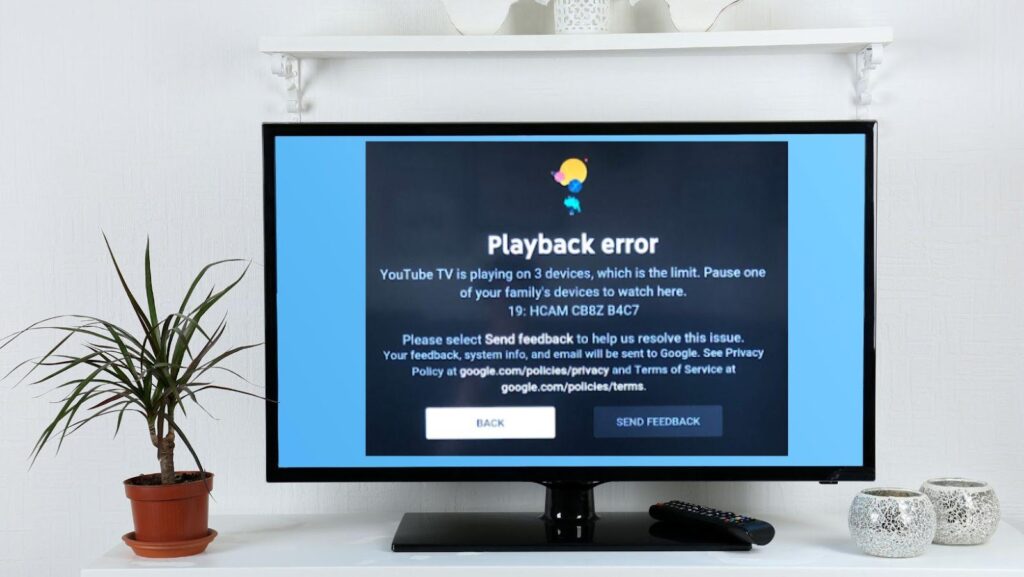
When you subscribe to the standard YouTube TV base plan, you are granted the ability to use three simultaneous streams. This means that up to three different devices can be actively playing content from your YouTube TV account at the same time. These devices could range from smart TVs, streaming sticks (like Roku, Apple TV, Fire TV), gaming consoles (PlayStation, Xbox), to mobile phones and tablets. This default allowance is generally sufficient for most nuclear families, allowing perhaps a parent to watch a sports game in the living room, a child to stream a cartoon in their bedroom, and another family member to catch up on a show on a tablet, all concurrently. The system is designed to intelligently manage these connections, ensuring that once the third stream is active, any attempt to initiate a fourth stream will result in a notification indicating that the stream limit has been reached.
In-Home vs. Out-of-Home Viewing
YouTube TV introduces an important distinction regarding the location of your viewing devices, which directly impacts how streams are counted and managed. The service designates a “home network” – essentially the primary Wi-Fi network associated with your billing address. All three standard streams can originate from within this home network without any specific restrictions.
However, when you attempt to stream from outside your home network, the rules become slightly more complex. YouTube TV generally allows users to stream remotely, but it still maintains ties to your home location for certain functionalities and stream counting. For instance, if you’re traveling and accessing YouTube TV from a hotel or a friend’s house, those streams are counted against your total. The critical aspect here is ensuring that your account primarily operates from your designated home location. YouTube TV periodically requires you to verify your home location by signing in from a device connected to your home network, typically once every few months, to prevent widespread account sharing across different households.
Device Compatibility and Limitations
While the three-stream limit applies across the board, the actual experience can vary slightly depending on the device. YouTube TV is renowned for its broad device compatibility, supporting a vast array of platforms. Each device, regardless of whether it’s a high-end smart TV or a budget smartphone, consumes one stream when active. There are no specific device types that consume more or fewer streams; the limitation is purely on the number of concurrent playback sessions. However, some users might encounter slight variations in performance based on their device’s processing power and network connectivity, but these are separate from the stream count itself.
Elevating Your Viewing: The 4K Plus Add-On
For households with greater viewing demands or those seeking a premium technical experience, YouTube TV offers an upgrade path through its “4K Plus” add-on. This paid enhancement significantly expands streaming capabilities and introduces other valuable features.
Unlocking Unlimited In-Home Streams
The most compelling feature of the 4K Plus add-on for many users is the provision of unlimited simultaneous streams while on your home network. This effectively removes the three-stream constraint for devices connected to your primary Wi-Fi network. This is a game-changer for larger families, multi-generational households, or even roommates living together who might frequently find themselves wanting to watch different programs at the same time. With 4K Plus, the era of “who’s watching what?” conflicts due to stream limits largely vanishes, at least within the confines of your home. It offers unparalleled flexibility, allowing every screen in the house to potentially stream unique content without interruption.
Expanded Out-of-Home Access
While the unlimited in-home streams are a major draw, the 4K Plus add-on also extends benefits to remote viewing. Subscribers to 4K Plus gain an additional allowance of streams for out-of-home use, specifically, three concurrent streams that can be used anywhere away from your home network. This means you retain the standard three remote streams you get with the base plan, but these three are in addition to the unlimited in-home streams. This significantly enhances flexibility for individuals who travel frequently or have family members often viewing from different locations outside the home. It ensures that even when multiple people are away from the primary residence, they still have ample streaming capacity.
Beyond Streams: Other 4K Plus Perks
The 4K Plus add-on isn’t solely about expanding your stream count; it also introduces other technical enhancements that justify its cost. As the name suggests, it unlocks access to available 4K resolution content. While 4K content on live TV is still growing, this add-on prepares you for the future and allows you to enjoy compatible sports, on-demand shows, and movies in pristine ultra-high definition, assuming your internet connection and display devices support it.
Another significant benefit is the ability to download DVR recordings for offline viewing. This feature is particularly useful for travelers or commuters who want to watch their recorded content without consuming mobile data or when internet access is unavailable. You can download shows to your mobile device and watch them later, transforming your commute or flight into a personalized viewing experience. These additional perks position 4K Plus as a comprehensive upgrade for tech-savvy users seeking maximum flexibility and premium quality.
Navigating Stream Limits: Best Practices and Troubleshooting
Even with clear policies, users can sometimes encounter issues related to stream limits. Understanding how to manage and troubleshoot these situations is key to a smooth viewing experience.

Monitoring Active Streams
YouTube TV provides tools within its interface to help users monitor their active streams. While there isn’t always a real-time dashboard showing every active device, if you encounter a “stream limit reached” message, it typically indicates that three (or your subscribed limit) devices are already playing content. The service often gives you an option to stop an active stream from another device to free up a slot. Proactive management can involve periodically reviewing which devices are logged into your YouTube TV account and ensuring unnecessary streams are closed, especially if you suspect unauthorized usage.
Common Scenarios Causing Stream Conflicts
Stream conflicts often arise from common household usage patterns. For example:
- Forgetting to close an app: A user might finish watching on a tablet but simply put the device to sleep instead of closing the YouTube TV app, leaving a stream active in the background.
- Multiple smart TVs: In homes with several smart TVs, it’s easy for different family members to turn on the TV and start watching, quickly hitting the limit.
- Guests accessing the Wi-Fi: If guests are given access to your home Wi-Fi and use your YouTube TV login, they could inadvertently consume streams.
- Automatic playback: Some devices or settings might automatically resume playback, contributing to active streams without explicit user action.
When a conflict occurs, YouTube TV will usually notify the user attempting to start the fourth stream, suggesting they close an existing stream or providing an option to “bump” one of the active streams off, although this can be disruptive to the other viewer.
Optimizing Your Family’s Viewing Habits
To prevent stream conflicts, several strategies can be employed:
- Communicate: Encourage family members to communicate what they are watching and when they are finished.
- Educate on closing apps: Teach everyone to properly close the YouTube TV app when they are done viewing, especially on mobile devices.
- Utilize separate profiles: While all profiles share the same stream limit, they help organize individual watch histories and DVRs, making it easier to see who is using the service.
- Consider the 4K Plus add-on: For households with consistently high simultaneous viewing needs, the add-on is often the simplest and most effective solution.
- Regularly review logged-in devices: Periodically check your Google account settings for YouTube TV to remove any old or unrecognized devices that might be logged in.
Why Stream Limits Exist: Technical and Business Perspectives
The implementation of stream limits isn’t arbitrary; it’s a strategic decision influenced by a confluence of technical realities and business necessities that govern the operation of any large-scale streaming service.
Bandwidth and Server Load Management
From a technical standpoint, every active stream consumes bandwidth and places a load on YouTube TV’s servers and content delivery networks (CDNs). While Google’s infrastructure is incredibly robust, there are still practical limits to how much data can be streamed to millions of simultaneous users worldwide. Limiting streams per account helps in:
- Ensuring Quality of Service: By preventing an individual account from monopolizing excessive resources, YouTube TV can better ensure that all active streams receive adequate bandwidth for high-quality, uninterrupted playback.
- Preventing Network Congestion: Uncapped streams could lead to a massive surge in data traffic during peak hours, potentially overwhelming parts of the network and degrading performance for all users.
- Cost Management: Operating a streaming service at scale involves significant costs for server infrastructure, bandwidth, and content delivery. Stream limits are a mechanism to manage these operational expenses.
Content Licensing and Revenue Models
Perhaps the most significant driver behind stream limits is the complex web of content licensing agreements. YouTube TV, like other live TV streaming services, licenses its channels from various media companies (e.g., Disney, Fox, NBCUniversal). These licensing agreements often include clauses specifying the number of concurrent streams allowed per household. These clauses are designed to:
- Protect Traditional Broadcast Revenue: Content providers aim to prevent streaming services from cannibalizing their traditional cable/satellite revenue by effectively allowing one subscription to serve multiple households.
- Fair Compensation: The fees paid for content licenses are often tied to the perceived number of concurrent viewers or households served. Stream limits help define and control this metric.
- Prevent Uncontrolled Account Sharing: Without limits, a single YouTube TV subscription could theoretically be shared among dozens of individuals across different locations, severely undermining the service’s business model and the profitability of its content partners.
Fair Usage Policies
Stream limits also fall under the umbrella of “fair usage” policies. They are designed to ensure that subscribers use the service in a manner consistent with its intended purpose – serving a single household. While the definitions of a “household” can vary, stream limits act as a practical enforcement mechanism to prevent widespread, unauthorized sharing of accounts. This helps YouTube TV maintain a sustainable business model, which in turn allows it to continue offering a diverse range of content to its legitimate subscribers.
YouTube TV’s Streaming Capacity Compared to Competitors
To fully appreciate YouTube TV’s streaming policy, it’s helpful to contextualize it against the offerings of its main competitors in the live TV streaming space. The industry standard for simultaneous streams typically hovers around two to three, with options for upgrades.
A Look at Industry Standards
- Hulu + Live TV: Similar to YouTube TV, Hulu + Live TV generally offers two simultaneous streams by default. They also provide an “Enhanced Cloud DVR” add-on which, among other features, can increase the stream limit to an unlimited number of in-home screens and three out-of-home screens, mirroring YouTube TV’s 4K Plus offering in this regard.
- Sling TV: Sling TV’s approach is slightly different, often varying by channel package. Sling Orange (which includes ESPN) typically allows only one stream, while Sling Blue (which includes Fox/NBC) allows three simultaneous streams. If you subscribe to both, some channels might still be limited to one stream, while others enjoy three.
- FuboTV: FuboTV often starts with a base of 10 simultaneous streams on the home network and two additional streams while on the go. This is a significantly more generous offering out-of-the-box compared to YouTube TV’s standard plan, making it attractive for larger families or those prioritizing stream count.
- DirecTV Stream: DirecTV Stream is notable for its very generous stream policy, offering an impressive 20 simultaneous streams at home and up to 3 streams on the go with its unlimited option. This positions it as one of the most flexible options for large households.
Value Proposition: Streams vs. Price
When evaluating these options, subscribers must weigh the number of streams against the monthly subscription cost and the overall channel lineup. YouTube TV’s standard three streams are competitive and generally meet the needs of average households. The ability to upgrade to unlimited in-home streams with the 4K Plus add-on provides excellent flexibility for those who need it, albeit at an additional cost.
While some competitors might offer more streams in their base plans (like FuboTV or DirecTV Stream), YouTube TV often distinguishes itself through its robust DVR (unlimited cloud storage), user interface, and overall integration with the broader Google ecosystem. The “right” number of streams is subjective and depends heavily on individual household size, viewing habits, and budget. For many, YouTube TV strikes a good balance, offering a solid default and a clear upgrade path for enhanced technical capabilities and broader viewing flexibility.
In conclusion, YouTube TV’s streaming policies are designed to be flexible yet controlled, offering a standard three simultaneous streams that can be significantly expanded with the 4K Plus add-on. Understanding these limits, combined with best practices for managing your viewing, ensures that your YouTube TV experience remains seamless, enjoyable, and tailored to your household’s unique entertainment needs.
aViewFromTheCave is a participant in the Amazon Services LLC Associates Program, an affiliate advertising program designed to provide a means for sites to earn advertising fees by advertising and linking to Amazon.com. Amazon, the Amazon logo, AmazonSupply, and the AmazonSupply logo are trademarks of Amazon.com, Inc. or its affiliates. As an Amazon Associate we earn affiliate commissions from qualifying purchases.