
In an increasingly connected world, the quality of your home internet connection is paramount. From remote work and online learning to high-definition streaming and smart home ecosystems, a reliable, high-speed connection isn’t just a luxury; it’s a necessity. Fiber optic internet represents the pinnacle of modern connectivity, offering unparalleled speeds, low latency, and rock-solid reliability. But for many, the prospect of having this advanced technology installed in their home can seem daunting, shrouded in technical jargon and unknown processes. This guide aims to pull back the curtain, providing a clear, step-by-step breakdown of how fiber internet is installed, empowering homeowners to understand and prepare for this transformative upgrade. We’ll explore everything from the initial availability check to the final activation, ensuring you’re well-informed throughout the journey to superior connectivity.
The Promise of Fiber: Why Make the Switch?
Before delving into the technicalities of installation, it’s crucial to understand why fiber internet is revolutionizing home connectivity and why so many are making the switch. Its advantages extend far beyond mere speed, fundamentally altering how we interact with the digital world.
Unparalleled Speed and Reliability
Fiber optic cables transmit data using pulses of light through thin strands of glass or plastic, a stark contrast to the electrical signals sent over traditional copper wires (DSL, cable). This optical transmission method allows for incredibly high bandwidth, translating into symmetrical download and upload speeds that can reach gigabits per second (Gbps) or even tens of gigabits per second. This means you can download large files in seconds, stream 4K or 8K content without buffering, and participate in video conferences with crystal-clear quality, all simultaneously and across multiple devices.
Beyond raw speed, fiber offers superior reliability. It is less susceptible to electromagnetic interference, extreme weather conditions, and signal degradation over distance, issues that plague copper-based networks. This inherent robustness means fewer dropped connections, more consistent performance, and a more stable internet experience overall, a critical factor for both productivity and entertainment. For businesses operating from home, the stability and speed of fiber can directly impact output and efficiency, solidifying its position as a wise technological investment.
The Technology Behind the Hype
At its core, fiber optic technology leverages the principles of total internal reflection to transmit data. Light signals, generated by lasers or LEDs, travel along the fiber strands, bouncing off the inner walls without escaping. Each tiny fiber strand can carry vast amounts of data, far exceeding the capacity of even the thickest copper cables. This revolutionary approach not only delivers faster speeds today but also offers immense scalability, meaning it’s inherently “future-proofed” for the ever-increasing demands of tomorrow’s digital landscape, including advancements in AI tools, advanced VR, and burgeoning IoT ecosystems. Understanding this foundational technology helps contextualize the installation process, which is essentially about extending this light-speed network directly into your living space.
Pre-Installation Essentials: Setting the Stage
A smooth fiber internet installation begins long before the technician arrives. Proper preparation involves a series of crucial steps, from verifying service availability to choosing the right provider and preparing your home.
Checking Fiber Availability in Your Area
The first and most critical step is to determine if fiber internet is available at your specific address. While fiber networks are expanding rapidly, their deployment is still geographically dependent. Most major internet service providers (ISPs) offer online tools on their websites where you can simply input your address to check availability. Alternatively, a quick phone call to an ISP’s customer service line can provide this information.
It’s worth noting that even if a major provider doesn’t offer fiber, local or regional providers might. Many municipalities and smaller companies are investing heavily in their own fiber infrastructure. Exploring all options ensures you don’t miss out on potential service, which could offer competitive pricing or unique bundle deals.
Choosing the Right Provider and Plan
Once you’ve confirmed fiber availability, the next challenge is selecting the best provider and plan for your needs. This decision often involves balancing speed requirements, pricing, contract terms, and the provider’s brand reputation.
- Speed Tiers: Fiber internet typically comes in various speed tiers (e.g., 300 Mbps, 500 Mbps, 1 Gbps, 2 Gbps). Consider your household’s internet usage patterns:
- For basic browsing, email, and occasional streaming, lower tiers might suffice.
- For households with multiple users, 4K streaming, online gaming, and extensive video conferencing, 1 Gbps (gigabit) is often the sweet spot, offering ample bandwidth for virtually any activity.
- For power users, content creators, or smart homes with dozens of connected devices, multi-gig plans might be worth the investment.
- Pricing and Contracts: Compare monthly costs, looking out for promotional rates that may expire, hidden fees, and data caps (though most fiber plans offer unlimited data). Understand the contract length and early termination fees. Some providers offer no-contract options, which provide greater flexibility but might come at a slightly higher monthly cost.
- Brand Reputation and Customer Service: This is where the ‘Brand’ aspect of our website topics comes into play. Researching customer reviews and satisfaction ratings can save you headaches down the line. A brand known for excellent customer service, reliable network performance, and transparent billing can significantly enhance your overall experience. Check online forums, review sites, and consumer reports. A strong brand identity in the tech space often correlates with robust infrastructure and dedicated support, crucial for digital security and productivity.
- Bundles: Many ISPs offer bundles that combine internet with TV, phone, or even mobile services. While these can sometimes offer savings, always calculate the individual costs to ensure you’re truly getting a deal and not paying for services you don’t need.
Making an informed decision here is a critical financial step, as it directly impacts your monthly budget and long-term satisfaction with your investment in home technology.
Scheduling Your Installation Appointment
After selecting your provider and plan, you’ll schedule an installation appointment. During this process, be prepared to discuss:
- Preferred Date and Time: Choose a slot when an adult (18+) will be home for the entire duration of the appointment, which can typically range from 2 to 4 hours, depending on the complexity of the installation.
- Home Layout: Briefly describe your home’s layout, especially where you’d prefer the main equipment (router, ONT) to be located. This can help the technician plan their approach.
- Permissions: If you are a renter, ensure you have your landlord’s permission for any necessary exterior or interior modifications, such as drilling a small hole.
Clear communication during this stage helps ensure the technician arrives prepared and that the installation proceeds smoothly and efficiently.
The Installation Journey: From Street to Socket
This is the core of the fiber internet upgrade. The installation process typically involves several key stages, each designed to bring the lightning-fast fiber connection from the nearest network point directly into your home.
External Cabling and Connection to Your Home
The installation begins outside your home, connecting it to the larger fiber network.
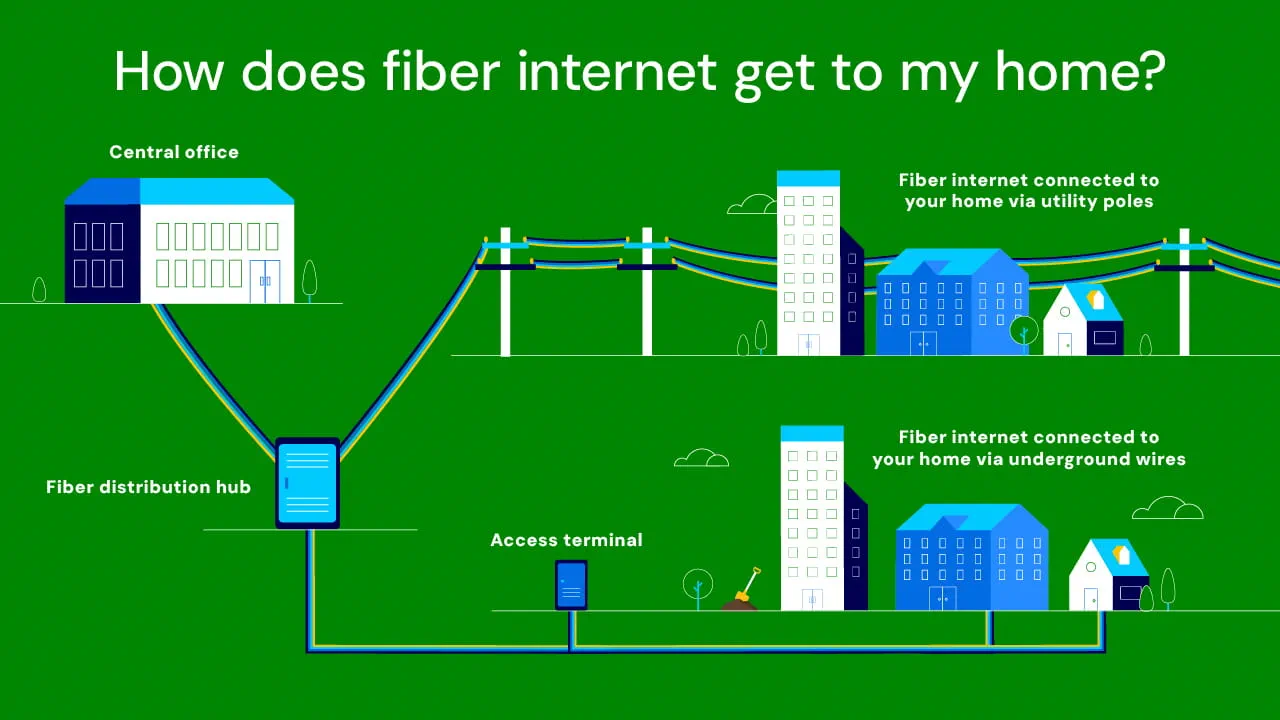
- Locating the Network Access Point: The technician’s first task is to identify the nearest fiber optic access point. This could be a fiber distribution hub (FDH) or a network access point (NAP) located on a utility pole, in an underground vault, or within a pedestal box in your neighborhood. These points act as gateways, branching off the main fiber lines to individual homes.
- Running the Fiber Line (Drop Cable): A thin, durable fiber optic “drop cable” must be run from this access point to your home.
- Aerial Drop: If your utilities are overhead, the technician will typically run the fiber cable along utility poles, attaching it securely until it reaches your house, often near where other utility lines (like electric or telephone) enter.
- Underground Drop: For homes with underground utilities, the process involves trenching. The technician will dig a shallow trench from the access point to your home’s exterior, burying the fiber cable to protect it. This can be done manually or with specialized equipment, depending on the length and terrain.
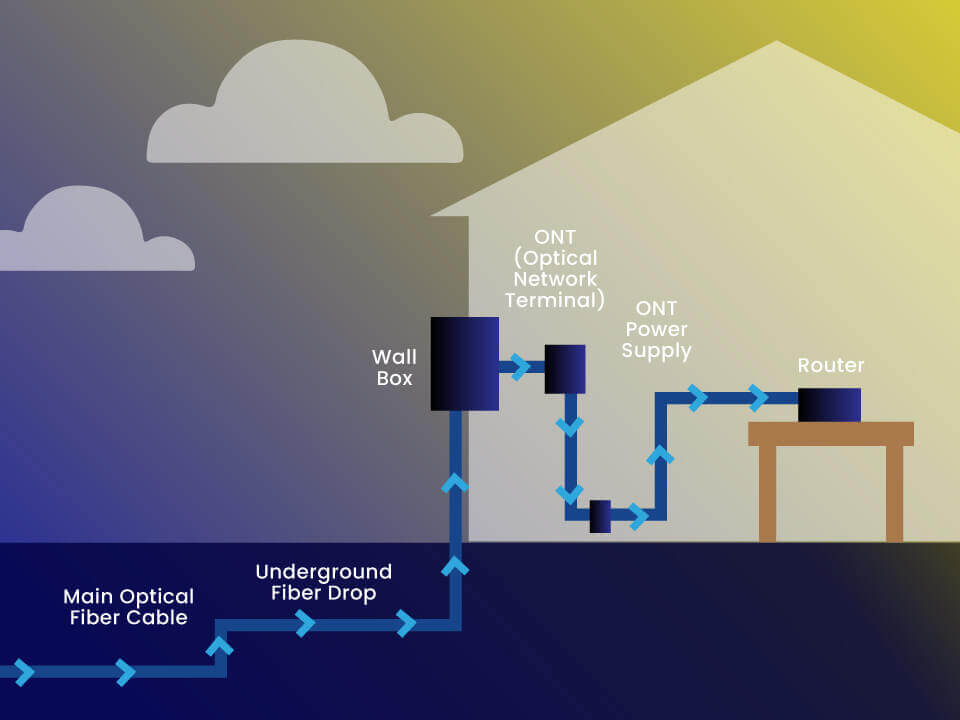
- Establishing the Demarcation Point: Once the drop cable reaches your home, it’s secured to the exterior wall, usually in a discreet location. This point, often a small gray box, is called the network interface device (NID) or demarcation point (demarc). It protects the delicate fiber cable and serves as the official boundary between the ISP’s network and your home’s internal wiring. The fiber is terminated here, either directly or into a small connector.
This external work is crucial for ensuring a robust and protected connection to the broader fiber network, forming the backbone of your high-speed internet.
Indoor Wiring and Optical Network Terminal (ONT) Placement

With the fiber connected to your home’s exterior, the next phase brings the connection inside.
- Drilling and Internal Cable Run: A small, discreet hole (typically 1/4 to 1/2 inch in diameter) is carefully drilled through an exterior wall, usually near the demarcation point. The fiber cable is then fed through this hole into your home. The technician will work with you to determine the best location for this, balancing aesthetics with practical considerations like proximity to power outlets and your desired router location. The goal is to minimize visible cabling while ensuring optimal performance.
- Installing the Optical Network Terminal (ONT): Inside your home, the fiber cable is connected to the Optical Network Terminal (ONT). This device is the linchpin of your fiber setup. Its primary function is to convert the optical (light) signals from the fiber cable into electrical signals that your router and other devices can understand (Ethernet).
- Location: The ONT typically requires an electrical outlet for power and should be placed in a clean, dry, and easily accessible location. Technicians usually recommend a central location if possible, or near your primary computer setup. It’s often wall-mounted or placed on a shelf.
- Power and Connectivity: The technician will ensure the ONT is powered on and that its indicator lights confirm a successful connection to the fiber network. This device is functionally similar to a modem in traditional cable or DSL setups, but it operates specifically with fiber optic signals.
- Ethernet Output: The ONT will have one or more Ethernet ports, which will be used to connect to your Wi-Fi router.
The ONT is a critical piece of technology; its proper installation ensures the smooth translation of light-speed data into usable internet for your home network.
Router Setup and Wi-Fi Configuration
Once the ONT is active, the focus shifts to establishing your home’s Wi-Fi network.
- Connecting the Router: An Ethernet cable is run from one of the ONT’s Ethernet ports to the WAN (Wide Area Network) or Internet port on your Wi-Fi router. This establishes the physical connection between the fiber service and your home’s local network.
- Initial Router Configuration: The technician will power on the router and access its administration interface (often via a web browser on a laptop) to perform the initial setup. This typically involves:
- Firmware Updates: Ensuring the router is running the latest software for optimal performance and security.
- Network Name (SSID) and Password: Setting up your unique Wi-Fi network name (SSID) and a strong, secure password. This is a critical step for digital security, protecting your network from unauthorized access.
- Security Protocols: Configuring the appropriate wireless security protocols (e.g., WPA2 or WPA3) to encrypt your Wi-Fi traffic.
- Basic Settings: Adjusting any necessary basic settings for internet connectivity specific to your ISP.
- Wi-Fi Optimization (Optional but Recommended): The technician might offer advice or perform basic optimizations for your Wi-Fi signal, such as channel selection to avoid interference or discussing optimal router placement for maximum coverage. A central, elevated location away from obstructions and other electronics is generally best.
This step connects the powerful fiber connection to your daily devices, creating the wireless network that most users interact with.
Final Testing and Activation
The final stage of installation confirms that everything is working as it should be.
- Speed Tests: The technician will perform multiple speed tests using a wired connection (directly from the router) and sometimes wirelessly, to verify that you are receiving the advertised download and upload speeds. It’s good practice for you to witness these tests.
- Device Connectivity: They will test connectivity on one or more of your devices (or their own) to ensure successful internet access, web browsing, and perhaps basic streaming.
- Service Activation: The fiber service is officially activated on the ISP’s network. This may involve a final push from the central office or a simple confirmation within the technician’s system.
- Customer Handover and Q&A: Before leaving, the technician will walk you through the installed equipment, explain how it works, and answer any questions you may have. They will often provide a welcome kit with account information, troubleshooting tips, and contact numbers. This is your opportunity to understand your new system and ensure you feel comfortable with its operation.
With this final check, your home is now officially connected to the fiber optic network, ready to experience the benefits of super-fast, reliable internet.
Post-Installation: Maximizing Your Fiber Experience
Getting fiber installed is just the beginning. To truly leverage its potential, understanding your new network and maintaining it effectively is crucial.
Understanding Your New Network
Familiarize yourself with your router’s capabilities. Many modern fiber routers offer advanced features accessible through a web interface or a mobile app. These can include:
- Guest Wi-Fi Networks: Create a separate network for guests, keeping your main network secure.
- Parental Controls: Manage internet access and content for children.
- Quality of Service (QoS): Prioritize certain types of traffic (e.g., video streaming or gaming) to ensure smooth performance.
- Network Monitoring: See which devices are connected and how much bandwidth they are using.
- Mesh Wi-Fi Capability: If you have a large home, consider adding mesh Wi-Fi extenders to ensure consistent coverage throughout. This can be a smart ‘Money’ investment to ensure every square foot of your home benefits from the ‘Tech’ upgrade.
Taking the time to explore these features can significantly enhance your digital security, productivity, and overall user experience.
Troubleshooting Common Issues
While fiber is highly reliable, minor issues can occasionally arise. Knowing basic troubleshooting steps can often resolve problems quickly.
- Reboot the Router and ONT: The classic “turn it off and on again” works wonders for many connectivity glitches. Power cycle both your ONT and router by unplugging them for 30 seconds, then plugging them back in, starting with the ONT.
- Check Cables: Ensure all Ethernet and power cables are securely plugged into the correct ports.
- Indicator Lights: Learn what the indicator lights on your ONT and router mean. Most have lights for power, internet connection, and Wi-Fi status. Refer to your device manuals or the ISP’s website for specific interpretations.
- ISP Outages: Check your ISP’s website or social media channels for any reported outages in your area before spending too much time troubleshooting.
For persistent issues, don’t hesitate to contact your ISP’s technical support. Their expertise can diagnose and resolve more complex problems.
Long-Term Maintenance and Optimization
Maintaining your fiber internet connection is minimal compared to older technologies, but a few practices can ensure its longevity and peak performance.
- Router Placement: Periodically check that your router remains in an optimal, unobstructed location. Avoid placing it behind large appliances or in enclosed cabinets.
- Software Updates: Keep your router’s firmware updated. Many modern routers offer automatic updates, but some might require manual intervention. These updates often include security patches and performance improvements, vital for safeguarding your digital assets.
- Cable Protection: Ensure external fiber cables are not damaged by landscaping, pets, or other activities. If you notice any exposed or damaged fiber, contact your ISP immediately; never attempt to repair fiber optic cables yourself, as they are delicate and require specialized tools.
- Regular Rebooting: A monthly reboot of your router and ONT can clear temporary glitches and refresh your network’s performance, much like restarting a computer.
By understanding and managing your fiber network, you’re not just a consumer of technology; you become an active participant in optimizing your digital home environment, reaping the full benefits of your investment.
Future-Proofing Your Connectivity
The installation of fiber internet isn’t merely an upgrade for today; it’s a strategic investment in the future of your home connectivity. As technology continues its relentless march forward, our demands on bandwidth and network stability will only grow. Fiber’s inherent capacity and resilience mean your home is well-prepared for what’s next.
Think about the burgeoning landscape of smart homes, where dozens of devices—from smart thermostats and security cameras to voice assistants and automated lighting—continuously communicate over your network. Consider the evolution of entertainment, with immersive virtual reality (VR) and augmented reality (AR) experiences becoming mainstream, alongside ultra-high-definition content that will push the boundaries of current streaming capabilities. Professional applications like cloud computing, advanced AI tools, and massive data transfers will also continue to become more prevalent in our daily lives.
Fiber internet, with its symmetrical speeds and low latency, provides the robust backbone necessary for these innovations to thrive without bottlenecks. It enhances the value proposition of a smart home, ensures productivity for remote work, and unlocks new possibilities for entertainment and education. From a ‘Money’ perspective, investing in fiber is akin to upgrading the foundational infrastructure of your home; it ensures long-term utility, reduces future upgrade costs, and can even contribute to the resale value of your property by offering a desirable modern amenity.
In conclusion, the journey to fiber internet installation is a clear path to unlocking unprecedented digital capabilities in your home. By understanding each step—from initial checks and provider selection to external cabling, internal setup, and ongoing optimization—homeowners can confidently embrace this essential technological leap. With fiber, you’re not just getting faster internet; you’re building a reliable, future-ready foundation for every aspect of your connected life.
aViewFromTheCave is a participant in the Amazon Services LLC Associates Program, an affiliate advertising program designed to provide a means for sites to earn advertising fees by advertising and linking to Amazon.com. Amazon, the Amazon logo, AmazonSupply, and the AmazonSupply logo are trademarks of Amazon.com, Inc. or its affiliates. As an Amazon Associate we earn affiliate commissions from qualifying purchases.