
In an age dominated by smartphones and advanced computing, the humble calculator often goes overlooked, yet it remains an indispensable tool across countless domains. From balancing a checkbook to solving complex engineering equations, its silent precision underpins much of our daily numerical interaction. But beyond the simple act of pressing a button and seeing a result, lies a fascinating world of intricate electronics and clever computational logic. How does this pocket-sized marvel transform a series of key presses into an accurate numerical answer? This article will delve into the technological marvels that power every calculator, dissecting its core components and revealing the sophisticated processes that enable instant arithmetic.
From Simple Presses to Complex Computations: The Input and Processing Core
At its heart, a calculator is a specialized computer designed for numerical operations. The journey of a calculation begins with user input, but the true magic unfolds in the invisible dance between hardware and software that translates those inputs into meaningful data for the machine’s “brain.”
The Anatomy of a Keypad: Capturing User Intent
The first point of interaction is the keypad. While seemingly straightforward, a calculator’s keypad is a matrix of switches designed for reliability and accuracy. Each key, when pressed, completes an electrical circuit at a specific coordinate within this matrix. The calculator’s internal circuitry constantly scans this matrix, looking for a closed circuit. This process, known as “key debouncing,” is crucial; a physical key press often generates multiple fleeting electrical signals as the contacts bounce before settling. The calculator’s processor must filter out these spurious signals, registering only a single, deliberate press.
Once a valid key press is detected, it’s assigned a unique digital code. For instance, pressing the ‘5’ key doesn’t send the number “5” directly; it sends a specific binary code (e.g., 0101 for a simple binary-coded decimal system) that the calculator’s processor understands as “the five key was pressed.” This digital representation is then temporarily stored in a memory register, ready for processing. Similarly, operation keys like ‘+’, ‘-‘, ‘x’, and ‘÷’ also have their own unique codes, signaling the desired arithmetic function.
Inside the Brain: The Microprocessor and ALU
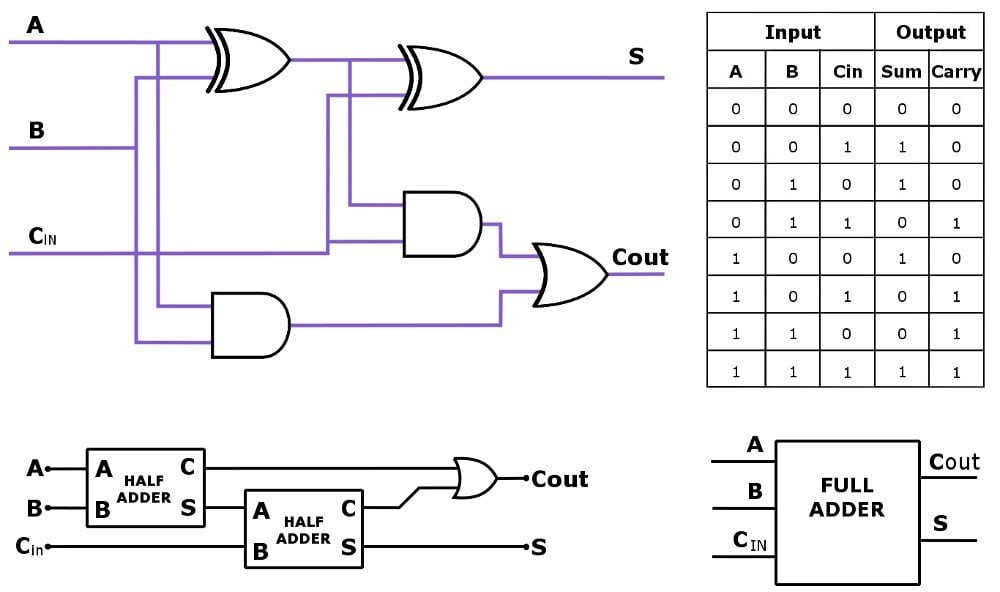
The true computational powerhouse of any electronic calculator is its microprocessor, a tiny integrated circuit that acts as the central processing unit (CPU). Modern calculators, even basic ones, often employ custom-designed microcontrollers optimized for low power consumption and numerical operations. Within this microprocessor, the Arithmetic Logic Unit (ALU) is the workhorse. The ALU is a digital circuit that performs arithmetic operations (addition, subtraction, multiplication, division) and bitwise logical operations (AND, OR, NOT, XOR).
When you input “5 + 3,” the microprocessor takes the digital code for ‘5’ and stores it. Then, it recognizes the ‘+’ operation. Next, it receives the code for ‘3’. With both operands and the operation identified, the microprocessor instructs the ALU to perform the addition. This involves converting the decimal numbers into their binary equivalents, carrying out the binary addition, and then converting the result back. The clock speed of the microprocessor, while significantly lower than a desktop computer’s, determines how quickly these operations are performed. For a simple calculator, even a modest clock speed allows for near-instantaneous calculations.
Translating Numbers: Binary Code and Logic Gates
The fundamental language of all digital electronics, including calculators, is binary. This base-2 number system uses only two symbols: 0 and 1. Every number you enter into a calculator, every operation, and every result is internally represented and manipulated as a series of 0s and 1s, or “bits.” For example, the decimal number 5 is 101 in binary, and 3 is 011.
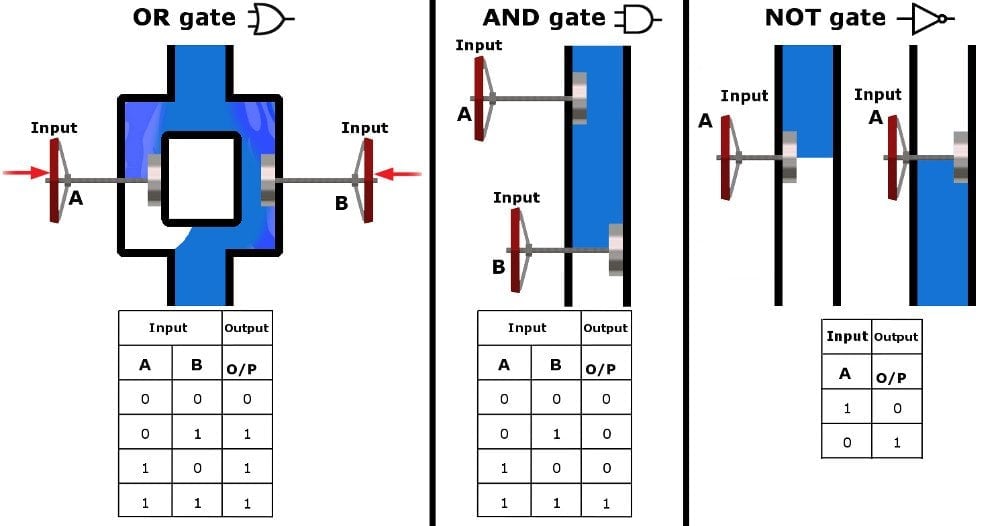
The conversion and manipulation of these binary numbers are executed by tiny electronic switches called logic gates. These are the foundational building blocks of digital circuits. Basic logic gates include AND, OR, NOT, XOR, NAND, and NOR gates. Each gate takes one or more binary inputs and produces a single binary output based on a specific logical rule. For instance, an AND gate outputs a ‘1’ only if all its inputs are ‘1’. A calculator’s ALU is essentially a highly complex arrangement of thousands, if not millions, of these interconnected logic gates, designed to perform specific arithmetic and logical operations by manipulating patterns of 0s and 1s. This intricate web of gates allows the calculator to add, subtract, multiply (often performed as repeated additions or bit shifts), and divide (repeated subtractions or bit shifts). The efficiency and speed of these logic gate arrangements are key to a calculator’s performance.
Storing, Recalling, and Displaying: Memory and Output Systems
Beyond processing, a calculator needs to remember numbers, operations, and display results in a human-readable format. This involves sophisticated memory systems and efficient display technologies.
The Calculator’s Memory: RAM, ROM, and Registers
Calculators employ several types of memory, each serving a distinct purpose:
- Registers: These are small, high-speed storage locations within the microprocessor itself, used to temporarily hold data during calculations. For instance, the number you just entered, the result of a sub-calculation, or the instruction currently being executed by the ALU would reside in a register.
- RAM (Random Access Memory): This is volatile memory used for active data storage. When you enter a long string of numbers or an equation, RAM holds these inputs. If you use memory functions (M+, M-, MR), RAM is where these values are stored. The contents of RAM are typically lost when the calculator is turned off, unless it has a special battery-backed-up memory feature.
- ROM (Read-Only Memory): This non-volatile memory stores the calculator’s firmware – the permanent instructions, or program, that tell the calculator how to operate. This includes the algorithms for performing arithmetic operations, how to interpret key presses, how to drive the display, and any built-in functions (like trigonometric calculations or square roots). The contents of ROM are fixed during manufacturing and remain even when power is off. More advanced calculators might also include EEPROM (Electrically Erasable Programmable Read-Only Memory) or Flash memory to allow for firmware updates or user-defined programs.
The coordinated use of these memory types allows the calculator to manage complex equations, store intermediate results, and recall previously saved values, making multi-step calculations seamless.
Illuminating the Results: Display Technologies
Once the calculation is complete, the binary result must be translated back into a human-readable decimal number and displayed. Most modern handheld calculators use a Liquid Crystal Display (LCD). An LCD consists of a liquid crystal material sandwiched between two pieces of polarized glass, with electrodes applied to the surfaces. When an electric current is applied to specific electrodes, the liquid crystals align themselves to block or allow light to pass through, creating dark segments against a lighter background.
Seven-segment displays are common in basic calculators, forming numbers by illuminating combinations of seven bar-shaped segments. More advanced scientific and graphing calculators use dot-matrix LCDs, which offer a grid of tiny pixels. This allows for displaying more complex characters, scientific notation, graphs, and even small amounts of text, greatly enhancing the calculator’s functionality. The display controller, another specialized integrated circuit, is responsible for taking the binary output from the microprocessor, converting it to the appropriate decimal representation, and then activating the correct segments or pixels on the LCD to form the numbers and symbols.
Powering the Precision: Energy Sources
Calculators are designed for portability and efficiency, and their power sources reflect this. Many basic calculators rely on small button-cell batteries (like LR44 or CR2032) due to their low power consumption. More advanced models might use AA or AAA batteries.
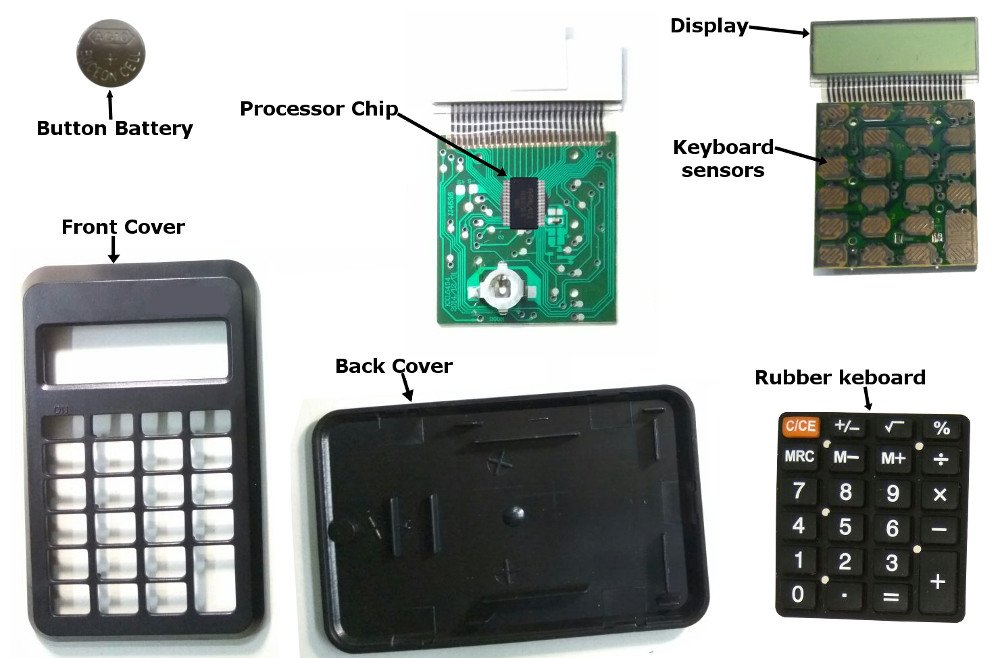
A significant innovation in calculator power management is the integration of solar cells. These photovoltaic cells convert ambient light into electrical energy, often providing enough power for operation in well-lit environments, reducing reliance on batteries or extending battery life. Even calculators that use batteries often have a small solar panel that acts as a primary power source, with the battery serving as a backup for dim conditions or during periods of high computational load, ensuring continuous operation. This dual power strategy contributes significantly to the calculator’s longevity and convenience.
A Journey Through Time: The Evolution of Calculation Devices
The quest for faster and more accurate calculations is as old as civilization itself. The electronic calculator, as we know it, is merely the latest chapter in a long and fascinating history of computational aids.
Early Innovations: Abacus to Mechanical Wonders
The earliest known calculation device is the abacus, used for millennia across various cultures to perform arithmetic through bead manipulation. While entirely manual, it provided a structured method for calculations that was far more efficient than mental arithmetic alone.
The 17th century saw the dawn of mechanical calculators. Pioneers like Wilhelm Schickard and Blaise Pascal developed devices using gears and levers to automate addition and subtraction. Pascal’s “Pascaline” (1642) could add and subtract directly, and with some effort, perform multiplication and division. Later, Gottfried Leibniz refined these ideas with his “Stepped Reckoner” (1672), which could perform all four basic operations more efficiently. These machines were precursors to the complex mechanical calculators that became common in offices by the late 19th and early 20th centuries, such as those made by Curta or Marchant, capable of complex calculations but requiring manual input and considerable mechanical complexity.
The Electronic Revolution: Transistors and Integrated Circuits
The real breakthrough came with the advent of electronics. Early electronic calculating machines of the mid-20th century, like the ENIAC, were room-sized behemoths using thousands of vacuum tubes, consuming immense power, and generating significant heat. They were general-purpose computers, not calculators in the modern sense.
The invention of the transistor in 1947 by Bell Labs marked a pivotal moment. Transistors were smaller, faster, more reliable, and consumed less power than vacuum tubes. This allowed for the miniaturization of electronic circuits. The first entirely electronic desktop calculator, the ANITA MK VII, appeared in 1961, using vacuum tubes, but was soon superseded by transistor-based designs.
The true revolution for handheld calculators arrived with the development of the integrated circuit (IC) in the late 1950s and its subsequent mass production. An IC combines many transistors, resistors, and capacitors onto a single, small silicon chip. This allowed for unprecedented miniaturization. In 1970, Sharp introduced the “QT-8B,” a desktop electronic calculator using four LSI (Large Scale Integration) chips. However, it was companies like Busicom, Canon, and Texas Instruments that pioneered truly portable, handheld electronic calculators in the early 1970s. The Busicom LE-120A “HANDY-LE” (1971) and the HP-35 (1972) are iconic examples, utilizing single or very few specialized ICs to pack significant computational power into a pocketable device. These devices democratized complex calculations, making them accessible to students, engineers, and businesses alike.
Modern Marvels: From Scientific to Graphing Calculators
Since the 1970s, calculators have continued to evolve in power, functionality, and specialization. Basic four-function calculators remain popular, but the complexity has skyrocketed:
- Scientific Calculators: Essential for STEM fields, these calculators feature a wide array of functions beyond basic arithmetic, including trigonometric functions (sin, cos, tan), logarithms, exponentials, factorials, and statistical computations. They often support complex number calculations and unit conversions.
- Graphing Calculators: Pioneered by companies like Casio and Texas Instruments, these are powerful, programmable handheld computers with large dot-matrix displays capable of plotting functions, solving equations graphically, performing matrix operations, and sometimes even running simple programs. They bridge the gap between a traditional calculator and a rudimentary computer, becoming indispensable tools in higher education for mathematics and science.
- Financial Calculators: Specialized models designed for business and finance professionals, these calculators quickly compute loan payments, interest rates, net present value, internal rate of return, and other complex financial metrics.
The continuous advancement in microchip technology, display resolution, and battery efficiency has pushed the boundaries of what a handheld calculator can achieve, making them more powerful and versatile with each generation.
Beyond the Basics: Advanced Features and Software Calculators
The definition of “calculator” has expanded significantly, moving from dedicated hardware devices to software applications and integrated functionalities within larger systems.
Specialized Calculators: Tailored for Every Need
Beyond the mainstream categories, a plethora of specialized calculators exist, designed for very specific niches. Construction calculators, for example, can quickly compute material quantities, roof pitch, and dimensional conversions. Medical calculators assist healthcare professionals in dosage calculations, body mass index, and other clinical metrics. Aviation calculators aid pilots with flight planning, fuel consumption, and wind correction. These devices demonstrate how the core principles of a calculator – efficient input, precise processing, and clear output – can be adapted and optimized for virtually any domain requiring quick, accurate numerical solutions. Their pre-programmed algorithms and specialized key functions save valuable time and reduce errors in critical fields.
The Digital Frontier: Software Emulation and AI Integration
With the ubiquity of smartphones and personal computers, software-based calculators have become incredibly common. Operating systems often include a built-in calculator application, and app stores offer a vast selection, ranging from simple four-function tools to advanced scientific and graphing emulators that mimic the functionality of their hardware counterparts. These software calculators leverage the powerful processors and high-resolution displays of their host devices, often offering more flexibility, updateability, and integration with other applications.
Furthermore, the concept of a calculator is evolving with artificial intelligence (AI). Modern virtual assistants (like Siri, Google Assistant, or Alexa) can perform calculations simply by voice command, parsing natural language queries and returning results. AI-powered tools are also integrating computational capabilities into broader problem-solving platforms, where calculation is just one step in a larger analytical process. For instance, AI in data science or engineering can perform complex computations as part of predictive modeling or simulation. While not “calculators” in the traditional sense, these intelligent systems represent the ultimate evolution of computational aids, where the underlying “how it works” still relies on fundamental arithmetic and logic, but with an added layer of intelligent interpretation and automation.
The Enduring Legacy of the Calculator
From the intricate gears of a Pascaline to the silicon heart of a graphing calculator, the journey of computational devices reflects humanity’s unyielding drive for precision and efficiency. The calculator, in its various forms, has democratized mathematics, empowering individuals across all walks of life to tackle numerical challenges with confidence and speed.
Its impact on education, science, engineering, and daily commerce is immeasurable. It has freed minds from tedious manual calculations, allowing them to focus on higher-level problem-solving and conceptual thinking. As technology continues to advance, the calculator will undoubtedly continue to evolve, integrating new features and adapting to emerging computational paradigms. Yet, at its core, it will always remain a testament to clever engineering, where a simple press of a button unleashes a hidden symphony of binary code, logic gates, and microprocessors, delivering accurate answers with effortless grace. The unassuming calculator, truly a marvel of modern technology, continues to quietly power our numerically-driven world.
aViewFromTheCave is a participant in the Amazon Services LLC Associates Program, an affiliate advertising program designed to provide a means for sites to earn advertising fees by advertising and linking to Amazon.com. Amazon, the Amazon logo, AmazonSupply, and the AmazonSupply logo are trademarks of Amazon.com, Inc. or its affiliates. As an Amazon Associate we earn affiliate commissions from qualifying purchases.