
In today’s increasingly digital world, the ability to transfer money quickly, securely, and conveniently has become an indispensable aspect of personal finance. Among the plethora of peer-to-peer (P2P) payment applications, Venmo has carved out a significant niche, becoming a household name for its user-friendly interface and social integration. Whether you’re splitting a dinner bill with friends, paying back a roommate for utilities, or sending a gift to a loved one, understanding how to effectively use Venmo is a crucial skill. This article will delve into the intricacies of using Venmo, providing a comprehensive guide for both new and experienced users.

Understanding the Fundamentals of Venmo
Venmo, a subsidiary of PayPal, operates on the principle of simplifying money transfers between individuals. It bridges the gap between traditional banking methods and instant digital transactions, offering a streamlined experience that has resonated with millions. At its core, Venmo allows users to link a bank account, debit card, or credit card to their Venmo profile, enabling them to send and receive money with ease.
Creating Your Venmo Account and Setting Up Your Profile
The first step to harnessing the power of Venmo is to establish your account. The process is straightforward and can be completed within minutes.
Downloading the App and Initial Registration
Begin by downloading the Venmo app from your respective app store (Apple App Store for iOS devices or Google Play Store for Android devices). Once installed, open the app and select the option to sign up. You will be prompted to provide basic information such as your name, email address, phone number, and to create a secure password. Venmo prioritizes security, so choosing a strong, unique password is paramount. You may also need to verify your email address and phone number through codes sent to you.
Linking Your Payment Methods
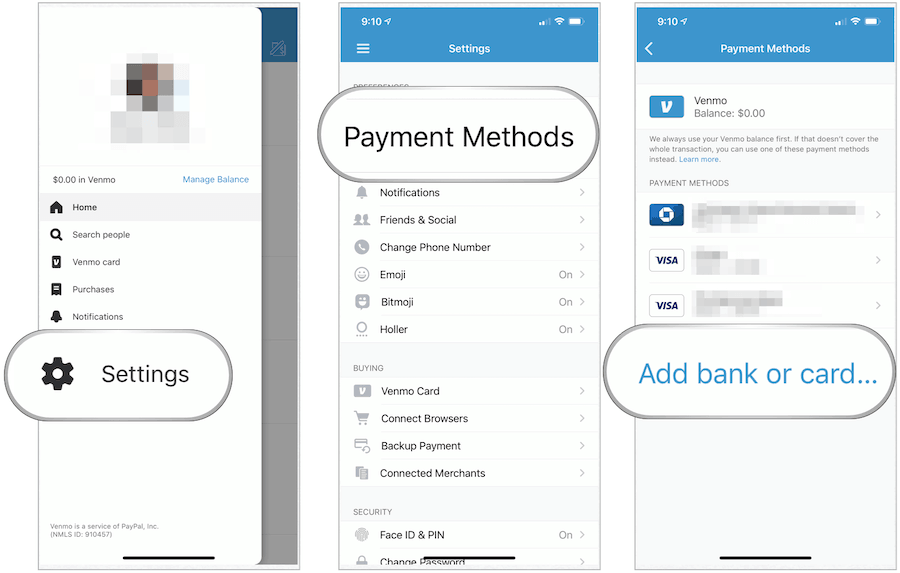
After creating your account, the next crucial step is to link your preferred payment methods. This is how Venmo will facilitate your transactions.
- Bank Account: Linking your bank account is generally the most cost-effective method. Venmo uses secure protocols to connect with your bank, allowing you to transfer funds directly from your checking or savings account. This typically involves providing your bank account number and routing number.
- Debit Card: A debit card offers another convenient way to fund your Venmo transactions. You’ll need to enter your card number, expiration date, and CVV code. Payments funded via debit card are usually instant.
- Credit Card: Venmo also allows you to link credit cards. However, it’s important to be aware of potential fees associated with using a credit card for P2P payments. While Venmo itself may not charge a fee for credit card payments, your credit card issuer might treat it as a cash advance, which often incurs higher interest rates and fees. This option is best used judiciously, perhaps for convenience rather than as a primary funding source.
Setting Up Your Venmo Profile and Discoverability
Beyond linking payment methods, personalizing your Venmo profile enhances the user experience and facilitates easier recognition by your contacts.
- Username: You’ll be assigned a unique Venmo username (e.g., @john-smith). This username acts as your identifier within the app and is what others will use to find and send you money. You can often customize this username to something more memorable.
- Profile Picture and Name: Uploading a clear profile picture and ensuring your real name is associated with your account makes it easier for friends and family to identify you and avoid sending money to the wrong person.
- Privacy Settings: Venmo offers various privacy settings. You can choose to make your transactions public (visible to friends), private (visible only to you), or even set specific privacy levels for individual payments. Understanding these settings is crucial for managing your financial privacy.
Sending and Receiving Money with Venmo
The core functionality of Venmo revolves around its seamless money transfer capabilities. Whether you’re initiating a payment or receiving funds, the process is designed to be intuitive.
Initiating a Payment to Another User
Sending money is the most common interaction on Venmo. The app makes this process remarkably simple.
Finding the Recipient
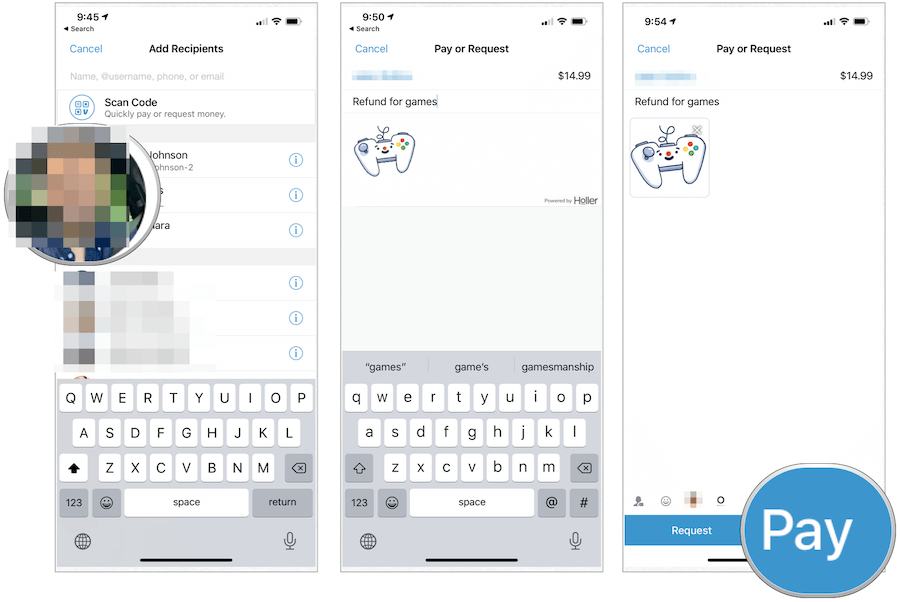
- Search by Username, Phone Number, or Email: The primary way to find someone is by searching for their Venmo username, the phone number associated with their account, or their email address. This ensures you are sending money to the correct individual.
- Connecting with Friends: Venmo can often access your phone’s contact list (with your permission) to suggest contacts who are already on the platform. You can also search for people you know by their real names if they have made their profiles discoverable.
- QR Codes: For in-person transactions, Venmo generates a unique QR code that can be scanned by another user’s app to quickly initiate a payment request or send money.
Specifying the Amount and Adding a Note
Once you’ve selected your recipient, you’ll be presented with an interface to enter the transaction details.
- Amount Input: Clearly input the exact amount of money you wish to send. Double-checking this figure before confirming is essential.
- Adding a Note (Memo): This is a signature feature of Venmo. You can add a brief description of the payment, such as “Pizza last night,” “Rent for August,” or “Birthday gift.” These notes are visible in your and the recipient’s transaction history, acting as a digital record and adding a social element to transactions. Some users even use emojis or create humorous descriptions.
- Choosing Your Funding Source: If you have multiple payment methods linked, you can select which one to use for the specific transaction.
Confirming and Sending the Payment
After reviewing all the details – the recipient, amount, and note – you will confirm the transaction. Depending on your security settings, you might be prompted for a fingerprint scan, facial recognition, or your Venmo PIN to authorize the payment. Once confirmed, the money is transferred instantly to the recipient’s Venmo balance or directly to their linked bank account, depending on their settings and the amount.
Requesting Money from Another User
Just as you can send money, Venmo makes it equally easy to request funds from others. This is particularly useful for splitting bills or collecting shared expenses.
Finding the Payer and Specifying the Amount
The process of initiating a money request is very similar to sending money.
- Search for the Requester: Find the person (or people) you want to request money from using their username, phone number, or email.
- Amount and Note: Enter the amount you are requesting and add a clear note explaining what the payment is for. This clarity is vital to avoid confusion.
- Requesting from Multiple People: Venmo allows you to request money from multiple users simultaneously, often with an option to split a total cost evenly or specify individual amounts.
Sending the Request
Once all details are in place, send the request. The recipient will receive a notification within their Venmo app. They can then review the request and choose to pay it, decline it, or even send a partial amount.
Receiving Money and Managing Your Balance
When someone sends you money on Venmo, it typically lands in your Venmo balance.
Notifications and Transaction History
You will receive an instant notification within the app, and possibly via email or text, when you receive a payment. All transactions, both sent and received, are logged in your transaction history, providing a transparent record of your Venmo activity.
Accessing Your Funds: Transferring to Your Bank Account
Your Venmo balance is readily accessible. You have a few options for using these funds.
- Standard Transfer: This is a free transfer of funds from your Venmo balance to your linked bank account. It typically takes 1–3 business days to complete.
- Instant Transfer: For immediate access to your funds, Venmo offers an instant transfer option to your linked debit card or bank account for a small fee (usually a percentage of the amount, with a minimum fee). This is ideal when you need cash or want to make an immediate purchase elsewhere.
- Spending with Your Venmo Balance: You can also use your Venmo balance to pay for goods and services directly through the Venmo app or at merchants that accept Venmo.
Advanced Features and Best Practices for Venmo Usage
While the core functionality of Venmo is straightforward, the app offers several advanced features and best practices that can enhance your experience and ensure secure, efficient use.
Understanding Venmo’s Social Feed and Privacy Settings
Venmo’s social feed is a unique aspect of the app, allowing users to see (depending on privacy settings) their friends’ transactions.
- Public vs. Private Transactions: By default, Venmo transactions are visible to your friends on the social feed, with the note being public but the amount hidden. You can choose to make individual transactions completely private or change your default privacy settings. This control is crucial for maintaining financial privacy.
- Controlling Your Feed: You can adjust your settings to see fewer or more transactions on your feed and manage who can see your activity.
- Privacy for Sensitive Transactions: For any transaction you consider sensitive, ensure you set its privacy to “Private.” This is especially important if you are handling business-related payments or any personal financial matters you don’t wish to share.
Security Measures to Protect Your Account
Security is paramount when dealing with financial transactions. Venmo implements several measures to protect users.
- Two-Factor Authentication (2FA): Enabling 2FA adds an extra layer of security by requiring a second form of verification (like a code sent to your phone) when logging in from a new device.
- PIN and Biometric Authentication: You can set up a PIN for app access and enable fingerprint or facial recognition for quick and secure login and transaction authorization.
- Monitoring Your Transactions: Regularly review your Venmo transaction history to ensure all activity is legitimate. Report any suspicious activity immediately to Venmo support.
- Beware of Scams: Be cautious of unsolicited payment requests or individuals claiming to be from Venmo support asking for your login details or personal information. Venmo will never ask for your password or full banking details directly.
Utilizing Venmo for Business and Other Features
Beyond personal use, Venmo offers functionalities that cater to small businesses and freelancers.
- Venmo Business Profiles: For those who conduct regular transactions for goods or services, Venmo offers business profiles. These profiles allow for more professional branding, the ability to accept payments from customers, and access to features like transaction reporting. Fees may apply to business transactions.
- Splitting Bills with Groups: The app’s group payment features simplify splitting costs among multiple individuals, making it ideal for group trips, shared housing, or event planning.
- Adding a Custom Note to Payments: As mentioned earlier, the descriptive notes are more than just memos; they are a form of digital communication and record-keeping that can be incredibly useful for tracking expenses and understanding past transactions.
In conclusion, Venmo has revolutionized peer-to-peer payments by offering a simple, accessible, and feature-rich platform. By understanding its core functionalities, setting up your account securely, and utilizing its advanced features thoughtfully, you can confidently navigate the world of digital transactions, making it easier than ever to manage your money with friends, family, and even your business.
aViewFromTheCave is a participant in the Amazon Services LLC Associates Program, an affiliate advertising program designed to provide a means for sites to earn advertising fees by advertising and linking to Amazon.com. Amazon, the Amazon logo, AmazonSupply, and the AmazonSupply logo are trademarks of Amazon.com, Inc. or its affiliates. As an Amazon Associate we earn affiliate commissions from qualifying purchases.