
Embracing Digital Payments for Modern Personal Finance
In an increasingly digital world, managing personal finances has evolved beyond traditional banking. Peer-to-peer (P2P) payment applications have revolutionized how individuals send, receive, and manage money, offering unparalleled convenience and speed. Among these innovations, Venmo stands out as a prominent financial tool, enabling millions to handle everyday transactions with ease. Understanding how to integrate such tools into one’s financial strategy is crucial for optimizing personal money management in the contemporary landscape.
The Evolution of Peer-to-Peer Transactions
Historically, sharing costs with friends or family involved physical cash or cumbersome bank transfers. The advent of P2P payment platforms dramatically simplified this process. These applications allow users to transfer funds directly between bank accounts or debit cards using just a phone number or email, bypassing many of the delays and fees associated with traditional banking methods. This shift reflects a broader trend towards digital-first financial services, driven by consumer demand for efficiency and accessibility.
Venmo’s Role in Everyday Money Management
Venmo, specifically, has become synonymous with casual money exchanges—from splitting dinner bills and concert tickets to contributing to group gifts. Its social feed, while optional, adds a layer of transparency and engagement, making financial interactions feel less transactional. Beyond casual use, Venmo also serves as a practical financial instrument for small businesses, freelancers, and even landlords for collecting payments. For individuals, mastering Venmo’s functionalities, starting with the sign-up process, is a fundamental step toward leveraging a powerful tool for efficient personal finance and expense management.
A Step-by-Step Guide to Activating Your Venmo Account
The process of signing up for Venmo is designed to be straightforward, ensuring quick access to its financial services. However, it requires attention to detail regarding personal information and security to safeguard your financial data.
Downloading the Venmo App
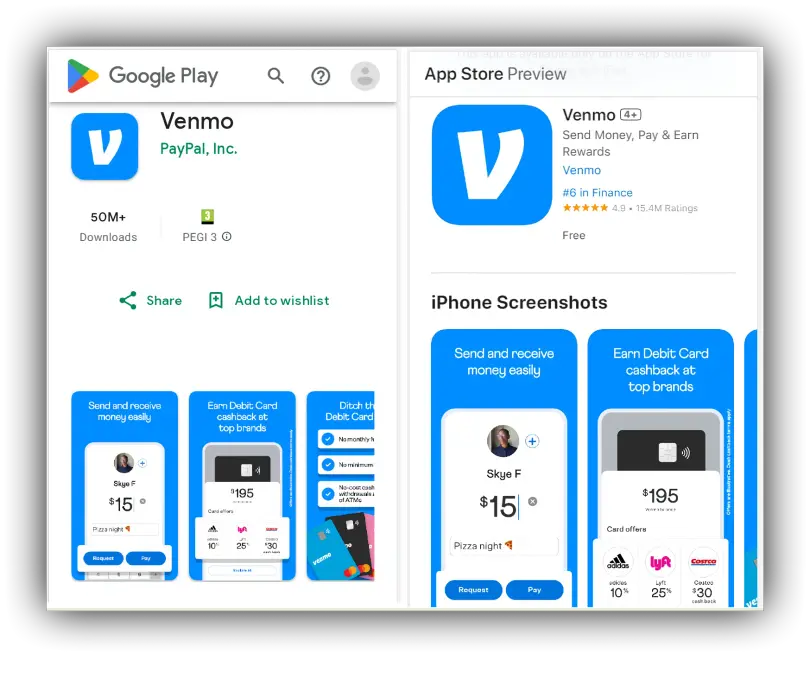
The initial step involves acquiring the Venmo application. Venmo is primarily a mobile-first platform, meaning its core functionalities are accessed via its dedicated app.
-
Access your device’s app store: For iOS users, this is the App Store; for Android users, it’s the Google Play Store.
-
Search for “Venmo”: Type “Venmo” into the search bar.
-
Download and Install: Locate the official Venmo app, identifiable by its distinct blue “V” logo, and tap “Get” or “Install.” Ensure you are downloading the legitimate application to prevent potential financial security risks.
Creating Your Personal Profile
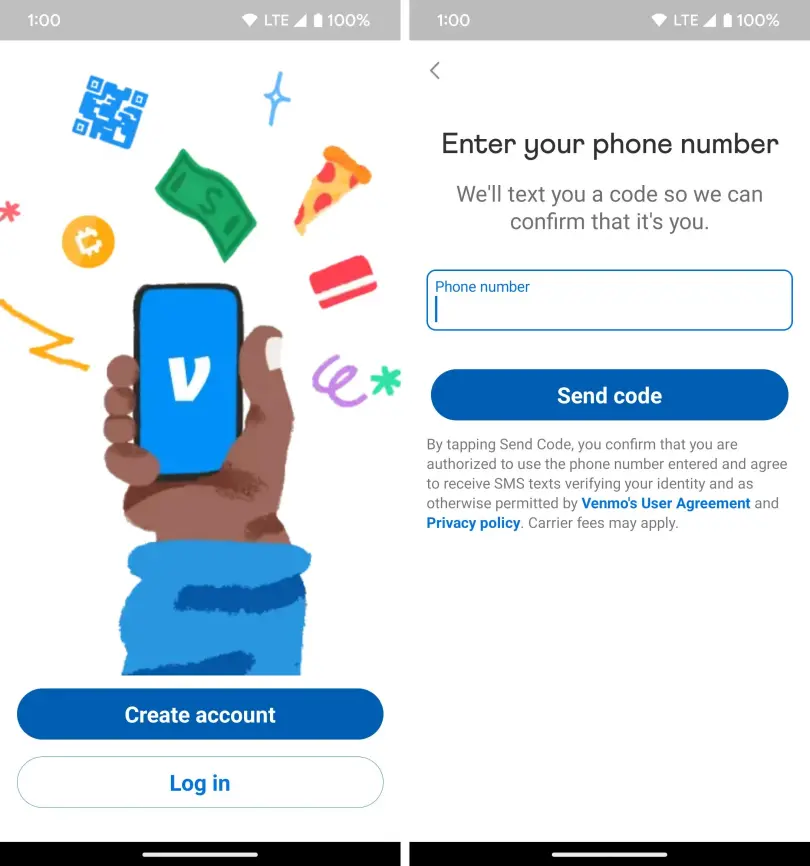
Once the app is installed, open it to begin the account creation process.
-
Choose “Get Started” or “Sign Up”: You’ll be prompted to either create a new account or log in if you already have one. Select the option to create a new account.
-
Provide Personal Information: You’ll need to enter your legal first name, last name, phone number, email address, and create a strong, unique password. It’s imperative to use accurate information, as this will be linked to your financial transactions and for identity verification.
-
Verify Your Phone Number and Email: Venmo will send a verification code to your provided phone number and an activation link to your email address. Follow the instructions to confirm ownership of both. This two-factor verification is a critical security measure to protect your financial account.
-
Set Up Your Profile: Choose a username (your Venmo handle), which is how others will find and pay you. You can also add a profile picture and customize your privacy settings, deciding who can see your transactions. Carefully consider your privacy preferences, as they impact the social visibility of your financial activities.
Linking Your Bank Account or Debit Card
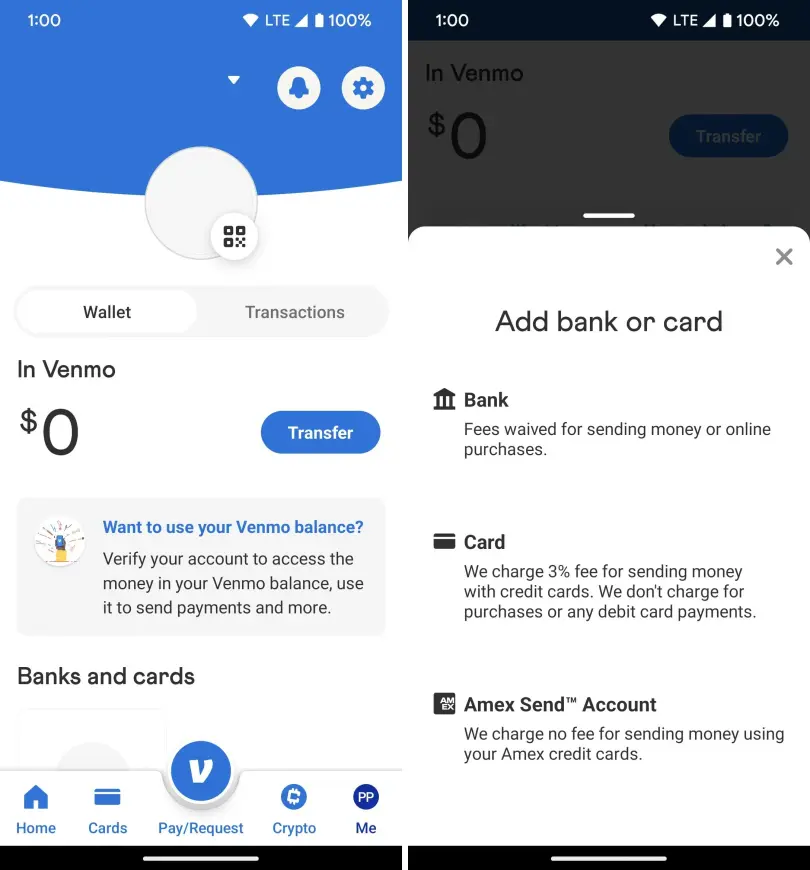
To effectively send and receive money, you must link a funding source to your Venmo account. This is a core financial step.
-
Navigate to “Settings” or “Wallet”: Within the app, usually found via the three-line menu icon, locate the “Settings” or “Wallet” section.
-
Select “Payment Methods”: Choose to add a new bank account or debit card.
-
Link a Debit Card (Recommended for immediate use): Enter your debit card number, expiration date, and CVV. Linking a debit card allows for instant transfers of funds from your bank to your Venmo balance, and vice-versa, often without fees for standard transfers.
-
Link a Bank Account (for larger transfers or alternative funding): You can link your bank account directly using your bank’s online login credentials (instant verification) or by manually entering your bank’s routing and account numbers (requires micro-deposit verification, which can take 1-3 business days). While direct bank transfers can sometimes be slower, they offer flexibility for larger financial transactions.
Verifying Your Identity for Enhanced Financial Security
To unlock Venmo’s full financial capabilities, such as increasing sending limits or enabling certain features, identity verification is often required. This is a standard practice for financial service providers to comply with regulations and prevent financial fraud.
-
Access the Identity Verification Prompt: This prompt might appear automatically or can be initiated from the “Settings” or “Profile” section.
-
Provide Necessary Documentation: You will typically be asked to provide your date of birth, the last four digits of your Social Security Number (SSN), and potentially your full SSN or a photo of a government-issued ID.
-
Complete the Verification Process: Venmo uses this information to confirm your identity, bolstering the security of your account and expanding your transaction limits, ensuring safer and more robust financial interactions.
Unlocking Venmo’s Full Financial Potential
Once your Venmo account is active and funded, you gain access to a suite of features designed to simplify and enhance your personal finance management.
Seamless Money Transfers and Expense Splitting
The primary utility of Venmo is its ability to facilitate quick and easy money transfers.
-
Sending Money: To send funds, tap the “Pay/Request” button, select the recipient (from your contacts or by searching their username), enter the amount, add a note (optional), and tap “Pay.” Funds are typically transferred instantly.
-
Requesting Money: If you need to be reimbursed, the “Request” option allows you to send a payment request to another Venmo user, streamlining the process of recouping shared expenses.
-
Splitting Expenses: Venmo’s “Split” feature is particularly useful for group activities. You can enter a total amount and divide it among multiple contacts, making it simple to settle shared costs like rent, utilities, or restaurant tabs, promoting fair and efficient financial settlements.
Exploring Venmo’s Debit and Credit Card Options
Venmo extends its financial services beyond P2P transfers by offering physical cards, integrating more deeply into your daily spending habits.
-
Venmo Debit Card: This card is directly linked to your Venmo balance. It allows you to spend your Venmo balance anywhere Mastercard is accepted, offering an alternative to transferring funds back to your bank account for purchases. It also provides rewards and cash back opportunities on eligible purchases, adding value to your everyday spending.
-
Venmo Credit Card: For eligible users, the Venmo Credit Card offers cash back rewards on top spending categories, which are automatically transferred to your Venmo balance. This card can be a strategic tool for maximizing rewards on your regular expenditures, but like any credit product, requires responsible management to avoid interest and maintain financial health.
Leveraging Venmo for Small Business Transactions
Venmo isn’t just for friends; it’s also a viable financial tool for small businesses and freelancers.
-
Business Profiles: Venmo allows users to create business profiles, which are separate from personal profiles. This enables small entrepreneurs to accept payments from customers for goods and services, often with lower transaction fees compared to traditional credit card processors. It provides a convenient, digital payment solution for a variety of informal and formal business interactions, helping streamline income collection.
-
QR Codes: Business profiles often come with unique QR codes that customers can scan to pay, simplifying the checkout process and providing a contactless payment option. This facilitates quick and secure transactions, which is beneficial for brick-and-mortar small businesses and pop-up shops.
Safeguarding Your Finances on the Venmo Platform
While Venmo offers convenience, responsible use and understanding its security features are paramount to protecting your financial assets.
Understanding Privacy and Transaction Visibility
Venmo has a social feed that, by default, makes transactions visible to your friends or the public, depending on your settings.
-
Adjusting Privacy Settings: It’s critical to review and adjust your privacy settings to match your comfort level. You can set individual transactions or your default privacy setting to “Friends” or “Private.” For financial transactions involving sensitive amounts or parties, choosing “Private” is always recommended to maintain discretion.
-
Choosing Your Audience: Be mindful of the notes you attach to transactions, as these are also visible according to your privacy settings. Public notes can unintentionally reveal personal financial information.
Protecting Your Account from Unauthorized Access
Your Venmo account is a gateway to your funds; therefore, robust security practices are essential.
-
Strong, Unique Passwords: Always use a complex password that isn’t reused on other accounts.
-
Two-Factor Authentication (2FA): Enable 2FA for an added layer of security. This requires a code sent to your phone in addition to your password, making it much harder for unauthorized users to access your account.
-
Regular Monitoring: Periodically review your transaction history for any unauthorized activity. Report suspicious transactions immediately.
-
Device Security: Ensure your mobile device is secure with a passcode, fingerprint, or facial recognition. Do not share your device or allow others access to your Venmo app.
Recognizing and Avoiding Financial Scams
Like any financial platform, Venmo can be targeted by scammers. Vigilance is key to protecting your money.
-
Unsolicited Requests: Be wary of payment requests from unknown individuals or offers that seem too good to be true.
-
Phishing Attempts: Venmo will never ask for your password or sensitive information via email or text message. Always check the sender’s email address and look for official Venmo branding if you receive a communication that purports to be from them.
-
Goods and Services Rule: Venmo is primarily designed for transactions between trusted friends and family. For buying or selling goods and services, use a platform designed for buyer/seller protection, or ensure you are using Venmo’s specific ‘goods and services’ payment option, if available, which may offer limited protection. However, always exercise caution when sending money to strangers for products or services through any P2P app.
Integrating Venmo into Your Broader Financial Strategy
Effectively using Venmo means understanding its place within your overall financial picture—from budgeting to managing cash flow.
Budgeting and Tracking Venmo Transactions
While Venmo offers convenience, it’s vital to integrate its transactions into your personal budgeting and expense tracking.
-
Exporting Transaction History: Venmo allows you to export your transaction history, which can then be imported into budgeting software or spreadsheets. This ensures that money moved via Venmo is accounted for in your financial planning.
-
Categorization: When creating transaction notes, develop a system for categorizing expenses (e.g., #food, #utilities) to make tracking easier when reviewing your financial statements. This helps in understanding where your money is going and adhering to your budget.
-
Avoid Using Venmo as a Savings Account: Funds held in your Venmo balance generally do not earn interest and are not FDIC insured in the same way traditional bank accounts are. It’s best practice to transfer significant balances back to your primary bank account for safety and potential interest accrual.
Considering Transaction Limits and Fees
Understanding Venmo’s operational parameters is crucial for managing your money effectively.
-
Sending and Receiving Limits: Venmo imposes limits on how much money you can send and receive within a certain timeframe. These limits increase once your identity is verified. Be aware of these to avoid unexpected delays in large financial transactions.
-
Instant Transfer Fees: While standard transfers from Venmo to your bank are typically free, instant transfers (where money arrives in your bank account within minutes) usually incur a small fee (e.g., 1.75% of the transfer amount, with a minimum and maximum fee). Factor these fees into your financial calculations if you rely on immediate access to funds.
-
Credit Card Fees: Using a credit card to send money to friends and family typically incurs a 3% fee. To avoid this, always use your linked bank account or debit card for P2P transfers.
By thoughtfully navigating the sign-up process and adopting best practices for security and financial management, Venmo can become a valuable and efficient tool in your personal finance arsenal. Its seamless integration into daily life, coupled with responsible usage, empowers individuals to manage their money with greater agility and convenience.
aViewFromTheCave is a participant in the Amazon Services LLC Associates Program, an affiliate advertising program designed to provide a means for sites to earn advertising fees by advertising and linking to Amazon.com. Amazon, the Amazon logo, AmazonSupply, and the AmazonSupply logo are trademarks of Amazon.com, Inc. or its affiliates. As an Amazon Associate we earn affiliate commissions from qualifying purchases.