
The landscape of digital media consumption has undergone a radical transformation over the last decade, transitioning from physical hardware and disc-based ownership to sophisticated cloud-based streaming ecosystems. At the forefront of this evolution is Amazon’s digital media arm, formerly known as Amazon Instant Video and now integrated into the broader Prime Video interface. Understanding how to navigate this platform to purchase and own digital content requires a grasp of both user interface design and the underlying technical infrastructure that manages Digital Rights Management (DRM) and cross-device synchronization.
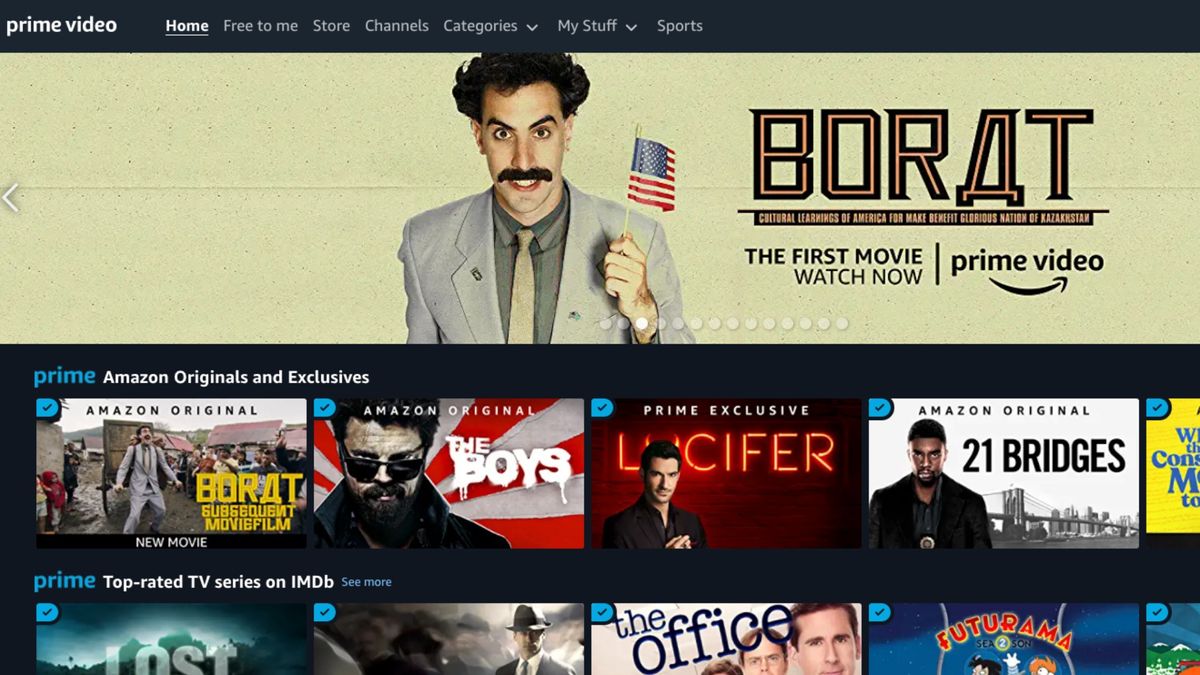
Purchasing a movie on Amazon is more than a simple transaction; it is an integration of a digital asset into a personal cloud library. Whether you are using a dedicated streaming device, a mobile application, or a web browser, the process involves several technical layers—from payment gateway verification to high-definition licensing. This guide provides an exhaustive look at the technical steps, hardware considerations, and library management strategies necessary to build a digital film collection on Amazon.
Navigating the Prime Video Interface Across Platforms
To initiate a purchase, a user must first navigate the Prime Video ecosystem. Amazon has unified its storefront across various hardware configurations, yet the technical experience varies significantly depending on the operating system and device architecture.
Web Browser Functionality
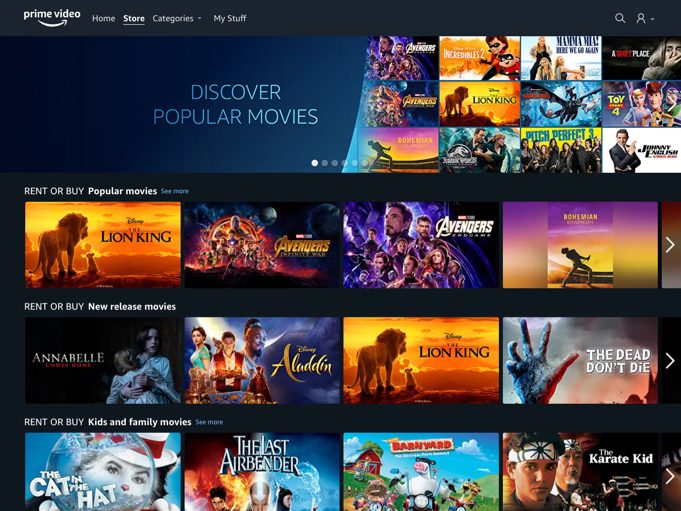
The most robust way to buy movies is through a standard web browser on a PC or Mac. Because the web interface is not subject to the restrictive “in-app purchase” fees imposed by mobile operating system developers like Apple or Google, it offers the most direct path to purchase. Upon logging into your Amazon account, navigating to the “Store” tab within the Prime Video section allows you to filter content by “Movies to Buy.” The web interface utilizes advanced search algorithms and metadata tagging to help users distinguish between content included with a Prime subscription and content available for individual purchase.
Mobile and Tablet Applications
The experience on mobile devices is bifurcated by platform policy. On Android and iOS, Amazon has frequently adjusted its purchase flow to comply with or circumvent app store commission structures. In many versions of the iOS and Android apps, users may find that they cannot purchase a movie directly within the app. Instead, the interface serves as a “discovery” tool where users can add titles to their “Watchlist.” To finalize the purchase, the user must technically exit the app and use a mobile browser to access the Amazon website, where the “Buy” button is active. Once the transaction is completed via the web, the digital license is instantly synchronized to the mobile app’s library via cloud-based API calls.
Smart TVs and Streaming Devices
On devices such as the Amazon Fire TV Stick, Roku, or integrated Smart TV apps, the purchase process is streamlined. These devices are designed for a “Leanback” UI experience. Since these platforms are often optimized for commerce, the purchase button is usually prominently displayed alongside the movie’s metadata (cast, crew, runtime, and resolution). The software utilizes a secure “1-Click” payment system, which minimizes the friction between browsing and ownership.
The Technical Workflow of a Digital Purchase
When you click the “Buy” button, a series of complex backend processes occur to ensure that the content is licensed to your account and accessible across your authorized devices.
Setting Up 1-Click Ordering
Amazon’s proprietary 1-Click technology is the engine behind digital movie sales. To buy content, your account must have a default payment method and a verified billing address on file. From a technical standpoint, this simplifies the checkout process by bypassing the traditional “shopping cart” model. When the purchase is initiated, Amazon’s servers ping the payment gateway to authorize the transaction. Once the authorization code is received, the digital asset—the movie—is appended to your account’s “My Stuff” or “Purchases” database.
Resolution Options: SD, HD, and 4K UHD
During the purchase process, users are often presented with different price points based on video resolution.
-
Standard Definition (SD): This version requires less bandwidth (typically 900 Kbps to 1.5 Mbps) and is suitable for older devices or limited data connections.
-
High Definition (HD): This provides 1080p resolution and requires a more robust connection (3.5 Mbps to 5 Mbps).
-
4K Ultra HD (UHD): This is the premium tier, often including High Dynamic Range (HDR) metadata. Purchasing 4K content requires hardware that supports High-bandwidth Digital Content Protection (HDCP) 2.2 and a consistent internet speed of at least 15-25 Mbps.
Choosing a resolution is a technical commitment. If you purchase an HD version, you generally do not have access to the 4K version unless you pay for an upgrade, though many 4K purchases include the HD and SD versions for downward compatibility on older screens.
Renting vs. Buying: The Licensing Distinction
It is crucial to understand the technical difference between a rental and a purchase. When you rent a movie, the digital license is temporary. Typically, you have 30 days to begin watching the film and 48 hours to finish it once playback has commenced. In contrast, “buying” a movie grants you a “perpetual” license to stream or download the content as long as your Amazon account is active and the content remains available on the platform’s servers due to licensing agreements with studios.
Hardware Compatibility and Playback Optimization
Once a movie is purchased, the technical challenge shifts to playback. Amazon employs sophisticated adaptive bitrate streaming technology to ensure the best possible experience based on the user’s hardware and network conditions.
Digital Rights Management (DRM) and Security
Every movie bought on Amazon is protected by DRM. This technology prevents unauthorized copying and limits playback to authorized applications and devices. Amazon uses several DRM standards, including Microsoft PlayReady and Google Widevine, to secure its streams. When you hit “Play,” a license request is sent to Amazon’s license server to verify your ownership. Only after this handshake is completed does the encrypted video stream begin to decrypt on your device.
Offline Viewing and Downloads
For users on mobile devices or tablets, Amazon allows the downloading of purchased content for offline viewing. This is a significant technical advantage for travelers. The software creates a local, encrypted file on the device’s storage. These files are typically compressed using the H.264 or H.265 (HEVC) codec to balance visual fidelity with storage efficiency. It is important to note that these downloads are still subject to DRM checks; the app must occasionally “check in” with the servers to verify that the account still holds a valid license for the content.
Multi-Device Synchronization
The “Whispersync” technology developed by Amazon ensures that your library and your progress within a film are synchronized across the entire tech stack. If you buy a movie on your desktop and watch the first twenty minutes, you can open the Prime Video app on your Fire Tablet and resume exactly where you left off. This involves constant metadata updates being pushed to the cloud, tracking timestamps and user preferences.
Managing Your Digital Library and Troubleshooting
As your collection grows, managing your digital assets becomes a matter of account maintenance and technical troubleshooting.
The “My Stuff” Interface
All purchased movies are housed in the “My Stuff” or “Purchases & Rentals” section of the Prime Video interface. Here, users can sort their collection alphabetically or by purchase date. From a technical perspective, this library is a cloud-based ledger. Even if you delete the Prime Video app or factory reset your hardware, your purchases remain tied to your Amazon identity.
Common Technical Hurdles
Several technical issues can arise during the purchase or playback of Amazon movies:
-
Geographic Restrictions: Due to licensing agreements, certain movies may only be available for purchase in specific regions. The platform uses IP geolocation to enforce these boundaries. If you move to a different country, your purchased library may be restricted based on local distribution rights.
-
HDCP Errors: If you are trying to play a purchased HD or 4K movie on a PC connected to a monitor via an old VGA or non-compliant HDMI cable, you may encounter an HDCP error. This is a hardware-level security handshake failing to verify that the display is authorized to show protected content.
-
Payment Failures: If the 1-Click payment method has expired or been declined, the purchase will fail at the authorization stage. Users must update their “Payment Settings” in the Amazon account dashboard to resolve this.

The Future of Digital Ownership
As streaming technology continues to advance, the methods for buying movies on Amazon are becoming more integrated with voice technology and AI. Users can now utilize Alexa-enabled devices to purchase movies via voice command (“Alexa, buy ‘The Batman’ on Prime Video”). This utilizes voice biometrics or a PIN code for security, representing the next frontier in frictionless digital commerce.
The transition from “Amazon Instant Video” to the modern Prime Video experience has streamlined the technical barriers to entry. By understanding the interplay between the storefront, the DRM-protected cloud library, and hardware-specific requirements, users can effectively build a robust, high-quality digital cinema collection that is accessible anytime, anywhere. Through careful management of account settings and awareness of resolution standards, the process of buying movies becomes a seamless part of the modern digital lifestyle.
aViewFromTheCave is a participant in the Amazon Services LLC Associates Program, an affiliate advertising program designed to provide a means for sites to earn advertising fees by advertising and linking to Amazon.com. Amazon, the Amazon logo, AmazonSupply, and the AmazonSupply logo are trademarks of Amazon.com, Inc. or its affiliates. As an Amazon Associate we earn affiliate commissions from qualifying purchases.