
In today’s fast-paced digital economy, managing personal finances often involves a blend of traditional banking and innovative fintech solutions. Among these, Cash App has emerged as a widely popular platform, offering a seamless way to send, spend, save, and invest money. Central to its utility is the Cash App Card—a customizable, free Visa debit card directly linked to your Cash App balance. For many, understanding how to efficiently add cash to this card is the gateway to leveraging its full potential for everyday transactions, online purchases, and even ATM withdrawals. This comprehensive guide will navigate the various methods available, empowering you to keep your Cash App Card funded and ready for use.
Understanding Your Cash App Card and Its Utility
The Cash App Card transcends the simple function of a traditional debit card; it’s a versatile financial instrument designed to provide instant access to your digital funds. Before diving into the mechanics of adding cash, it’s crucial to grasp what this card represents within the broader landscape of personal finance.
The Cash App Card: A Gateway to Digital Finance
At its core, the Cash App Card is a physical (and virtual) debit card connected directly to your Cash App balance. Unlike conventional bank debit cards that draw from a checking or savings account, the Cash App Card exclusively uses the funds held within your Cash App account. This distinction is significant for financial management, as it allows users to segregate a portion of their funds specifically for Cash App-related transactions.
The card bears the Visa logo, granting it widespread acceptance wherever Visa is processed, whether at brick-and-mortar stores, online retailers, or ATMs. It offers a tangible link to your digital money, making it incredibly convenient for daily spending without the need to carry physical cash or transfer funds back and forth to a traditional bank account. For many, it acts as a primary spending card, a budgeting tool, or a secure way to access peer-to-peer payments received through the app.
Key Benefits of a Funded Cash App Card
A consistently funded Cash App Card unlocks a multitude of benefits that enhance personal financial convenience and control:
-
Unrivaled Convenience and Accessibility: With funds readily available on your card, you can make purchases instantly, both online and in-store. This eliminates the need for repeated bank transfers or the inconvenience of carrying large amounts of cash. It’s particularly useful for spontaneous purchases or when a traditional bank account isn’t immediately accessible.
-
Enhanced Budgeting and Spending Tracking: Because the Cash App Card operates with its own distinct balance, it can serve as an excellent budgeting tool. By allocating a specific amount of money to your Cash App, you can easily track your spending against that budget, helping you stay within your financial limits. The app’s transaction history provides a clear overview of where your money is going.
-
Direct Access to P2P Payments: Funds received from other Cash App users are immediately available in your balance and, consequently, accessible via your Cash App Card. This means that money sent from friends, family, or even clients (for small services) can be spent instantly, bypassing traditional bank transfer delays.
-
ATM Access (with a fee): While primarily designed for spending, a funded Cash App Card also allows you to withdraw cash from ATMs, offering flexibility when physical currency is required. It’s important to note that Cash App charges a small fee for ATM withdrawals, and the ATM operator may also levy their own fee.
By keeping your Cash App Card funded, you’re not just loading money onto a piece of plastic; you’re activating a powerful personal finance tool that integrates seamlessly into your daily economic life.
Direct Methods for Loading Cash Onto Your Card
Funding your Cash App Card can be accomplished through several straightforward methods, each catering to different preferences and situations. These direct approaches ensure that your funds are available quickly and efficiently for immediate use.
Adding Cash at Retail Stores (Paper Money)
Perhaps the most direct way to get physical cash onto your Cash App Card is by depositing paper money at participating retail locations. This method bridges the gap between the digital and physical realms of finance.
-
Locate a Participating Retailer: Cash App has partnered with numerous major retailers across the United States, including Walmart, Walgreens, 7-Eleven, Dollar General, Family Dollar, CVS, and Rite Aid. Before heading out, it’s wise to check the Cash App’s in-app map or website for the nearest location that supports paper money deposits.
-
Initiate the Deposit in the App: Open your Cash App, tap on the “Banking” tab (the house icon) on the bottom left, then select the “Paper Money” option (or “Deposit Paper Money”). This will generate a unique barcode or QR code on your screen.
-
Head to the Cashier: Inform the cashier that you wish to add cash to your Cash App. They will typically ask to scan the barcode or QR code displayed on your phone.
-
Hand Over Your Cash: Provide the cashier with the desired amount of cash you wish to deposit. Most retailers allow deposits in increments, with a typical minimum of $5 and a maximum often around $500 to $1,000 per transaction, and daily limits can vary.
-
Confirm and Complete: Once the cashier processes the transaction, the funds are usually added to your Cash App balance instantly. Always obtain a receipt for your records.
It’s important to note that while Cash App does not charge a fee for this service, some retailers might impose a small convenience fee, usually around $1.00 to $4.00 per transaction. Always confirm any potential fees with the retailer beforehand.
Linking a Bank Account or Debit Card
For those who prefer digital transfers, linking an existing bank account or debit card provides a secure and convenient way to add funds. This is often the most common method for recurring top-ups.
-
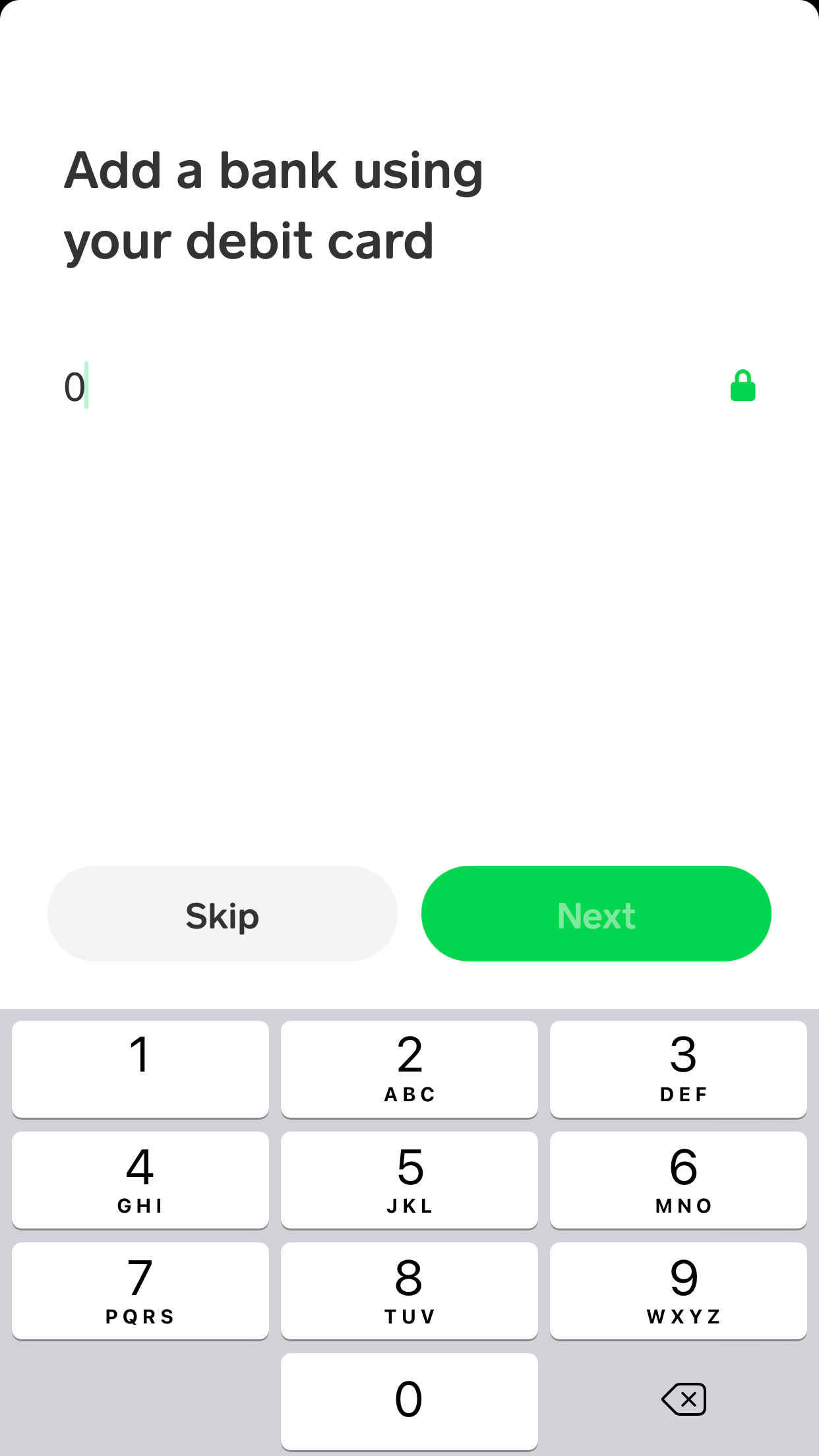
Link Your Account: From the “Banking” tab in Cash App, tap on “Linked Banks” (or “Add Bank” if you haven’t linked one yet). You’ll be prompted to enter your bank’s login credentials (for instant verification) or manually input your account and routing numbers. Similarly, you can link a debit card by entering its details.
-
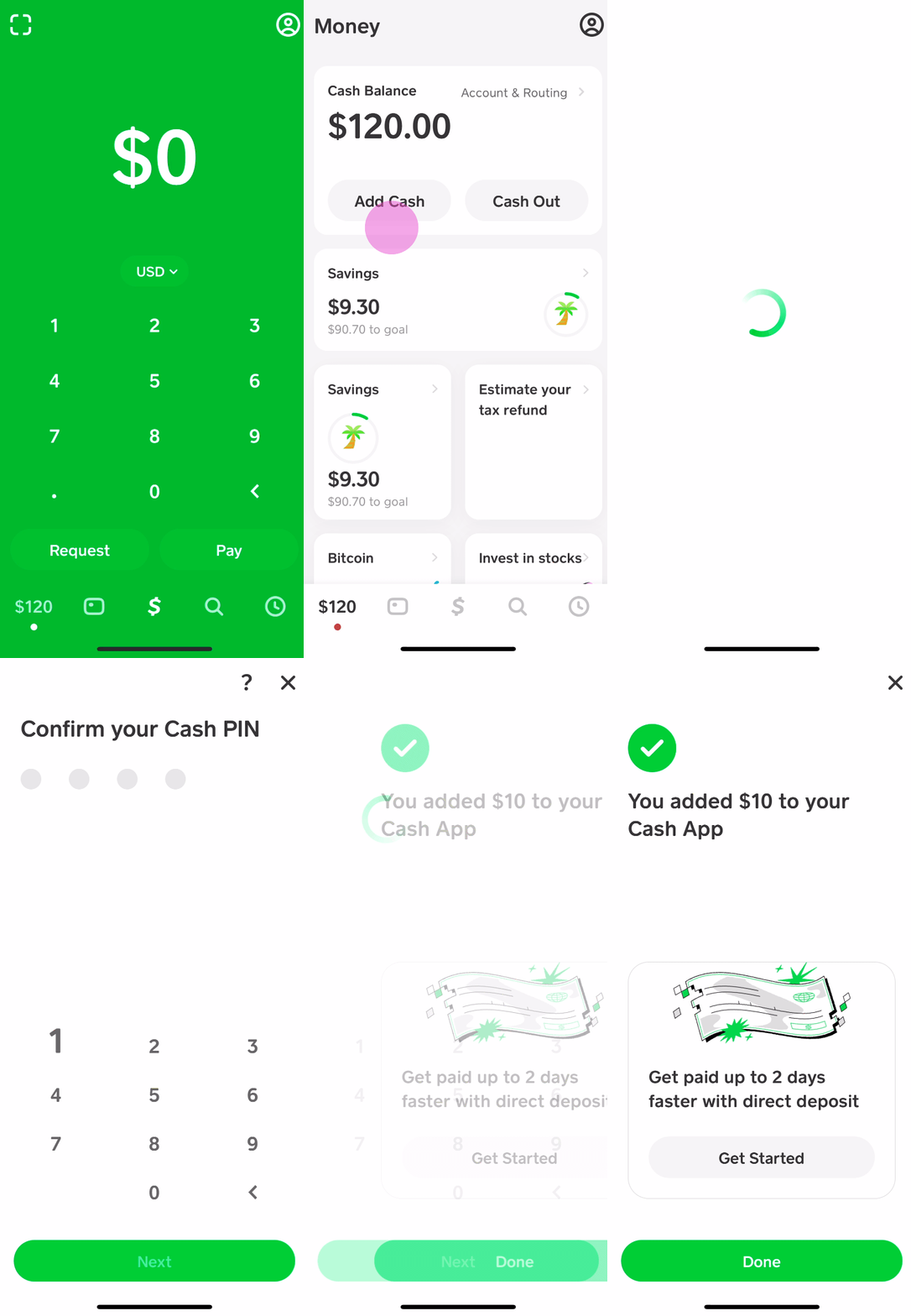
Transfer Funds: Once linked, navigate back to the “Banking” tab and tap the “Add Cash” button. Enter the amount you wish to transfer from your linked bank account or debit card to your Cash App balance.
-
Choose Transfer Speed: You’ll typically be given two options:
-
Standard Deposit: Funds are transferred from your bank account to Cash App within 1-3 business days, usually without a fee.
-
Instant Deposit: Funds are transferred immediately to your Cash App, but typically incur a small fee (e.g., 0.5% to 1.75% of the transaction amount). This fee applies specifically when you are transferring from Cash App to your bank instantly, or from your bank to Cash App instantly using a debit card. When adding cash from a linked bank account, it’s generally free but takes a few days. Using a linked debit card is usually instant but incurs a fee.
-
This method offers flexibility and control, allowing you to manage transfers directly from your primary financial institutions.
Receiving Funds from Other Cash App Users
The peer-to-peer (P2P) payment functionality is one of Cash App’s defining features. Receiving money from another Cash App user is another way to “add cash” to your balance, which then becomes available on your Cash App Card.
-
Simple Request or Payment: If someone owes you money, you can send them a “Request” through Cash App. Alternatively, they can simply send you a payment using your Cashtag or phone number/email associated with your account.
-
Instant Availability: Once a payment is sent and successfully received, the funds are immediately credited to your Cash App balance and are instantly accessible via your Cash App Card. There are no fees for standard P2P payments.
-
Verification is Key: Always verify the sender and the amount before confirming receipt, and be cautious of unsolicited payments or requests from unknown individuals to avoid scams.
This method is particularly convenient for splitting bills, receiving money from friends and family, or accepting small payments for goods or services within your network.
Indirect and Alternative Ways to Fund Your Cash App Card
Beyond the direct deposit and transfer methods, Cash App offers several indirect yet highly effective avenues for loading funds onto your card, especially for those seeking to integrate their income streams with their digital wallet.
Direct Deposit Your Paycheck

For many, linking their paycheck directly to Cash App offers unparalleled convenience and faster access to funds. This automatically “adds cash” to your account on a regular basis.
-
Setting Up Direct Deposit: In your Cash App, navigate to the “Banking” tab. Here, you’ll find your unique Cash App account number and routing number. These are the details you’ll provide to your employer’s payroll department. They will typically require you to fill out a direct deposit form.
-
Benefits for Personal Finance: Direct depositing your paycheck means your earnings land directly in your Cash App balance, often up to two days earlier than traditional banks. This not only provides quicker access to your money but also centralizes your funds within the app, streamlining your budgeting and spending via the Cash App Card. It eliminates the need for check-cashing fees or waiting for bank transfers.
This method is ideal for those who wish to use Cash App as their primary banking solution for managing their income and daily expenses.
Cashing Out from Other Platforms
In the interconnected digital finance ecosystem, Cash App can serve as a convenient destination for funds from various other online platforms.
-
Connecting to Online Income Platforms: If you earn money through freelance work, online surveys, or other digital income streams, many platforms offer options to withdraw funds directly to a linked bank account or debit card. By using your Cash App account and routing number (or the associated debit card details), you can often route these earnings directly into your Cash App balance.
-
Transferring from Other P2P Services: While direct linking between all P2P apps might not be seamless, you can often transfer funds from other services (e.g., PayPal, Venmo, Google Pay) to a linked bank account, and then from that bank account to your Cash App. Alternatively, if the other service allows withdrawals to a debit card, you can use your Cash App Card details for direct transfer, though standard transfer times and fees may apply.
Utilizing Cash App in this manner allows for a consolidated view of your earnings and makes these funds immediately spendable via your Cash App Card.
Selling Items or Services (Online Income)
Cash App’s ease of use makes it an attractive payment solution for small businesses, freelancers, and individuals engaged in side hustles. Accepting payments directly into your Cash App account effectively funds your card.
-
Accepting Payments via Cashtag: Each Cash App user has a unique Cashtag (e.g., $YourName). You can share this Cashtag with customers or clients, allowing them to send you money directly. This is particularly useful for small-scale operations, local services, or selling items through social media.
-
For Small Businesses and Freelancers: For those running small ventures, using Cash App to receive payments for services rendered or goods sold provides a quick and often fee-free way to get paid. The money received instantly boosts your Cash App balance, ready to be spent via your Cash App Card.
-
Invoicing: While Cash App’s invoicing features are not as robust as dedicated business platforms, you can use the “Request” feature to send payment requests to clients, specifying the amount owed.
This method transforms your entrepreneurial efforts directly into spendable funds on your Cash App Card, reinforcing its utility as a financial tool for both personal and micro-business finance.
Managing Your Funds and Card Effectively
Having various methods to add cash is only one part of the equation; effective management of your Cash App funds and card is crucial for a healthy financial experience. Understanding limits, fees, and security practices will empower you to use your card responsibly and efficiently.
Monitoring Your Cash App Balance
Regularly checking your Cash App balance is fundamental to good financial hygiene and ensures you always know how much you have available to spend.
-
Instant Balance Display: Your current Cash App balance is prominently displayed on the main screen of the app as soon as you open it. This real-time view allows for immediate assessment of your funds.
-
Transaction History: Tap the clock icon (Activity tab) on the bottom right to review all your past transactions, including money added, money spent, and payments received. This detailed history helps in budgeting and spotting any unauthorized activity.
-
Setting Up Notifications: Enable push notifications for all transactions within the app’s settings. This provides immediate alerts whenever money is added or spent, offering an extra layer of awareness and security.
Proactive monitoring helps prevent overdrafts (though Cash App typically declines transactions if funds are insufficient, rather than allowing an overdraft) and helps you stick to your spending limits.
Understanding Limits and Fees
Like most financial tools, Cash App has certain limits and fees associated with its services. Being aware of these helps you plan your transactions and avoid unexpected costs.
-
Adding Cash Limits: While receiving money from other Cash App users is generally unlimited, there are caps on adding paper money at retailers (e.g., $1,000 per transaction, $7,500 per week) and transfers from linked debit cards. These limits can vary and may increase as your account is verified.
-
Spending Limits: Your Cash App Card typically has daily, weekly, and monthly spending limits (e.g., $7,000 daily, $10,000 weekly, $25,000 monthly, subject to change). ATM withdrawal limits also apply (e.g., $310 per transaction, $1,000 daily).
-
Fees to Be Aware Of:
-
Instant Transfer Fees: When instantly adding cash from a linked debit card or instantly transferring out to a bank, a fee (typically 0.5% – 1.75%) applies.
-
ATM Withdrawal Fees: Cash App charges a $2.00 fee for ATM withdrawals, and the ATM operator may also charge their own fee. Cash App offers free ATM withdrawals once you receive at least $300 in direct deposits monthly.
-
Retail Deposit Fees: While Cash App itself doesn’t charge for paper money deposits, participating retailers might levy a small convenience fee (usually $1-$4).
-
Strategies to minimize costs include using standard transfers when time isn’t critical, opting for retailers with no or lower deposit fees, and leveraging direct deposit to qualify for free ATM withdrawals.
Security Best Practices for Your Cash App Card
Protecting your funds and personal information is paramount when using any financial tool. Adhering to security best practices for your Cash App Card is essential.
-
Enable Security Lock/PIN: Always set up a PIN for your Cash App account and enable the security lock feature (which requires your PIN, fingerprint, or facial recognition for transactions). This prevents unauthorized access to your funds even if your phone is lost or stolen.
-
Protect Your Card Details: Treat your Cash App Card details (card number, expiration date, CVV) with the same caution as any other debit or credit card. Do not share them with untrusted individuals or websites.
-
Beware of Scams and Phishing: Be highly suspicious of unsolicited messages, emails, or calls claiming to be from Cash App, especially if they ask for your PIN, login credentials, or to send money. Cash App will never ask for your PIN or require you to send money to resolve an issue.
-
Report Suspicious Activity: If you notice any unauthorized transactions or suspicious activity on your account, immediately contact Cash App support through the app or their official website. You can also temporarily lock your Cash App Card directly from the app if it’s lost or stolen.
By diligently following these security measures, you can significantly reduce the risk of fraud and ensure your Cash App Card remains a secure and reliable financial tool.
Conclusion
The Cash App Card stands as a testament to the evolving landscape of personal finance, offering a flexible and accessible way to manage your money in the digital age. Whether you prefer the tangible act of adding paper cash at a local retailer, the digital convenience of bank transfers, the communal ease of peer-to-peer payments, or the streamlined approach of direct deposit for your income, Cash App provides a method tailored to your needs.
By understanding these diverse funding options, coupled with astute management of limits, fees, and robust security practices, you transform your Cash App Card from a simple payment method into a powerful instrument for financial control. A fully funded Cash App Card not only offers unparalleled convenience for daily spending but also empowers you to navigate your financial life with greater efficiency and confidence. Embrace the versatility of Cash App and unlock a smarter way to handle your money.
aViewFromTheCave is a participant in the Amazon Services LLC Associates Program, an affiliate advertising program designed to provide a means for sites to earn advertising fees by advertising and linking to Amazon.com. Amazon, the Amazon logo, AmazonSupply, and the AmazonSupply logo are trademarks of Amazon.com, Inc. or its affiliates. As an Amazon Associate we earn affiliate commissions from qualifying purchases.