
The evolution of personal finance has transformed from ledger books and manual calculations to a streamlined, digital-first experience. At the center of this transformation for millions of taxpayers is TurboTax, a sophisticated financial tool designed to demystify the complexities of the tax code. Navigating this platform is not merely about data entry; it is about leveraging a powerful algorithm to ensure financial accuracy, maximize wealth retention, and maintain compliance with ever-changing federal and state regulations. Understanding how to use TurboTax effectively requires a blend of organizational preparation and a strategic approach to the software’s intuitive interface.
Setting the Foundation: Gathering Your Financial Intelligence
Before engaging with the software, the most critical step in the tax-filing process happens offline. TurboTax functions as a data processor, and the quality of your financial output is entirely dependent on the quality of your input. To use the tool effectively, you must first centralize your financial documents for the fiscal year.
Organizing Income Documentation
The primary building block of your tax return is your income. For most users, this begins with the W-2 form provided by employers. However, in the modern economy, income is often multifaceted. You must gather all 1099 forms, which might include 1099-NEC for non-employee compensation, 1099-K for third-party platform payments, and 1099-INT for interest earned on savings accounts. If you are an active investor, your 1099-B forms—which detail capital gains and losses from stock or cryptocurrency trades—are essential. TurboTax allows for the direct import of these documents from thousands of financial institutions, which significantly reduces the risk of manual entry errors that often trigger IRS inquiries.
Expense and Deduction Tracking
Beyond income, a strategic user focuses on deductions and credits. If you plan to itemize rather than take the standard deduction, you must compile records of mortgage interest (Form 1098), property taxes, charitable contributions, and significant medical expenses. For those using TurboTax for business finance—such as freelancers or small business owners—gathering receipts for home office expenses, equipment, and travel is paramount. The software provides a specific “Self-Employed” module that asks targeted questions to ensure no legitimate business expense is overlooked.
Navigating the Software: A Step-by-Step Strategic Workflow
Once your documentation is ready, the process of using TurboTax follows a linear, user-friendly trajectory. The software is designed to act as a virtual CPA, walking you through “interviews” rather than forcing you to look at daunting tax forms directly.
Initial Setup and Personal Profile
The journey begins with the “Personal Info” section. Here, you establish your filing status—Single, Married Filing Jointly, Married Filing Separately, Head of Household, or Qualifying Surviving Spouse. This choice is a fundamental pillar of your personal finance strategy, as it determines your standard deduction amount and your tax brackets. TurboTax provides guidance on which status offers the most significant financial advantage based on your specific household situation.
The Income Interview
After establishing your profile, you move into the income section. This is where the software’s automation shines. Instead of typing in every box from your W-2, you can often use the “Import” feature by entering your employer’s Federal Employer Identification Number (EIN) or logging into your payroll provider’s portal.
For more complex financial portfolios, such as those involving rental properties or K-1 forms from partnerships, TurboTax uses a tiered approach. It will ask if you sold stock, earned foreign income, or received a distribution from a retirement account (1090-R). Answering these questions accurately allows the software to open the necessary schedules and forms in the background, ensuring that your “Total Income” is calculated according to the latest tax laws.
Deductions and Credits: The Optimization Phase
This is the phase where users can actively influence their financial outcome. TurboTax utilizes a “Deduction Finder” that scans your profile for potential tax breaks. It will compare the Standard Deduction against your Itemized Deductions in real-time, showing you which method results in a lower tax liability.
Key areas of focus include:
-
Education Credits: If you paid tuition for higher education, the software guides you through the American Opportunity Tax Credit (AOTC) or the Lifetime Learning Credit (LLC).
-
Family Credits: The Child Tax Credit and the Earned Income Tax Credit (EITC) are major drivers of significant refunds for eligible families.
-
Adjustments to Income: These are “above-the-line” deductions, such as IRA contributions or student loan interest payments, which lower your Adjusted Gross Income (AGI) regardless of whether you itemize.

Advanced Features: Managing Complex Financial Portfolios
For individuals with high net worth or diverse income streams, TurboTax serves as more than a simple filing tool; it becomes a comprehensive financial management system. Dealing with investments and business assets requires a deeper dive into the software’s specialized capabilities.
Investment and Cryptocurrency Integration
With the rise of digital assets, the tax implications of cryptocurrency trading have become a focal point for the IRS. TurboTax has integrated features that allow users to upload CSV files or link directly to crypto exchanges and wallets. This allows the software to calculate the cost basis and the holding period (short-term vs. long-term) for hundreds or even thousands of transactions. This level of automation is vital for maintaining an accurate financial record and avoiding the heavy penalties associated with underreporting capital gains.
Business Finance and Depreciation
For the self-employed, the software handles the complexities of Schedule C. A sophisticated feature within the higher-tier versions of TurboTax is the ability to calculate depreciation on business assets. Whether you are deducting a portion of your home for a home office or depreciating a vehicle used for business, the software applies the correct MACRS (Modified Accelerated Cost Recovery System) logic. This ensures that you are recovering the cost of your business investments over time in the most tax-efficient manner possible.
Security, Review, and Final Submission
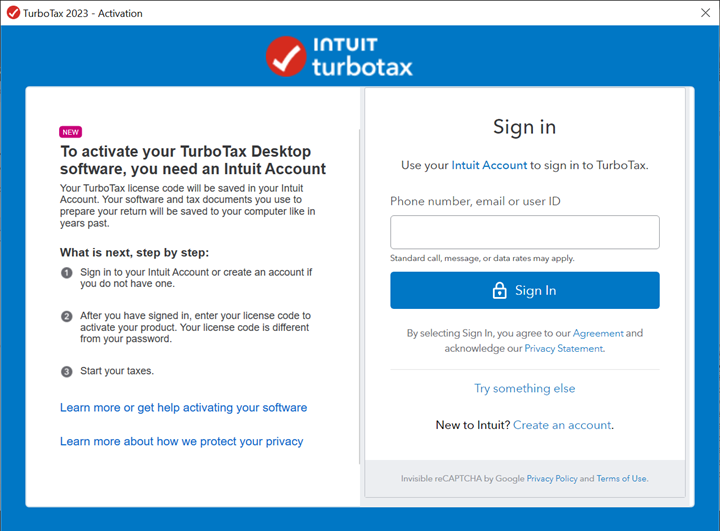
As a digital financial tool, security is a cornerstone of the TurboTax experience. Given the sensitivity of the data involved—Social Security numbers, bank account details, and total income—the platform employs multi-factor authentication and high-level encryption.
The SmartCheck and Audit Defense
Before the submission phase, TurboTax runs a comprehensive “SmartCheck.” This diagnostic scan looks for inconsistencies, missing information, or “red flags” that might attract the attention of the IRS. It provides a “Refund Monitor” that updates as you navigate the sections, but the final review is where the software ensures that the mathematical logic holds up across federal and state returns.
Users also have the option to opt into “Audit Defense” or “Full Service” features. These are personal finance safeguards that provide professional representation or review by a human tax expert. For those with complex filings, this added layer of professional oversight can provide peace of mind and protect against future financial liability.
Electronic Filing and Refund Management
The final step is the electronic filing (e-file) process. TurboTax transmits your return through a secure gateway directly to the IRS and your state’s department of revenue. At this stage, you must make a strategic decision regarding your refund or your balance due.
For refunds, the fastest financial route is selecting direct deposit. You will need your bank’s routing and account numbers. Alternatively, some users choose to apply their refund toward next year’s estimated taxes—a prudent move for freelancers who want to stay ahead of their quarterly obligations. If you owe money, the software allows you to schedule a payment directly from your bank account or provides instructions for paying via credit card or installment agreements.

Conclusion: Leveraging TurboTax for Long-Term Financial Health
Using TurboTax effectively is about more than just completing a yearly chore; it is an exercise in financial literacy. By moving through the software’s organized modules, you gain a clearer picture of your effective tax rate, the impact of your investment decisions, and the value of your business deductions.
The software also provides a “Tax Year Comparison” report at the end of the process. This document is a powerful financial tool for the following year, highlighting how your income and tax liability have shifted over time. By analyzing these trends, you can make informed decisions about retirement contributions, charitable giving, and investment timing. Ultimately, TurboTax is a bridge between the complexity of government mandates and the personal goal of financial clarity. When used with diligence and preparation, it empowers the individual to take full control of their financial destiny, one tax season at a time.
aViewFromTheCave is a participant in the Amazon Services LLC Associates Program, an affiliate advertising program designed to provide a means for sites to earn advertising fees by advertising and linking to Amazon.com. Amazon, the Amazon logo, AmazonSupply, and the AmazonSupply logo are trademarks of Amazon.com, Inc. or its affiliates. As an Amazon Associate we earn affiliate commissions from qualifying purchases.