
The world of PC gaming, particularly for enduringly popular titles like The Elder Scrolls V: Skyrim, is often enhanced by the vibrant and creative modding community. These dedicated players and developers craft intricate modifications that breathe new life into beloved games, offering new quests, gameplay mechanics, visual upgrades, and an almost endless stream of content. At the heart of many of these transformative mods lies the Skyrim Script Extender (SKSE). If you’re looking to delve deep into Skyrim’s modding scene, understanding and installing SKSE is an essential first step.

This guide will walk you through the process of installing SKSE, ensuring you can unlock the full potential of your Skyrim experience. We’ll cover what SKSE is, why it’s crucial for modding, and provide step-by-step instructions for installation across different versions of the game. Our focus will be on the technical aspects of installation, drawing parallels to the broader themes of technological adoption and software utilization found on our website.
Understanding the Significance of SKSE in Skyrim Modding
Before we dive into the installation process, it’s crucial to understand why SKSE is such a vital component for many Skyrim mods. Think of it like a fundamental piece of infrastructure that allows for more complex constructions.
What is SKSE?
SKSE, standing for Skyrim Script Extender, is a utility developed by the modding community. It’s not a mod in the traditional sense, meaning it doesn’t add new content or alter gameplay directly by itself. Instead, SKSE acts as an enhancement to the game’s scripting engine. The vanilla Skyrim engine has limitations on what its scripts can do. SKSE expands these capabilities, allowing mod authors to create far more complex and sophisticated mods than would otherwise be possible.
Why is SKSE Essential for Many Mods?
Many of the most popular and impactful Skyrim mods rely heavily on SKSE to function correctly. These mods often involve:
- Complex Questlines and Interactions: Mods that introduce intricate new quests with multiple branching paths, unique NPC behaviors, or advanced dialogue systems often require SKSE’s extended scripting capabilities.
- Overhauled Gameplay Mechanics: Mods that significantly alter fundamental gameplay systems, such as combat, magic, crafting, or character progression, frequently depend on SKSE to implement their intricate changes.
- New Magic Systems and Abilities: Creating entirely new schools of magic or adding unique abilities with complex animations and effects often necessitates the power of SKSE.
- Advanced User Interfaces: Mods that introduce custom menus, inventories, or heads-up displays (HUDs) with dynamic information might leverage SKSE for their functionality.
- System-Level Changes: Some mods aim to optimize performance, manage memory more effectively, or introduce other technical enhancements that require the deeper access provided by SKSE.
Essentially, if a mod description explicitly states “requires SKSE,” then installing it is non-negotiable for that mod to work. Attempting to run such a mod without SKSE will likely result in game crashes, errors, or the mod simply not functioning.
The “Tech” Angle: Analogy to Software Development
From a technological perspective, SKSE is a prime example of how a dedicated community can extend the functionality of existing software. This is analogous to how developers build upon operating systems or create plug-ins for complex applications. Just as a robust API (Application Programming Interface) allows for richer software development, SKSE provides an extended API for Skyrim‘s scripting. This concept aligns with our website’s focus on Technology Trends and Software. Understanding how tools like SKSE work is fundamental to appreciating the innovation and creative problem-solving within the tech space. It’s about leveraging existing platforms to achieve new possibilities, a core principle in both game modding and broader technological advancement.
Step-by-Step Installation Guide for SKSE
Installing SKSE might seem daunting at first, but by following these steps carefully, you can ensure a smooth and successful installation. The process is largely the same regardless of whether you own The Elder Scrolls V: Skyrim or The Elder Scrolls V: Skyrim Special Edition. However, it’s crucial to download the correct version of SKSE for your specific game edition.
1. Identify Your Skyrim Version
This is the most critical first step. There are two main editions of Skyrim on PC:
- The Elder Scrolls V: Skyrim (Original/Legendary Edition): This is the older version of the game, often referred to as “Oldrim” or “LE.” It uses a 32-bit engine.
- The Elder Scrolls V: Skyrim Special Edition (SE): This is the remastered version, released in 2016, which features updated graphics and a 64-bit engine. Many newer mods are exclusively for the SE version.
How to Check Your Version:
- If you purchased Skyrim recently, it’s almost certainly the Special Edition.
- Check your Steam library: The Elder Scrolls V: Skyrim will be listed as the original, and The Elder Scrolls V: Skyrim Special Edition will be listed separately if you own both.
- Check the game’s executable file: Navigate to your Skyrim installation folder. For the Original Edition, the main executable might be
TESV.exe. For Special Edition, it’s oftenSkyrimSE.exe. The presence of “SE” in the filename is a strong indicator.
2. Download the Correct SKSE Version
Once you’ve identified your game version, you need to download the corresponding SKSE build.
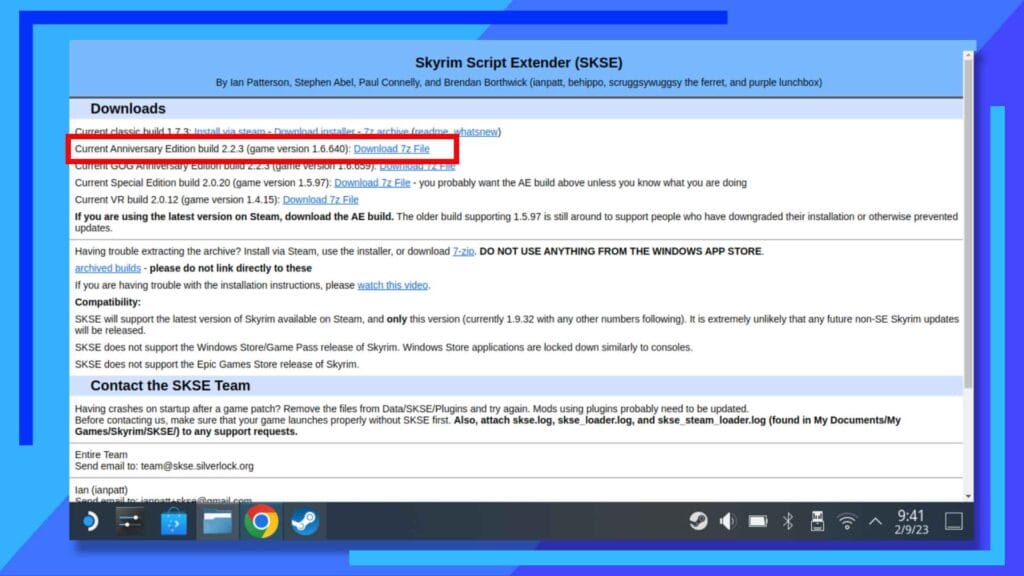
- For Skyrim Special Edition (SE): Go to the official SKSE website (skse.silverlock.org). Navigate to the “Special Edition” section and download the latest “Current SE Build.”
- For The Elder Scrolls V: Skyrim (Original/Legendary Edition): On the same SKSE website, navigate to the “Legendary Edition” section and download the latest “Current LE Build.”
Important Considerations:
- Do NOT download SKSE from unofficial sources. Always use the official Silverlock website to ensure you get a legitimate and up-to-date version.
- Pay attention to the version number. The SKSE build should ideally match the version of your Skyrim game. If you’ve recently updated Skyrim through Steam, you might need to wait a short while for the SKSE team to release a compatible build. The SKSE website usually provides information about compatibility with recent game updates.
3. Extract the SKSE Files
After downloading the SKSE archive (usually a .7z or .zip file), you need to extract its contents.
- Locate the downloaded SKSE file.
- Use an extraction tool like 7-Zip (free and highly recommended for
.7zfiles) or WinRAR to extract the contents to a temporary folder or your desktop.
You will typically find several files and folders within the extracted archive, including:
skse64_loader.exe(for SE) orskse_loader.exe(for LE)skse64_1_5_97.dll(or similar versioning, for SE) orskse_1_9_32.dll(for LE)Datafoldersrcfolder (source code, usually not needed for installation)
4. Install SKSE into Your Skyrim Directory
This is where the installation actually happens. You need to copy the extracted SKSE files into your Skyrim game folder.
-
Open your Skyrim installation directory. This is where the game’s executable file (
SkyrimSE.exeorTESV.exe) is located.- For Steam: Right-click on The Elder Scrolls V: Skyrim (or Special Edition) in your Steam library, select “Manage,” then “Browse local files.”
- For GOG/Other Launchers: The location will vary, but it’s typically in a folder named “The Elder Scrolls V Skyrim” or similar.
-
Copy the following files and folders from the extracted SKSE archive into your Skyrim game directory:
- The
.exeloader file (e.g.,skse64_loader.exeorskse_loader.exe) - The
.dllfile (e.g.,skse64_1_5_97.dllorskse_1_9_32.dll) - The
Datafolder
- The

Crucially, do NOT extract the contents of the Data folder into your existing Data folder. Copy the entire Data folder itself.
After copying, your Skyrim directory should contain the SKSE executable and DLL alongside your game’s main executable.
5. Verifying the Installation
To ensure SKSE is installed correctly, you need to launch Skyrim through the SKSE loader.
- Find the SKSE loader executable you just copied into your Skyrim folder (
skse64_loader.exeorskse_loader.exe). - Double-click this loader file to launch The Elder Scrolls V: Skyrim.
- If you are using a mod manager like Mod Organizer 2 or Vortex, you will need to add the SKSE loader as an executable in your mod manager. This is the preferred method for managing mods. We’ll touch on this briefly later.
How to Check if it Worked:
- Launch the game via the SKSE loader.
- Once in-game, open the console (usually by pressing the
~key). - Type
getSKSEVersionand press Enter. - If SKSE is installed correctly, it will display the version number of SKSE. If you get an error or nothing happens, the installation likely failed.
Integrating SKSE with Mod Managers and Launchers
While manual installation is straightforward for SKSE itself, managing multiple mods requires a dedicated tool. For the best experience and to avoid conflicts, it’s highly recommended to use a mod manager.
Using Mod Managers for SKSE
Mod managers automate many of the tedious aspects of modding, including installation, uninstallation, and load order management. The two most popular mod managers for Skyrim are Mod Organizer 2 (MO2) and Vortex.
Mod Organizer 2 (MO2)
MO2 is a powerful and flexible mod manager favored by many experienced modders.
- Install SKSE manually first as described above, ensuring it’s in your Skyrim game directory.
- Open Mod Organizer 2.
- Go to “Tools” -> “Create new executable.”
- In the “Binary” field, browse to your Skyrim installation folder and select
skse64_loader.exe(orskse_loader.exe). - In the “Title” field, type “SKSE” or “SKSE64” for easy identification.
- Click “OK.”
Now, you will see “SKSE” (or whatever you named it) in the dropdown list of executables in MO2. When you want to launch Skyrim with SKSE and all your mods managed by MO2, select “SKSE” from the dropdown and click “Run.” MO2 will launch the SKSE executable, which in turn will launch Skyrim with SKSE and all your installed mods.
Vortex
Vortex is Bethesda’s official mod manager and is generally considered more user-friendly for beginners.
- Install SKSE manually first.
- Open Vortex.
- Go to “Dashboard” -> “Add Tool.”
- Click “Add External Tool.”
- In the “Path” field, browse to your Skyrim installation folder and select
skse64_loader.exe(orskse_loader.exe). - In the “Name” field, type “SKSE” or “SKSE64.”
- Click “Add Tool.”
You will then see SKSE listed under “External Tools” in your Vortex dashboard. Click the “Run” button next to it to launch Skyrim through SKSE.
Using Other Launchers (e.g., SKSE.ini Configuration)
For more advanced users, the skse.ini file can be used to further configure SKSE’s behavior. This file is typically created in the DataSKSE folder within your Skyrim installation directory. For example, you might create it to adjust memory allocation or other specific settings. This is less about initial installation and more about fine-tuning, but it’s a testament to the technical depth available within the modding community.
Troubleshooting Common SKSE Installation Issues
Even with careful steps, modding can sometimes present challenges. Here are a few common issues and their solutions when installing SKSE.
“SKSE Not Found” or Game Crashes on Launch
- Did you download the correct version of SKSE? Ensure you have the build for your specific Skyrim edition (LE or SE).
- Did you copy the files to the correct directory? The SKSE loader, DLL, and the
Datafolder must be in the root of your Skyrim installation directory, alongsideSkyrimSE.exeorTESV.exe. - Are you launching the game through the SKSE loader? You must launch the game via
skse64_loader.exe(orskse_loader.exe), not directly from Steam or your mod manager’s default Skyrim shortcut. If using a mod manager, ensure you’ve added SKSE as a custom executable. - Is your Skyrim game up-to-date? If you recently updated Skyrim through Steam, the SKSE team may need time to release a compatible update for SKSE. Check the SKSE website for announcements regarding game updates.
Mods Not Working or Displaying Errors
- Are the mods themselves SKSE-dependent? Double-check the mod’s description page. If it lists SKSE as a requirement, and you still have issues, re-verify your SKSE installation.
- Are your mods installed correctly? If you’re using a mod manager, ensure the mods are deployed correctly according to the manager’s instructions.
- Is your SKSE version compatible with your game version and the mods? This is particularly important if you’re using older mods or if the game has been recently updated.
“Skyrim is not running” Error When Launching Mods
This usually indicates that the modding tools or the game itself cannot detect a running Skyrim process launched with SKSE.
- Re-check your SKSE installation and ensure you’re launching the game through the SKSE executable.
- If using a mod manager, ensure the SKSE executable is correctly configured within the manager.
The “Brand” and “Money” Connection: Investing in Your Gaming Experience
While the primary focus here is technical, it’s worth noting the parallels to other aspects of our website’s themes.
- Brand: For many, Skyrim is more than just a game; it’s a beloved brand with a rich history. Investing time into learning how to mod it effectively is akin to building a personal brand as a discerning gamer or a skilled modder. Understanding SKSE is a key differentiator that allows you to curate a unique gaming experience.
- Money: While SKSE itself is free, the time and effort invested in learning to use it can be seen as an investment. This investment yields significant returns in terms of enhanced gameplay and replayability, arguably making your initial purchase of Skyrim far more valuable. It’s about maximizing the utility and enjoyment derived from your digital assets, much like smart personal finance or investing aims to maximize returns on financial assets.
Conclusion
Installing SKSE is a fundamental gateway for The Elder Scrolls V: Skyrim players looking to explore the vast and exciting world of modding. By understanding its role as a powerful script extender and meticulously following the installation steps for your specific game version, you can unlock a universe of new possibilities. Remember to always download SKSE from its official source and consider integrating it with a mod manager like Mod Organizer 2 or Vortex for the most streamlined and robust modding experience. With SKSE successfully installed, you’re well on your way to transforming Skyrim into an even more personalized and breathtaking adventure.
aViewFromTheCave is a participant in the Amazon Services LLC Associates Program, an affiliate advertising program designed to provide a means for sites to earn advertising fees by advertising and linking to Amazon.com. Amazon, the Amazon logo, AmazonSupply, and the AmazonSupply logo are trademarks of Amazon.com, Inc. or its affiliates. As an Amazon Associate we earn affiliate commissions from qualifying purchases.