
Percentages are ubiquitous in our daily lives, forming the bedrock of everything from financial calculations and retail discounts to scientific data analysis and digital progress indicators. Understanding how to calculate a percentage of a number isn’t just a basic mathematical skill; it’s a fundamental competency that empowers users across a myriad of technological platforms and applications. In an increasingly data-driven world, the ability to accurately derive, interpret, and apply percentages is a critical digital literacy skill. This comprehensive guide will demystify the process, offering insights and practical tutorials on leveraging various technological tools—from simple calculators and spreadsheet software to programming languages—to master percentage computations.

Understanding the Core Concept: What is a Percentage?
Before diving into the technological tools, it’s crucial to firmly grasp the underlying mathematical concept. A percentage is, at its heart, a way of expressing a number as a fraction of 100. The word “percent” literally means “per hundred” or “out of one hundred.” It’s a standardized way to compare parts of a whole, providing a relative measure that’s easy to understand and apply across different contexts, regardless of the original total.
The Fundamental Formula
The most basic way to think about percentages involves a simple formula. If you want to find ‘X percent’ of a ‘Y number’, the formula is:
Percentage = (Part / Whole) × 100
Or, if you want to find ‘X percent of a number’, and you know the number and the percentage:
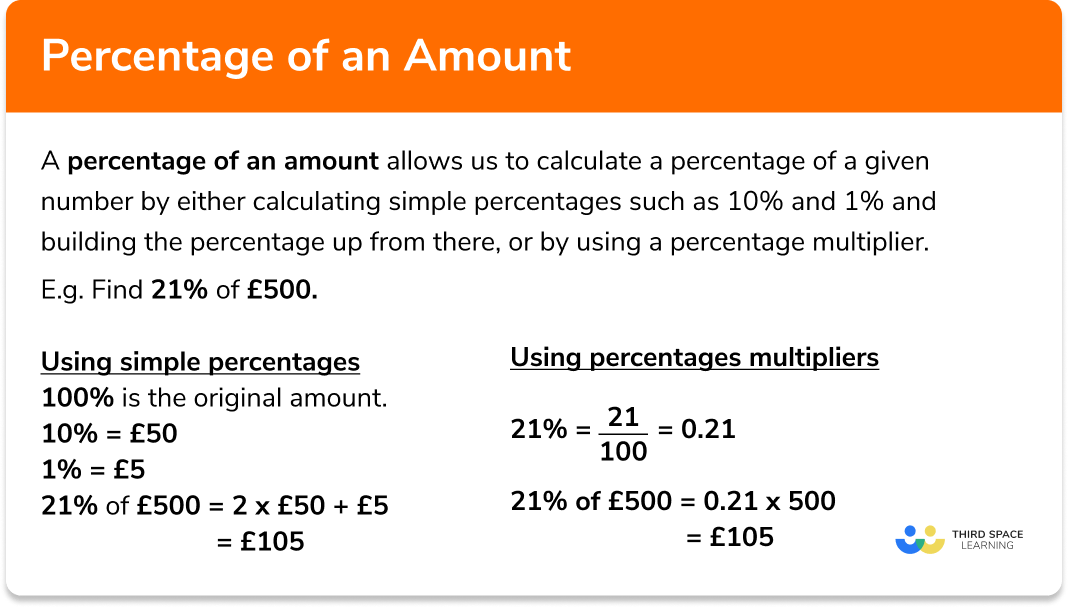
Result = (Percentage / 100) × Number
For example, if you want to find 20% of 50:
Result = (20 / 100) × 50 = 0.20 × 50 = 10.
Conversely, if you want to know what percentage 10 is of 50:
Percentage = (10 / 50) × 100 = 0.2 × 100 = 20%.
This foundational understanding is the bedrock upon which all digital tools build. Whether you’re using a calculator or writing a complex algorithm, the underlying logic remains consistent.
Why Percentages Matter in Tech Contexts
In the realm of technology, percentages are far more than abstract mathematical concepts; they are functional components of user interfaces, data reporting, and system operations. Consider the battery life indicator on your smartphone, the progress bar for a file download, the completion rate of an online course, or the market share statistics presented in a business intelligence dashboard. All these rely heavily on percentages to communicate information effectively and intuitively. Software applications use percentages to scale elements, represent data visually in charts and graphs, and to process conditional logic. For developers, data analysts, or even everyday users, a robust understanding of percentage calculations is indispensable for interacting meaningfully with digital systems and interpreting the information they present.
Leveraging Digital Calculators and Online Tools
The most accessible and often the quickest way to calculate percentages is through digital calculators and various online tools. These resources automate the mathematical operations, allowing users to focus on the inputs and interpretation of results.
Standard Digital Calculators
Every modern operating system, smartphone, and even many web browsers come equipped with a built-in digital calculator. These tools are perfectly capable of handling percentage calculations.
To find X percent of a number Y:
-
Enter the number Y.
-
Multiply by X.
-
Press the percentage (%) button. (Some calculators require you to divide by 100 after multiplying by X, while others handle the division automatically when you press the ‘%’ button).
Example: Find 15% of 200
-
Type
200 * 15 %(On some calculators, this will directly give 30) -
Alternatively: Type
200 * 15 / 100(This method works universally)
To find what percentage X is of Y:
-
Divide X by Y.
-
Multiply the result by 100.
Example: What percentage is 40 of 500?
- Type
40 / 500 * 100(Result: 8)
Familiarity with your specific calculator’s percentage function is key, as functionality can vary slightly between models and software versions.
Dedicated Online Percentage Calculators
Beyond basic digital calculators, numerous websites offer dedicated online percentage calculators. These tools often provide more specialized functions, such as calculating percentage increase/decrease, percentage change, or finding the original number after a percentage change.
How they work:
You typically input two or three numbers into designated fields (e.g., “What is X% of Y?”, “X is what percent of Y?”), and the tool instantly computes the result. They are particularly useful for complex scenarios where you might otherwise get confused by the order of operations.
Advantages:
-
User-friendly interfaces with clear labels for inputs and outputs.
-
Often provide explanations of the calculation process.
-
Can handle various types of percentage problems in one place.
Browser-Based Search Functionality
For quick, on-the-fly calculations, your web browser’s search bar (e.g., Google, Bing) can act as a powerful calculator. Simply type your percentage query directly into the search bar, and the search engine will often provide the answer instantly.
Examples:
-
what is 25% of 80 -
40 is what percent of 200 -
percentage increase from 50 to 75
This method is incredibly efficient for single, straightforward calculations and requires no navigation to a specific tool or website.
Mastering Percentages in Spreadsheet Software
For anyone working with data—whether in business, academia, or personal finance—spreadsheet software like Microsoft Excel, Google Sheets, or LibreOffice Calc is an indispensable tool for percentage calculations. Spreadsheets not only compute percentages but also allow for dynamic, automated calculations across large datasets, making them critical for analysis and reporting.
Calculating a Percentage of a Number (Basic)
To find X percent of a number in a spreadsheet, you convert the percentage to its decimal equivalent (divide by 100) and then multiply it by the number.
Example: To find 20% of the number in cell A1.
-
In an empty cell, type:
=A1 * 0.20 -
Alternatively, if 20% is in cell B1, type:
=A1 * B1(and ensure cell B1 is formatted as a percentage or its decimal equivalent).
To ensure correct display, you can format the result cell as a number or a percentage as needed.
Finding the Percentage One Number is of Another
This is a common requirement in data analysis, such as determining sales growth or market share.
Example: To find what percentage the number in cell A1 is of the total in cell B1.
-
In an empty cell, type:
=A1 / B1 -
The result will be a decimal (e.g., 0.25). To display it as a percentage, select the cell and click the “Percentage Style” button (usually found in the ‘Number’ group on the ‘Home’ tab of the ribbon in Excel). This will automatically multiply the decimal by 100 and add the ‘%’ sign (e.g., 25%).
Increasing or Decreasing a Number by a Percentage
This is crucial for scenarios like applying discounts, calculating markups, or adjusting figures based on growth rates.
To increase a number (in A1) by X percent (e.g., 10%):
-
Type:
=A1 * (1 + 0.10) -
Or, if the percentage (10%) is in cell B1:
=A1 * (1 + B1)(ensure B1 is formatted as a percentage or decimal).- This formula works by finding 100% of the original number plus an additional 10%, effectively 110% of the original.
To decrease a number (in A1) by X percent (e.g., 10%):
-
Type:
=A1 * (1 - 0.10) -
Or, if the percentage (10%) is in cell B1:
=A1 * (1 - B1)- This calculates 100% of the original number minus 10%, which is 90% of the original.
Practical Applications: Sales Tax, Discounts, Progress Tracking
Spreadsheets excel at these real-world applications:
-
Sales Tax: If an item costs $100 (A1) and sales tax is 8% (B1):
=A1 * (1 + B1)for the total price, or=A1 * B1for just the tax amount. -
Discounts: If an item costs $50 (A1) and is 20% off (B1):
=A1 * (1 - B1)for the discounted price, or=A1 * B1for the discount amount. -
Progress Tracking: If you have completed 15 tasks out of 20 total:
=15/20formatted as a percentage will show 75% completion. -
Data Analysis: Comparing monthly sales figures or year-over-year growth rates is easily done by calculating percentage changes across rows or columns.
The power of spreadsheets lies in their ability to apply these formulas to entire columns or rows with simple drag-and-drop functionality, instantly updating calculations as data changes.
Implementing Percentage Calculations in Programming and Scripting
For developers, data scientists, and those who need to automate calculations or integrate them into more complex applications, programming languages offer the ultimate flexibility and control. Languages like Python, JavaScript, and R provide robust arithmetic capabilities that make percentage calculations straightforward.
Basic Arithmetic in Programming Languages (Python, JavaScript Examples)
The fundamental formulas translate directly into code, using standard arithmetic operators.
Python Example:
# Function to calculate X percent of a number Y


def percentage_of_number(percentage, number):


    return (percentage / 100) * number


# Function to find what percentage X is of Y


def what_percent_is_of(part, whole):


    if whole == 0:


        return "Error: Cannot divide by zero"


    return (part / whole) * 100


# Examples


result1 = percentage_of_number(20, 500)  # 20% of 500


print(f"20% of 500 is: {result1}") # Output: 20% of 500 is: 100.0


result2 = what_percent_is_of(150, 600)  # 150 is what percent of 600


print(f"150 is what percent of 600: {result2}%") # Output: 150 is what percent of 600: 25.0%


# Increase/Decrease by percentage


original_value = 100


increase_percentage = 15


decreased_percentage = 10


increased_value = original_value * (1 + (increase_percentage / 100))


decreased_value = original_value * (1 - (decreased_percentage / 100))


print(f"100 increased by 15% is: {increased_value}") # Output: 100 increased by 15% is: 115.0


print(f"100 decreased by 10% is: {decreased_value}") # Output: 100 decreased by 10% is: 90.0
JavaScript Example (for web applications):
// Calculate X percent of a number Y


function calculatePercentageOf(percentage, number) {


    return (percentage / 100) * number;


}


// Find what percentage X is of Y


function calculateWhatPercent(part, whole) {


    if (whole === 0) {


        return "Error: Cannot divide by zero";


    }


    return (part / whole) * 100;


}


// Examples


let result1 = calculatePercentageOf(25, 400); // 25% of 400


console.log(`25% of 400 is: ${result1}`); // Output: 25% of 400 is: 100


let result2 = calculateWhatPercent(75, 300); // 75 is what percent of 300


console.log(`75 is what percent of 300: ${result2}%`); // Output: 75 is what percent of 300: 25%


// Increase/Decrease by percentage


let originalValue = 200;


let increasePercentage = 5;


let decreasePercentage = 20;


let increasedValue = originalValue * (1 + (increasePercentage / 100));


let decreasedValue = originalValue * (1 - (decreasePercentage / 100));


console.log(`200 increased by 5% is: ${increasedValue}`); // Output: 200 increased by 5% is: 210


console.log(`200 decreased by 20% is: ${decreased_value}`); // Output: 200 decreased by 20% is: 160
Handling Edge Cases and Precision
When programming, it’s essential to consider edge cases, such as division by zero (as shown in the what_percent_is_of function) or the need for specific numerical precision. Floating-point arithmetic in computers can sometimes lead to tiny inaccuracies, so for financial or highly sensitive calculations, specific libraries or data types designed for precision might be necessary. Rounding functions (e.g., round() in Python, toFixed() in JavaScript) are commonly used to present results clearly.
Real-World Scenarios: Data Visualization, Algorithmic Decision-Making
Programming percentage calculations are fundamental to:
-
Data Visualization: Generating charts (pie charts, bar charts) where segments or bars represent percentages of a total. Libraries like Matplotlib (Python) or D3.js (JavaScript) heavily rely on these computations.
-
Algorithmic Decision-Making: In machine learning, percentages might be used for confidence scores, error rates, or for determining thresholds (e.g., if a probability is above 80%, take action).
-
Financial Applications: Building custom tools for investment analysis, budget tracking, or calculating interest, where precise and automated percentage calculations are critical.
-
Game Development: Health bars, experience points, or resource management often use percentages to represent progress or status.
Tips for Accuracy and Avoiding Common Pitfalls
While technological tools simplify percentage calculations, a clear understanding and careful application are still paramount to ensure accuracy and avoid common mistakes.
Understanding Decimal vs. Percentage Representation
One of the most frequent sources of error is confusing percentages with their decimal equivalents.
-
25% is
0.25as a decimal. -
100% is
1.00as a decimal. -
5% is
0.05as a decimal.
When using spreadsheets or programming languages, you will almost always use the decimal form in your formulas (e.g., * 0.25, not * 25). Only apply the percentage formatting or the * 100 step for display purposes, not for the core calculation itself, unless the tool explicitly handles it (like some digital calculator ‘%’ buttons).
Double-Checking Your Inputs
A common adage in computing is “Garbage In, Garbage Out.” If your initial numbers are incorrect, your percentage calculation, no matter how perfectly executed by the software, will also be wrong. Always verify the source data, ensure you’re using the correct values for the “part” and the “whole,” and confirm that any percentage rates (e.g., interest rates, discount rates) are accurate and in the correct format.

The Importance of Context
While the math for “how to get the percentage of a number” is universal, the interpretation of that percentage is highly context-dependent.
-
“20% off” means a reduction.
-
“A 20% increase” means an addition.
-
“20% market share” means one fifth of the total market.
Always consider what the percentage represents in the real world. Does the result make logical sense? If you calculate a discount of $50 on an item that costs $40, something is clearly wrong. Tech tools can perform the calculation, but human insight is needed to validate the result within its practical context.
In conclusion, understanding how to calculate the percentage of a number is a foundational skill amplified by technology. From quick checks with digital calculators and powerful data manipulation in spreadsheets to custom automation with programming, various tech tools empower users to perform these calculations with speed and precision. By grasping the underlying mathematical principles, leveraging the right tools, and applying a critical eye to the results, anyone can master percentage calculations in the digital age.
aViewFromTheCave is a participant in the Amazon Services LLC Associates Program, an affiliate advertising program designed to provide a means for sites to earn advertising fees by advertising and linking to Amazon.com. Amazon, the Amazon logo, AmazonSupply, and the AmazonSupply logo are trademarks of Amazon.com, Inc. or its affiliates. As an Amazon Associate we earn affiliate commissions from qualifying purchases.